
Lesson 4: Using .gitignore to Keep Your Repository Clean


In the previous lesson, we learned how WordPress discovers and loads plugins during every request. We also explored the difference between plugin activation and the normal loading process.
While developing Flipnzee Auctions, we created a ZIP file so that we could install and test our plugin in WordPress. That ZIP file served its purpose, but it raised an important question:
Should generated files be stored in Git?
The answer is usually no.
Professional developers use a special file called .gitignore to tell Git which files and folders should never be tracked.
In this lesson, we’ll create our first .gitignore file and learn why keeping a repository clean is an important part of software development.
Learning Objectives
By the end of this lesson, you’ll be able to:
- Understand the purpose of a
.gitignorefile. - Create a
.gitignorefile in GitHub Codespaces. - Prevent generated ZIP files from being tracked by Git.
- Understand the difference between source code and generated files.
- Learn what kinds of files should never be committed.
What Is a .gitignore File?
A .gitignore file tells Git:
“Ignore these files. Don’t show them as changes, and don’t include them in commits.”
It does not delete files.
It simply prevents Git from tracking them.
Why Do We Need One?
Suppose you create:
flipnzee-auctions.zip
This ZIP file is generated from your source code.
It can always be recreated.
If we committed every ZIP file to GitHub, our repository would quickly become cluttered with generated files instead of the source code that actually matters.
Our Git repository should contain the recipe, not the finished product.
Step 1 – Delete the Existing ZIP File

If you still have the ZIP file from Lesson 2, delete it.
GUI Method
In GitHub Codespaces Explorer:
- Right-click
flipnzee-auctions.zip - Select Delete
Terminal Method
rm flipnzee-auctions.zip
Verify it has been removed:
ls
The ZIP file should no longer appear.
Step 2 – Create a .gitignore File
Make sure you’re in the repository root.
pwd
Expected output:
/workspaces/flipnzee-auctions
GUI Method
Click New File.
Create:
.gitignore
Terminal Method
touch .gitignore
Open it:
code .gitignore
Step 3 – Add Your First Ignore Rule
Add the following:
# Generated plugin package
flipnzee-auctions.zip
Save the file.
That’s all!
From now on, Git will ignore the generated plugin ZIP.
Step 4 – Let’s Expand It

As our project grows, we’ll generate more temporary files.
Let’s prepare for that now.
Replace the contents of .gitignore with:
# Generated plugin package
flipnzee-auctions.zip

# ZIP files
*.zip

# Log files
*.log

# macOS
.DS_Store

# Windows
Thumbs.db
This is still a very small .gitignore, but it’s a good start.
We’ll continue adding to it throughout the project.
How Git Uses .gitignore
Imagine this repository:
flipnzee-auctions/
│
├── README.md
├── ROADMAP.md
├── LICENSE
├── CHANGELOG.md
├── .gitignore
│
├── flipnzee-auctions/
│
└── flipnzee-auctions.zip
Git sees the ZIP file.
It checks .gitignore.
It finds:
*.zip
Git immediately ignores the ZIP.
The file still exists on your computer.
It simply won’t appear in git status.
Test It Yourself
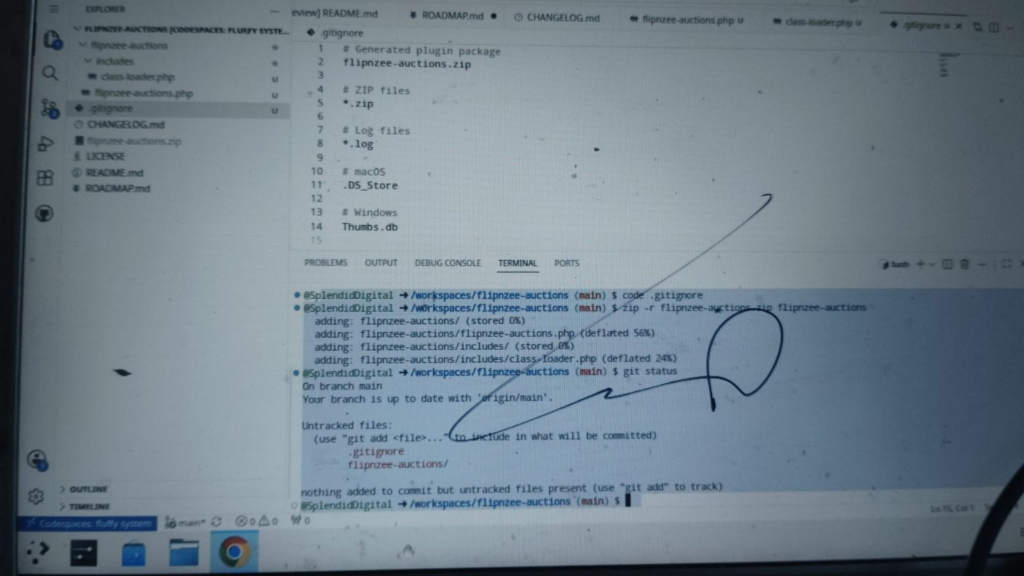
Create a ZIP again.
zip -r flipnzee-auctions.zip flipnzee-auctions
Now run:
git status
You should not see:
flipnzee-auctions.zip
Git is ignoring it exactly as we intended.
What Should Never Be Committed?
Generally speaking, Git repositories should contain:
✅ Source code
✅ Documentation
✅ Configuration
❌ Generated ZIP files
❌ Temporary files
❌ Cache files
❌ Log files
❌ Operating system metadata
Why This Matters
A clean Git repository has many advantages:
- Smaller repositories.
- Faster cloning.
- Easier code reviews.
- Fewer accidental commits.
- More professional project organization.
Keeping only the files that matter makes collaboration much easier.
Lesson Summary
In this lesson, we created our first .gitignore file and learned why professional developers keep generated files out of version control. We also distinguished between source code, which belongs in Git, and generated artifacts, which can always be recreated.
Although .gitignore is a small file, it plays an important role in keeping software projects clean and maintainable.
Key Takeaways
- ✓
.gitignoretells Git which files to ignore. - ✓ Ignored files remain on your computer.
- ✓ Generated ZIP files should not be committed.
- ✓ Source code belongs in Git.
- ✓ Build artifacts generally do not.
Common Mistakes
- Creating
.gitignore.txtinstead of.gitignore. - Adding files to
.gitignoreafter they’ve already been committed. - Thinking
.gitignoredeletes files. - Forgetting to save the
.gitignorefile before testing.
Git Commands Used
touch .gitignore

git status

git add .

git commit -m "Lesson 4: Add .gitignore"

git push
Project Status
✅ Development environment

✅ Plugin skeleton

✅ Plugin installation

✅ Plugin lifecycle

✅ .gitignore

⬜ Database tables

⬜ Auction data model

⬜ Bidding engine

⬜ Escrow

⬜ Payment gateways

⬜ Website transfer

⬜ Version 1.0
Developer’s Notebook
One of the easiest ways to recognize a well-maintained software project is by looking at its Git repository. Professional repositories focus on the source code, documentation, and configuration files that define the project. Temporary files, generated packages, and operating system metadata are intentionally left out. A well-crafted .gitignore file is a small investment that pays dividends throughout the lifetime of a project.
Looking Ahead
In Lesson 5, we’ll take our first step into persistent data by creating the database tables that will power the Flipnzee Auctions plugin. We’ll learn why complex plugins often use custom database tables instead of relying entirely on WordPress post types and post meta, and we’ll create our first table using WordPress’s dbDelta() function.