
Lesson 32 Implementation – Adding a Fully Functional Status Filter to the Auctions Table

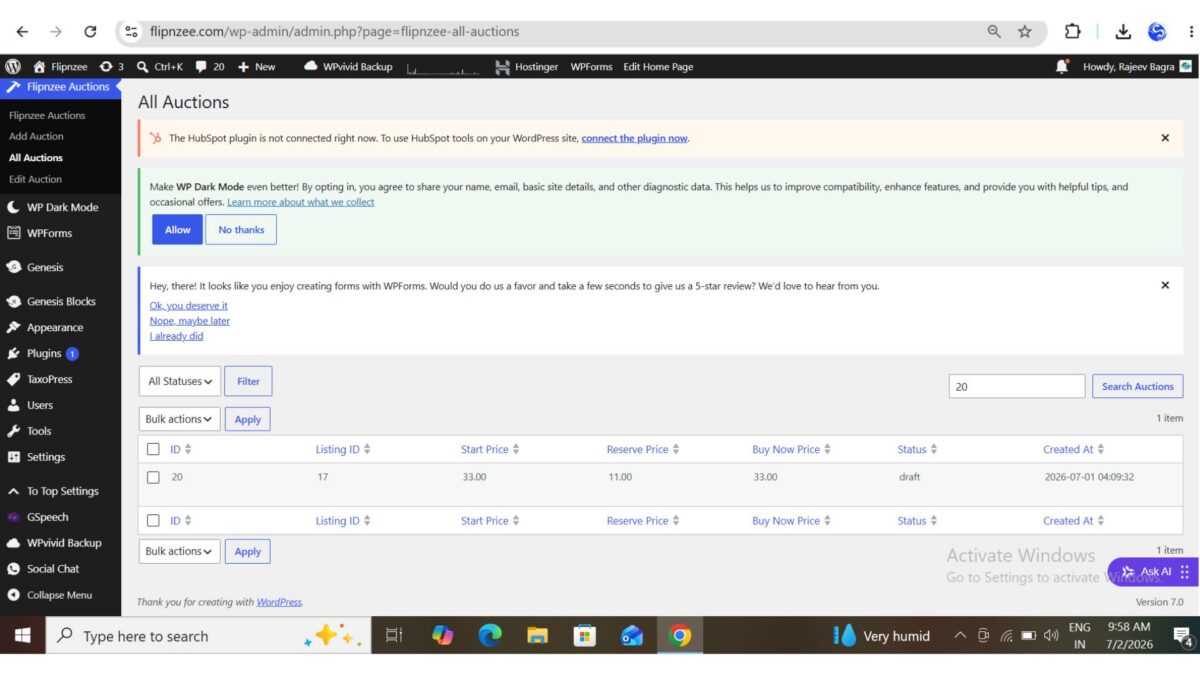
In the previous lesson, we added the Status dropdown above the auctions table. Although the user interface looked complete, the filter was only partially functional. Selecting a status displayed filtered results, but the search box and pagination count did not always stay synchronized.
In this lesson, we’ll complete the implementation by making the Status Filter, Search Box, and Pagination work together seamlessly.
Prerequisites
Before starting, ensure you have completed:
- Lesson 29 – Bulk Actions
- Lesson 30 – Bulk Delete
- Lesson 31 – Adding a Status Filter Dropdown
Step 1 – Read the Selected Status
Open:
admin/class-auctions-table.php
Inside the prepare_items() method, read the selected status.
$status = isset( $_GET['status'] )
	? sanitize_text_field(
		wp_unslash( $_GET['status'] )
	)
	: '';
Using sanitize_text_field() and wp_unslash() follows WordPress coding standards and safely processes user input.
Step 2 – Pass the Status to the Count Query
Previously we counted auctions using only the search keyword.
Replace:
$total_items = Flipnzee_Auction_Manager::count_auctions(
	$search
);
with:
$total_items = Flipnzee_Auction_Manager::count_auctions(
	$search,
	$status
);
Now the pagination count knows which status is currently selected.
Step 3 – Pass Status to get_all_auctions()
Next, update the method call that loads auction records.
Replace:
$this->items = Flipnzee_Auction_Manager::get_all_auctions(
	$per_page,
	$offset,
	$search,
	$orderby,
	$order
);
with:
$this->items = Flipnzee_Auction_Manager::get_all_auctions(
	$per_page,
	$offset,
	$search,
	$status,
	$orderby,
	$order
);
The status value is now available inside the database query.
Step 4 – Update get_all_auctions()
Open:
includes/class-auction-manager.php
Modify the function signature.
Replace:
public static function get_all_auctions(
	$per_page = 20,
	$offset = 0,
	$search = '',
	$orderby = 'created_at',
	$order = 'DESC'
)
with:
public static function get_all_auctions(
	$per_page = 20,
	$offset = 0,
	$search = '',
	$status = '',
	$orderby = 'created_at',
	$order = 'DESC'
)
The function can now receive the selected status.
Step 5 – Filter by Status
Inside get_all_auctions(), add SQL logic that filters records when a status is selected.
For example:
- Draft → Draft auctions only
- Active → Active auctions only
- Closed → Closed auctions only
When no status is selected, the original query continues to return all auctions.
Step 6 – Support Search and Status Together
One important improvement is allowing both filters to work simultaneously.
Instead of choosing between Search or Status, the query now supports both.
Example:
| Search | Status | Result |
|---|---|---|
| 20 | Draft | Draft auction containing “20” |
| Laptop | Active | Active Laptop auctions |
| Empty | Closed | All Closed auctions |
| Empty | Empty | All auctions |
This creates a much better user experience.
Step 7 – Update count_auctions()
Next, update the counting method.
Change the function signature from:
public static function count_auctions(
	$search = ''
)
to:
public static function count_auctions(
	$search = '',
	$status = ''
)
Now the counting function receives the selected status as well.
Step 8 – Count Filtered Records Correctly
Update the SQL inside count_auctions() so it supports:
- Search only
- Status only
- Search + Status
- No filters
This ensures the total number of auctions displayed above the table always matches the records shown.
Without this change, the table could display five Draft auctions while the pagination still reported the total number of auctions in the database.
Step 9 – Test the Feature
Verify the following scenarios:
- All Statuses
- Draft
- Active
- Closed
- Search only
- Search + Draft
- Search + Active
- Search + Closed
Also verify that pagination continues to display the correct number of filtered records.
Final Result
After completing this lesson, the Auctions table supports:
- ✅ Status filtering
- ✅ Search
- ✅ Search + Status
- ✅ Pagination
- ✅ Sorting
- ✅ Bulk Actions
- ✅ Bulk Delete
The Auctions management screen now behaves much more like WordPress core list tables, providing administrators with a smoother and more intuitive experience.
What We Learned
In this lesson, we learned how to:
- Read filter values securely from the URL.
- Pass filter values through multiple application layers.
- Extend database methods with additional parameters.
- Combine multiple filtering conditions safely.
- Keep pagination synchronized with filtered data.
- Build a more professional WordPress admin experience.
Download Source Code
Download the starting version of the plugin before the lesson:
Download the completed version after this lesson:
Next Lesson
In Lesson 33, we’ll extend our auction system by adding Start Date/Time and End Date/Time fields. These scheduling options will become the foundation for many future features, including countdown timers, automatic activation, automatic closing, winner selection, and Escrow.com integration.