
Lesson 5: Designing the Data Model – Custom Post Types, Custom Tables, or Both?

Introduction
Up to this point, we’ve built a solid foundation for the Flipnzee Auctions plugin. Our plugin installs correctly, follows good development practices, and is managed with Git.
Now it’s time to ask one of the most important questions in WordPress plugin development:
Where should we store our data?
WordPress offers several ways to store information, and choosing the right one can significantly affect your plugin’s performance, scalability, and maintainability.
For Flipnzee Auctions, we’ll eventually need to store:
- Website listings
- Auctions
- Bids
- Escrow transactions
- Payment records
- Website transfer progress
- User watchlists
- Notifications
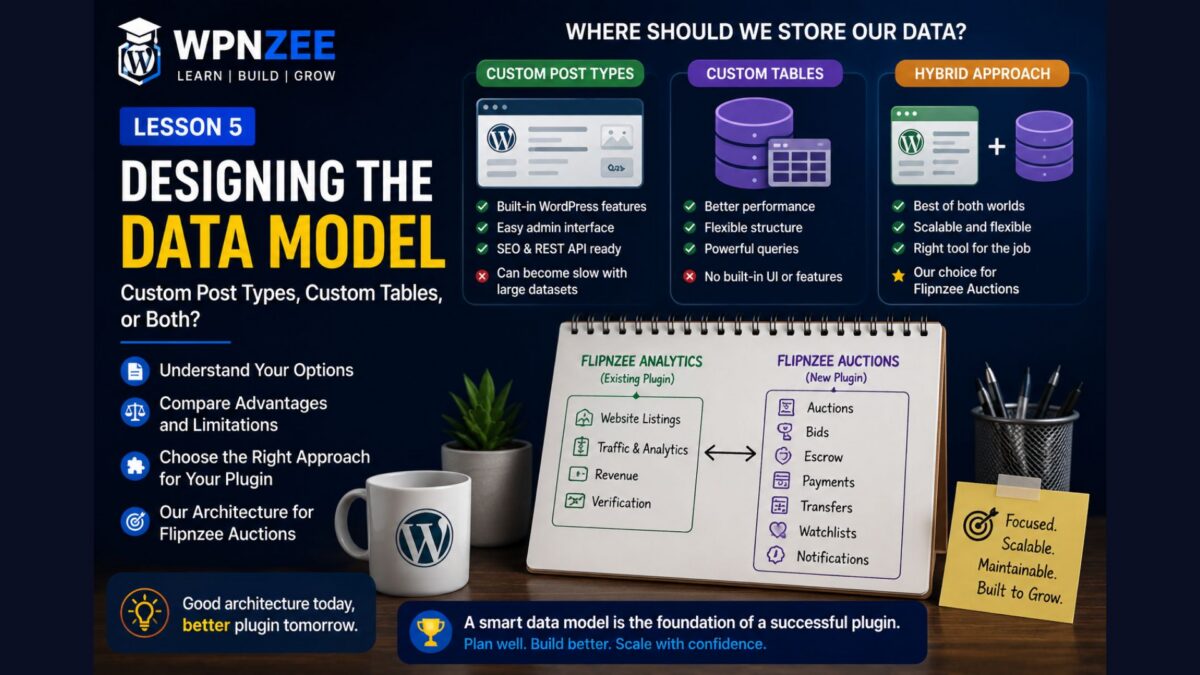
Should all of these be stored as WordPress posts? Should we create our own database tables? Or is a hybrid approach the best solution?
In this lesson, we’ll explore the strengths and limitations of each approach before making our architectural decision.
Learning Objectives
By the end of this lesson, you’ll understand:
- How WordPress stores content.
- What Custom Post Types (CPTs) are.
- What custom database tables are.
- The advantages and disadvantages of each approach.
- Why many professional plugins combine both.
- Why Flipnzee Auctions will use a hybrid architecture.
Option 1 – Using Custom Post Types
Many plugins use Custom Post Types to store structured content.
For example:
Post
Page
Product
Event
Property
Listing
Each item is stored in the standard WordPress posts table, while additional information is stored as post meta.
Advantages include:
- Built-in WordPress admin interface.
- Revisions.
- Categories and tags.
- SEO compatibility.
- REST API support.
- Familiar editing experience.
For website listings, this is often an excellent choice.
Option 2 – Using Custom Database Tables
Some plugins create their own tables.
Examples include:
wp_flipnzee_auctions
wp_flipnzee_bids
wp_flipnzee_payments
Advantages include:
- Faster queries for large datasets.
- Better indexing.
- Greater flexibility.
- Easier reporting.
- Better performance when storing transactional data.
This approach is commonly used by complex plugins such as e-commerce systems, booking systems, and learning management systems.
Why Not Store Everything as Posts?
Imagine an auction with:
- 5,000 bids
- 200 auctions
- Thousands of payment records
Storing all of this in wp_posts and wp_postmeta would make queries increasingly complex and potentially slower as the site grows.
Transactional data is often better suited to dedicated database tables.
Why Not Store Everything in Custom Tables?
Custom tables are powerful, but they don’t automatically provide:
- The WordPress editor.
- Revisions.
- Built-in REST support.
- Categories and tags.
- Media integration.
You would need to build many of these features yourself.
The Hybrid Approach
Many large WordPress plugins use a combination of both methods.
For Flipnzee Auctions, that’s exactly what we’ll do.
Flipnzee Analytics (Existing Plugin)
This plugin already manages website listings and verified analytics.
It provides:
- Website listing
- Google Analytics integration
- Search Console integration
- Verified metrics
Those listings can continue using WordPress’s strengths.
Flipnzee Auctions (New Plugin)
Our plugin will focus on transactional data such as:
- Auction settings
- Bid history
- Watchlists
- Escrow records
- Payment tracking
- Website transfer workflow
These are excellent candidates for custom database tables.
Our Planned Architecture
Flipnzee Analytics
-------------------
Website Listings
Traffic
Revenue
Verification

        │
        ▼

Flipnzee Auctions
-------------------
Auction
Bids
Escrow
Payments
Transfers
Watchlists
Each plugin has a clear responsibility.
This keeps the overall system modular, easier to maintain, and easier to extend.
Why This Matters
One of the biggest mistakes beginners make is trying to solve every problem with the same tool.
Professional developers choose the storage mechanism that best fits the type of data being stored.
Content and transactions have different requirements.
By recognizing that difference early, we can build a plugin that scales more effectively over time.
Lesson Summary
In this lesson, we explored three approaches to storing data in WordPress:
- Custom Post Types
- Custom Database Tables
- A Hybrid Approach
Rather than choosing one exclusively, we’ve decided that Flipnzee Auctions will complement the existing Flipnzee Analytics plugin by storing transactional data in dedicated database tables while continuing to use WordPress where it makes sense.
This architectural decision will guide the remainder of the project.
Key Takeaways
- ✓ WordPress provides several ways to store data.
- ✓ Custom Post Types are ideal for content.
- ✓ Custom tables are well suited to transactional data.
- ✓ Many successful plugins use both approaches.
- ✓ Flipnzee Auctions will use a hybrid architecture.
Common Mistakes
- Assuming every plugin should use only Custom Post Types.
- Creating database tables without a clear need.
- Duplicating data already managed by another plugin.
- Designing the database before understanding the application’s requirements.
Git Commands Used
git add .

git commit -m "Lesson 5: Design plugin data architecture"

git push
Note: This lesson focuses on architecture and planning. Unless you’ve actually changed files in your repository (such as updating
ROADMAP.mdor documentation), you don’t need to create a Git commit just because you published the lesson.
Project Status
✅ Development environment

✅ Plugin skeleton

✅ Plugin installation

✅ Plugin lifecycle

✅ .gitignore

✅ Data architecture planned

⬜ Database tables

⬜ Auction model

⬜ Bid engine

⬜ Escrow

⬜ Payment gateways

⬜ Website transfer

⬜ Version 1.0
Developer’s Notebook
Software architecture is about making good decisions before writing code. It’s tempting to start creating tables immediately, but taking time to understand your data leads to cleaner, more maintainable systems. In this series, we’ll build Flipnzee Auctions step by step, ensuring each design decision has a clear purpose rather than simply following convention.
Looking Ahead
In Lesson 6, we’ll create our first custom database table using WordPress’s dbDelta() function. We’ll learn why WordPress provides this function, how it safely creates and updates tables, and how we’ll use it to store auction data as our plugin grows.