
Lesson 90 Implementation: Building and Validating the Flipnzee Database Migration Framework

Project: Flipnzee Auctions Plugin
Lesson: 90
Topic: Database Migration Framework and Schema Version Management
Plugin Version: 1.2.0
Introduction
As the Flipnzee Auctions plugin continues to evolve, simply creating database tables during plugin activation is no longer sufficient. Existing users must be able to upgrade to newer plugin versions without losing their auction data.
In this lesson, we implemented a production-ready database migration framework that allows the plugin to safely upgrade existing database schemas whenever new plugin versions introduce structural changes. We also created and thoroughly tested our first real migration by adding a new payment_reference column to the transactions table.
This lesson involved extensive real-world debugging and validation, ensuring the migration framework behaves correctly across fresh installations and upgrades.
Objectives
During this implementation we aimed to:
- Build a reusable database migration framework.
- Execute migrations only when required.
- Track database versions independently of plugin versions.
- Add new database columns safely.
- Prevent duplicate schema modifications.
- Verify migrations through real upgrade testing.
- Prepare the plugin for future database upgrades.
Files Modified
flipnzee-auctions.php

includes/class-database.php

includes/class-database-migration.php
Step 1 — Integrating Database Migrations
The activation hook was enhanced to distinguish between fresh installations and upgrades.
For new installations, database tables are created normally.
For existing installations, the migration manager is executed.
function flipnzee_auction_activate() {

	if ( false === get_option( 'flipnzee_db_version', false ) ) {

		Flipnzee_Auction_Database::create_tables();

	} else {

		Flipnzee_Database_Migration::run();

	}

}
This prevents unnecessary table recreation while ensuring existing installations receive required schema updates.
Step 2 — Creating the Migration Manager
A dedicated migration manager was introduced.
It determines the currently installed database version and executes only the pending migrations.
Example:
public static function run() {

	$current_version = get_option(
		'flipnzee_db_version',
		'1.0.0'
	);

	if ( version_compare( $current_version, '1.1.0', '<' ) ) {

		self::migrate_to_1_1_0();

	}

	if ( version_compare( $current_version, '1.2.0', '<' ) ) {

		self::migrate_to_1_2_0();

	}

}
Step 3 — Implementing the First Production Migration
The first production migration upgrades the database from version 1.1.0 to 1.2.0.
Its primary responsibility is adding the new payment reference column.
self::add_column(
	'flipnzee_transactions',
	'payment_reference',
	'`payment_reference` VARCHAR(100) NULL'
);
Once complete, the migration updates the stored database version.
Step 4 — Safe Schema Updates
The helper function first checks:
- whether the table exists
- whether the column already exists
before executing:
ALTER TABLE
ADD COLUMN
This prevents duplicate-column errors during repeated activations.
Step 5 — Debugging and Validation
During testing we investigated every stage of the migration process.
Temporary debugging was added to inspect:
- activation hook execution
- database version detection
- SQL queries
- migration execution
- WordPress option values
- LiteSpeed object cache
- database updates
- activation sequence
This systematic debugging helped identify and eliminate every suspected issue.
Step 6 — Real Upgrade Simulation
To simulate a real plugin upgrade:
- The database version was manually changed to:
1.1.0
- The plugin was deactivated.
- The plugin was activated again.
The migration manager correctly detected the older version:
FLIPNZEE RUN: Current version = 1.1.0
It then executed:
FLIPNZEE RUN: Calling migrate_to_1_2_0()
The schema update completed successfully:
FLIPNZEE MIGRATION: Added payment_reference column.
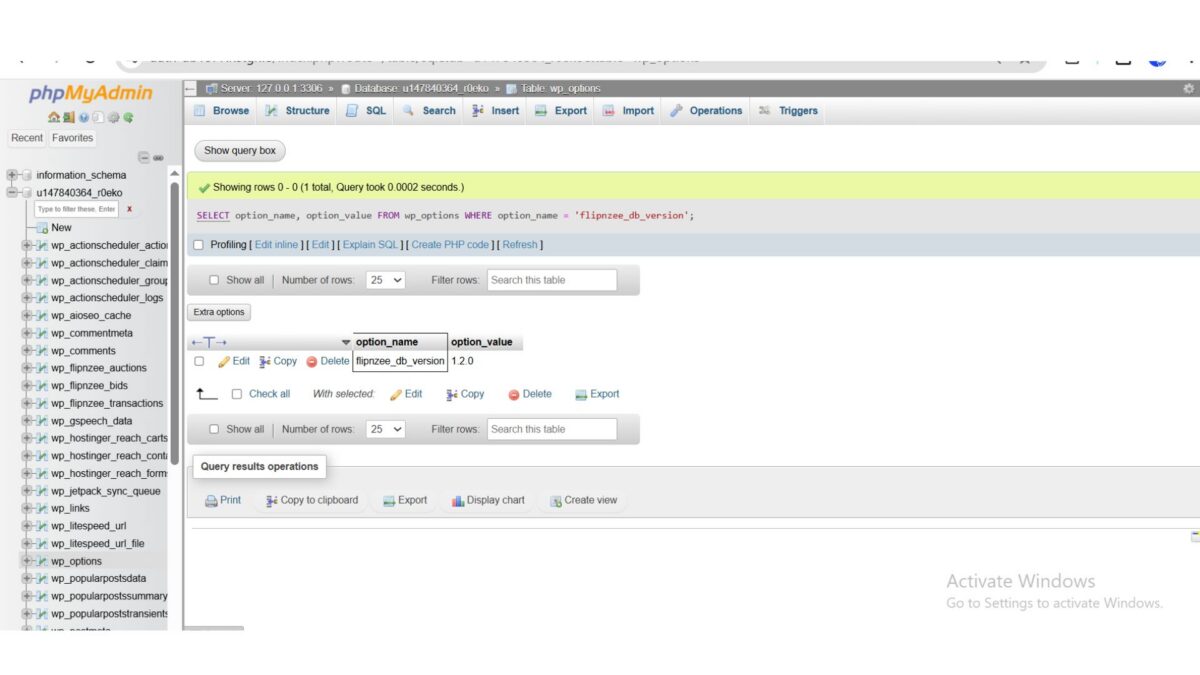
Finally, the stored database version became:
flipnzee_db_version = 1.2.0
This confirmed that the migration framework correctly performs production upgrades.
Step 7 — Cleaning the Framework
Once the migration was verified:
- temporary debugging statements were removed
- cache investigation code was removed
- SQL diagnostic code was removed
- activation logic was simplified
- the migration runner was restored to a clean production-ready implementation
Testing Performed
The migration framework was tested using:
- Fresh installation
- Existing installation
- Manual version downgrade
- Plugin deactivate/reactivate
- phpMyAdmin verification
- Debug log inspection
- SQL verification
- Column existence validation
Every test completed successfully.
Download Source Code
Download the starting version of the plugin before the lesson:
Download the completed version after this lesson:
Lessons Learned
This lesson reinforced several important development practices:
- Database migrations are essential for production plugins.
- Schema updates should always be incremental.
- Migration code must be idempotent.
- Version numbers should drive upgrade logic.
- Thorough debugging is invaluable when validating activation workflows.
- Real upgrade simulations provide greater confidence than relying solely on fresh installs.
Final Outcome
By the end of this lesson, Flipnzee Auctions now includes a fully functional database migration framework capable of upgrading existing installations without requiring users to reinstall the plugin or lose data.
The first production migration (v1.2.0) was successfully implemented, tested, and validated through a complete upgrade simulation. This framework provides a scalable foundation for future database enhancements, ensuring that new tables, columns, indexes, and data transformations can be introduced safely as the plugin evolves.
Git Commit
Lesson 90: Implement and validate database migration framework with schema versioning
This lesson marks a major architectural milestone for the Flipnzee Auctions plugin, bringing its database management in line with best practices used in mature WordPress plugins and laying the groundwork for future feature development.