
Lesson 97 Implementation: Building the Buyer Dashboard Foundation for Flipnzee Auctions

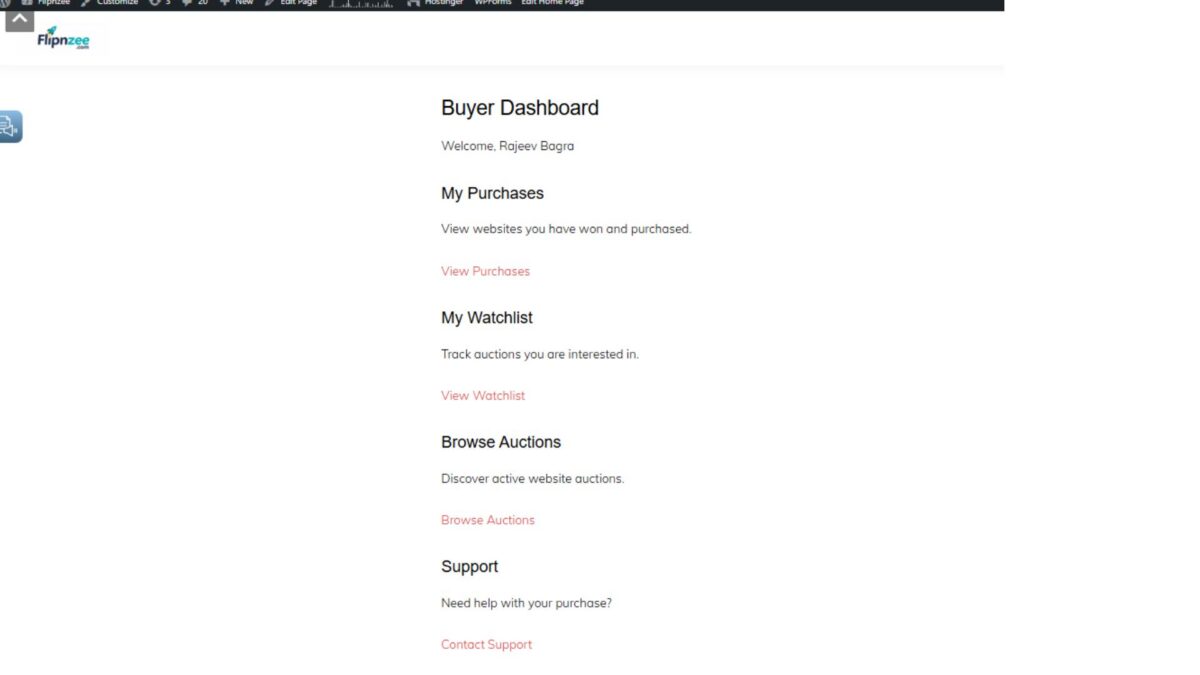
After completing the Watchlist system in Lesson 96, the next logical milestone was to provide buyers with a centralized location where they can manage their auction activities. Lesson 97 introduces the first version of the Buyer Dashboard, establishing the foundation for future buyer-focused features such as active bids, purchases, watchlists, invoices, and payment tracking.
Rather than implementing every buyer feature at once, this lesson focuses on building a clean, extensible dashboard architecture that future lessons can expand without requiring major refactoring.
Objectives
The primary goals of Lesson 97 were:
- Create a dedicated Buyer Dashboard class.
- Register a reusable shortcode for displaying the dashboard.
- Restrict dashboard access to logged-in users.
- Display personalized buyer information.
- Integrate existing purchase information into the dashboard.
- Prepare the plugin architecture for future buyer-related modules.
Creating a Dedicated Buyer Dashboard Class
A new class was introduced:
includes/class-buyer-dashboard.php
Separating the dashboard into its own class keeps the plugin modular and follows the object-oriented architecture used throughout the Flipnzee Auctions plugin.
The constructor registers a new shortcode:
add_shortcode(
    'flipnzee_buyer_dashboard',
    array( $this, 'render_dashboard' )
);
This allows administrators to place the buyer dashboard anywhere using:
[flipnzee_buyer_dashboard]
Loading the New Module
The new class was loaded from the main plugin bootstrap file:
require_once FLIPNZEE_AUCTION_PATH .
    'includes/class-buyer-dashboard.php';
The dashboard is then initialized alongside the plugin’s other core components:
new Flipnzee_Buyer_Dashboard();
During implementation, a fatal activation error occurred because of a typo in the plugin path constant (FLIPNZEE_AUCTIONS_PATH instead of FLIPNZEE_AUCTION_PATH). After correcting the constant name, the Buyer Dashboard loaded successfully.
Restricting Dashboard Access
Since the Buyer Dashboard contains user-specific information, access is limited to authenticated users.
if ( ! is_user_logged_in() ) {
    return '<p>Please log in to access your Buyer Dashboard.</p>';
}
This prevents visitors from viewing private purchase and account information.
Personalized Welcome Section
Once authenticated, the dashboard greets the logged-in buyer.
Example:
Buyer Dashboard

Welcome, Rajeev Bagra
Displaying the current user’s name creates a more personalized experience and confirms that account-specific information is being shown.
Integrating Existing Purchase Data
Instead of building a completely separate purchase interface, the Buyer Dashboard reuses the purchase functionality implemented in earlier lessons.
The dashboard now displays the existing My Purchases section, allowing buyers to review:
- Purchased websites
- Winning bids
- Purchase status
- Purchase dates
- Payment links
- Transaction details
This reuse of existing functionality avoids duplicate code and keeps future maintenance simpler.
Frontend Result
After implementation, the Buyer Dashboard displays:
- Buyer Dashboard heading
- Personalized welcome message
- Existing purchase information
- Purchase status
- Payment actions
- Purchase detail links
This creates the first centralized buyer experience within the Flipnzee Auctions platform.
Debugging Challenges
Lesson 97 also involved several real-world debugging exercises.
These included:
- PHP syntax verification using:
php -l includes/class-buyer-dashboard.php
- Resolving plugin activation failures.
- Correcting an incorrect plugin path constant.
- Verifying shortcode registration.
- Confirming successful class loading.
- Testing frontend rendering after plugin activation.
These debugging steps reinforced the importance of validating each integration point rather than assuming new classes are loading correctly.
Architectural Benefits
Although the first version of the Buyer Dashboard is intentionally simple, it establishes an important architectural foundation.
Future buyer functionality can now be added without restructuring the plugin.
Upcoming modules can include:
- Active bids
- Watchlist summary
- Pending payments
- Escrow status
- Downloadable invoices
- Buyer notifications
- Purchase history
- Account settings
Because all buyer functionality now has a dedicated entry point, future enhancements become significantly easier to organize.
Lessons Learned
Several important development practices were reinforced during this lesson:
- Keep major features isolated in dedicated classes.
- Use shortcodes for flexible frontend rendering.
- Restrict private pages to authenticated users.
- Reuse existing components whenever possible.
- Verify plugin loading after introducing new modules.
- Debug activation errors systematically by checking constants, includes, and class initialization.
Download Source Code
Download the starting version of the plugin before the lesson:
Download the completed version after this lesson:
Conclusion
Lesson 97 marks an important milestone in the evolution of the Flipnzee Auctions plugin. With the introduction of a dedicated Buyer Dashboard, the platform now has a centralized location for buyer-related functionality. While the current dashboard focuses primarily on purchases, its true value lies in the scalable architecture it provides for future lessons.
In the next lesson, this dashboard will evolve from a simple landing page into a fully featured buyer control panel by introducing dynamic statistics, watchlist summaries, active bid information, and additional navigation tools.