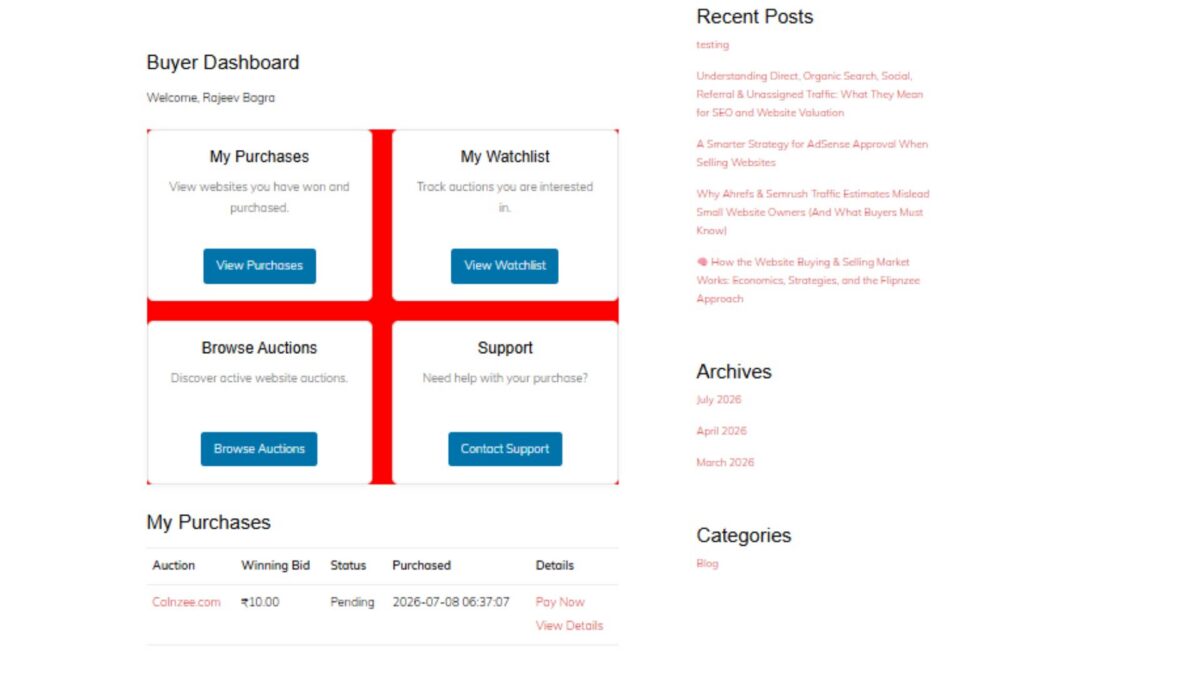
Lesson 98 Implementation: Building the Buyer Dashboard

In this lesson, we introduced the Buyer Dashboard, an important milestone in the Flipnzee Auctions plugin. While the earlier lessons focused on auctions, bidding, payments, and watchlists, this lesson begins building the buyer’s personal workspace after logging into the marketplace.

The Buyer Dashboard serves as the central navigation hub for buyers, allowing them to quickly access their purchases, watchlist, active auctions, and support resources.


Why a Buyer Dashboard?

As Flipnzee grows into a specialized marketplace for buying and selling websites, buyers need a dedicated area where they can manage their activity without navigating through multiple pages.

The dashboard is designed to provide:

  • Quick access to purchased websites
  • Easy navigation to the watchlist
  • Direct access to current auctions
  • Support resources
  • A foundation for future buyer features

This dashboard will continue to evolve in upcoming lessons as more buyer functionality is introduced.


Registering a Dedicated Shortcode

A new shortcode was created for the dashboard:

[flipnzee_buyer_dashboard]

This shortcode allows the dashboard to be embedded on any WordPress page while keeping the implementation modular and reusable.

The dashboard class registers the shortcode during construction using WordPress’ Shortcode API.


Login Protection

Since the dashboard contains user-specific information, it is only available to authenticated users.

If a visitor is not logged in, the shortcode displays a friendly message requesting authentication before accessing buyer features.

This keeps buyer information private while following WordPress best practices.


Personalized Welcome Section

The dashboard greets the logged-in buyer using their WordPress display name.

Example:

Buyer Dashboard

Welcome, Rajeev Bagra

Personalization creates a much more user-friendly experience and prepares the dashboard for future account-specific information.


Dashboard Cards

Instead of displaying long navigation menus, the dashboard uses clean responsive cards.

Four primary navigation cards were introduced:

My Purchases

Provides access to websites that the buyer has successfully won and purchased.

Future lessons will display:

  • Purchase history
  • Pending transfers
  • Completed transfers
  • Payment status

My Watchlist

Allows buyers to quickly revisit auctions they are monitoring.

This integrates directly with the Watchlist system developed in previous lessons.


Browse Auctions

Provides a shortcut back to the marketplace so buyers can continue exploring active website auctions.


Support

Offers direct access to marketplace support resources whenever assistance is required during the buying process.


Responsive CSS Grid

A responsive CSS Grid layout was implemented to display the dashboard cards.

Benefits include:

  • Responsive across desktop, tablet, and mobile devices
  • Equal spacing between cards
  • Professional appearance
  • Easy future expansion

Each card includes:

  • Title
  • Description
  • Action button
  • Hover animation
  • Subtle shadows
  • Rounded corners

Modern User Interface

Several interface improvements were added:

  • Soft shadows
  • Rounded card design
  • Smooth hover animations
  • Consistent Flipnzee button styling
  • Responsive spacing
  • Clean typography

The result is a dashboard that feels modern while remaining lightweight.


Reusing Existing Marketplace Pages

Each dashboard card links to an existing or upcoming marketplace page.

Current destinations include:

  • /my-purchases/
  • /watchlist/
  • /listings/
  • /support/

This keeps navigation centralized and reduces unnecessary menu complexity.


Debugging Journey

An interesting challenge during this lesson involved the dashboard layout initially rendering as a vertical list instead of the intended responsive grid.

The issue was systematically investigated by verifying:

  • Shortcode registration
  • HTML structure
  • CSS loading
  • Browser Developer Tools
  • Network requests
  • Stylesheet versions
  • CSS Grid rules

A temporary diagnostic background color confirmed that the correct stylesheet was being loaded, allowing the issue to be isolated and resolved successfully.

This debugging process reinforced the importance of methodical troubleshooting rather than assuming the problem originates in PHP or HTML.


Foundation for Future Lessons

Although the dashboard currently serves as a navigation hub, it lays the groundwork for significantly richer buyer functionality.

Upcoming enhancements will include:

  • Live purchase summaries
  • Recent bidding activity
  • Pending payments
  • Escrow transaction status
  • Website transfer progress
  • Buyer notifications
  • Personalized marketplace insights

The dashboard is intentionally designed to grow alongside the Flipnzee marketplace.

Download Source Code

Download the starting version of the plugin before the lesson:

Download the completed version after this lesson:


Final Thoughts

Lesson 97 marks the beginning of the buyer experience within Flipnzee Auctions. By introducing a dedicated Buyer Dashboard, the plugin now offers a centralized, user-friendly starting point for every buyer after login.

Rather than overwhelming users with scattered pages and menus, the dashboard provides a clean, responsive interface that will gradually evolve into a comprehensive buyer control panel as future lessons expand payment workflows, purchase management, and ownership transfers.

The Buyer Dashboard represents another important step toward transforming Flipnzee Auctions into a professional marketplace specifically built for buying and selling websites and digital assets.
Lesson 95 – Implementing the Watchlist System with AJAX in Flipnzee Auctions


Series: Building the Flipnzee Auctions Plugin
Lesson: 95
Project: Flipnzee Auctions – A WordPress Auction Plugin for Websites & Digital Assets


Introduction

In the previous lesson, we designed the Watchlist feature for Flipnzee Auctions. The objective was to allow registered users to bookmark auctions they are interested in and easily revisit them later from a dedicated My Watchlist page.

This implementation transformed that design into a working feature by introducing a dedicated Watchlist Manager, AJAX-powered interactions, frontend buttons, and a Watchlist shortcode. As with many real-world development tasks, the implementation also involved extensive debugging and refinement to ensure the feature integrates correctly with the rest of the plugin.


Objectives

The primary objectives of this lesson were:

  • Implement a Watchlist Manager for database operations.
  • Allow logged-in users to add auctions to their watchlist.
  • Allow users to remove auctions from their watchlist.
  • Prevent duplicate watchlist entries.
  • Display a personalised Watchlist page.
  • Implement secure AJAX requests using WordPress nonces.
  • Integrate the Watchlist button into auction listings.

Files Added and Updated

New Components

  • includes/class-watchlist-manager.php
  • includes/class-watchlist-ajax.php
  • assets/js/watchlist.js

Updated Components

  • includes/class-shortcodes.php
  • flipnzee-auctions.php

Building the Watchlist Manager

A dedicated manager class was introduced to centralise all watchlist-related database operations.

Its responsibilities include:

  • Initialising database access.
  • Checking whether an auction already exists in a user’s watchlist.
  • Adding auctions.
  • Removing auctions.
  • Retrieving all saved auctions.
  • Counting the number of users watching an auction.

Separating these responsibilities into a dedicated class improves maintainability and follows the plugin’s object-oriented architecture.


Preventing Duplicate Entries

Before inserting a new record, the manager verifies whether the auction has already been saved.

Example:

if ( self::is_in_watchlist( $auction_id, $user_id ) ) {
	return true;
}

This ensures that repeated clicks do not create duplicate database entries.


AJAX Integration

Dedicated AJAX handlers were implemented for both watchlist actions.

The handlers perform:

  • Nonce verification
  • Login validation
  • Input sanitisation
  • Database updates
  • JSON success/error responses

This allows watchlist operations to be performed without navigating away from the current page.


Rendering the Watchlist Button

A reusable Watchlist button renderer was implemented.

Depending on the current state, it automatically displays:

❤ Add to Watchlist

or

❤ Remove from Watchlist

This state is determined dynamically by checking whether the current auction already exists in the logged-in user’s watchlist.


Creating the Watchlist Shortcode

A dedicated shortcode was implemented to display the user’s saved auctions.

The shortcode performs the following steps:

  • Retrieves the current user’s watchlist.
  • Loads each saved auction.
  • Retrieves the associated website listing.
  • Displays auction information.
  • Provides a link back to the listing.

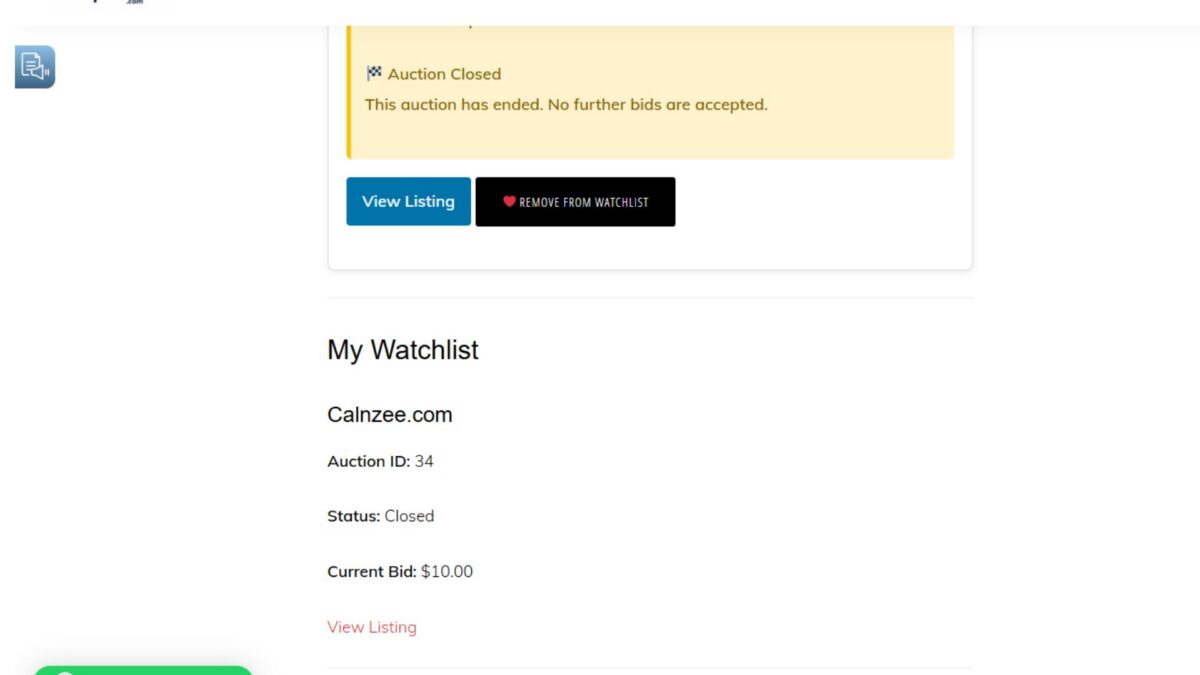
Current output includes:

  • Listing title
  • Auction ID
  • Auction status
  • Current bid
  • Listing link

This provides users with a simple dashboard for managing their saved auctions.


Database Operations

The Watchlist Manager now supports:

  • Adding auctions
  • Removing auctions
  • Checking whether an auction is already saved
  • Retrieving all saved auctions
  • Counting watchers

These methods provide a reusable backend API for future watchlist-related features.


Security Considerations

Several WordPress security practices were implemented throughout this lesson.

These include:

  • Nonce verification using check_ajax_referer()
  • Login verification
  • Sanitising incoming POST values
  • Prepared SQL statements
  • Escaping frontend output
  • Using the WordPress database API

These measures help protect the feature against common attack vectors.


Debugging and Troubleshooting

A considerable portion of this lesson involved debugging and integration testing.

Issues encountered included:

  • Duplicate method declarations
  • Missing manager methods
  • PHP fatal errors
  • AJAX HTTP 500 errors
  • JavaScript event binding problems
  • Cached JavaScript during development
  • Leftover debugging statements
  • Plugin activation failures
  • Watchlist manager integration issues

Resolving these problems reinforced the importance of systematic debugging, incremental testing, and verifying both backend and frontend behaviour throughout development.


Current Functionality

The Watchlist feature now successfully:

  • Adds auctions to a user’s watchlist.
  • Removes auctions from a user’s watchlist.
  • Prevents duplicate entries.
  • Retrieves saved auctions.
  • Displays a personalised Watchlist page.
  • Uses secure AJAX communication.
  • Integrates with the auction interface.

Known Limitation

One frontend enhancement remains.

After adding or removing an auction using AJAX, the underlying database is updated correctly, but the visible page does not immediately reflect the change until the page is refreshed.

The backend functionality is fully operational. The remaining work is limited to improving frontend state synchronisation after successful AJAX requests.

This enhancement will be addressed during a future UI refactoring lesson.


Lessons Learned

This implementation highlighted several important software engineering practices:

  • Keep business logic separate from presentation.
  • Build reusable manager classes.
  • Secure every AJAX endpoint.
  • Prevent duplicate database records.
  • Validate all user input.
  • Test incrementally.
  • Use browser developer tools alongside server logs for debugging.
  • Separate backend functionality from frontend user experience improvements.

Download Source Code

Download the starting version of the plugin before the lesson:

Download the completed version after this lesson: 


Future Roadmap

The Watchlist system provides a strong foundation for several upcoming enhancements, including:

  • Instant UI updates after AJAX operations.
  • Reusable auction card rendering.
  • Watcher counters.
  • Email notifications.
  • Auction alerts.
  • User dashboard improvements.
  • Real-time watchlist interactions.

Conclusion

Lesson 95 marks another significant milestone in the development of Flipnzee Auctions.

The plugin now includes a functional Watchlist system that enables registered users to save auctions for future reference using secure AJAX-powered interactions.

Although a minor frontend synchronisation enhancement remains, the underlying architecture is complete, extensible, and ready to support future features such as notifications, live updates, and personalised auction management.


Git Commit

Lesson 95: Implement Watchlist system with AJAX, shortcode, and database manager

This lesson also reinforces an important principle of plugin development: building a reliable backend first creates a solid foundation upon which frontend enhancements can be safely and incrementally added.

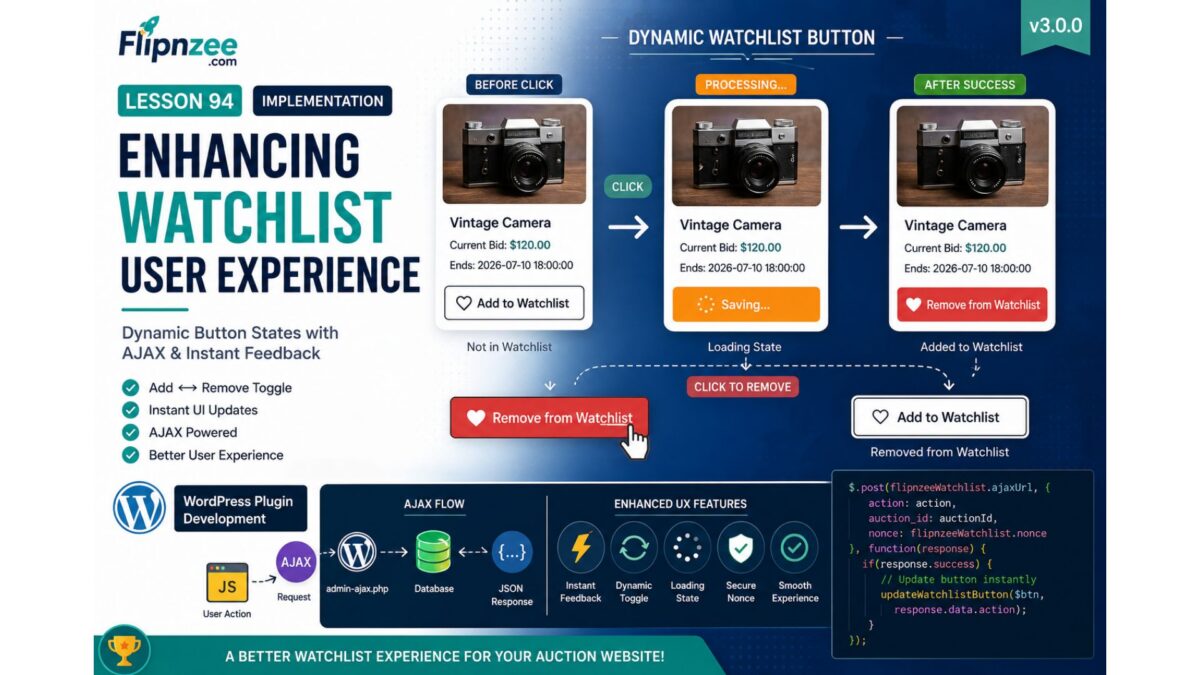
Lesson 94: Enhancing the Watchlist User Experience with Dynamic Button States

Series: Building the Flipnzee Auctions WordPress Plugin
Lesson: 94


Introduction

In Lesson 93, we successfully built the backend foundation of the Flipnzee Watchlist system. Users can now securely add auctions to their personal watchlists using AJAX, with data stored in a dedicated database table.

Although the functionality works correctly, the user interface still behaves like a simple button. After clicking Add to Watchlist, nothing visually changes unless the page is refreshed. Modern web applications provide immediate visual feedback, making interactions feel faster and more intuitive.

In this lesson, we will significantly improve the user experience by making the Watchlist button dynamic. The button will automatically update its appearance and text after successful AJAX requests, allowing users to instantly see whether an auction is already saved in their watchlist.

By the end of this lesson, the Watchlist feature will feel much closer to what users expect from professional marketplaces like eBay, Etsy, or Facebook Marketplace.


What We Will Build

We will enhance the frontend Watchlist interface by implementing:

  • Dynamic button text updates
  • Automatic icon changes
  • Button state switching
  • Add ↔ Remove Watchlist toggle
  • Visual feedback after successful AJAX requests
  • Loading state while AJAX is processing
  • Prevention of multiple rapid clicks

Current Workflow

Current behavior:

User clicks Add to Watchlist
        │
        ▼
AJAX Request
        │
        ▼
Database Updated
        │
        ▼
Nothing changes on screen

Improved workflow after this lesson:

User clicks Add to Watchlist
        │
        ▼
Loading...
        │
        ▼
AJAX Success
        │
        ▼
♥ Remove from Watchlist

And vice versa:

User clicks Remove
        │
        ▼
AJAX Request
        │
        ▼
Database Updated
        │
        ▼
♡ Add to Watchlist

Concepts Covered

During this lesson we will learn:

  • Building interactive UI with jQuery
  • Updating HTML without refreshing the page
  • Manipulating button classes
  • Handling AJAX success callbacks
  • Creating reusable frontend logic
  • Improving user experience (UX)
  • Preventing duplicate submissions

Files Expected to Change

assets/js/watchlist.js

includes/class-watchlist-manager.php

includes/class-watchlist-ajax.php

assets/css/frontend.css

Planned Enhancements

1. Loading State

Before

♥ Add to Watchlist

While Processing

Saving...

After Success

♥ Remove from Watchlist

2. Dynamic Button Classes

We’ll switch CSS classes dynamically.

Example:

flipnzee-watchlist-button

flipnzee-watchlist-button active

3. Toggle Icons

We’ll switch between:

♡ Add to Watchlist

and

♥ Remove from Watchlist

4. AJAX Response Improvements

Our AJAX handlers will return richer JSON responses, such as:

{
    "success": true,
    "action": "added",
    "message": "Added to Watchlist"
}

and

{
    "success": true,
    "action": "removed",
    "message": "Removed from Watchlist"
}

5. Better User Experience

Users will immediately know:

  • item saved
  • item removed
  • request failed
  • request processing

without refreshing the page.


Learning Outcomes

After completing this lesson, you will understand:

  • AJAX-driven UI updates
  • State-based interface design
  • Dynamic DOM manipulation
  • Frontend/backend synchronization
  • Better WordPress plugin UX design

Roadmap Progress

Completed:

  • ✅ Auction database
  • ✅ Bidding system
  • ✅ Transactions
  • ✅ Purchase workflow
  • ✅ My Purchases
  • ✅ Activity Log
  • ✅ Watchlist database
  • ✅ Watchlist Manager
  • ✅ AJAX Add to Watchlist

Current Lesson:

  • 🔵 Dynamic Watchlist UI

Coming Next:

  • Lesson 95: Displaying the User’s Watchlist (My Watchlist Page & Shortcode)
  • Lesson 96: Removing Items from the Watchlist with AJAX
  • Lesson 97: Watchlist Notifications and Bid Alerts

By the end of Lesson 94, the Watchlist feature will no longer be just functional—it will provide a smooth, responsive, and professional user experience that aligns with modern auction and marketplace applications.