
Lesson 94: Enhancing the Watchlist User Experience with Dynamic Button States

Series: Building the Flipnzee Auctions WordPress Plugin
Lesson: 94
Introduction
In Lesson 93, we successfully built the backend foundation of the Flipnzee Watchlist system. Users can now securely add auctions to their personal watchlists using AJAX, with data stored in a dedicated database table.
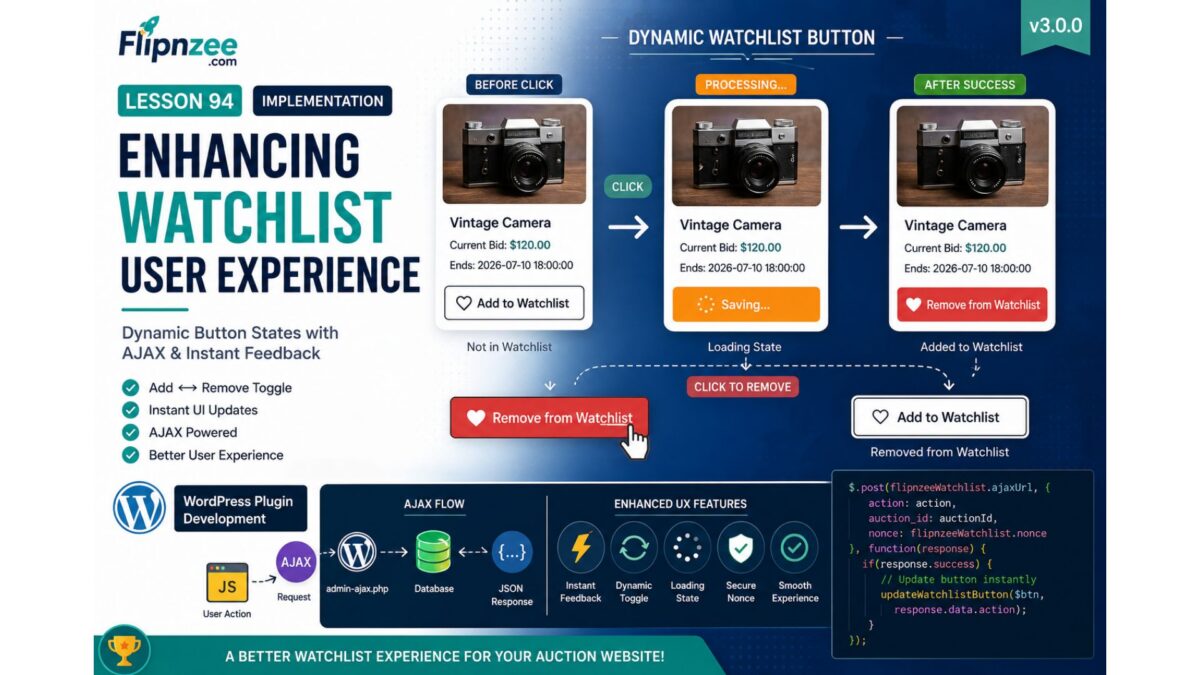
Although the functionality works correctly, the user interface still behaves like a simple button. After clicking Add to Watchlist, nothing visually changes unless the page is refreshed. Modern web applications provide immediate visual feedback, making interactions feel faster and more intuitive.
In this lesson, we will significantly improve the user experience by making the Watchlist button dynamic. The button will automatically update its appearance and text after successful AJAX requests, allowing users to instantly see whether an auction is already saved in their watchlist.
By the end of this lesson, the Watchlist feature will feel much closer to what users expect from professional marketplaces like eBay, Etsy, or Facebook Marketplace.
What We Will Build
We will enhance the frontend Watchlist interface by implementing:
- Dynamic button text updates
- Automatic icon changes
- Button state switching
- Add ↔ Remove Watchlist toggle
- Visual feedback after successful AJAX requests
- Loading state while AJAX is processing
- Prevention of multiple rapid clicks
Current Workflow
Current behavior:
User clicks Add to Watchlist
        │
        ▼
AJAX Request
        │
        ▼
Database Updated
        │
        ▼
Nothing changes on screen
Improved workflow after this lesson:
User clicks Add to Watchlist
        │
        ▼
Loading...
        │
        ▼
AJAX Success
        │
        ▼
♥ Remove from Watchlist
And vice versa:
User clicks Remove
        │
        ▼
AJAX Request
        │
        ▼
Database Updated
        │
        ▼
♡ Add to Watchlist
Concepts Covered
During this lesson we will learn:
- Building interactive UI with jQuery
- Updating HTML without refreshing the page
- Manipulating button classes
- Handling AJAX success callbacks
- Creating reusable frontend logic
- Improving user experience (UX)
- Preventing duplicate submissions
Files Expected to Change
assets/js/watchlist.js

includes/class-watchlist-manager.php

includes/class-watchlist-ajax.php

assets/css/frontend.css
Planned Enhancements
1. Loading State
Before
♥ Add to Watchlist
While Processing
Saving...
After Success
♥ Remove from Watchlist
2. Dynamic Button Classes
We’ll switch CSS classes dynamically.
Example:
flipnzee-watchlist-button
↓
flipnzee-watchlist-button active
3. Toggle Icons
We’ll switch between:
♡ Add to Watchlist
and
♥ Remove from Watchlist
4. AJAX Response Improvements
Our AJAX handlers will return richer JSON responses, such as:
{
    "success": true,
    "action": "added",
    "message": "Added to Watchlist"
}
and
{
    "success": true,
    "action": "removed",
    "message": "Removed from Watchlist"
}
5. Better User Experience
Users will immediately know:
- item saved
- item removed
- request failed
- request processing
without refreshing the page.
Learning Outcomes
After completing this lesson, you will understand:
- AJAX-driven UI updates
- State-based interface design
- Dynamic DOM manipulation
- Frontend/backend synchronization
- Better WordPress plugin UX design
Roadmap Progress
Completed:
- ✅ Auction database
- ✅ Bidding system
- ✅ Transactions
- ✅ Purchase workflow
- ✅ My Purchases
- ✅ Activity Log
- ✅ Watchlist database
- ✅ Watchlist Manager
- ✅ AJAX Add to Watchlist
Current Lesson:
- 🔵 Dynamic Watchlist UI
Coming Next:
- Lesson 95: Displaying the User’s Watchlist (My Watchlist Page & Shortcode)
- Lesson 96: Removing Items from the Watchlist with AJAX
- Lesson 97: Watchlist Notifications and Bid Alerts
By the end of Lesson 94, the Watchlist feature will no longer be just functional—it will provide a smooth, responsive, and professional user experience that aligns with modern auction and marketplace applications.