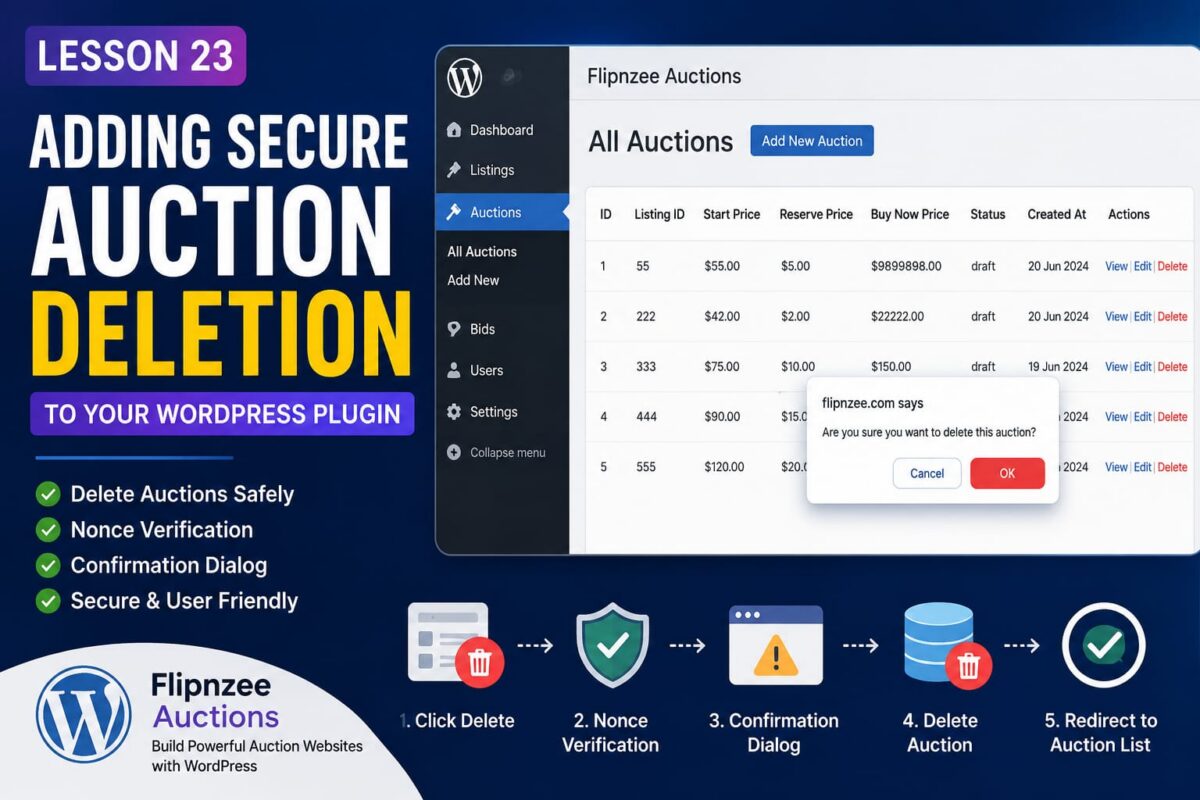
Lesson 23: Adding Secure Auction Deletion to Your WordPress Plugin


Deleting data is one of the most sensitive operations in any application. A single mistake can accidentally remove valuable records or create a serious security vulnerability.

In this lesson, we’ll build a secure Delete Auction feature for the Flipnzee Auctions plugin using WordPress best practices.

Why a Delete Feature Matters

As administrators manage auctions over time, some records become unnecessary:

  • Test auctions
  • Duplicate auctions
  • Expired drafts
  • Incorrect listings

Instead of manually deleting records from phpMyAdmin, administrators should be able to remove auctions directly from the WordPress dashboard.


Step 1 — Add a Delete Link

Inside our custom WP_List_Table, we added a new row action.

'delete' => sprintf(
    '<a href="%s" onclick="return confirm(\'Are you sure you want to delete this auction?\');">Delete</a>',
    wp_nonce_url(
        admin_url(
            'admin-post.php?action=flipnzee_delete_auction&auction_id=' . absint( $item->id )
        ),
        'flipnzee_delete_auction'
    )
),

This generates a secure URL for every auction.


Step 2 — Protect the Request with a Nonce

Deleting records should never rely only on an auction ID.

Instead, WordPress adds a nonce to the URL.

A nonce helps verify that:

  • the request originated from your website
  • the current administrator intentionally clicked Delete
  • attackers cannot easily forge deletion requests

Step 3 — Display a Confirmation Dialog

Before the browser follows the Delete link, JavaScript displays:

Are you sure you want to delete this auction?

This gives administrators one final chance to cancel.

It is a simple but important safeguard.


Step 4 — Register the Delete Action

WordPress routes admin form submissions and custom actions through the admin_post hook.

We registered:

add_action(
    'admin_post_flipnzee_delete_auction',
    array( $this, 'handle_delete_auction' )
);

Now WordPress knows exactly which method should process the deletion request.


Step 5 — Verify the Nonce

Inside our handler we verify the request.

check_admin_referer(
    'flipnzee_delete_auction'
);

If the nonce is invalid, WordPress immediately stops execution.

This protects the plugin from Cross-Site Request Forgery (CSRF) attacks.


Step 6 — Delete the Database Record

The Auction Manager performs the actual deletion.

Flipnzee_Auction_Manager::delete_auction(
    $auction_id
);

Keeping database operations inside the manager class keeps the code organized and easier to maintain.


Step 7 — Redirect Back

After deletion, the administrator is redirected back to the auction list.

wp_safe_redirect(
    admin_url(
        'admin.php?page=flipnzee-all-auctions'
    )
);

This prevents accidental duplicate requests if the page is refreshed.


What We Learned

In this lesson we learned how to:

  • Add custom row actions to WP_List_Table
  • Generate secure admin URLs
  • Protect delete operations using WordPress nonces
  • Display JavaScript confirmation dialogs
  • Handle custom admin_post actions
  • Remove database records safely
  • Redirect users after completing an action

Why This Matters

Delete functionality may seem simple, but implementing it securely is an important milestone in WordPress plugin development.

By following WordPress coding standards—using nonces, confirmation dialogs, dedicated manager classes, and proper redirects—you create a plugin that is both user-friendly and resistant to common security risks.

In the next lesson, we’ll continue enhancing the Flipnzee Auctions plugin by adding more professional management features to make auction administration even more powerful.
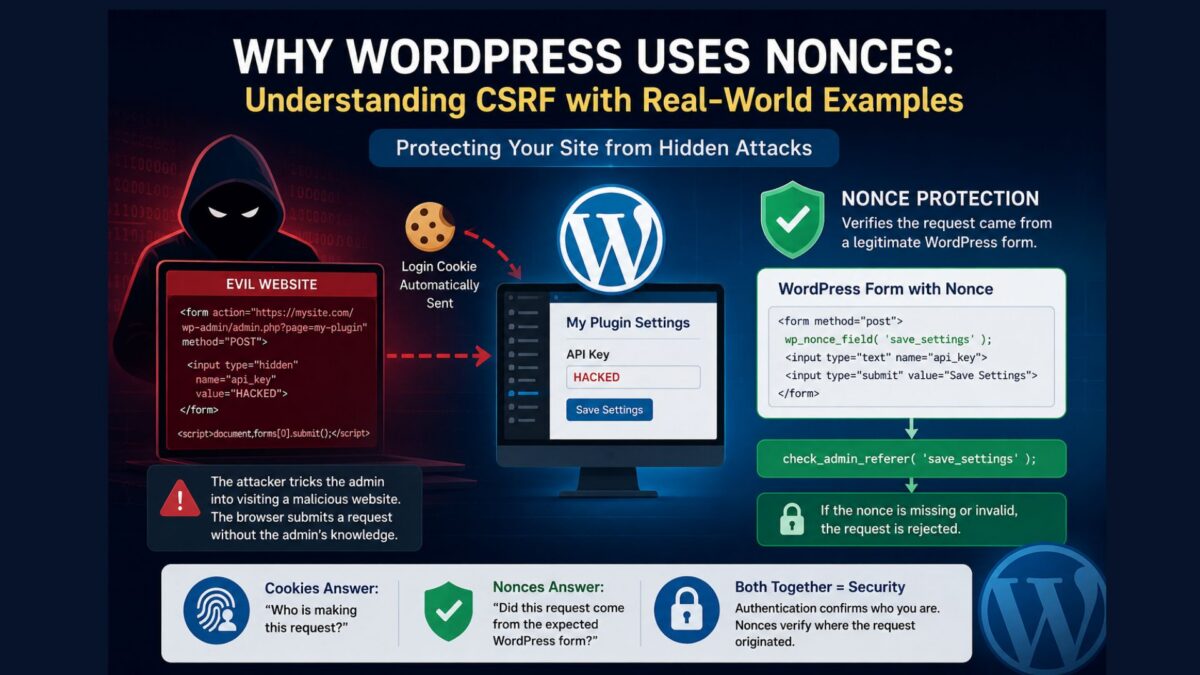
Why WordPress Uses Nonces: Understanding CSRF with a Simple Real-World Example

Many WordPress beginners encounter functions like wp_nonce_field() and check_admin_referer() while developing plugins. At first, these functions can seem unnecessary. After all, if only administrators can access your plugin settings, why add another layer of protection?

The answer lies in understanding a common web security attack called Cross-Site Request Forgery (CSRF). In this article, we’ll explore how such an attack works, why it is dangerous, and how WordPress nonces help prevent it.

A Simple Plugin Settings Form

Imagine your plugin has a settings page where an administrator can save an API key.

<form method="post">
    <input type="text" name="api_key">
    <input type="submit" value="Save Settings">
</form>

When the administrator submits the form, the plugin stores the value.

update_option(
    'my_plugin_api_key',
    $_POST['api_key']
);

Everything works perfectly during normal use.

The Administrator Is Already Logged In

When an administrator logs into WordPress, the browser stores a login cookie.

Whenever the browser communicates with the WordPress website, this cookie is automatically included with every request.

This allows WordPress to recognize the administrator without asking them to log in again for every page.

The Unexpected Problem

Now imagine the administrator visits another website while still logged into WordPress.

That website appears harmless, but behind the scenes it contains a hidden HTML form.

<form action="https://mysite.com/wp-admin/admin.php?page=my-plugin"
      method="POST">

    <input type="hidden"
           name="api_key"
           value="HACKED">

</form>

<script>
document.forms[0].submit();
</script>

The administrator never sees this form.

The JavaScript immediately submits it in the background.

What Happens Next?

When the browser submits the hidden form to your WordPress website, it automatically includes the administrator’s login cookie.

From WordPress’s perspective, the request looks completely legitimate because it comes from an authenticated administrator.

If your plugin simply executes:

update_option(
    'my_plugin_api_key',
    $_POST['api_key']
);

the malicious value is saved.

The administrator never clicked your plugin’s Save Settings button. Their browser unknowingly performed the action on their behalf.

Why Is This Dangerous?

At first glance, changing a single setting may not seem like a serious problem. However, many administrative actions can be performed through web forms.

Without CSRF protection, an attacker could trick an administrator’s browser into:

  • Changing plugin or theme settings
  • Publishing unwanted posts or announcements
  • Creating a new administrator account
  • Deleting important data
  • Disabling security plugins
  • Importing malicious configuration files
  • Triggering actions that execute harmful code

The attacker never needs to know the administrator’s password.

Instead, they misuse the administrator’s already authenticated browser.

Enter WordPress Nonces

WordPress solves this problem by adding a nonce to forms.

wp_nonce_field( 'save_settings' );

This generates a hidden field similar to:

<input type="hidden"
       name="_wpnonce"
       value="9f8d72e1ab">

When the form is submitted, your plugin verifies the nonce.

check_admin_referer( 'save_settings' );

If the nonce is missing or invalid, WordPress immediately rejects the request.

Why Can’t the Attacker Guess the Nonce?

The nonce is generated by WordPress specifically for the logged-in user and is embedded in the genuine plugin page.

A malicious website cannot simply invent a valid nonce value.

Without the correct nonce, the forged request fails, even though the administrator is logged in.

Cookies and Nonces Serve Different Purposes

It is important to understand that authentication cookies and nonces solve different problems.

The login cookie answers:

Who is making this request?

The nonce answers:

Did this request originate from a legitimate WordPress form?

Both checks are necessary for secure plugin development.

A Real-World Analogy

Imagine entering your office using your employee ID card.

Once inside, someone hands you a sealed envelope and asks you to place it in the manager’s mailbox.

You assume it’s legitimate and deliver it.

Later, the manager discovers the envelope contains a fake resignation letter or an unauthorized payment request.

The manager trusted the envelope because it was delivered by you, even though you never intended to send that message.

A CSRF attack works in much the same way.

The attacker doesn’t steal your identity. Instead, they trick your browser—which WordPress already trusts—into performing actions on your behalf.

Key Takeaways

  • Being logged into WordPress does not automatically protect against CSRF attacks.
  • A malicious website can cause a logged-in browser to submit unwanted requests.
  • WordPress nonces help verify that a request originated from a genuine WordPress page.
  • Every plugin that processes forms should use wp_nonce_field() when generating the form and check_admin_referer() (or check_ajax_referer() for AJAX requests) before processing submitted data.
  • Authentication confirms who is making the request, while nonces help verify where the request came from.

Understanding this distinction is one of the most important milestones in becoming a secure WordPress plugin developer.