Lesson 134: Refactoring the Winner Determination Workflow (Implementation)

Introduction

In the previous lesson, we analyzed the complete winner determination workflow and discovered that several responsibilities had gradually accumulated inside the Bid Manager.

While debugging the missing transaction creation, it became clear that the underlying issue was not the Transaction Manager or the Escrow integration. Instead, the winner determination process itself had become increasingly difficult to follow due to duplicated logic and mixed responsibilities.

The objective of this lesson was therefore to refactor the workflow before introducing any new marketplace functionality.


Problems Identified

During the review we identified several issues.

  • Reserve price validation appeared in multiple places.
  • Winner determination and reserve checking were tightly coupled.
  • The workflow was difficult to trace from auction completion to transaction creation.
  • Debugging required following several nested function calls.
  • Future payment integrations would become increasingly difficult.

Rather than continuing to build on top of this complexity, the decision was made to simplify the workflow.


Refactoring Goals

The refactoring focused on three objectives.

Single Responsibility

Each function should perform one task.

For example:

  • Determine winner
  • Validate reserve price
  • Fire events
  • Create transaction

should all remain separate operations.


Clear Event Flow

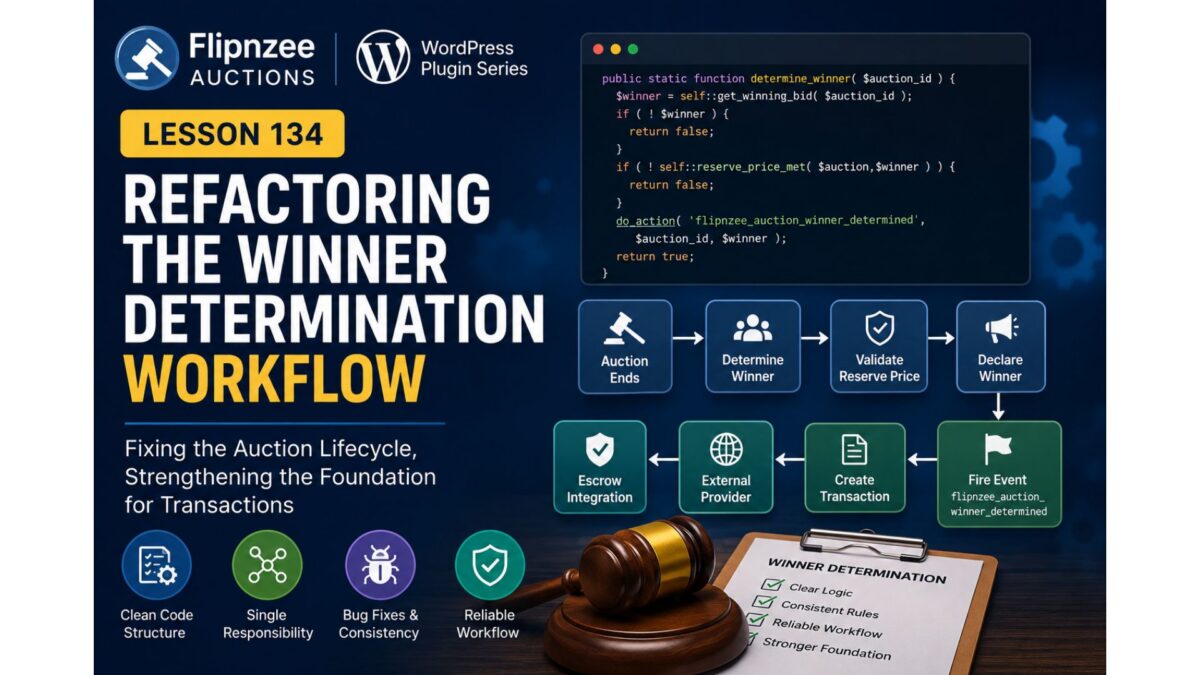
The winner determination process now follows a predictable sequence.

Auction Ends
      │
      ▼
Determine Highest Bid
      │
      ▼
Validate Reserve Price
      │
      ▼
Declare Winner
      │
      ▼
Fire Winner Event
      │
      ▼
Transaction Manager
      │
      ▼
External Provider Manager
      │
      ▼
Escrow API Client

Easier Debugging

Instead of wondering whether the Transaction Manager was malfunctioning, it became possible to inspect the workflow step by step.

Each stage now represents a clear transition in the auction lifecycle.


Why This Matters

Although this refactoring produced very little visible change on the frontend, it significantly improved the internal architecture.

A well-defined event flow makes it easier to:

  • integrate new payment providers
  • add notifications
  • automate transactions
  • create audit logs
  • support additional marketplace features

without repeatedly modifying the Bid Manager.


Result

The Flipnzee Auctions plugin now has a cleaner winner determination workflow that separates auction logic from payment processing.

This architectural improvement provides a stable foundation for the next phase of development, where the marketplace begins evolving beyond simple bidding into a complete purchasing experience.


Next Lesson

In the next lesson we begin connecting auctions with secure payments by redesigning the Buy Now workflow around Escrow.com.

Rather than treating Buy Now as the end of the auction, it will become the beginning of a secure purchasing process.
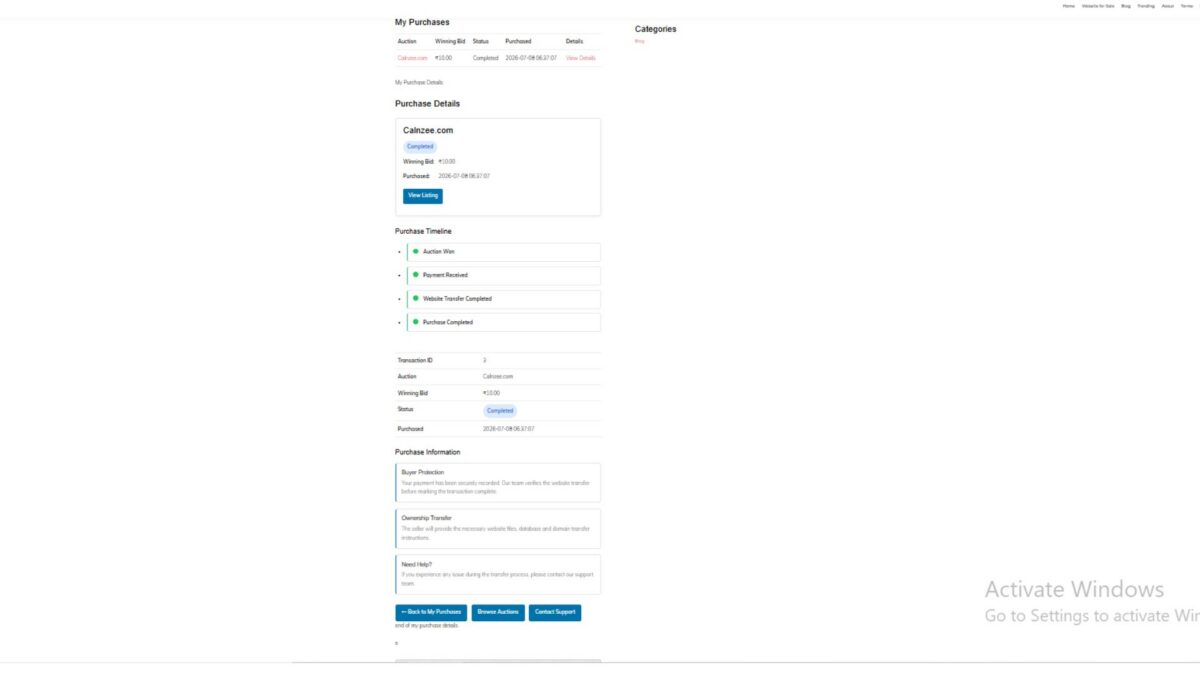
Lesson 134: Refactoring the Winner Determination Workflow

As the Escrow integration matured, testing uncovered an unexpected issue. Although the transaction management architecture had been significantly improved, transaction creation was still not occurring when an auction completed. Rather than immediately assuming the problem existed inside the new transaction code, a systematic review of the auction lifecycle was performed.

This lesson documents the investigation, identifies the true source of the problem, and begins refactoring the winner determination workflow.


The Initial Symptoms

The plugin loaded successfully.

The logs confirmed:

  • Auction Manager initialized.
  • Escrow Provider initialized.
  • Transaction Manager instantiated.

However, one important log entry never appeared:

FLIPNZEE: create_transaction_from_auction() started.

This indicated that the transaction manager itself was not the source of the problem.


Following the Execution Path

Instead of modifying more code, the auction completion workflow was traced step by step.

The execution path is:

Auction Ends
      │
      ▼
Determine Winner
      │
      ▼
Fire Winner Event
      │
      ▼
Transaction Manager
      │
      ▼
Create Transaction
      │
      ▼
Create External Provider
      │
      ▼
Escrow API

Since the Transaction Manager never received control, the investigation moved further upstream.


Reviewing the Bid Manager

The winner determination logic resides inside the Bid Manager.

The following event was confirmed to exist:

do_action(
    'flipnzee_auction_winner_determined',
    $auction_id,
    $winner
);

The event itself was not missing.

Instead, attention shifted to the code responsible for deciding whether a winner should be declared.


Problems Identified

During inspection, the reserve price validation logic had become increasingly difficult to follow after several previous feature additions.

Several architectural issues were identified.

Mixed Responsibilities

The reserve price helper was no longer acting as a simple validation function.

Instead, it contained:

  • Database queries
  • Activity logging
  • Winner modification
  • Business rules
  • Validation logic

A helper function should ideally perform only one task.


Recursive Logic

The helper contained recursive calls back into itself.

This unnecessarily complicated the control flow and made debugging much harder.


Inconsistent Parameters

Different parts of the code expected different inputs.

Some calls passed:

Auction ID

while the helper expected:

Auction Object

This inconsistency made the workflow fragile and difficult to reason about.


Duplicate Business Rules

Reserve price validation appeared in multiple locations.

When business rules are duplicated:

  • bugs become harder to fix,
  • future changes become risky,
  • behavior can become inconsistent.

A single source of truth is always preferable.


Why This Matters

The transaction system depends entirely on the auction lifecycle.

If the winner determination process is unstable, then:

  • transactions cannot be created,
  • provider records cannot be generated,
  • Escrow integration cannot begin.

Rather than continuing to build on uncertain foundations, the focus shifted toward stabilizing the auction lifecycle first.


Architectural Principle

This lesson reinforced an important software engineering principle.

Each stage of the workflow should have one clearly defined responsibility.

Determine Winner
        │
        ▼
Validate Reserve Price
        │
        ▼
Declare Winner
        │
        ▼
Fire Event
        │
        ▼
Create Transaction

When each stage performs only one job, the entire workflow becomes easier to understand, test, and extend.


Benefits of the Refactor

Although this lesson does not introduce new user-facing functionality, it significantly improves the maintainability of the codebase.

Benefits include:

  • Cleaner control flow.
  • Easier debugging.
  • Reduced code duplication.
  • Better separation of concerns.
  • More predictable transaction lifecycle.
  • Stronger foundation for Escrow integration.

Looking Ahead

With the transaction architecture now largely complete and the root cause isolated to the winner determination workflow, the next phase will focus on simplifying the reserve price validation logic into a dedicated, single-purpose component.

Once the auction lifecycle is fully stabilized, the transaction manager, external provider manager, and Escrow integration will operate on a much more reliable foundation.


Lesson 134 demonstrates that effective debugging is often about validating assumptions rather than immediately writing new code. By tracing the complete execution path and identifying weaknesses in the winner determination workflow, Flipnzee Auctions moves closer to a robust, maintainable architecture capable of supporting future payment providers and marketplace features.

Lesson 101 Implementation: Introducing the Transfer Manager & Refactoring the Purchase Details Page

Welcome to Lesson 101 of the Flipnzee Auctions development series. In this lesson, we take a significant step toward making the website transfer workflow cleaner, more maintainable, and easier to extend in future releases.

Rather than continuing to place transfer-related logic directly inside the Purchase Details page, we introduce a dedicated Transfer Manager class. This refactoring follows object-oriented programming principles and prepares the plugin for a fully dynamic transfer management system.


Lesson Objectives

During this lesson we aimed to:

  • Create a dedicated Transfer Manager class.
  • Centralize transfer workflow data.
  • Refactor the Purchase Details page.
  • Reduce duplicated code.
  • Improve maintainability.
  • Prepare for database-driven transfer tracking.

Why This Refactoring Was Needed

As the Flipnzee Auctions plugin grew, the Purchase Details page gradually became responsible for multiple tasks:

  • Loading transaction information
  • Rendering purchase details
  • Managing transfer progress
  • Displaying status badges
  • Showing buyer guidance

Although functional, this approach mixed business logic with presentation.

To improve long-term maintainability, we extracted the transfer-related functionality into its own manager class.


Introducing Flipnzee_Transfer_Manager

A new class named:

Flipnzee_Transfer_Manager

was introduced.

Its responsibility is to manage all transfer-related information independently from the user interface.

Initially, it provides three centralized methods:

get_default_steps()

Returns the default website transfer workflow.

get_default_status()

Returns the default transfer status values.

get_status_badges()

Returns the CSS classes used for status badges.


Default Transfer Workflow

The transfer manager now defines a standard website transfer process consisting of:

  • Payment Confirmed
  • Website Files Delivered
  • Database Delivered
  • Domain Transfer Completed
  • Buyer Verification
  • Purchase Completed

By centralizing these steps, the Purchase Details page no longer needs to manually construct workflow arrays.


Purchase Details Refactoring

The Purchase Details page was substantially cleaned up.

Instead of containing hardcoded arrays, it now simply requests data from the Transfer Manager.

For example, instead of:

$transfer_steps = array(
    ...
);

the page now uses:

$transfer_steps =
    Flipnzee_Transfer_Manager::get_default_steps();

The same approach is used for transfer statuses and status badges.


Cleaner Separation of Responsibilities

After the refactoring:

Transfer Manager

Responsible for:

  • transfer workflow
  • transfer status
  • badge mappings

Purchase Details

Responsible only for:

  • loading transaction data
  • displaying purchase information
  • rendering the user interface

This greatly improves readability.


Improvements to the Purchase Details Page

Several improvements were made:

  • Purchase Summary Card
  • Purchase Timeline
  • Transaction Details Table
  • Purchase Information
  • Transfer Status
  • Next Steps
  • Purchase Notes
  • Dashboard Action Buttons

Each section is now more clearly organized.


Reduced Code Duplication

Earlier versions contained repeated transfer arrays and duplicated HTML sections.

These duplicates were removed.

The resulting code is significantly cleaner and easier to maintain.


Improved Maintainability

One major advantage of this architecture is that future changes only need to be made in one place.

For example, adding another transfer step later requires modifying only the Transfer Manager rather than every page displaying transfer information.


Foundation for Future Lessons

Although the Transfer Manager currently returns default values, this is only the first stage.

Future lessons will replace these defaults with real database records.

This means the Purchase Details page will automatically display live transfer progress without requiring significant changes to its rendering logic.


Current Flipnzee Workflow

At Flipnzee.com, the auction platform currently sells only in-house websites and digital assets.

The transfer workflow therefore reflects the internal process used by the Flipnzee team after an auction is won.

However, because the plugin is fully open source, developers may extend it into a complete marketplace supporting multiple independent sellers.

The Transfer Manager has been designed with that future flexibility in mind.


Benefits Achieved

By the end of Lesson 101 we have:

  • Introduced a dedicated Transfer Manager class.
  • Improved separation of concerns.
  • Reduced duplicated code.
  • Centralized transfer workflow logic.
  • Simplified the Purchase Details page.
  • Improved WordPress Coding Standards compliance.
  • Established a solid architectural foundation for future transfer features.

Download Source Code

Download the starting version of the plugin before the lesson:

Download the completed version after this lesson:


Looking Ahead

In Lesson 102, we will transform the Transfer Manager from a provider of default values into a fully dynamic transfer tracking system.

Instead of hardcoded statuses, transfer progress will be stored and retrieved from the database, allowing administrators to update website transfers while buyers see real-time progress directly within their Purchase Details page.

This marks the beginning of a much more powerful post-auction management system and moves Flipnzee Auctions closer to becoming a complete website transfer platform.

Lesson 84: Designing the Payment Transaction Database for Flipnzee Auctions


One of the most important milestones for any auction platform is handling what happens after an auction ends. While previous lessons focused on listings, bidding, winners, and auction management, the next stage is enabling a complete payment workflow between buyers and sellers.

In this lesson, the goal is to extend the existing transactions table so that it can support manual payment verification and future payment gateway integrations.

Objectives

  • Extend the transaction database schema.
  • Store payment status for every completed auction.
  • Record the selected payment gateway.
  • Support uploading payment proof.
  • Store the payment submission timestamp.
  • Prepare the plugin for future escrow and automated payment workflows.

Planned Database Enhancements

The transaction table will be extended with additional fields such as:

  • payment_status
  • payment_gateway
  • payment_proof_id
  • payment_submitted_at

These fields will allow the plugin to track the complete payment lifecycle from auction completion through seller verification.

Expected Outcome

By the end of this lesson, the payment database foundation will be ready for implementing buyer payment submission and seller/admin verification in upcoming lessons.

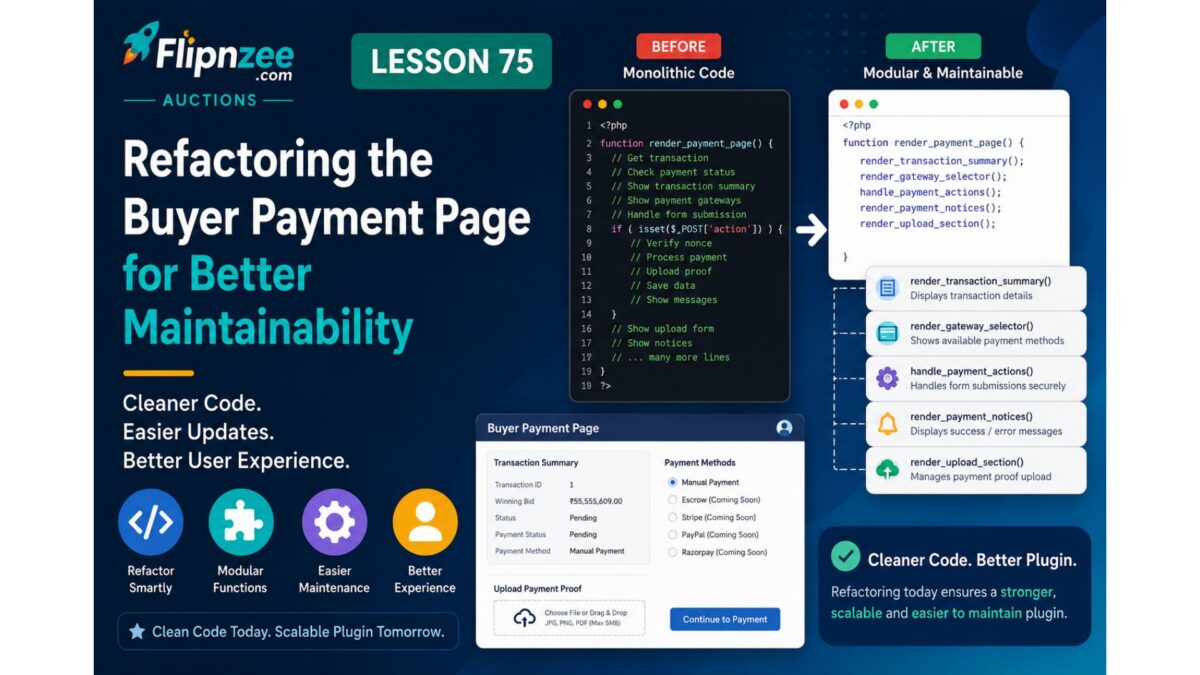
Lesson 75 Implementation: Refactoring the Buyer Payment Page into Modular Components

As the Flipnzee payment system evolved, the class-payment-page.php file gradually accumulated multiple responsibilities. It was responsible for retrieving transactions, validating payment requests, rendering payment instructions, displaying transaction information, and generating the payment gateway interface.

Rather than continuing to add more features to an increasingly large method, this lesson focused on improving the internal architecture of the payment page through refactoring.

Although no new user-facing functionality was introduced, this refactoring significantly improves code readability, maintainability, and prepares the payment system for future features such as payment proof uploads, administrator verification, and live payment gateway integrations.


Why Refactor?

One of the most common problems in software development is allowing a single function to become too large.

Our original render() method was responsible for:

  • Loading transactions
  • Validating requests
  • Processing payment gateway selection
  • Rendering manual payment instructions
  • Displaying transaction information
  • Displaying the payment gateway selector

Instead of adding even more functionality to this method, we separated the interface into reusable helper methods.


Step 1 – Extract the Transaction Summary

The payment summary table was moved into its own private method.

Instead of embedding the HTML directly inside render(), we created:

private static function render_transaction_summary( $transaction ) {
?>

<h2>Payment</h2>

<table class="widefat striped">

<tr>
    <th>Transaction ID</th>
    <td><?php echo esc_html( $transaction->id ); ?></td>
</tr>

<tr>
    <th>Winning Bid</th>
    <td>
        <?php
        echo esc_html(
            number_format_i18n(
                $transaction->winning_bid,
                2
            )
        );
        ?>
    </td>
</tr>

<tr>
    <th>Status</th>
    <td><?php echo esc_html( ucfirst( $transaction->status ) ); ?></td>
</tr>

<tr>
    <th>Payment Status</th>
    <td><?php echo esc_html( ucfirst( $transaction->payment_status ) ); ?></td>
</tr>

<tr>
    <th>Payment Gateway</th>
    <td>
        <?php
        echo esc_html(
            Flipnzee_Payment_Manager::get_gateway_name( $transaction )
        );
        ?>
    </td>
</tr>

</table>

<?php
}

The main render method now simply calls:

self::render_transaction_summary( $transaction );

Step 2 – Extract the Gateway Selector

Next, the payment gateway selection form was moved into a dedicated helper method.

private static function render_gateway_selector( $gateways ) {
?>

<form method="post">

<?php
wp_nonce_field(
    'flipnzee_payment_action',
    'flipnzee_payment_nonce'
);
?>

<h3>Select Payment Method</h3>

<div class="flipnzee-payment-gateways">

<?php foreach ( $gateways as $gateway_id => $gateway ) : ?>

<p>

<label>

<input
    type="radio"
    name="payment_gateway"
    value="<?php echo esc_attr( $gateway_id ); ?>"
    <?php checked( $gateway['enabled'] ); ?>
    <?php disabled( ! $gateway['enabled'] ); ?>
>

<?php echo esc_html( $gateway['label'] ); ?>

<?php if ( ! $gateway['enabled'] ) : ?>

<em>(Coming Soon)</em>

<?php endif; ?>

</label>

</p>

<?php endforeach; ?>

</div>

<p class="flipnzee-payment-actions">

<button
    type="submit"
    name="flipnzee_payment_completed"
    class="button"
>
I've Completed Payment
</button>

<button
    type="submit"
    name="flipnzee_continue_payment"
    class="button button-primary"
>
Continue to Payment
</button>

</p>

</form>

<?php
}

This method now encapsulates the entire payment gateway interface.


Step 3 – Extract Manual Payment Instructions

The manual payment interface was also separated into its own method.

private static function render_manual_payment( $transaction ) {
?>

<div class="notice notice-success">

    <p><strong>Manual Payment Selected</strong></p>

    <p>Please complete your payment using the instructions below.</p>

</div>

<div class="flipnzee-manual-payment">

<h3>Payment Instructions</h3>

<p>Thank you for choosing Manual Payment.</p>

<p>Please use the transaction reference below when sending your payment.</p>

<table class="widefat striped">

<tr>
    <th>Reference Number</th>
    <td>
        <?php
        echo esc_html(
            'FLIP-' . str_pad(
                $transaction->id,
                6,
                '0',
                STR_PAD_LEFT
            )
        );
        ?>
    </td>
</tr>

<tr>
    <th>Amount</th>
    <td>
        <?php
        echo esc_html(
            number_format_i18n(
                $transaction->winning_bid,
                2
            )
        );
        ?>
    </td>
</tr>

<tr>
    <th>Status</th>
    <td>Awaiting Payment</td>
</tr>

</table>

<h4>Important</h4>

<ul>

<li>Include the reference number with your payment.</li>

<li>Keep proof of payment for verification.</li>

<li>Your transaction will be reviewed before ownership transfer.</li>

</ul>

</div>

<?php
}

Step 4 – Simplify the Gateway Router

Previously, the switch statement contained a large block of HTML for the Manual Payment gateway.

After refactoring, it became much cleaner:

switch ( $selected_gateway ) {

    case 'manual':

        self::render_manual_payment( $transaction );

        break;

    case 'escrow':
        // Escrow placeholder.
        break;

    case 'stripe':
    case 'paypal':
    case 'razorpay':
    case 'crypto':
        // Future gateways.
        break;

    default:
        ?>
        <div class="notice notice-error">
            <p>Unknown payment gateway.</p>
        </div>
        <?php
        break;
}

The routing logic now clearly expresses intent without mixing presentation and control flow.


Benefits of the Refactoring

This refactoring provides several long-term advantages:

  • Cleaner render() method
  • Smaller, focused helper methods
  • Easier debugging
  • Improved readability
  • Better separation of concerns
  • Simpler extension for future payment gateways
  • Reduced code duplication
  • Easier maintenance as the payment workflow grows

Testing

After completing the refactoring:

  • The Buyer Payment Page displayed exactly the same information as before.
  • Manual Payment instructions continued to work.
  • The transaction summary rendered correctly.
  • Payment gateway selection remained functional.
  • No user-facing functionality changed.
  • PHP syntax validation completed successfully.

This confirmed that the refactoring preserved existing behavior while improving the internal architecture.


Lessons Learned

As features accumulate, it is often beneficial to pause and improve the code structure before introducing additional functionality. Separating presentation into dedicated helper methods makes the codebase easier to navigate, simplifies future enhancements, and reduces the risk of introducing bugs when extending existing features.

This lesson also reinforced the importance of keeping rendering logic modular so that future components—such as payment proof uploads, administrator verification, and live gateway integrations—can be added with minimal impact on existing code.

Download Source Code

Download the starting version of the plugin before the lesson:

Download the completed version after this lesson:


Conclusion

Lesson 75 focused on improving the maintainability of the Buyer Payment Page through thoughtful refactoring. By extracting the transaction summary, payment gateway selector, and manual payment instructions into reusable helper methods, the payment page is now significantly cleaner and better organized. This modular architecture provides a solid foundation for the next stage of development, where buyers will be able to upload payment proof and administrators will verify completed payments before ownership transfer.