Lesson 116: Refactoring the Buyer Payment Page into a State-Driven Workflow

As the Flipnzee Auctions plugin continues to mature, the buyer payment page has evolved beyond a simple form. It now manages multiple stages of a transaction—from selecting a payment method to uploading payment proof and tracking verification status. As additional payment gateways and workflows are planned, maintaining everything inside a single method would quickly become difficult.

In this lesson, the payment page is refactored into a cleaner, state-driven architecture while preserving the existing functionality.


Why Refactor?

The original implementation mixed several responsibilities inside one method:

  • Validating the transaction
  • Handling payment gateway selection
  • Uploading payment proof
  • Displaying transaction details
  • Rendering different payment states
  • Showing payment instructions

Although functional, this structure made future enhancements increasingly difficult.

The objective was to separate these responsibilities into focused methods that each perform one task.


Design Goals

The refactoring focused on four principles:

  • Smaller, easier-to-read methods
  • Separation of business logic and presentation
  • State-driven rendering
  • A scalable foundation for future payment gateways

This approach aligns more closely with object-oriented design and WordPress coding standards.


Simplifying render()

The render() method now serves primarily as the controller for the page.

Its responsibilities are limited to:

  • Validating the request
  • Loading the transaction
  • Processing payment proof uploads
  • Delegating payment actions
  • Rendering the appropriate payment state

Instead of containing hundreds of lines of mixed logic, it now orchestrates the workflow through dedicated helper methods.


Extracting Payment Submission Logic

Payment gateway processing was moved into its own method:

private static function handle_payment_submission()

This method now handles:

  • nonce validation
  • selected gateway validation
  • gateway routing
  • unsupported gateway messaging

The result is a much cleaner entry point that will make future integrations significantly easier.


Introducing a State Machine

Rather than scattering conditional statements throughout the page, the buyer interface now behaves like a simple state machine.

Current payment states include:

  • Pending
  • Submitted
  • Verified
  • Completed

A single controller determines which section should be displayed.

render_payment_state()

Internally it delegates to dedicated rendering methods for each state.


Dedicated Rendering Methods

Instead of one large template, each payment state now has its own renderer.

Examples include:

  • render_pending_state()
  • render_submitted_state()
  • render_verified_state()
  • render_completed_state()

Each method focuses on presenting one stage of the payment lifecycle.

This improves readability while making future UI enhancements much safer.


Payment Proof Upload

The payment proof upload process remains fully functional after the refactor.

The workflow now becomes:

  1. Buyer selects Manual Payment.
  2. Payment instructions are displayed.
  3. Buyer uploads proof of payment.
  4. The proof is stored.
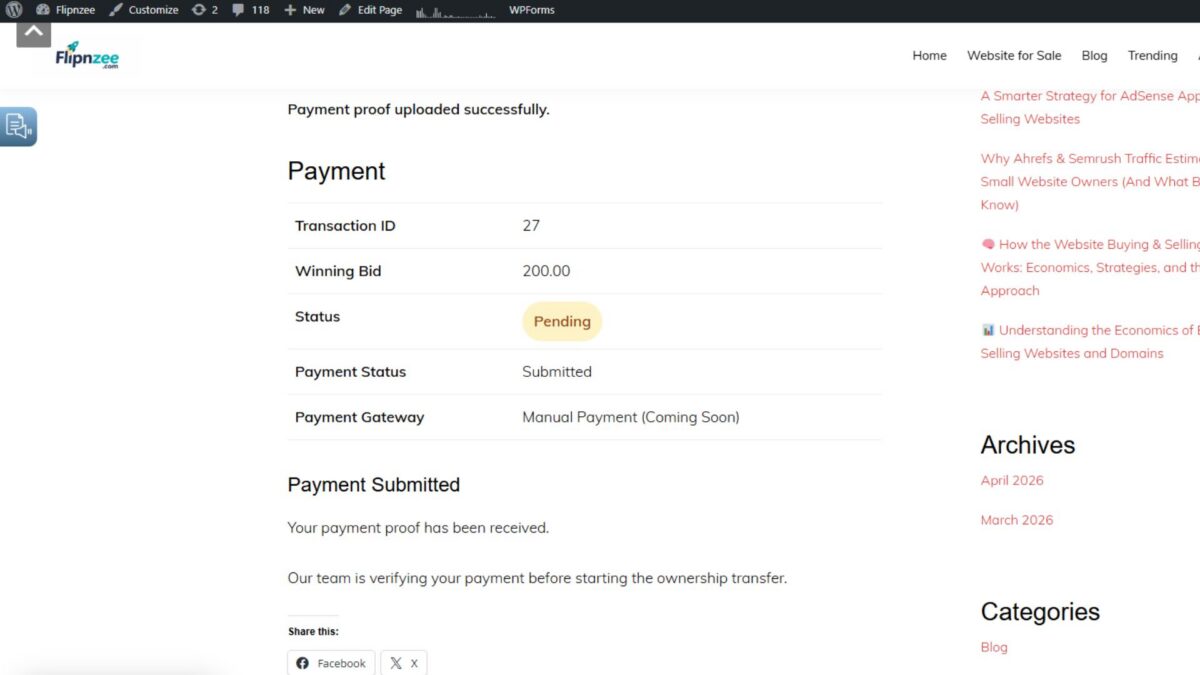
  5. Payment status changes to Submitted.
  6. The buyer now sees a confirmation message instead of the upload form.

This creates a much clearer user experience while preventing duplicate uploads.


Transaction Summary

The transaction summary has also been isolated into its own renderer.

It displays:

  • Transaction ID
  • Winning Bid
  • Transaction Status
  • Payment Status
  • Selected Payment Gateway

Keeping this component separate makes future additions—such as payment timestamps or invoice numbers—straightforward.


Benefits of the Refactor

Compared to the previous implementation, the payment page is now:

  • Easier to read
  • Easier to debug
  • Easier to test
  • Easier to extend
  • Better aligned with object-oriented design

Future payment gateways such as Escrow.com, Stripe, PayPal, Wise, and cryptocurrency integrations can now be added with minimal impact on the rest of the codebase.


Lessons Learned

One important takeaway from this refactor is that working code is not always well-structured code.

As software grows, periodically revisiting earlier implementations helps improve maintainability without changing the user-facing behaviour.

By separating responsibilities into focused methods, the payment page becomes easier to understand today while reducing technical debt for future development.


Current Payment Lifecycle

The buyer payment workflow now follows a clear sequence:

Auction Won
        │
        ▼
Pending Payment
        │
        ▼
Select Payment Gateway
        │
        ▼
View Payment Instructions
        │
        ▼
Upload Payment Proof
        │
        ▼
Submitted
        │
        ▼
Verified (Admin)
        │
        ▼
Ownership Transfer
        │
        ▼
Completed

Conclusion

Although this lesson introduces very few visible changes to the buyer interface, it represents an important architectural milestone for the Flipnzee Auctions plugin. The payment page has been transformed from a monolithic implementation into a modular, state-driven workflow that is easier to maintain and extend.

With this foundation in place, the next lessons can focus on the administrative side of the payment lifecycle, including payment verification, ownership transfer, transaction completion, and integration with additional payment gateways, all without requiring major structural changes to the buyer-facing code.

https://github.com/SplendidDigital/flipnzee-auctions/releases/tag/lesson-116-payment-page-refactor
Lesson 115 – Implementation: Implementing the Buy Now Auction Completion Workflow


Introduction

In the previous lesson, we outlined how the Buy Now feature should behave from a business perspective. In this implementation lesson, we transform that design into working code.

Rather than introducing a separate purchase engine, the implementation builds upon the auction infrastructure already developed throughout the project. The result is a cleaner architecture where a Buy Now purchase is simply a special case of a successful bid that immediately concludes the auction.


Step 1 – Detect Buy Now Bids

A new helper method was introduced:

Flipnzee_Bid_Manager::is_buy_now_bid()

This method retrieves the configured Buy Now price for the auction and compares it against the submitted bid amount.

If the bid is equal to or greater than the Buy Now price, the method returns true.

Keeping this logic separate makes the bid placement code easier to understand and allows future enhancements without modifying the core bidding workflow.


Step 2 – Update the Bid Handler

After a successful bid is recorded, the bid handler now performs an additional check:

$is_buy_now = Flipnzee_Bid_Manager::is_buy_now_bid(
    $auction_id,
    $bid_amount
);

For ordinary bids, execution continues exactly as before.

For Buy Now bids, the workflow branches into an immediate auction completion sequence.


Step 3 – Close the Auction

A new method was added to the Auction Manager:

Flipnzee_Auction_Manager::close_auction(
    $auction_id
);

This method:

  • updates the auction status to closed,
  • records the closing timestamp,
  • returns whether the update succeeded.

Centralising this behaviour inside the Auction Manager keeps auction state management in a single location.


Step 4 – Determine the Winner Immediately

Once the auction is closed, the existing winner determination logic is reused:

Flipnzee_Bid_Manager::determine_winner(
    $auction_id
);

No duplicate winner-selection logic is required.

The plugin simply performs the same process that would normally occur after the scheduled auction expiry.


Step 5 – Reuse Existing Hooks

Because winner determination already fires the existing action hook:

do_action(
    'flipnzee_auction_winner_determined',
    $auction_id,
    $winner
);

the following systems continue working automatically:

  • Buyer notification
  • Seller notification
  • Administrator notification
  • Transaction creation

This demonstrates one of the benefits of designing around WordPress actions rather than tightly coupled method calls.


Step 6 – Automatically Create the Transaction

The existing Transaction Manager now creates the purchase transaction immediately after the winner is determined.

This removes the delay that previously existed between auction completion and payment.

The buyer is now ready to proceed directly to the payment stage.


Step 7 – Integrate the External Provider Workflow

During implementation, the transaction workflow also creates an associated external provider record for future integrations such as Escrow.com.

This lays the foundation for supporting external payment and escrow services without altering the auction workflow itself.


Debugging the Workflow

This lesson involved significantly more debugging than implementation.

Extensive logging was added throughout the Buy Now workflow to verify each stage executed correctly.

Typical log entries included:

  • Buy Now detection
  • Auction closure
  • Winner determination
  • Notification dispatch
  • Transaction creation
  • External provider creation

These logs made it possible to isolate failures quickly and verify that each subsystem executed in the expected order.


Issues Encountered

Several issues surfaced while implementing this workflow:

  • Buy Now bids behaved like normal bids.
  • Auctions remained active after reaching the Buy Now price.
  • Winner determination was not triggered immediately.
  • Transaction creation exposed a missing class loading issue for the External Provider Manager.
  • Front-end auction state required refreshing after administrative changes because the database status remained closed until explicitly reopened.

Resolving these issues reinforced the importance of validating the complete workflow rather than assuming each individual component behaved correctly in isolation.


Final Workflow

After completing Lesson 115, the Buy Now process now follows this sequence:

Buyer submits Buy Now bid
        │
        ▼
Bid accepted
        │
        ▼
Buy Now detected
        │
        ▼
Auction closed
        │
        ▼
Winner determined
        │
        ▼
Notifications sent
        │
        ▼
Transaction created
        │
        ▼
External provider record created
        │
        ▼
Buyer proceeds to payment

Conclusion

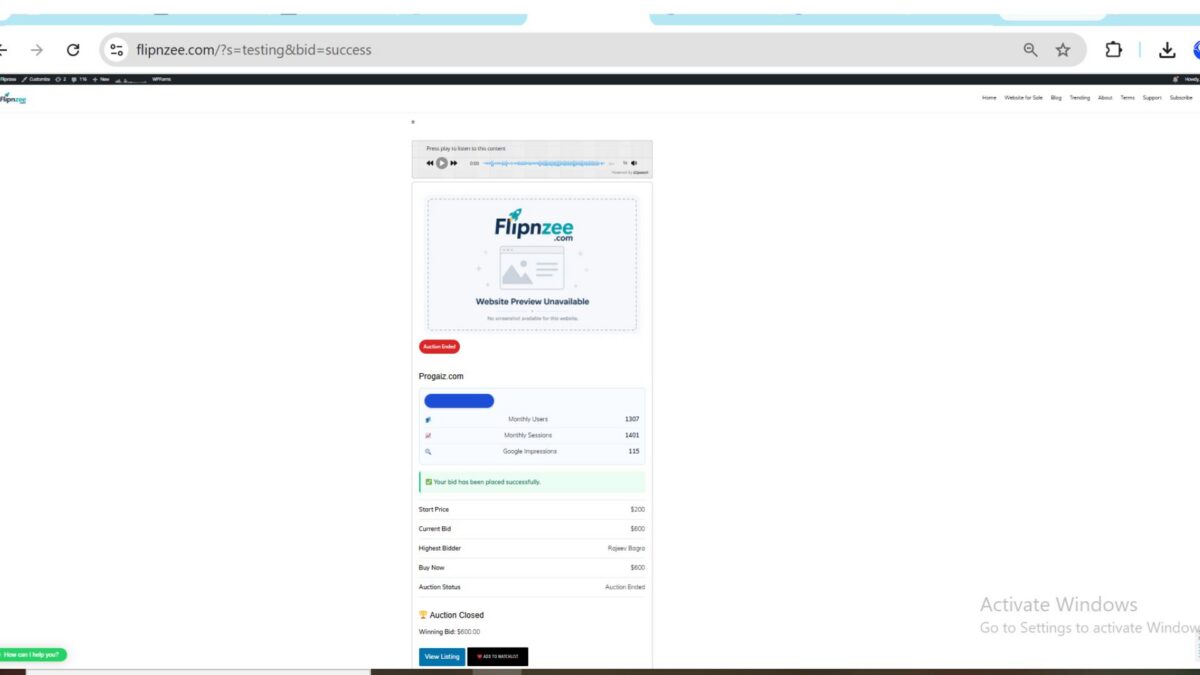
With this lesson complete, the Flipnzee Auctions plugin now supports an end-to-end Buy Now workflow. A qualifying bid no longer waits for the auction timer to expire; instead, it immediately concludes the auction, determines the winner, creates the transaction, and launches the payment process.

This represents a major architectural milestone. The plugin has evolved from handling bids and scheduled auction endings to supporting immediate purchases through a unified auction lifecycle, providing a solid foundation for future enhancements such as escrow integrations, automated transfers, and richer post-sale workflows.

https://github.com/SplendidDigital/flipnzee-auctions/releases/tag/lesson-115-stable