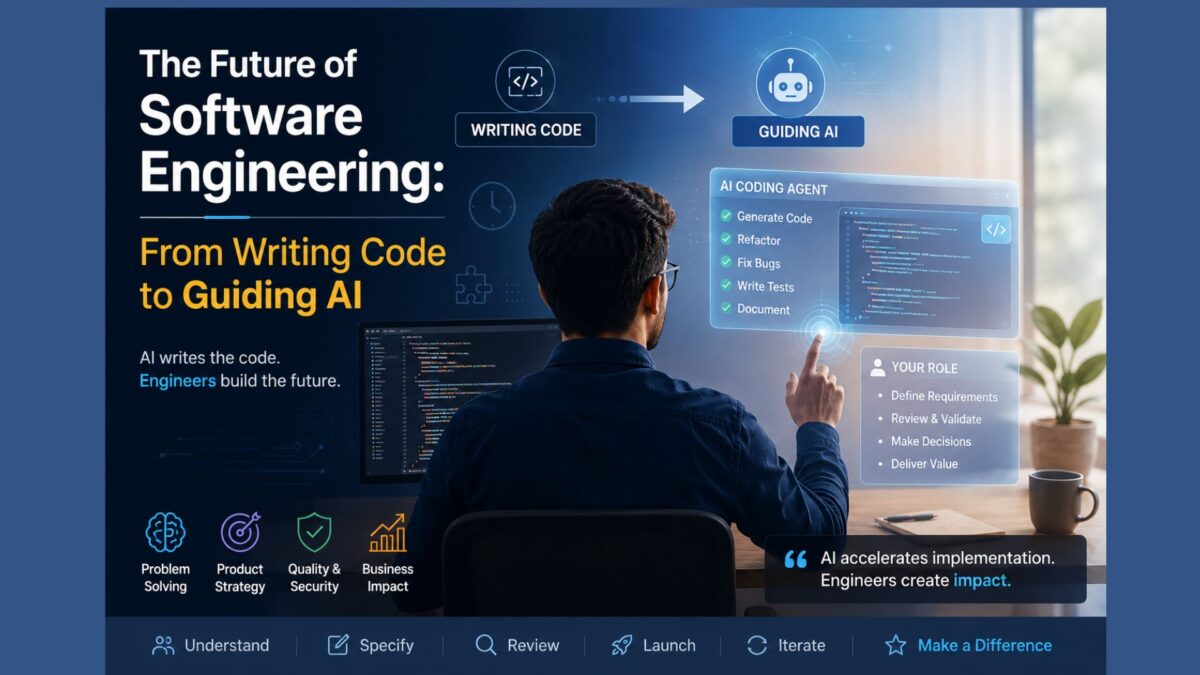
For many developers, the emergence of AI coding agents has prompted an uncomfortable question: Was all the time spent learning software development worth it if AI can now generate working code in minutes?
A recent reflection on the development of the Flipnzee Auctions plugin offers an interesting perspective.
The project began as a learning exercise. Rather than rushing to release a product, its development progressed step by step, covering WordPress plugin architecture, object-oriented PHP, database design, AJAX, scheduled tasks, payment workflows, Git, debugging, and software organization. Every feature became an opportunity to understand not just what to build, but why it should be built that way.
Looking back, there is no denying that modern AI coding agents can now perform many of these implementation tasks remarkably quickly. Refactoring classes, generating CRUD interfaces, organizing project structures, fixing common bugs, writing documentation, and even producing test cases are increasingly becoming tasks that can be completed in minutes rather than days.
At first glance, this might suggest that months of development effort were unnecessary.
The reality is more nuanced.
The greatest value of the project was never the number of lines of PHP that were written. It was the understanding gained throughout the process.
By building the plugin manually, the developer learned how WordPress hooks interact, how database migrations work, why security checks matter, how to organize maintainable code, how to debug complex issues, and how seemingly small architectural decisions affect future development.
These lessons cannot simply be downloaded from an AI.
Ironically, this experience makes AI significantly more valuable rather than less. Someone who understands software engineering can evaluate AI-generated code, recognize hidden bugs, identify security concerns, and determine whether a suggested implementation truly fits the product.
Without that understanding, generated code often becomes little more than a black box.
There is, however, an important lesson for startups.
While the educational value of building software from scratch is enormous, there is also a point of diminishing returns. Projects can become trapped in endless cycles of refactoring, redesigning, and documenting instead of reaching users.
Many founders discover that they spend more time perfecting architecture than validating whether customers actually want the product.
In hindsight, a more balanced approach may have been to release an early version, gather feedback, and allow AI to accelerate subsequent iterations.
This highlights the real shift brought about by modern coding agents.
The competitive advantage is no longer typing code faster than everyone else.
The competitive advantage lies in identifying worthwhile problems, designing practical solutions, specifying clear requirements, reviewing AI-generated implementations, and continuously improving the product based on real-world feedback.
For developers who have invested years in learning programming, this should be encouraging rather than discouraging.
Their knowledge has not lost its value.
Instead, the nature of their work has evolved.
As AI increasingly handles implementation, software engineers move higher up the value chain—focusing on product strategy, architecture, user experience, quality assurance, and business decisions.
The future belongs not to those who write every line of code manually, nor to those who rely entirely on AI, but to those who can combine engineering judgment with AI-assisted development.
In many ways, learning software engineering has become more valuable than ever—not because developers must write every function themselves, but because they now possess the expertise to guide AI toward building better software.
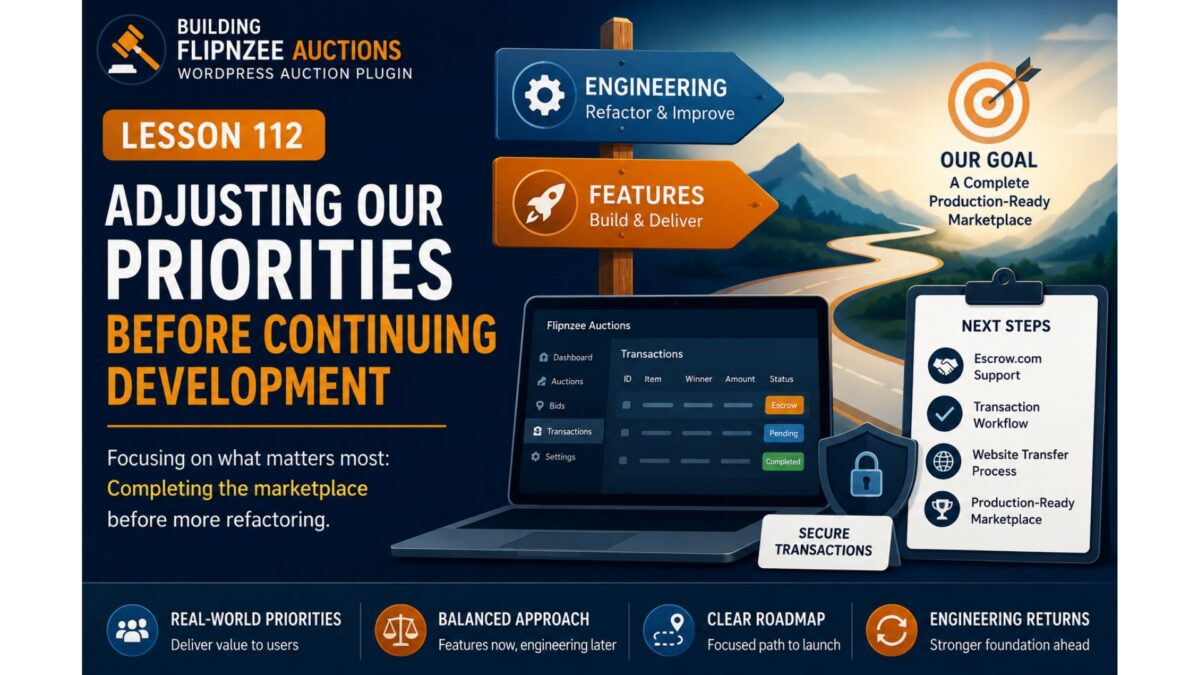
Adjusting Our Priorities Before Continuing Development
Series: Building Flipnzee Auctions
Lesson: 112
Difficulty: Beginner
Prerequisites: Lesson 111
Code Changes: None (Project Planning)
Introduction
Over the past several lessons, we’ve taken a short break from adding new features to review parts of the Flipnzee Auctions codebase from a software engineering perspective.
During that review, we examined the plugin bootstrap, explored the plugin lifecycle, and identified several areas that could eventually be improved through refactoring.
Our original intention was to continue along that path.
However, software projects rarely follow a perfectly straight roadmap.
Before continuing with additional engineering improvements, we’ve decided to return to feature development and complete one of the most important capabilities originally planned for Flipnzee Auctions: Escrow.com support.
Why Change Direction?
When this project began, Flipnzee Auctions was primarily a learning exercise for building a WordPress plugin.
As development progressed, it gradually evolved into a real marketplace application intended to power Flipnzee.com.
That changes the project’s priorities.
Instead of focusing solely on cleaner architecture, we now need to ensure that the marketplace itself is capable of supporting real transactions.
The Marketplace Is Almost Complete
Most of the core auction functionality already exists.
Today the plugin can:
Create auction listings
Accept bids
Determine auction winners
Manage transactions
Display buyer information
Support watchlists
Record activity
Handle administrative workflows
From a feature perspective, the marketplace is surprisingly close to being usable.
One important piece, however, is still missing.
The Missing Piece
Website and domain sales are often significantly more valuable than ordinary online purchases.
Because of that, buyers and sellers frequently prefer using a trusted third-party escrow service instead of sending money directly.
From the beginning of this project, Escrow.com was intended to become the primary payment method for completed auctions.
Although the plugin already contains the foundation for transaction management, the Escrow workflow itself has not yet been implemented.
Completing that workflow now provides more value than continuing with additional internal refactoring.
Engineering Is Not Being Abandoned
This is important.
We’re not abandoning the Plugin Engineering series.
We’re simply changing priorities.
Professional software projects constantly alternate between two activities:
Build New Features
        │
        ▼
Improve Existing Code
        │
        ▼
Build More Features
        │
        ▼
Refactor and Maintain
Both activities are important.
The challenge is deciding which one creates the greatest value at a particular stage of the project.
Right now, completing the marketplace is the higher priority.
Why Not Finish Refactoring First?
It might seem logical to finish every planned engineering improvement before adding more features.
In practice, that isn’t always the best approach.
Major features often influence the final architecture of a project.
Refactoring too early may result in restructuring code that will soon need to change again.
By completing the marketplace workflow first, future engineering decisions can be based on a more complete product.
What Happens Next?
The next phase of development returns to the Building Flipnzee Auctions series.
We’ll begin implementing the long-planned Escrow workflow, starting with a practical solution that can be used in production before exploring deeper integrations.
The immediate roadmap becomes:
Escrow.com Support
        │
        ▼
Transaction Workflow
        │
        ▼
Website Transfer Process
        │
        ▼
Production-Ready Marketplace
Once these marketplace features are complete, we’ll return to the Plugin Engineering series and continue improving the plugin’s architecture.
Key Takeaways
Software development is rarely a straight line.
As projects evolve, priorities naturally change.
Although we originally planned to continue refactoring the plugin, completing the marketplace now provides greater value for both the project and its future users.
The engineering work remains important—but the marketplace comes first.
Looking Ahead
In the next lesson, we’ll begin designing the Escrow.com payment workflow for Flipnzee Auctions.
Rather than jumping directly into API integration, we’ll first design a practical transaction process that allows buyers, sellers, and administrators to complete website sales securely while laying the foundation for future automation.
Why I prefer this version
This version doesn’t feel like an apology or a detour. Instead, it reflects a real-world product decision:
Lessons 110–111 introduced engineering thinking.
Lesson 112 explains why the project is returning to feature development.
Lesson 113 onward resumes the familiar Building Flipnzee Auctions two-post format (planning first, implementation second).
That keeps both series coherent and makes the transition feel intentional rather than abrupt.
Series: Plugin Engineering for Flipnzee Auctions Lesson: 111 Difficulty: Beginner to Intermediate Prerequisites: Lesson 110 Code Changes: None (Engineering Review)
Introduction
In Lesson 110, we examined the overall responsibilities of the Flipnzee Auctions bootstrap file. Rather than modifying code immediately, we learned to identify the different responsibilities handled by the bootstrap and understand why they exist.
One of those responsibilities is managing the plugin’s lifecycle.
Every WordPress plugin has important lifecycle events such as installation, activation, deactivation, updates, and uninstallation. During these events, WordPress gives plugins an opportunity to perform setup or cleanup tasks.
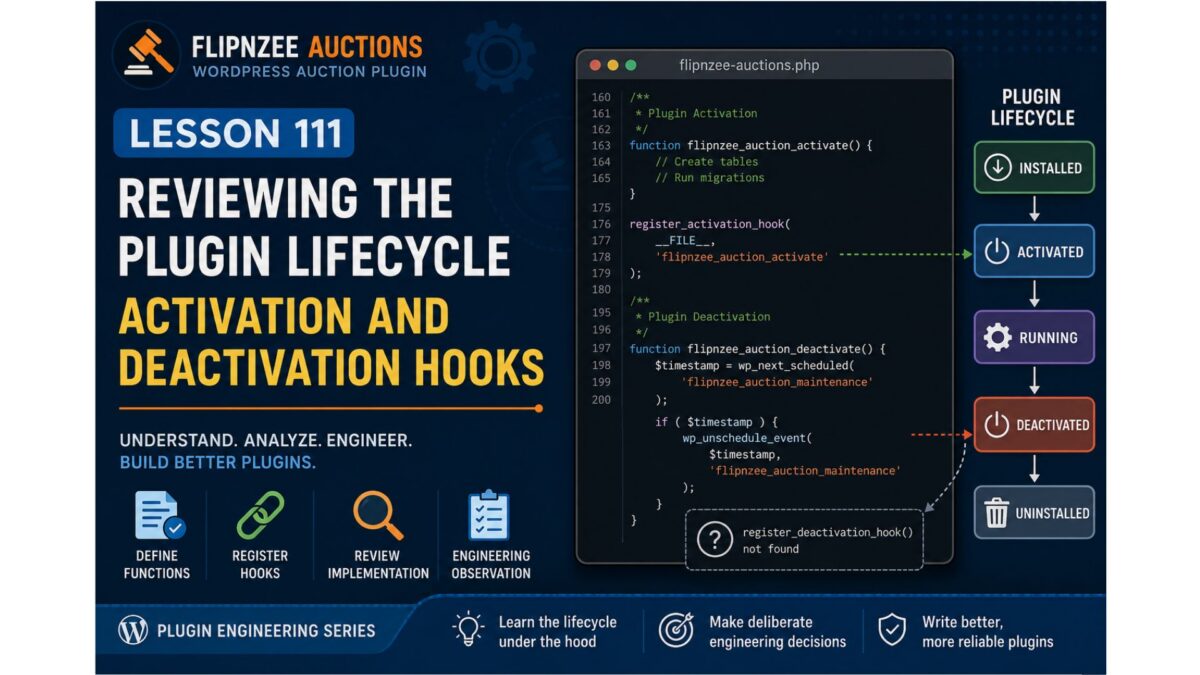
In this lesson, we’ll focus on activation and deactivation, and review how Flipnzee Auctions currently handles these lifecycle events.
Unlike many coding tutorials, this lesson is based entirely on the current Lesson 107 Stable codebase.
Learning Objectives
By the end of this lesson you will be able to:
Explain the difference between defining a lifecycle function and registering it.
Understand how register_activation_hook() works.
Understand how register_deactivation_hook() works.
Review the current lifecycle implementation in Flipnzee Auctions.
Identify an engineering improvement for a future lesson.
Understanding the Plugin Lifecycle
A WordPress plugin is not simply loaded and forgotten.
Instead, WordPress communicates with plugins during specific lifecycle events.
Skipping directly to implementation can introduce unintended side effects.
Our goal is to make deliberate improvements backed by evidence rather than assumptions.
Testing
No source code was modified during this lesson.
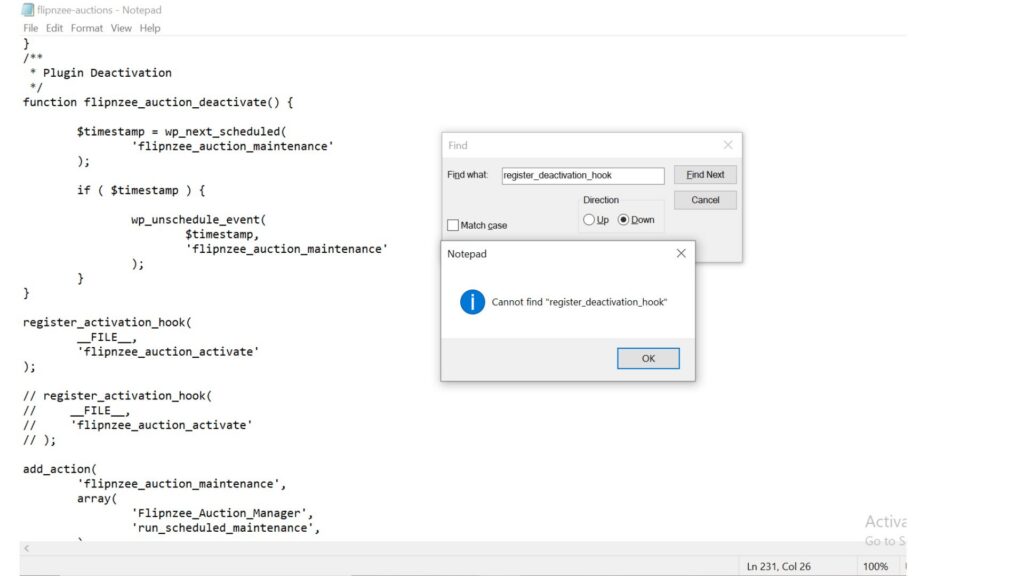
Instead, we verified the current implementation by reviewing the bootstrap and searching for lifecycle hook registrations.
This confirms our understanding before any refactoring takes place.
Git
No Git commit is required because no source code was changed.
Key Takeaways
In this lesson we learned that defining a lifecycle function and registering it are two separate responsibilities.
We reviewed the current Flipnzee Auctions bootstrap and confirmed that:
activation logic is defined,
deactivation logic is defined,
activation is registered with WordPress,
and no deactivation hook registration was found in the current stable bootstrap.
Rather than treating this as an immediate bug, we recorded it as an engineering observation for further investigation.
This disciplined approach helps ensure that future changes are intentional, well-tested, and based on a clear understanding of the existing architecture.
Ends here (for now).
The Plugin Engineering series will pause temporarily while we complete several high-priority marketplace features. Once Flipnzee Auctions reaches a feature-complete milestone, we’ll return to refactoring and architectural improvements
In Lessons 108 and 109, we learned what a plugin bootstrap is and why professional developers review existing code before making changes.
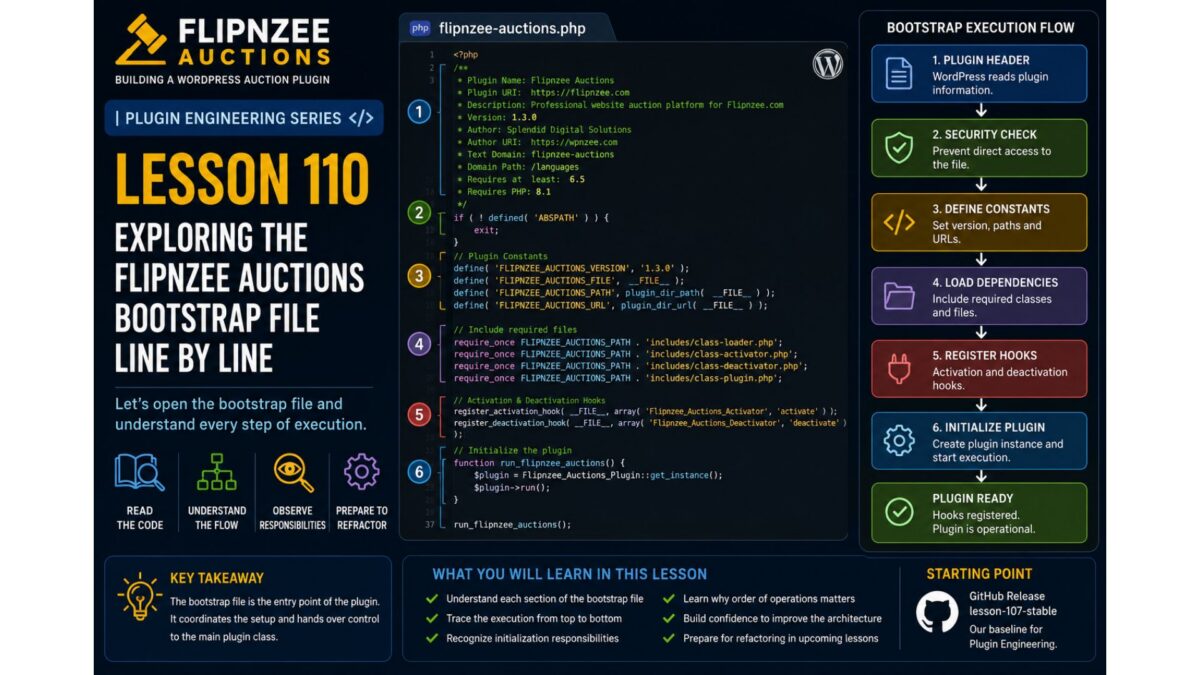
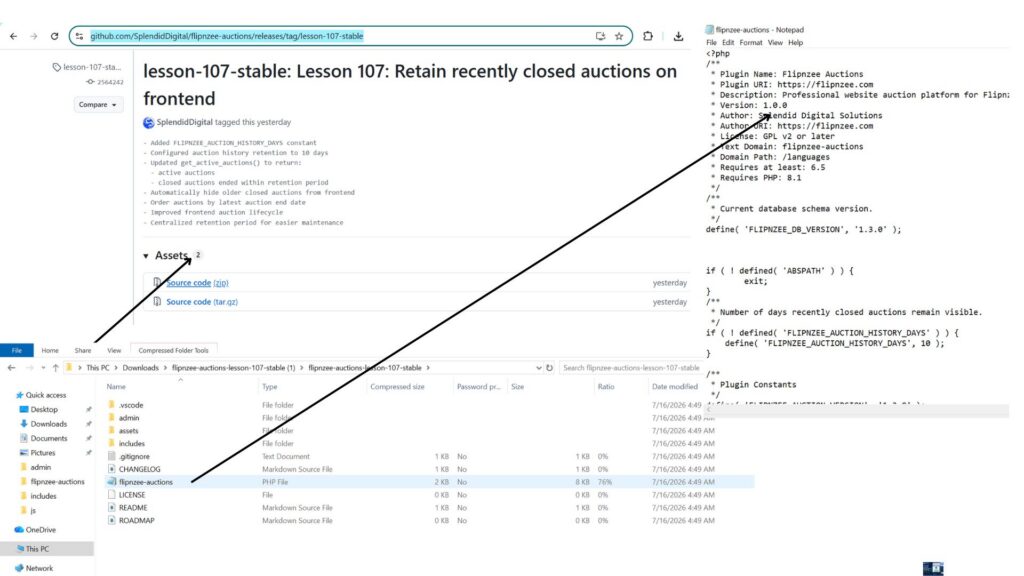
Now it’s time to examine the actual flipnzee-auctions.php file from the Lesson 107 Stable release. Unlike many tutorials that use simplified examples, this lesson is based on the real bootstrap powering Flipnzee Auctions.
Our goal is not to refactor the code. Instead, we will identify the different responsibilities contained within the bootstrap and understand why each one exists. By the end of this lesson, you’ll begin seeing the bootstrap not as a long PHP file, but as the central coordinator that connects WordPress with every major component of the plugin.
Learning Objectives
By the end of this lesson, you will be able to:
Identify the major responsibilities handled by the plugin bootstrap.
Understand why bootstrap files naturally grow as plugins evolve.
Recognize how WordPress uses hooks to communicate with plugins.
Explain why loading classes, registering hooks, and initializing components are separate responsibilities.
Prepare for future refactoring by first understanding the existing architecture.
Why Focus on Responsibilities?
Imagine walking into a manufacturing plant for the first time.
Before examining individual machines, you first identify the departments:
Reception
Manufacturing
Quality Control
Packaging
Shipping
Only after understanding those departments do you begin studying the machines inside each one.
Professional software engineers approach large codebases the same way.
Instead of immediately reading every line of code, they first identify the major responsibilities.
That is exactly what we’ll do with the Flipnzee Auctions bootstrap.
The Bootstrap at a Glance
After reviewing the file, we can divide its responsibilities into the following sections.
Even without reading every line, this diagram tells us something important:
The bootstrap does far more than simply “start the plugin.”
It acts as the coordinator for nearly every subsystem inside Flipnzee Auctions.
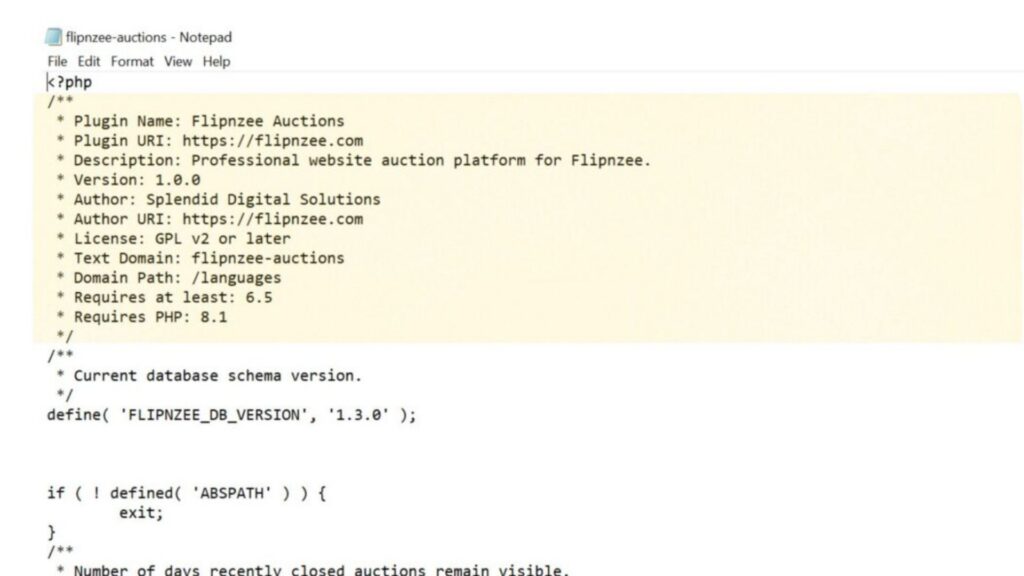
Section 1 – Plugin Header
The bootstrap begins with the standard WordPress plugin header.
It contains information such as:
Plugin Name
Version
Description
Author
Text Domain
Minimum WordPress Version
Minimum PHP Version
Although this appears to be nothing more than a PHP comment, WordPress reads this information to display the plugin on the Plugins screen and determine compatibility requirements.
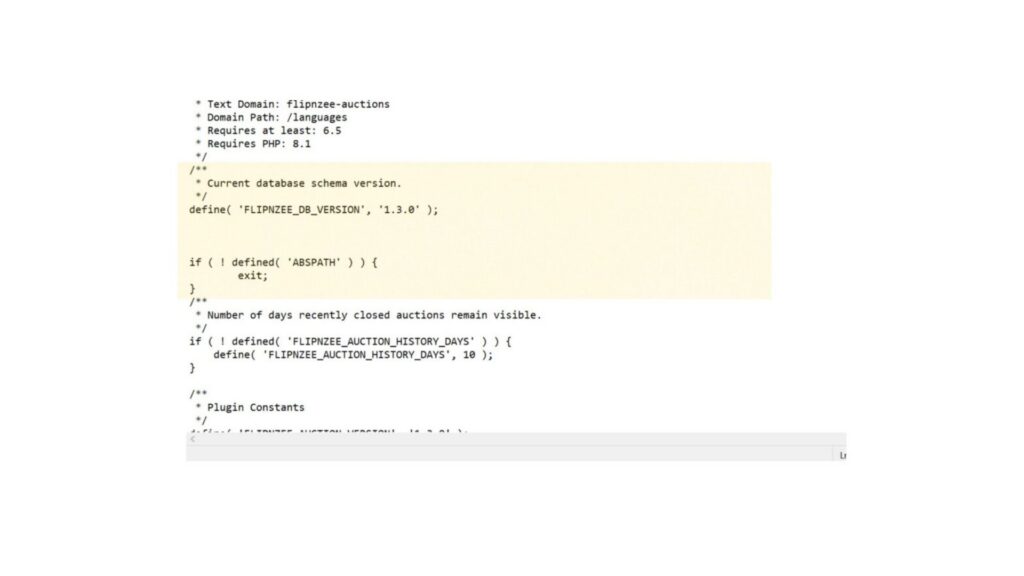
Section 2 – Security
Immediately after the header, the bootstrap protects itself from direct access.
if ( ! defined( 'ABSPATH' ) ) {
    exit;
}
Why does this exist?
Every plugin file lives inside the web server.
Without this check, someone could attempt to execute the file directly through a browser.
By verifying that ABSPATH exists, the plugin ensures it is only executed through WordPress.
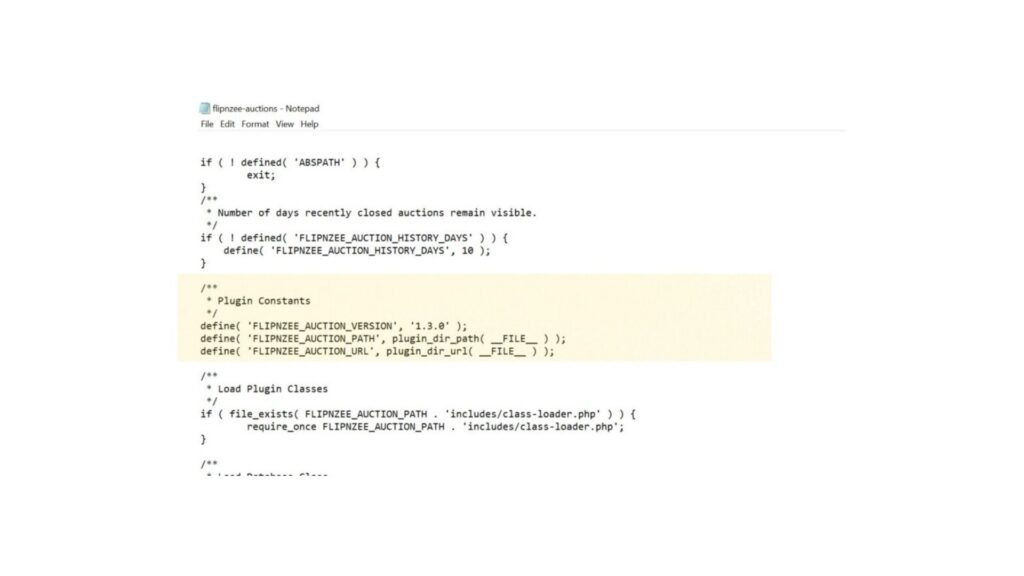
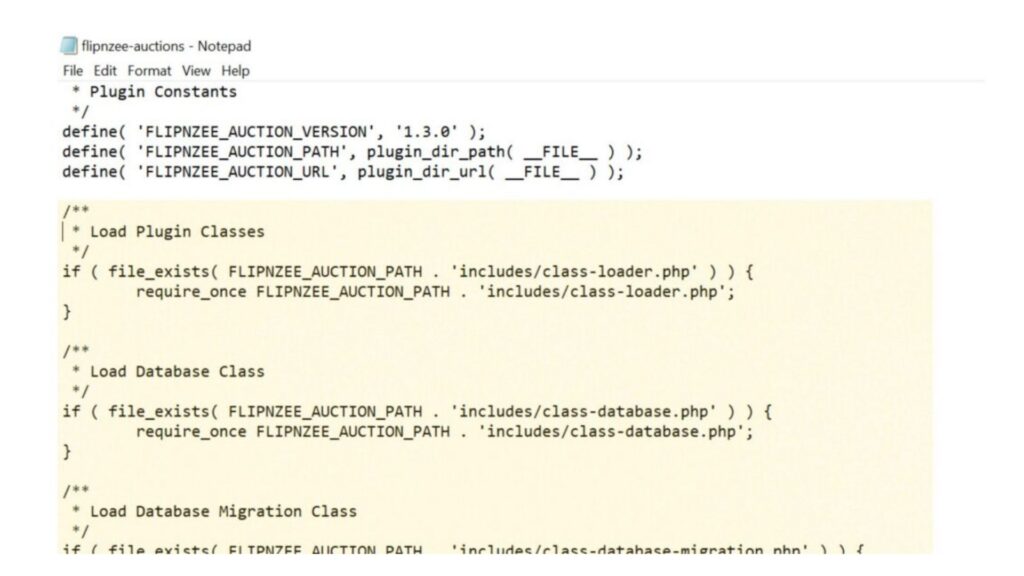
Section 3 – Plugin Constants
Next, the plugin defines several constants.
Examples include:
FLIPNZEE_DB_VERSION
FLIPNZEE_AUCTION_VERSION
FLIPNZEE_AUCTION_PATH
FLIPNZEE_AUCTION_URL
FLIPNZEE_AUCTION_HISTORY_DAYS
These values act as shared configuration used throughout the plugin. Rather than repeating version numbers or file paths in multiple locations, the plugin defines them once and reuses them everywhere.
Section 4 – Loading Classes
The largest portion of the bootstrap is responsible for loading the PHP classes that power the plugin.
Among them are:
Database
Database Migration
Auction Manager
Bid Manager
Payment Manager
Activity Log
Transaction Manager
Watchlist Manager
Buyer Dashboard
Notification Manager
Transfer Manager
…along with numerous administrative classes.
Why does this exist?
Before WordPress can execute any plugin functionality, PHP must know where those classes are located.
The bootstrap acts like a librarian—it gathers every required class before the plugin begins working.
Notice that some files are loaded after checking file_exists(), while others are included directly with require_once. This difference is an architectural observation that we’ll revisit in a future Plugin Engineering lesson.
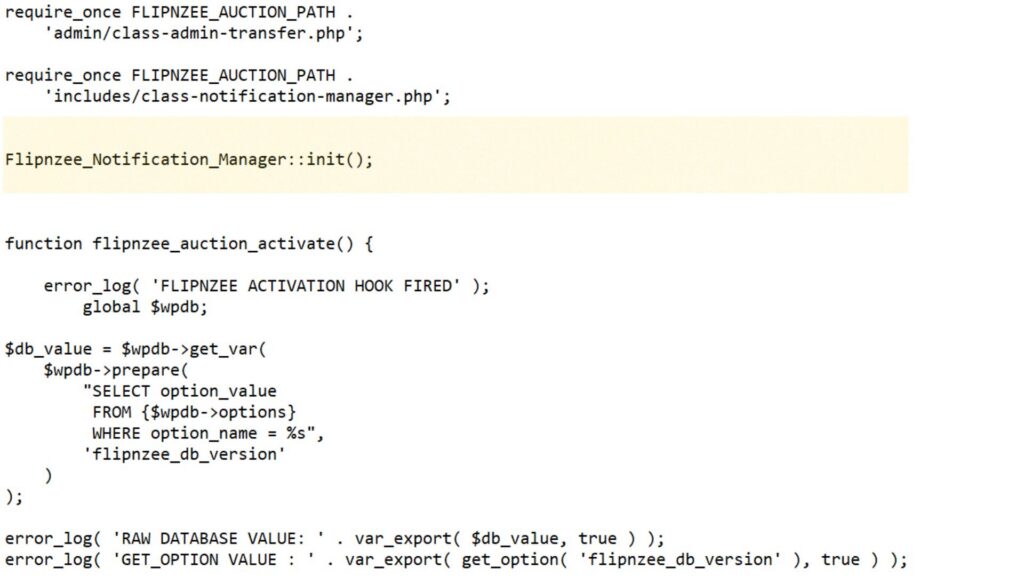
Section 5 – Notification Initialization
After loading the notification manager class, the bootstrap immediately calls:
Flipnzee_Notification_Manager::init();
Unlike many other classes that are instantiated later using the new keyword, this class exposes a static init() method.
Why does this exist?
The notification manager needs to perform startup tasks as soon as it becomes available, such as registering its own hooks or preparing notification services.
This also introduces an interesting engineering question:
Why do some classes use new, while others use a static init() method?
We’ll explore different initialization patterns later in this series.
Section 6 – Activation and Deactivation
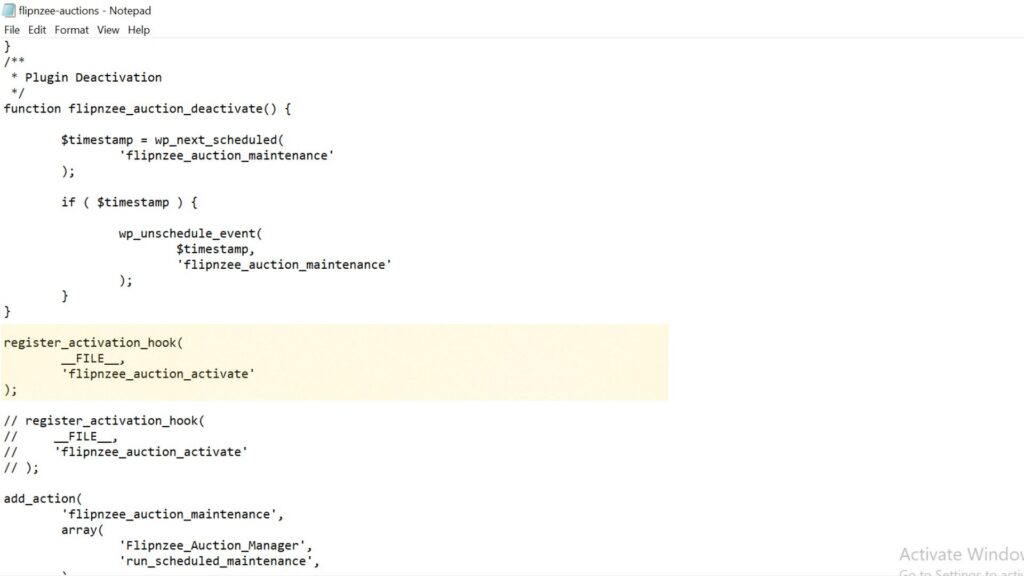
The bootstrap also contains the plugin’s activation and deactivation functions.
The activation function:
checks the stored database version,
creates database tables for new installations,
performs database migrations during upgrades,
and contains several debug log statements that were helpful during development.
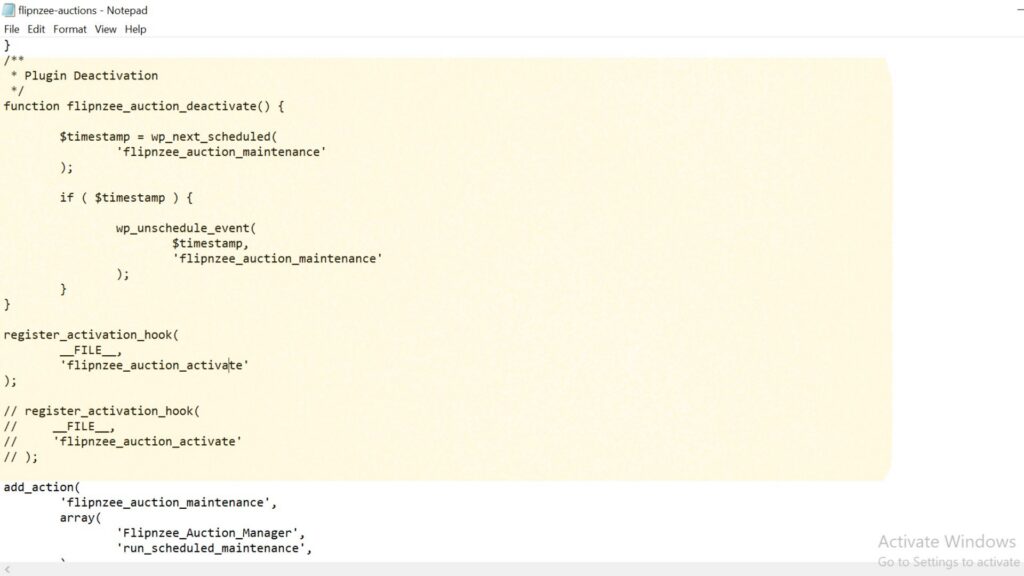
The deactivation function removes the scheduled maintenance event before the plugin is disabled.
One interesting observation is that the activation hook is registered, while the deactivation function currently exists without a corresponding register_deactivation_hook() call in this file. We’ll revisit this during our engineering review rather than changing it immediately.
Section 7 – Registering WordPress Hooks
One of the bootstrap’s most important responsibilities is connecting Flipnzee Auctions to WordPress.
For example, the plugin registers an activation hook:
Instead of constantly checking whether something has happened, the plugin simply tells WordPress:
“When this event occurs, call my function.”
This keeps the plugin efficient and allows WordPress to control the execution flow.
Section 8 – Frontend Assets
The bootstrap also loads the plugin’s frontend resources.
These include:
the main frontend stylesheet,
the auction countdown JavaScript,
the watchlist JavaScript,
and localized AJAX data containing the AJAX endpoint and security nonce.
Why doesn’t the plugin simply print <script> tags?
WordPress provides the enqueue system so plugins can:
avoid duplicate loading,
manage script dependencies,
support cache busting through version numbers,
and remain compatible with themes and other plugins.
The localized AJAX data also allows JavaScript to communicate with WordPress securely without hardcoding URLs.
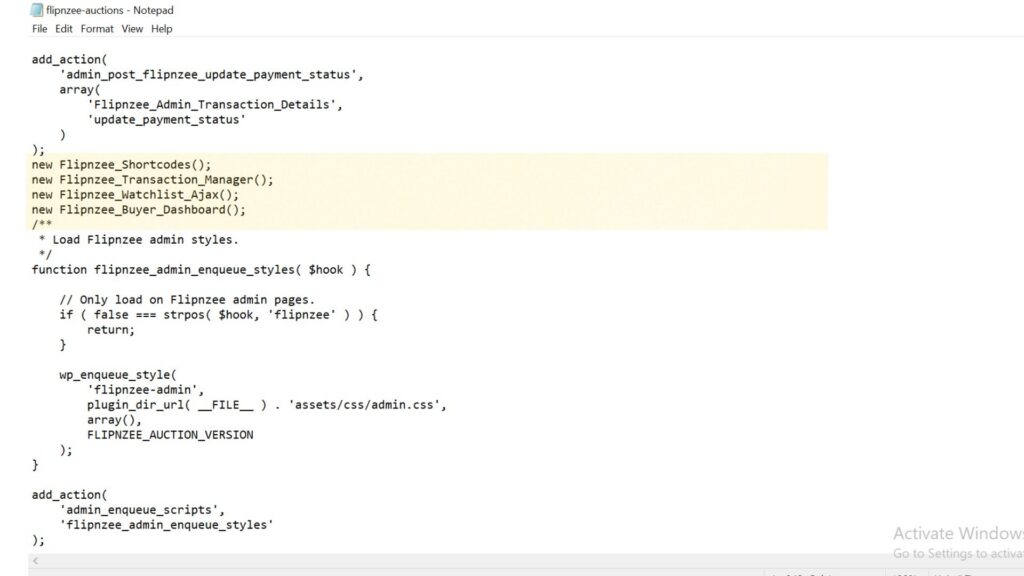
Section 9 – Instantiating Core Objects
Near the end of the bootstrap, several objects are created.
Examples include:
Flipnzee_Shortcodes
Flipnzee_Transaction_Manager
Flipnzee_Watchlist_Ajax
Flipnzee_Buyer_Dashboard
Why are these objects created here?
Creating these objects allows their constructors to register hooks, initialize services, or prepare functionality required while WordPress is running.
Notice the contrast with the earlier Flipnzee_Notification_Manager::init() call. Different initialization strategies are being used, and understanding those differences will be an important part of our Plugin Engineering journey.
Engineering Observations
Professional engineers learn to observe before they modify.
While reviewing the bootstrap, we noticed several architectural characteristics:
The bootstrap coordinates many different responsibilities.
Most class loading is grouped together.
Multiple initialization patterns are used.
Different file-loading styles appear throughout the bootstrap.
Some debugging statements remain from earlier development.
One file is loaded more than once.
These observations are not criticisms—they simply reflect how the plugin evolved over many lessons.
Understanding them is the first step toward thoughtful refactoring.
Testing
No code has been modified.
Therefore:
Plugin activation should behave exactly as before.
Frontend functionality should remain unchanged.
Admin functionality should remain unchanged.
This lesson focuses entirely on understanding the existing architecture.
Git
No Git commit is required because no source code was modified.
Key Takeaways
In this lesson, we shifted our perspective from reading PHP line by line to understanding the architecture of the Flipnzee Auctions bootstrap.
We discovered that the bootstrap is responsible for:
protecting the plugin,
defining shared configuration,
loading the application’s classes,
initializing core components,
registering WordPress hooks,
loading frontend resources,
and starting the plugin.
Most importantly, we learned that effective Plugin Engineering begins with understanding. Before we refactor code, we must first understand why it exists and what responsibility it serves.
Looking Ahead
In Lesson 111, we’ll evaluate the bootstrap using the Single Responsibility Principle (SRP). We’ll examine whether each responsibility belongs in the bootstrap or whether some can eventually be delegated to dedicated classes, laying the groundwork for our first architectural refactoring.
Series: Building Flipnzee Auctions → Plugin Engineering Lesson: 109 Difficulty: Beginner to Intermediate Prerequisites: Lesson 108 – Understanding the Plugin Bootstrap and Execution Flow Code Changes: None (Analysis & Code Review)
Introduction
In Lesson 108, we learned how WordPress loads plugins and why understanding execution flow is the first step toward professional software engineering.
In this lesson, we finally open the Flipnzee Auctions bootstrap file—the file that WordPress executes whenever the plugin is loaded.
Our goal is not to change anything yet.
Instead, we will carefully study what the bootstrap currently does, identify its responsibilities, and decide whether each responsibility belongs there.
Professional developers spend a significant amount of time reading code before modifying it. That habit reduces bugs and results in better architectural decisions.
Learning Objectives
By the end of this lesson, you will understand:
What the Flipnzee Auctions bootstrap file does.
Why WordPress starts execution from this file.
Which responsibilities belong inside a bootstrap.
Which responsibilities should eventually move elsewhere.
How to review existing code without immediately refactoring it.
Why Review Existing Code First?
Many beginner developers immediately start rewriting code whenever they think they see an improvement.
Experienced developers do something different.
They ask questions like:
Why was this written?
Does it already work correctly?
Is there hidden functionality?
Will changing this break something else?
Can this responsibility be better organized?
Only after answering these questions do they begin making changes.
Our objective is understanding, not criticism.
What Is the Bootstrap File?
The bootstrap file is the plugin’s entry point.
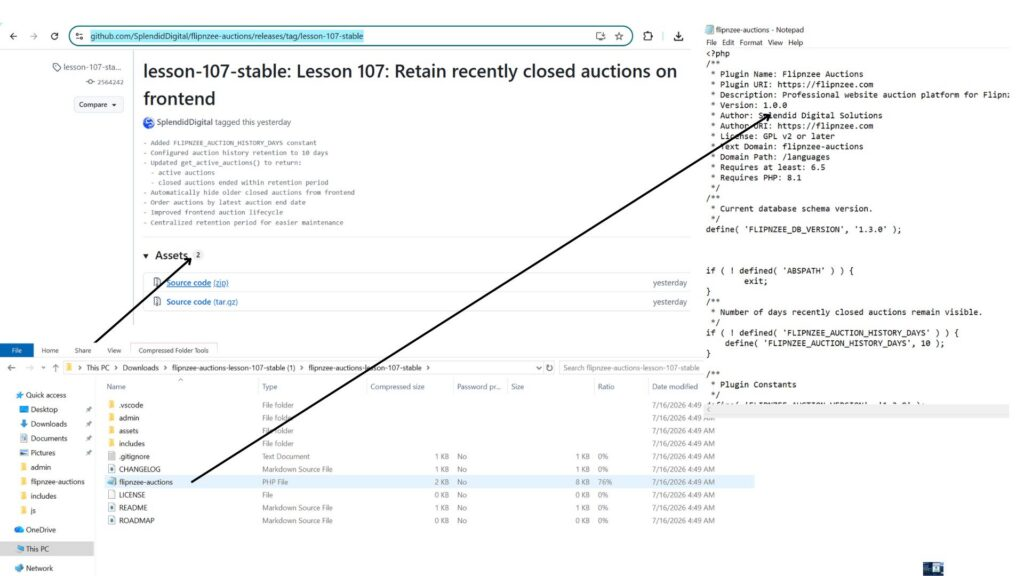
For Flipnzee Auctions, it is:
flipnzee-auctions.php
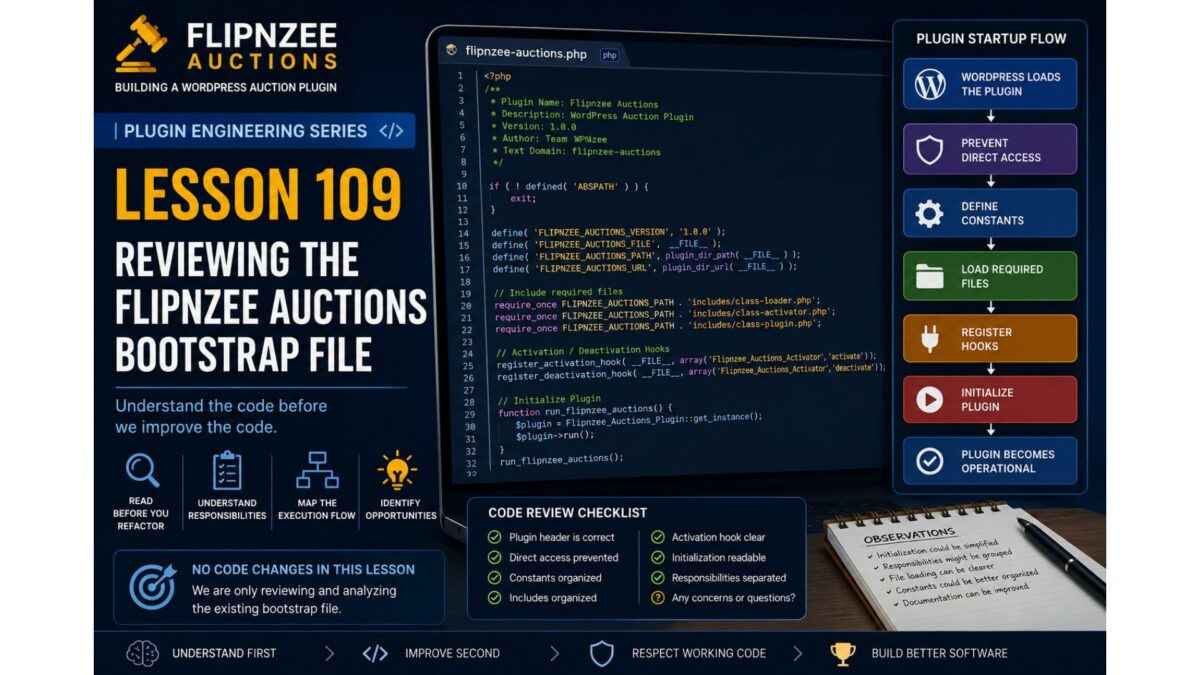
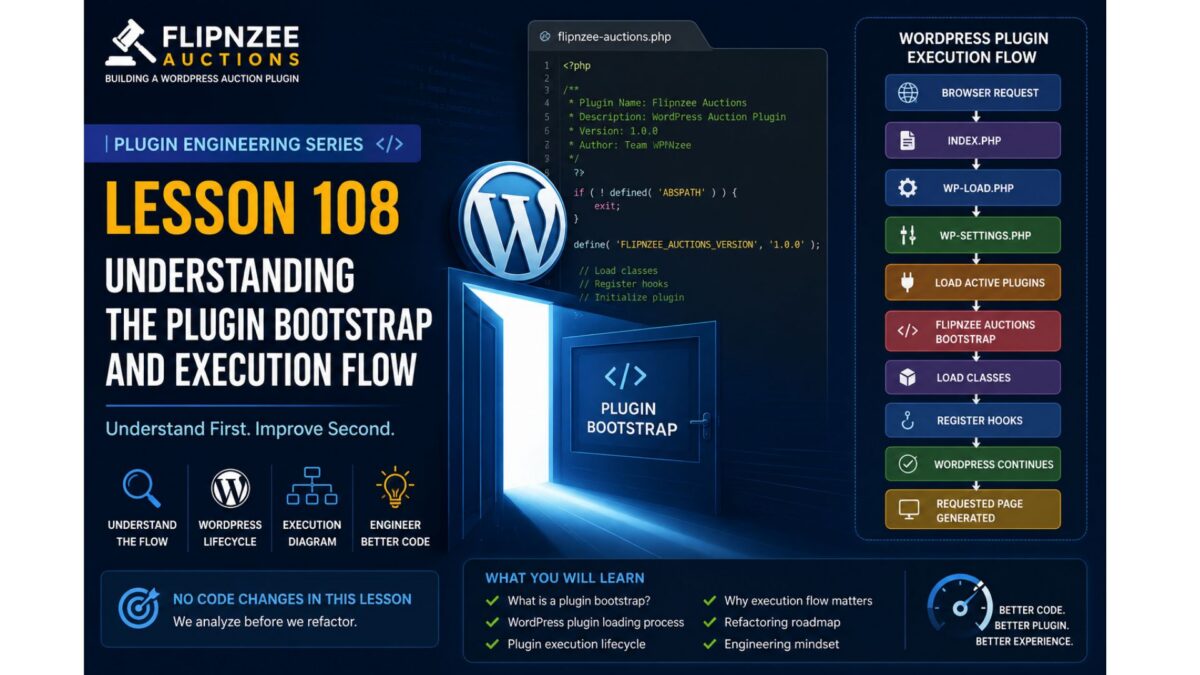
Figure 1. Starting Point for the Plugin Engineering Series
As we inspect the Flipnzee Auctions bootstrap, we will map each section to one of these responsibilities.
Code Review Checklist
During this lesson, create a simple checklist.
Question
Status
Plugin header is correct
✅
Direct access prevented
✅
Constants organized
Review
Includes organized
Review
Activation hook clear
Review
Initialization readable
Review
Responsibilities separated
Review
This checklist becomes the foundation for future refactoring.
Engineering Notes
One important principle throughout this series is:
Working code deserves respect.
Just because code can be improved does not mean it was poorly written.
Most software evolves over time.
Every version reflects the knowledge and priorities of the project at that moment.
Our goal is to improve the code while preserving its working behavior.
No Refactoring Yet
You may already notice opportunities to improve the bootstrap.
Resist the temptation.
One of the easiest ways to introduce bugs is to refactor before fully understanding the code.
Instead, maintain a list of observations.
For example:
Initialization could be simplified.
Responsibilities might be grouped differently.
File loading may become more readable.
Constants could be organized together.
Documentation could be improved.
These observations become candidates for future lessons.
Testing
Since we are only reviewing code:
No functionality should change.
Plugin behavior should remain identical.
Existing features should continue working.
This lesson is purely analytical.
Git
Because no code changes were made, there is nothing to commit.
If you took notes separately, you may commit documentation only.
Otherwise, proceed directly to Lesson 110.
Key Takeaways
In this lesson, we learned that professional engineering begins with careful observation.
We identified the responsibilities of a plugin bootstrap, discussed what belongs there and what does not, and established a framework for reviewing the Flipnzee Auctions startup sequence.
Most importantly, we adopted an engineering mindset:
Understand before changing.
Respect working code.
Identify responsibilities.
Record observations.
Refactor deliberately.
Looking Ahead
In Lesson 110, we will perform our first real code walkthrough of the flipnzee-auctions.php bootstrap file.
We’ll examine each section line by line, trace the execution path through the plugin, and build an execution-flow diagram based on the actual code. Only after fully understanding the implementation will we decide whether and how to refactor it.
Discussion
Before moving on, consider these questions:
Why should a bootstrap file avoid business logic?
Which startup responsibilities belong in the bootstrap, and which belong elsewhere?
Why is reviewing working code often more valuable than immediately rewriting it?
If you opened a plugin for the first time, what information would you look for in its bootstrap file?
Share your thoughts in the comments. In the next lesson, we’ll replace theory with practice by tracing the real execution flow of Flipnzee Auctions from its bootstrap file.
Welcome to the Plugin Engineering phase of the Building Flipnzee Auctions series.
The first 107 lessons focused on planning, designing, and building a functional WordPress auction plugin. Along the way, we implemented numerous features including auctions, bidding, watchlists, transactions, buyer dashboards, payment workflows, and transfer management.
The plugin now works well enough to demonstrate a complete auction workflow. However, like many real-world software projects, it has also accumulated technical debt through incremental development. As features were added one by one, some code became duplicated, responsibilities became mixed, naming conventions evolved, and temporary debugging code occasionally remained longer than intended.
This is perfectly normal. Real software is rarely perfect on its first iteration.
The purpose of this new series is not to rewrite Flipnzee Auctions from scratch. Instead, we will study the existing codebase, understand why it works, and gradually transform it into a cleaner, more maintainable, and production-quality WordPress plugin.
This lesson begins that journey.
Learning Objectives
By the end of this lesson, you should understand:
What a plugin bootstrap file is.
How WordPress loads a plugin.
The plugin execution lifecycle.
Why understanding execution flow is essential before refactoring.
The roadmap for the Plugin Engineering series.
Why Start with Understanding?
Imagine being asked to renovate a large house.
Would you immediately begin knocking down walls?
Probably not.
You would first walk through every room, inspect the plumbing and wiring, identify load-bearing walls, and understand how everything fits together.
Refactoring software follows the same principle.
Before improving code, we must understand how the application works today.
Professional developers spend significant time reading existing code before modifying it. This reduces bugs, preserves working functionality, and leads to better design decisions.
Throughout this series, our philosophy will be:
Understand first. Improve second.
What Is a Plugin Bootstrap?
Every WordPress plugin has one file that serves as its entry point.
This file contains the plugin header that WordPress reads when displaying installed plugins in the admin dashboard.
More importantly, it acts as the bootstrap of the plugin.
Its responsibilities typically include:
Preventing direct access.
Defining plugin constants.
Loading required PHP files.
Registering activation and deactivation hooks.
Initializing the plugin.
Starting the execution process.
Think of the bootstrap file as the front door to the entire plugin.
Every request begins here.
Understanding the WordPress Plugin Loading Process
Whenever WordPress loads, it follows a sequence similar to the one below:
Finally, each lesson will produce material suitable for publication on WPNzee.
By documenting every engineering decision, we create both a learning resource and a development record.
Plugin Engineering Roadmap
Over the coming lessons, we will explore the plugin in a logical order.
Phase 0 – Understanding the Plugin
Plugin Bootstrap
Folder Structure
Execution Flow
Class Responsibilities
Phase 1 – Development Environment
Debugging
Version Control
Coding Standards
Development Workflow
Phase 2 – Database Layer
Custom Tables
Migrations
Schema Versioning
Indexes
Phase 3 – Auction Engine
Business Logic
Lifecycle
Validation
Phase 4 – Bid Engine
Bid Processing
Reserve Prices
Winner Determination
Phase 5 – Transactions
Transaction Creation
Event-Driven Design
Phase 6 – Transfer Management
Transfer Lifecycle
Workflow States
Phase 7 – Payment Layer
Gateway Architecture
Payment Abstraction
Phase 8 – Frontend
Templates
Shortcodes
AJAX
Phase 9 – Security
Nonces
Sanitization
Escaping
Capability Checks
Phase 10 – Plugin Architecture
SOLID Principles
Dependency Management
Service Layers
Phase 11 – Performance
Database Optimization
Query Performance
Caching
Lazy Loading
Phase 12 – Production Release
Preparing Flipnzee Auctions for a stable v1.0 release.
Key Takeaways
This lesson deliberately made no code changes.
Instead, we established the mindset required for successful refactoring:
Understand before modifying.
Improve incrementally.
Refactor one concept at a time.
Preserve working functionality.
Document every engineering decision.
These principles will guide every lesson in the Plugin Engineering series.
Looking Ahead
In the next lesson, we will open the Flipnzee Auctions bootstrap file and trace the plugin’s execution from the moment WordPress loads it. We will examine how the plugin initializes, identify each responsibility within the bootstrap, and determine whether those responsibilities are appropriately placed or should be delegated elsewhere.
Only after fully understanding the bootstrap will we begin making carefully planned architectural improvements.
Discussion
Before reading the next lesson, consider the following questions:
Why is it important to understand existing code before refactoring it?
What responsibilities should a plugin bootstrap file have?
Why does WordPress use an event-driven architecture based on hooks and actions?
How can small, incremental refactoring reduce the risk of introducing bugs?
Share your thoughts in the comments below. In Lesson 109, we will answer these questions by exploring the Flipnzee Auctions bootstrap file in detail and tracing its execution flow from start to finish.