
Lesson 101 Implementation: Introducing the Transfer Manager & Refactoring the Purchase Details Page

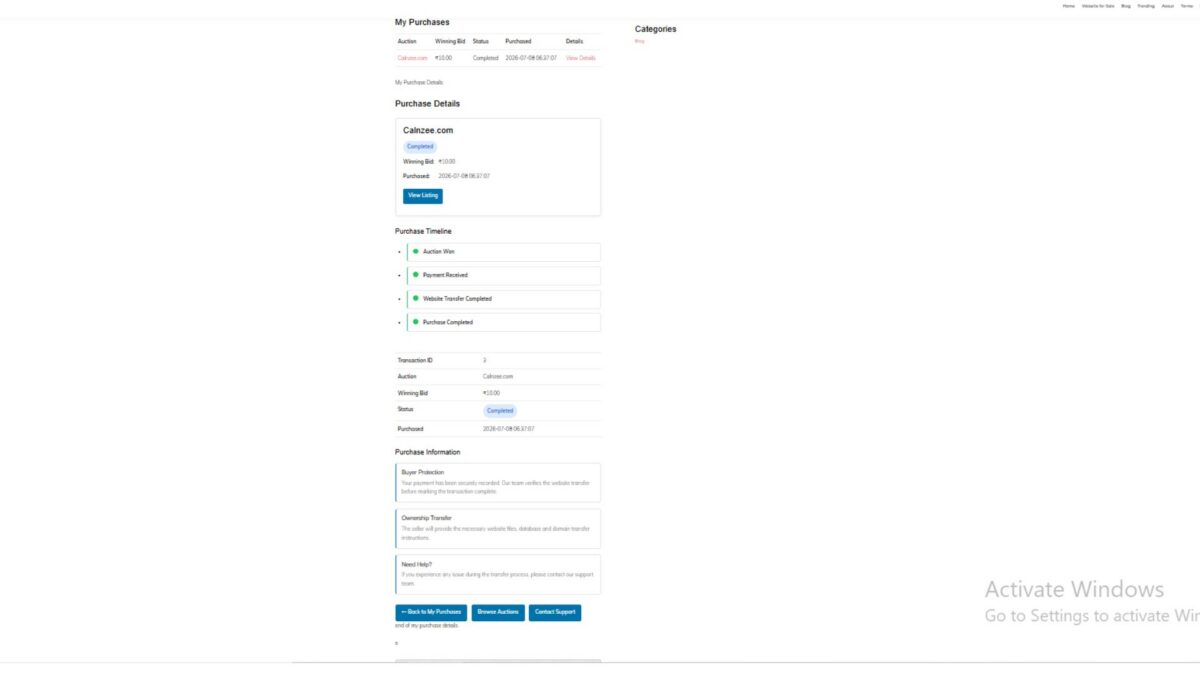
Welcome to Lesson 101 of the Flipnzee Auctions development series. In this lesson, we take a significant step toward making the website transfer workflow cleaner, more maintainable, and easier to extend in future releases.
Rather than continuing to place transfer-related logic directly inside the Purchase Details page, we introduce a dedicated Transfer Manager class. This refactoring follows object-oriented programming principles and prepares the plugin for a fully dynamic transfer management system.
Lesson Objectives
During this lesson we aimed to:
- Create a dedicated Transfer Manager class.
- Centralize transfer workflow data.
- Refactor the Purchase Details page.
- Reduce duplicated code.
- Improve maintainability.
- Prepare for database-driven transfer tracking.
Why This Refactoring Was Needed
As the Flipnzee Auctions plugin grew, the Purchase Details page gradually became responsible for multiple tasks:
- Loading transaction information
- Rendering purchase details
- Managing transfer progress
- Displaying status badges
- Showing buyer guidance
Although functional, this approach mixed business logic with presentation.
To improve long-term maintainability, we extracted the transfer-related functionality into its own manager class.
Introducing Flipnzee_Transfer_Manager
A new class named:
Flipnzee_Transfer_Manager
was introduced.
Its responsibility is to manage all transfer-related information independently from the user interface.
Initially, it provides three centralized methods:
get_default_steps()
Returns the default website transfer workflow.
get_default_status()
Returns the default transfer status values.
get_status_badges()
Returns the CSS classes used for status badges.
Default Transfer Workflow
The transfer manager now defines a standard website transfer process consisting of:
- Payment Confirmed
- Website Files Delivered
- Database Delivered
- Domain Transfer Completed
- Buyer Verification
- Purchase Completed
By centralizing these steps, the Purchase Details page no longer needs to manually construct workflow arrays.
Purchase Details Refactoring
The Purchase Details page was substantially cleaned up.
Instead of containing hardcoded arrays, it now simply requests data from the Transfer Manager.
For example, instead of:
$transfer_steps = array(
    ...
);
the page now uses:
$transfer_steps =
    Flipnzee_Transfer_Manager::get_default_steps();
The same approach is used for transfer statuses and status badges.
Cleaner Separation of Responsibilities
After the refactoring:
Transfer Manager
Responsible for:
- transfer workflow
- transfer status
- badge mappings
Purchase Details
Responsible only for:
- loading transaction data
- displaying purchase information
- rendering the user interface
This greatly improves readability.
Improvements to the Purchase Details Page
Several improvements were made:
- Purchase Summary Card
- Purchase Timeline
- Transaction Details Table
- Purchase Information
- Transfer Status
- Next Steps
- Purchase Notes
- Dashboard Action Buttons
Each section is now more clearly organized.
Reduced Code Duplication
Earlier versions contained repeated transfer arrays and duplicated HTML sections.
These duplicates were removed.
The resulting code is significantly cleaner and easier to maintain.
Improved Maintainability
One major advantage of this architecture is that future changes only need to be made in one place.
For example, adding another transfer step later requires modifying only the Transfer Manager rather than every page displaying transfer information.
Foundation for Future Lessons
Although the Transfer Manager currently returns default values, this is only the first stage.
Future lessons will replace these defaults with real database records.
This means the Purchase Details page will automatically display live transfer progress without requiring significant changes to its rendering logic.
Current Flipnzee Workflow
At Flipnzee.com, the auction platform currently sells only in-house websites and digital assets.
The transfer workflow therefore reflects the internal process used by the Flipnzee team after an auction is won.
However, because the plugin is fully open source, developers may extend it into a complete marketplace supporting multiple independent sellers.
The Transfer Manager has been designed with that future flexibility in mind.
Benefits Achieved
By the end of Lesson 101 we have:
- Introduced a dedicated Transfer Manager class.
- Improved separation of concerns.
- Reduced duplicated code.
- Centralized transfer workflow logic.
- Simplified the Purchase Details page.
- Improved WordPress Coding Standards compliance.
- Established a solid architectural foundation for future transfer features.
Download Source Code
Download the starting version of the plugin before the lesson:
Download the completed version after this lesson:
Looking Ahead
In Lesson 102, we will transform the Transfer Manager from a provider of default values into a fully dynamic transfer tracking system.
Instead of hardcoded statuses, transfer progress will be stored and retrieved from the database, allowing administrators to update website transfers while buyers see real-time progress directly within their Purchase Details page.
This marks the beginning of a much more powerful post-auction management system and moves Flipnzee Auctions closer to becoming a complete website transfer platform.