
Lesson 75 Implementation: Refactoring the Buyer Payment Page into Modular Components

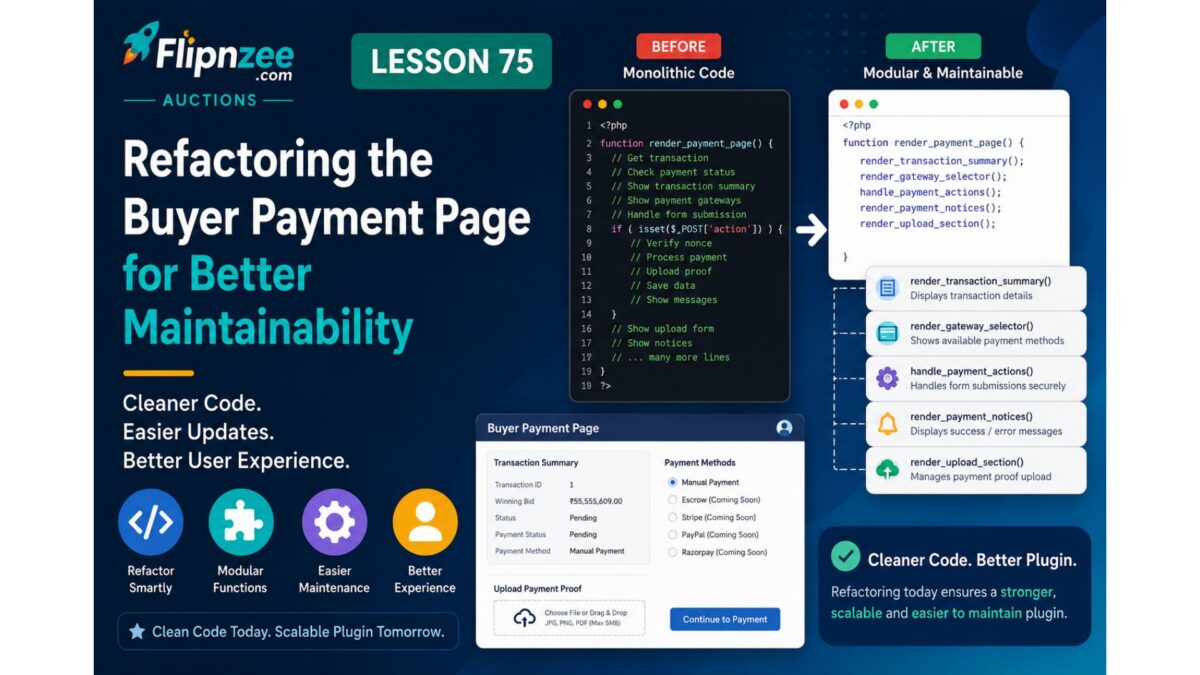
As the Flipnzee payment system evolved, the class-payment-page.php file gradually accumulated multiple responsibilities. It was responsible for retrieving transactions, validating payment requests, rendering payment instructions, displaying transaction information, and generating the payment gateway interface.
Rather than continuing to add more features to an increasingly large method, this lesson focused on improving the internal architecture of the payment page through refactoring.
Although no new user-facing functionality was introduced, this refactoring significantly improves code readability, maintainability, and prepares the payment system for future features such as payment proof uploads, administrator verification, and live payment gateway integrations.
Why Refactor?
One of the most common problems in software development is allowing a single function to become too large.
Our original render() method was responsible for:
- Loading transactions
- Validating requests
- Processing payment gateway selection
- Rendering manual payment instructions
- Displaying transaction information
- Displaying the payment gateway selector
Instead of adding even more functionality to this method, we separated the interface into reusable helper methods.
Step 1 – Extract the Transaction Summary
The payment summary table was moved into its own private method.
Instead of embedding the HTML directly inside render(), we created:
private static function render_transaction_summary( $transaction ) {
?>

<h2>Payment</h2>

<table class="widefat striped">

<tr>
    <th>Transaction ID</th>
    <td><?php echo esc_html( $transaction->id ); ?></td>
</tr>

<tr>
    <th>Winning Bid</th>
    <td>
        <?php
        echo esc_html(
            number_format_i18n(
                $transaction->winning_bid,
                2
            )
        );
        ?>
    </td>
</tr>

<tr>
    <th>Status</th>
    <td><?php echo esc_html( ucfirst( $transaction->status ) ); ?></td>
</tr>

<tr>
    <th>Payment Status</th>
    <td><?php echo esc_html( ucfirst( $transaction->payment_status ) ); ?></td>
</tr>

<tr>
    <th>Payment Gateway</th>
    <td>
        <?php
        echo esc_html(
            Flipnzee_Payment_Manager::get_gateway_name( $transaction )
        );
        ?>
    </td>
</tr>

</table>

<?php
}
The main render method now simply calls:
self::render_transaction_summary( $transaction );
Step 2 – Extract the Gateway Selector
Next, the payment gateway selection form was moved into a dedicated helper method.
private static function render_gateway_selector( $gateways ) {
?>

<form method="post">

<?php
wp_nonce_field(
    'flipnzee_payment_action',
    'flipnzee_payment_nonce'
);
?>

<h3>Select Payment Method</h3>

<div class="flipnzee-payment-gateways">

<?php foreach ( $gateways as $gateway_id => $gateway ) : ?>

<p>

<label>

<input
    type="radio"
    name="payment_gateway"
    value="<?php echo esc_attr( $gateway_id ); ?>"
    <?php checked( $gateway['enabled'] ); ?>
    <?php disabled( ! $gateway['enabled'] ); ?>
>

<?php echo esc_html( $gateway['label'] ); ?>

<?php if ( ! $gateway['enabled'] ) : ?>

<em>(Coming Soon)</em>

<?php endif; ?>

</label>

</p>

<?php endforeach; ?>

</div>

<p class="flipnzee-payment-actions">

<button
    type="submit"
    name="flipnzee_payment_completed"
    class="button"
>
I've Completed Payment
</button>

<button
    type="submit"
    name="flipnzee_continue_payment"
    class="button button-primary"
>
Continue to Payment
</button>

</p>

</form>

<?php
}
This method now encapsulates the entire payment gateway interface.
Step 3 – Extract Manual Payment Instructions
The manual payment interface was also separated into its own method.
private static function render_manual_payment( $transaction ) {
?>

<div class="notice notice-success">

    <p><strong>Manual Payment Selected</strong></p>

    <p>Please complete your payment using the instructions below.</p>

</div>

<div class="flipnzee-manual-payment">

<h3>Payment Instructions</h3>

<p>Thank you for choosing Manual Payment.</p>

<p>Please use the transaction reference below when sending your payment.</p>

<table class="widefat striped">

<tr>
    <th>Reference Number</th>
    <td>
        <?php
        echo esc_html(
            'FLIP-' . str_pad(
                $transaction->id,
                6,
                '0',
                STR_PAD_LEFT
            )
        );
        ?>
    </td>
</tr>

<tr>
    <th>Amount</th>
    <td>
        <?php
        echo esc_html(
            number_format_i18n(
                $transaction->winning_bid,
                2
            )
        );
        ?>
    </td>
</tr>

<tr>
    <th>Status</th>
    <td>Awaiting Payment</td>
</tr>

</table>

<h4>Important</h4>

<ul>

<li>Include the reference number with your payment.</li>

<li>Keep proof of payment for verification.</li>

<li>Your transaction will be reviewed before ownership transfer.</li>

</ul>

</div>

<?php
}
Step 4 – Simplify the Gateway Router
Previously, the switch statement contained a large block of HTML for the Manual Payment gateway.
After refactoring, it became much cleaner:
switch ( $selected_gateway ) {

    case 'manual':

        self::render_manual_payment( $transaction );

        break;

    case 'escrow':
        // Escrow placeholder.
        break;

    case 'stripe':
    case 'paypal':
    case 'razorpay':
    case 'crypto':
        // Future gateways.
        break;

    default:
        ?>
        <div class="notice notice-error">
            <p>Unknown payment gateway.</p>
        </div>
        <?php
        break;
}
The routing logic now clearly expresses intent without mixing presentation and control flow.
Benefits of the Refactoring
This refactoring provides several long-term advantages:
- Cleaner
render()method - Smaller, focused helper methods
- Easier debugging
- Improved readability
- Better separation of concerns
- Simpler extension for future payment gateways
- Reduced code duplication
- Easier maintenance as the payment workflow grows
Testing
After completing the refactoring:
- The Buyer Payment Page displayed exactly the same information as before.
- Manual Payment instructions continued to work.
- The transaction summary rendered correctly.
- Payment gateway selection remained functional.
- No user-facing functionality changed.
- PHP syntax validation completed successfully.
This confirmed that the refactoring preserved existing behavior while improving the internal architecture.
Lessons Learned
As features accumulate, it is often beneficial to pause and improve the code structure before introducing additional functionality. Separating presentation into dedicated helper methods makes the codebase easier to navigate, simplifies future enhancements, and reduces the risk of introducing bugs when extending existing features.
This lesson also reinforced the importance of keeping rendering logic modular so that future components—such as payment proof uploads, administrator verification, and live gateway integrations—can be added with minimal impact on existing code.
Download Source Code
Download the starting version of the plugin before the lesson:
Download the completed version after this lesson:
Conclusion
Lesson 75 focused on improving the maintainability of the Buyer Payment Page through thoughtful refactoring. By extracting the transaction summary, payment gateway selector, and manual payment instructions into reusable helper methods, the payment page is now significantly cleaner and better organized. This modular architecture provides a solid foundation for the next stage of development, where buyers will be able to upload payment proof and administrators will verify completed payments before ownership transfer.