
Lesson 76: Uploading Payment Proof and Recording Buyer Payment Submission

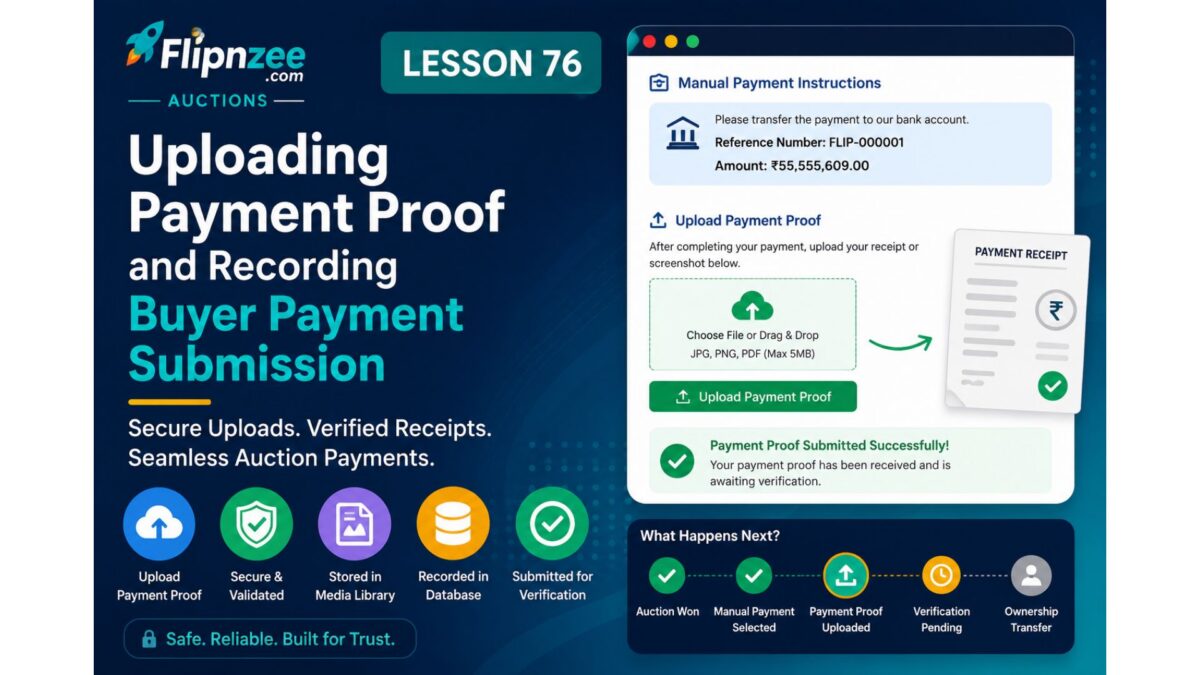
Introduction
With the Buyer Payment Page now refactored into modular components, the payment system is ready for its next major milestone.
In previous lessons, buyers could:
- View their transaction details
- Select a payment gateway
- Read manual payment instructions
- Receive a unique payment reference number
However, after making a payment, there is still no mechanism for buyers to notify the marketplace or provide proof that the payment has been completed.
In this lesson, we will implement the Payment Proof Upload feature. Buyers will be able to upload a payment receipt or screenshot directly from the payment page, and Flipnzee will securely store the uploaded file while associating it with the transaction for later administrator review.
This marks the beginning of the complete manual payment verification workflow.
Why This Feature Is Important
Manual payments require evidence before ownership of a digital asset can be transferred.
Instead of asking buyers to send screenshots through email or messaging apps, Flipnzee will manage everything inside the marketplace.
Benefits include:
- Centralized payment records
- Better buyer experience
- Easier administrator verification
- Improved transaction tracking
- Foundation for dispute resolution
- Scalable payment workflow
What We Will Build
After completing this lesson, buyers will be able to:
- Upload payment proof directly from the payment page.
- Submit JPG, PNG, or PDF payment receipts.
- Securely upload files using WordPress.
- Associate uploaded proof with the transaction.
- Receive confirmation that the proof has been submitted.
- Prepare the transaction for administrator verification.
Learning Objectives
By the end of this lesson, you will learn how to:
- Create secure file upload forms.
- Handle multipart form submissions.
- Validate uploaded files.
- Upload files to the WordPress Media Library.
- Store attachment IDs against marketplace transactions.
- Use WordPress upload APIs safely.
- Prepare transactions for manual verification.
Implementation Roadmap
Step 1
Extend the payment form to support file uploads.
Step 2
Add a Payment Proof upload section.
Step 3
Allow supported file formats:
- JPG
- JPEG
- PNG
Step 4
Secure the upload using the existing WordPress nonce.
Step 5
Upload the file into the WordPress Media Library.
Step 6
Store the uploaded attachment ID against the payment transaction.
Step 7
Display a success confirmation to the buyer.
Step 8
Prepare the transaction for administrator verification.
Files We’ll Modify
Primary files:
includes/class-payment-page.php
includes/class-payment-manager.php
Depending on your current database schema, we may also update the transaction table to include a field for the uploaded payment proof (for example, an attachment ID or file reference).
Expected Buyer Workflow
Buyer Wins Auction
        │
        ▼
Open Payment Page
        │
        ▼
Choose Manual Payment
        │
        ▼
View Payment Instructions
        │
        ▼
Complete Bank Transfer
        │
        ▼
Upload Payment Proof
        │
        ▼
Payment Proof Stored
        │
        ▼
Awaiting Verification
Skills You’ll Learn
During this lesson, you’ll gain experience with:
- WordPress file upload handling
- Media Library integration
- Secure file validation
- Transaction file associations
- Payment workflow design
- Preparing data for administrator approval
Expected Outcome
By the end of Lesson 76, Flipnzee will support one of the most important features of a marketplace payment system: allowing buyers to submit proof of payment directly within the platform. This removes the need for external communication channels and creates a streamlined, auditable workflow for manual payment verification.
Coming Next
Lesson 77: Administrator Payment Verification Dashboard
In the next lesson, administrators will be able to:
- Review uploaded payment proofs.
- View associated transaction details.
- Approve or reject submitted payments.
- Update payment and transaction statuses.
- Notify buyers of verification results.
- Continue the website ownership transfer process.
This will complete the first end-to-end manual payment workflow in the Flipnzee Auction plugin.