
Lesson 94 Implementation: Building a Dynamic AJAX Watchlist Toggle for Flipnzee Auctions

Lesson 94 Implementation: Building a Dynamic AJAX Watchlist Toggle for Flipnzee Auctions
In the previous lesson, the Flipnzee Auctions plugin introduced the foundation of the Watchlist feature, allowing authenticated users to add auctions to their personal watchlists using AJAX. While the backend functionality was working correctly, the user experience still required significant refinement.
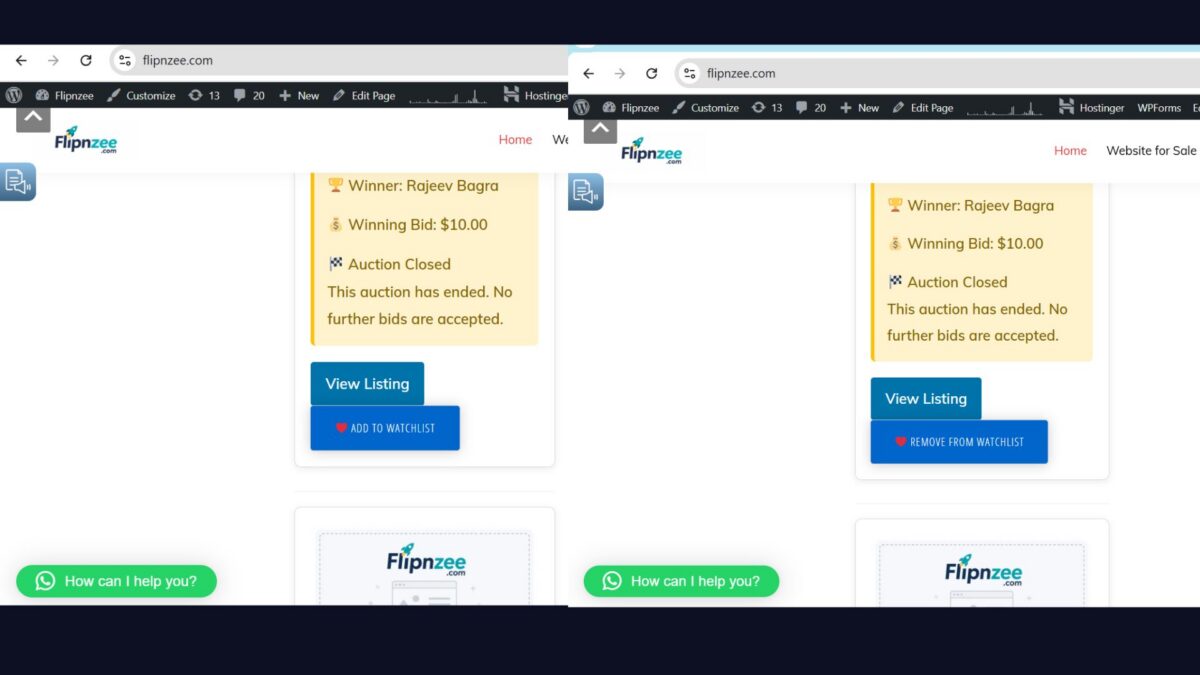
The Watchlist button always displayed “Add to Watchlist”, regardless of whether the auction had already been added to the user’s watchlist. Furthermore, there was no support for removing auctions from the watchlist using the same interface.
Lesson 94 focused on transforming the Watchlist into a fully interactive feature by introducing a dynamic AJAX-powered toggle button that automatically switches between Add to Watchlist and Remove from Watchlist while keeping the user interface synchronized with the database.
Lesson Objectives
The primary objectives of this lesson were:
- Display the correct Watchlist state when an auction page loads.
- Determine whether an auction is already present in the logged-in user’s watchlist.
- Convert the Watchlist button into a dynamic toggle.
- Support both Add and Remove operations using AJAX.
- Update the interface instantly without refreshing the page.
- Improve the user experience.
- Refactor the JavaScript implementation for improved readability.
- Display the Watchlist feature only to authenticated users.
Reviewing the Existing Watchlist
Before beginning this lesson, the plugin already supported:
- Watchlist database table
- AJAX Add to Watchlist
- Duplicate entry prevention
- Watchlist Manager
- Watchlist AJAX Controller
- Nonce verification
- Logged-in user validation
However, every auction page still displayed the same button:
❤ Add to Watchlist
even when the auction had already been added by the current user.
Rendering the Correct Initial State
The first improvement was made within the Watchlist Manager.
Instead of rendering a fixed button, the plugin now determines whether the current auction already exists in the logged-in user’s watchlist.
$is_watchlisted = self::is_in_watchlist(
	$auction_id,
	get_current_user_id()
);
Based on the result, the button is rendered appropriately.
When the auction is already being watched:
❤ Remove from Watchlist
Otherwise:
❤ Add to Watchlist
This ensures that the user interface accurately reflects the database before any JavaScript is executed.
Restricting the Watchlist to Logged-in Users
During testing, an important usability issue was discovered.
Anonymous visitors could still see the Watchlist button even though the feature required authentication. Clicking the button initiated an AJAX request that ultimately failed because the visitor was not logged in.
Instead of presenting a button that anonymous visitors could not use, the implementation was simplified by rendering the Watchlist button only for authenticated users.
A guard clause was introduced near the beginning of the rendering method.
if ( ! is_user_logged_in() ) {
	return;
}
This approach provides several advantages:
- Eliminates unnecessary AJAX requests
- Prevents user confusion
- Simplifies the interface
- Improves overall user experience
Future versions of the plugin may replace the hidden button with a dedicated “Log in to use Watchlist” link or notification, but the current implementation provides a cleaner experience for both visitors and registered users.
Using a CSS Class to Track State
Rather than maintaining additional JavaScript variables, the Watchlist button itself became the source of truth.
If an auction already exists in the user’s watchlist, the rendered button receives the CSS class:
watchlisted
The JavaScript simply checks:
const isWatchlisted = button.hasClass( 'watchlisted' );
This eliminates unnecessary complexity while keeping the implementation easy to understand.
Selecting the Appropriate AJAX Action
Instead of maintaining separate click handlers for adding and removing auctions, Lesson 94 introduced a single dynamic toggle.
The JavaScript determines which AJAX action should be executed.
const ajaxAction = isWatchlisted
	? 'flipnzee_remove_from_watchlist'
	: 'flipnzee_add_to_watchlist';
The same button can now perform both operations without duplicating code.
Completing the Remove Watchlist AJAX Handler
While Lesson 93 implemented the Add to Watchlist functionality, Lesson 94 completed the remaining AJAX workflow for removing auctions.
The Remove handler performs the same security validations as the Add handler.
These include:
- Nonce verification
- Logged-in user validation
- Auction ID validation
- Database deletion
- JSON success or error response
Maintaining identical validation logic for both operations keeps the AJAX architecture consistent throughout the plugin.
Updating the Interface Without Reloading
One of the most visible improvements introduced during this lesson was updating the button immediately after a successful AJAX request.
When an auction is added:
button
	.addClass( 'watchlisted' )
	.text( '❤ Remove from Watchlist' );
When removed:
button
	.removeClass( 'watchlisted' )
	.text( '❤ Add to Watchlist' );
Users now receive immediate visual feedback without refreshing the page.
Refactoring the JavaScript
Throughout development, several temporary debugging statements were introduced while troubleshooting AJAX requests, browser caching, and response handling.
After verifying that the implementation worked correctly, all temporary debugging code was removed.
The resulting JavaScript became considerably cleaner.
The overall workflow now follows a simple sequence:
- User clicks the Watchlist button.
- Determine current Watchlist state.
- Select the appropriate AJAX action.
- Send the AJAX request.
- Update the button after a successful response.
Keeping the implementation concise improves readability while making future maintenance much easier.
Development Challenges
Lesson 94 proved to be one of the most educational lessons completed so far.
During implementation several issues had to be investigated, including:
- Browser caching of JavaScript files
- AJAX response validation
- Logged-out user behavior
- Dynamic button rendering
- JavaScript refactoring
- Watchlist state synchronization
Rather than attempting to continuously patch the implementation, the project was rolled back to the stable Lesson 93 Git tag.
The feature was then rebuilt incrementally, validating every small improvement before introducing the next enhancement.
This iterative approach produced a significantly cleaner and more reliable implementation.
Lessons Learned
Several valuable software engineering principles were reinforced during this lesson.
Build on Stable Foundations
Rolling back to a known working version proved much more efficient than attempting to repair increasingly complex code.
Version control once again demonstrated its importance throughout the development process.
Small Changes Reduce Complexity
Implementing one improvement at a time made debugging significantly easier.
Small, testable changes reduced uncertainty while simplifying troubleshooting.
Use Guard Clauses
Introducing an early return for anonymous visitors simplified the rendering logic.
Instead of nesting multiple conditional statements, the method now exits immediately whenever the user is not authenticated.
This improves readability while reducing unnecessary processing.
Separate Responsibilities
The Watchlist implementation now follows clear architectural boundaries.
Watchlist Manager
- Business logic
- Database operations
- Button rendering
Watchlist AJAX Controller
- AJAX request processing
- Security validation
- JSON responses
watchlist.js
- User interaction
- AJAX communication
- Dynamic interface updates
This separation will simplify future enhancements.
User Experience Is Just As Important
Although the backend functionality already existed, the feature felt incomplete until the interface accurately reflected user actions.
Small improvements to user experience often have a significant impact on the perceived quality of software.
Testing
After completing the implementation, the following functionality was successfully verified.
Logged-in Users
- Add to Watchlist
- Remove from Watchlist
- Dynamic button updates
- Correct initial Watchlist state
- AJAX communication
- Database synchronization
- Duplicate prevention
Logged-out Visitors
- Watchlist button no longer displayed
- No unnecessary AJAX requests
- Cleaner interface
- Consistent user experience
Looking Ahead
With the Watchlist now functioning as a complete AJAX-powered toggle, the Flipnzee Auctions plugin continues moving toward a production-ready auction platform.
Possible future enhancements include:
- My Watchlist page
- Watchlist shortcode
- User dashboard integration
- Email notifications
- Auction ending reminders
- Watchlist statistics
- Login prompt for anonymous visitors
- Gutenberg block integration
Download Source Code
Download the starting version of the plugin before the lesson:
Download the completed version after this lesson:
Conclusion
Lesson 94 transformed the Watchlist from a basic AJAX feature into a polished and user-friendly component of the Flipnzee Auctions plugin.
Users can now seamlessly add and remove auctions from their watchlists using a single dynamic button that accurately reflects the current state without requiring a page refresh.
The lesson also reinforced the value of incremental development, disciplined debugging, clean architecture, and thoughtful user experience design. By introducing authenticated rendering, dynamic state management, and cleaner frontend logic, the Watchlist has become a much more intuitive and maintainable feature.
As Flipnzee Auctions continues to evolve, these development practices will remain essential for building a stable, professional, and extensible WordPress auction platform.