
Lesson 95: Build the “My Watchlist” Shortcode and Frontend Page

Overview
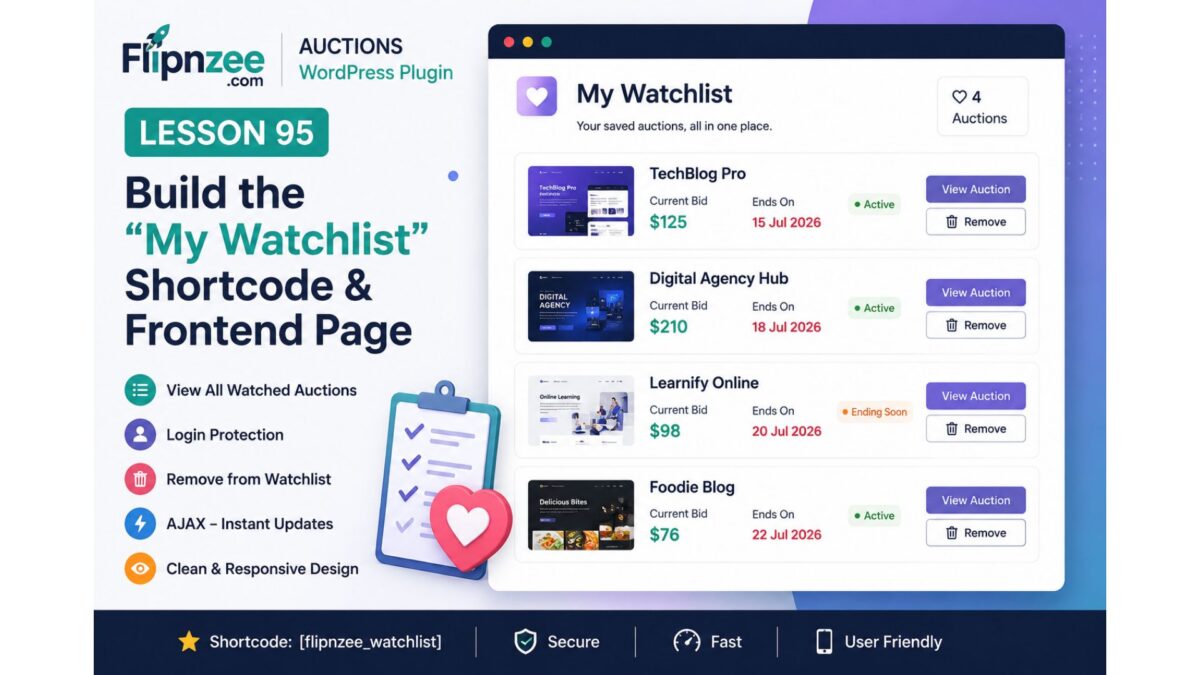
In Lesson 95, we will build the first frontend page dedicated to a user’s personal Watchlist.
Instead of requiring users to visit individual auction pages to know what they are watching, Flipnzee Auctions will provide a centralized Watchlist page listing all watched auctions.
Objectives
By the end of this lesson, users will be able to:
- View all auctions currently in their Watchlist.
- Access the Watchlist through a shortcode.
- See essential auction information.
- Remove auctions directly from the Watchlist.
- View auction status.
- Navigate back to individual auction pages.
Why this lesson?
The Watchlist now stores data correctly.
However, users currently have no way to access their saved auctions.
A Watchlist without a dedicated page provides little practical value.
This lesson completes the first full user workflow.
New Features
1. New Shortcode
Create:
[flipnzee_watchlist]
This shortcode will display the current user’s Watchlist.
2. Login Protection
Anonymous visitors should see:
Please log in to view your Watchlist.
instead of an empty page.
3. Empty Watchlist Message
If no auctions have been saved:
You have not added any auctions to your Watchlist yet.
4. Watchlist Layout
Each watched auction should display:
- Listing title
- Featured image (if available)
- Current bid
- Auction status
- Auction ending date
- View Auction button
- Remove from Watchlist button
Example:
----------------------------------------
Website Name

Current Bid: $125

Ends:
15 July 2026

[View Auction]

[Remove]
----------------------------------------
5. Remove Without Leaving Page
Reuse the existing AJAX endpoint.
Clicking Remove should:
- delete the auction,
- remove the card immediately,
- update the page without refresh.
6. Empty State After Last Removal
If the final auction is removed:
You have not added any auctions to your Watchlist.
should appear automatically.
Architecture
No database changes are required.
We already have:
Flipnzee_Watchlist_Managerget_user_watchlist()- AJAX Remove
- Watchlist table
Lesson 95 focuses on presentation.
Files to Modify
Existing
includes/class-shortcodes.php
Register the new shortcode.
includes/class-watchlist-manager.php
Retrieve auctions and prepare output.
assets/js/watchlist.js
Support removing cards from the Watchlist page.
New
assets/css/watchlist.css
Dedicated Watchlist styling.
User Experience
Logged-out Visitor
Please log in to view your Watchlist.
Empty Watchlist
You haven't added any auctions yet.

Browse Auctions
Populated Watchlist
Cards displaying watched auctions with quick actions.
WordPress Concepts Covered
This lesson introduces:
- Frontend shortcodes
- User-specific content
- Conditional rendering
- Empty-state design
- AJAX DOM updates
- Card-based layouts
- Secure user data retrieval
Testing Checklist
- Logged-out visitor sees login message.
- Logged-in user with no auctions sees empty state.
- Watchlist displays saved auctions.
- Remove button works.
- Card disappears immediately.
- Last removal shows empty message.
- View Auction opens correct listing.
- No PHP warnings.
- No JavaScript errors.
What Comes Next
After Lesson 95, we’ll continue enhancing the user experience:
- Lesson 96: Watchlist Counter in Header/Menu
- Lesson 97: Email Notifications for Watched Auctions
- Lesson 98: Dashboard Widget (“Recently Watched Auctions”)
- Lesson 99: Auction Ending Soon Notifications
- Lesson 100: User Dashboard & Activity Center
Why I think this is the right Lesson 95
Looking at the project as a whole, we’ve now completed the data layer (database), business logic (manager), and interaction layer (AJAX). The natural next step is the presentation layer.
This follows a clean progression:
- Lesson 93: Create the Watchlist functionality.
- Lesson 94: Make the Watchlist interactive with AJAX.
- Lesson 95: Give users a dedicated place to manage their Watchlist.
That completes the first full Watchlist feature set and provides a solid foundation for future enhancements like notifications and personalized dashboards.