Lesson 109: Reviewing the Flipnzee Auctions Bootstrap File

Series: Building Flipnzee Auctions → Plugin Engineering
Lesson: 109
Difficulty: Beginner to Intermediate
Prerequisites: Lesson 108 – Understanding the Plugin Bootstrap and Execution Flow
Code Changes: None (Analysis & Code Review)


Introduction

In Lesson 108, we learned how WordPress loads plugins and why understanding execution flow is the first step toward professional software engineering.

In this lesson, we finally open the Flipnzee Auctions bootstrap file—the file that WordPress executes whenever the plugin is loaded.

Our goal is not to change anything yet.

Instead, we will carefully study what the bootstrap currently does, identify its responsibilities, and decide whether each responsibility belongs there.

Professional developers spend a significant amount of time reading code before modifying it. That habit reduces bugs and results in better architectural decisions.


Learning Objectives

By the end of this lesson, you will understand:

  • What the Flipnzee Auctions bootstrap file does.
  • Why WordPress starts execution from this file.
  • Which responsibilities belong inside a bootstrap.
  • Which responsibilities should eventually move elsewhere.
  • How to review existing code without immediately refactoring it.

Why Review Existing Code First?

Many beginner developers immediately start rewriting code whenever they think they see an improvement.

Experienced developers do something different.

They ask questions like:

  • Why was this written?
  • Does it already work correctly?
  • Is there hidden functionality?
  • Will changing this break something else?
  • Can this responsibility be better organized?

Only after answering these questions do they begin making changes.

Our objective is understanding, not criticism.


What Is the Bootstrap File?

The bootstrap file is the plugin’s entry point.

For Flipnzee Auctions, it is:

flipnzee-auctions.php

Every request begins here.

Think of it as the reception desk of a company.

Visitors arrive here first.

The receptionist doesn’t perform accounting, legal work, or engineering.

Instead, the receptionist directs each visitor to the correct department.

A good bootstrap behaves the same way.

It coordinates.

It does not perform business logic.


Typical Responsibilities of a Bootstrap

A clean WordPress bootstrap usually performs responsibilities such as:

  • Plugin metadata
  • Prevent direct access
  • Define constants
  • Load required files
  • Register activation hook
  • Register deactivation hook
  • Load translations
  • Initialize the plugin

Notice what is missing.

A bootstrap should not:

  • Process bids
  • Create transactions
  • Query auctions
  • Render frontend HTML
  • Execute payment logic
  • Perform transfer workflows

Those belong elsewhere.


Reviewing the Flipnzee Auctions Bootstrap

As we examine our bootstrap file, ask yourself the following questions.

1. Does it have a single responsibility?

Is it primarily responsible for starting the plugin?

Or is it doing too much?


2. Is the execution flow easy to follow?

Can another developer understand the startup sequence within a few minutes?

Or must they jump between many unrelated sections?


3. Are constants grouped together?

Constants should be easy to find.

Examples include:

  • Version
  • Plugin path
  • Plugin URL
  • Asset paths

These values are typically defined early because many other classes depend on them.


4. Are dependencies loaded clearly?

Does the bootstrap make it obvious:

  • which files are required,
  • why they are required,
  • and in what order?

A predictable loading sequence makes debugging much easier.


5. Does it initialize one central plugin class?

A common professional pattern looks like this:

Bootstrap
        │
        ▼
Main Plugin Class
        │
        ▼
Services
        │
        ▼
Features

Instead of creating dozens of objects directly inside the bootstrap, one central class coordinates the rest of the plugin.

We’ll evaluate whether Flipnzee Auctions already follows this pattern or whether it can be improved.


Understanding the Current Startup Sequence

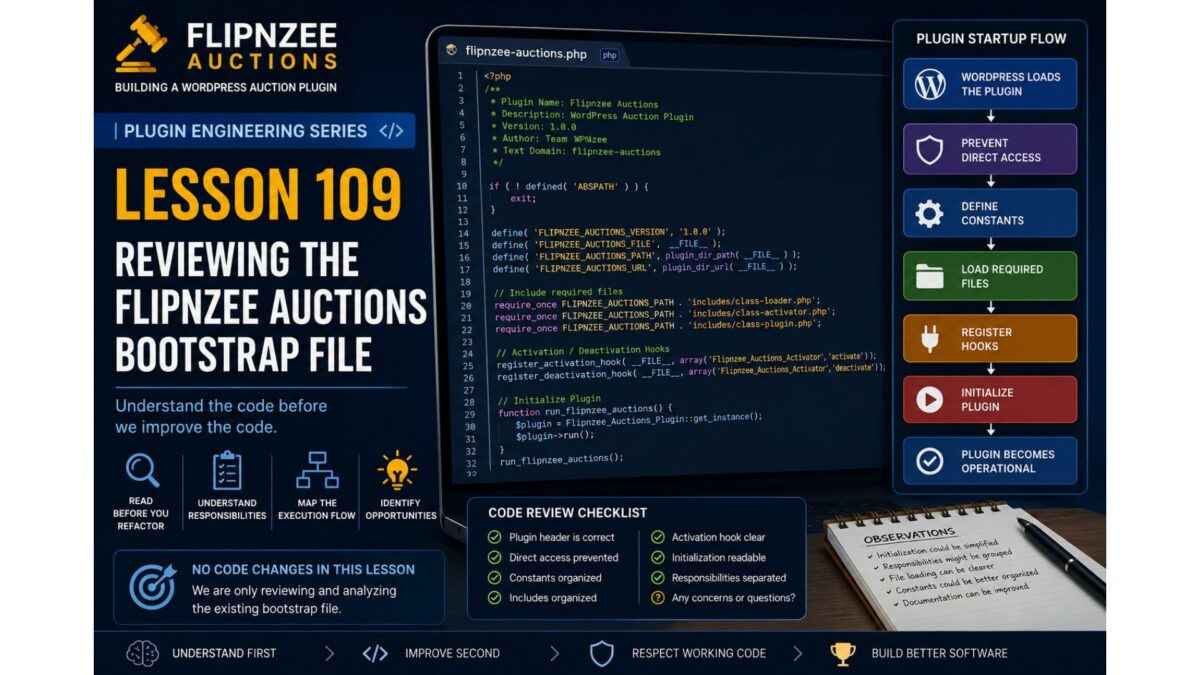
Although every plugin is different, the startup sequence generally looks like this:

WordPress loads plugin
        │
        ▼
Plugin header is read
        │
        ▼
Prevent direct access
        │
        ▼
Define constants
        │
        ▼
Load required files
        │
        ▼
Register activation hooks
        │
        ▼
Initialize plugin
        │
        ▼
Register WordPress hooks
        │
        ▼
Plugin becomes operational

As we inspect the Flipnzee Auctions bootstrap, we will map each section to one of these responsibilities.


Code Review Checklist

During this lesson, create a simple checklist.

QuestionStatus
Plugin header is correct
Direct access prevented
Constants organizedReview
Includes organizedReview
Activation hook clearReview
Initialization readableReview
Responsibilities separatedReview

This checklist becomes the foundation for future refactoring.


Engineering Notes

One important principle throughout this series is:

Working code deserves respect.

Just because code can be improved does not mean it was poorly written.

Most software evolves over time.

Every version reflects the knowledge and priorities of the project at that moment.

Our goal is to improve the code while preserving its working behavior.


No Refactoring Yet

You may already notice opportunities to improve the bootstrap.

Resist the temptation.

One of the easiest ways to introduce bugs is to refactor before fully understanding the code.

Instead, maintain a list of observations.

For example:

  • Initialization could be simplified.
  • Responsibilities might be grouped differently.
  • File loading may become more readable.
  • Constants could be organized together.
  • Documentation could be improved.

These observations become candidates for future lessons.


Testing

Since we are only reviewing code:

  • No functionality should change.
  • Plugin behavior should remain identical.
  • Existing features should continue working.

This lesson is purely analytical.


Git

Because no code changes were made, there is nothing to commit.

If you took notes separately, you may commit documentation only.

Otherwise, proceed directly to Lesson 110.


Key Takeaways

In this lesson, we learned that professional engineering begins with careful observation.

We identified the responsibilities of a plugin bootstrap, discussed what belongs there and what does not, and established a framework for reviewing the Flipnzee Auctions startup sequence.

Most importantly, we adopted an engineering mindset:

  • Understand before changing.
  • Respect working code.
  • Identify responsibilities.
  • Record observations.
  • Refactor deliberately.

Looking Ahead

In Lesson 110, we will perform our first real code walkthrough of the flipnzee-auctions.php bootstrap file.

We’ll examine each section line by line, trace the execution path through the plugin, and build an execution-flow diagram based on the actual code. Only after fully understanding the implementation will we decide whether and how to refactor it.


Discussion

Before moving on, consider these questions:

  1. Why should a bootstrap file avoid business logic?
  2. Which startup responsibilities belong in the bootstrap, and which belong elsewhere?
  3. Why is reviewing working code often more valuable than immediately rewriting it?
  4. If you opened a plugin for the first time, what information would you look for in its bootstrap file?

Share your thoughts in the comments. In the next lesson, we’ll replace theory with practice by tracing the real execution flow of Flipnzee Auctions from its bootstrap file.
Lesson 108: Understanding the Plugin Bootstrap and Execution Flow (No Code Changes)

Series: Building Flipnzee Auctions → Plugin Engineering
Lesson: 108
Difficulty: Beginner to Intermediate
Prerequisites: Basic PHP, WordPress Fundamentals
Code Changes: None


Introduction

Welcome to the Plugin Engineering phase of the Building Flipnzee Auctions series.

The first 107 lessons focused on planning, designing, and building a functional WordPress auction plugin. Along the way, we implemented numerous features including auctions, bidding, watchlists, transactions, buyer dashboards, payment workflows, and transfer management.

The plugin now works well enough to demonstrate a complete auction workflow. However, like many real-world software projects, it has also accumulated technical debt through incremental development. As features were added one by one, some code became duplicated, responsibilities became mixed, naming conventions evolved, and temporary debugging code occasionally remained longer than intended.

This is perfectly normal. Real software is rarely perfect on its first iteration.

The purpose of this new series is not to rewrite Flipnzee Auctions from scratch. Instead, we will study the existing codebase, understand why it works, and gradually transform it into a cleaner, more maintainable, and production-quality WordPress plugin.

This lesson begins that journey.


Learning Objectives

By the end of this lesson, you should understand:

  • What a plugin bootstrap file is.
  • How WordPress loads a plugin.
  • The plugin execution lifecycle.
  • Why understanding execution flow is essential before refactoring.
  • The roadmap for the Plugin Engineering series.

Why Start with Understanding?

Imagine being asked to renovate a large house.

Would you immediately begin knocking down walls?

Probably not.

You would first walk through every room, inspect the plumbing and wiring, identify load-bearing walls, and understand how everything fits together.

Refactoring software follows the same principle.

Before improving code, we must understand how the application works today.

Professional developers spend significant time reading existing code before modifying it. This reduces bugs, preserves working functionality, and leads to better design decisions.

Throughout this series, our philosophy will be:

Understand first. Improve second.


What Is a Plugin Bootstrap?

Every WordPress plugin has one file that serves as its entry point.

This file contains the plugin header that WordPress reads when displaying installed plugins in the admin dashboard.

More importantly, it acts as the bootstrap of the plugin.

Its responsibilities typically include:

  • Preventing direct access.
  • Defining plugin constants.
  • Loading required PHP files.
  • Registering activation and deactivation hooks.
  • Initializing the plugin.
  • Starting the execution process.

Think of the bootstrap file as the front door to the entire plugin.

Every request begins here.


Understanding the WordPress Plugin Loading Process

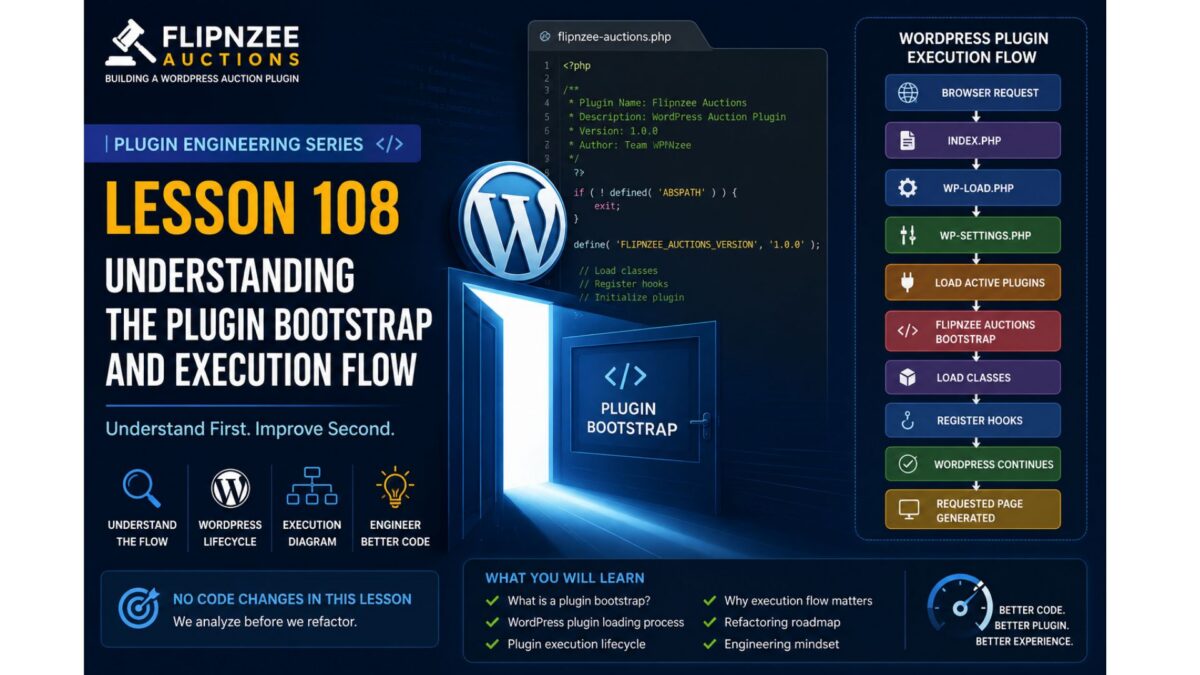
Whenever WordPress loads, it follows a sequence similar to the one below:

Browser Request
       │
       ▼
index.php
       │
       ▼
wp-blog-header.php
       │
       ▼
wp-load.php
       │
       ▼
wp-settings.php
       │
       ▼
Load Active Plugins
       │
       ▼
Flipnzee Auctions Bootstrap
       │
       ▼
Load Classes
       │
       ▼
Register Hooks
       │
       ▼
WordPress Continues Loading
       │
       ▼
Requested Page is Generated

Understanding this sequence helps explain why some code belongs in the bootstrap file while other logic belongs inside dedicated classes.


Why This Matters

Many beginners believe that a plugin simply “runs.”

In reality, WordPress controls the entire execution lifecycle.

Your plugin responds to events generated by WordPress through hooks and filters.

This event-driven architecture is one of the defining characteristics of WordPress development.

Understanding it makes the rest of the plugin much easier to follow.


Our Refactoring Philosophy

From this lesson onward, every engineering lesson will follow a consistent structure.

1. Concept

We begin by introducing a software engineering principle.

Examples include:

  • Single Responsibility Principle (SRP)
  • Separation of Concerns
  • Encapsulation
  • Dependency Management
  • Event-Driven Programming

2. PHP Concepts

Next, we explain only the PHP features required for the lesson.

Examples include:

  • Classes
  • Objects
  • Visibility
  • Static Methods
  • Namespaces (when introduced)
  • Interfaces (later)
  • Traits (later)

3. WordPress Concepts

We then study the relevant WordPress APIs.

Examples include:

  • Hooks
  • Filters
  • Activation Hooks
  • Shortcodes
  • AJAX
  • Nonces
  • Sanitization
  • Escaping

4. Current Code Review

Before changing anything, we inspect the existing implementation.

We ask questions such as:

  • What is this code responsible for?
  • What does it do well?
  • Can responsibilities be separated more clearly?
  • Is there duplication?
  • Does the naming reflect its purpose?

The goal is understanding, not criticism.


5. Refactoring

Only after fully understanding the existing code do we perform a focused improvement.

Each lesson will concentrate on a single engineering concept rather than attempting multiple unrelated changes.


6. Testing

Every change should be verified.

Testing is an essential part of engineering, not an optional extra.

We’ll discuss:

  • Expected behavior.
  • Regression risks.
  • Manual testing procedures.
  • Future opportunities for automated testing.

7. Git

Every lesson concludes with version control.

Typical workflow:

git add .
git commit -m "Refactor bootstrap initialization"
git tag lesson-109
git push
git push --tags

8. Documentation

Finally, each lesson will produce material suitable for publication on WPNzee.

By documenting every engineering decision, we create both a learning resource and a development record.


Plugin Engineering Roadmap

Over the coming lessons, we will explore the plugin in a logical order.

Phase 0 – Understanding the Plugin

  • Plugin Bootstrap
  • Folder Structure
  • Execution Flow
  • Class Responsibilities

Phase 1 – Development Environment

  • Debugging
  • Version Control
  • Coding Standards
  • Development Workflow

Phase 2 – Database Layer

  • Custom Tables
  • Migrations
  • Schema Versioning
  • Indexes

Phase 3 – Auction Engine

  • Business Logic
  • Lifecycle
  • Validation

Phase 4 – Bid Engine

  • Bid Processing
  • Reserve Prices
  • Winner Determination

Phase 5 – Transactions

  • Transaction Creation
  • Event-Driven Design

Phase 6 – Transfer Management

  • Transfer Lifecycle
  • Workflow States

Phase 7 – Payment Layer

  • Gateway Architecture
  • Payment Abstraction

Phase 8 – Frontend

  • Templates
  • Shortcodes
  • AJAX

Phase 9 – Security

  • Nonces
  • Sanitization
  • Escaping
  • Capability Checks

Phase 10 – Plugin Architecture

  • SOLID Principles
  • Dependency Management
  • Service Layers

Phase 11 – Performance

  • Database Optimization
  • Query Performance
  • Caching
  • Lazy Loading

Phase 12 – Production Release

Preparing Flipnzee Auctions for a stable v1.0 release.


Key Takeaways

This lesson deliberately made no code changes.

Instead, we established the mindset required for successful refactoring:

  • Understand before modifying.
  • Improve incrementally.
  • Refactor one concept at a time.
  • Preserve working functionality.
  • Document every engineering decision.

These principles will guide every lesson in the Plugin Engineering series.


Looking Ahead

In the next lesson, we will open the Flipnzee Auctions bootstrap file and trace the plugin’s execution from the moment WordPress loads it. We will examine how the plugin initializes, identify each responsibility within the bootstrap, and determine whether those responsibilities are appropriately placed or should be delegated elsewhere.

Only after fully understanding the bootstrap will we begin making carefully planned architectural improvements.


Discussion

Before reading the next lesson, consider the following questions:

  1. Why is it important to understand existing code before refactoring it?
  2. What responsibilities should a plugin bootstrap file have?
  3. Why does WordPress use an event-driven architecture based on hooks and actions?
  4. How can small, incremental refactoring reduce the risk of introducing bugs?

Share your thoughts in the comments below. In Lesson 109, we will answer these questions by exploring the Flipnzee Auctions bootstrap file in detail and tracing its execution flow from start to finish.