
Implementation Lesson 37: Automating Auction Maintenance with WordPress Cron

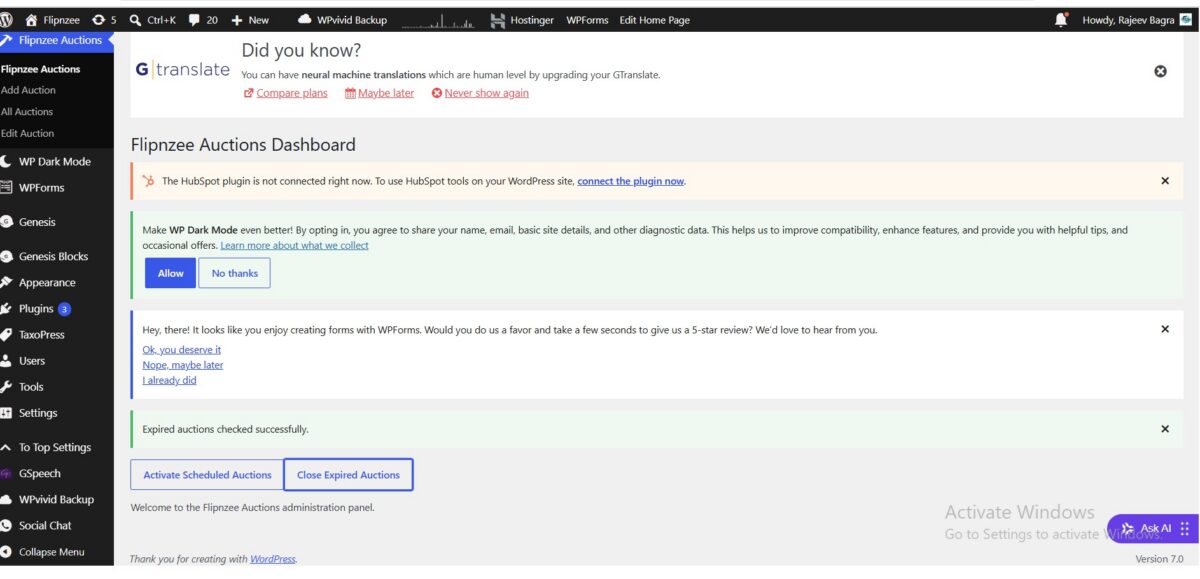
In the previous two lessons, we added the ability to manually activate scheduled auctions and manually close expired auctions. Those features worked correctly, but they still required an administrator to click buttons from the dashboard.
In this implementation lesson, we’ll take the next logical step by allowing WordPress to perform these maintenance tasks automatically using WP-Cron.
By the end of this lesson, Flipnzee Auctions will periodically check auction schedules in the background without administrator intervention.
Starting Point
Before beginning this lesson, ensure you have completed:
- Lesson 35 – Activate Scheduled Auctions
- Lesson 36 – Close Expired Auctions
Why WP-Cron?
Unlike a traditional Linux cron job, WordPress includes its own scheduling system called WP-Cron.
Instead of relying on server-level scheduled tasks, WordPress executes scheduled events whenever someone visits the website.
Many popular plugins use WP-Cron for tasks such as:
- Publishing scheduled posts
- Sending email notifications
- Clearing expired caches
- Running maintenance jobs
We’ll use the same mechanism for auction management.
Step 1: Create a Central Maintenance Method
Inside:
includes/class-auction-manager.php
we created a new method:
public static function run_scheduled_maintenance() {

	self::activate_scheduled_auctions();

	self::close_expired_auctions();
}
Rather than scheduling multiple background events, we created one maintenance method responsible for the complete auction lifecycle.
This keeps the plugin architecture simple and easier to extend.
Step 2: Register a Custom Cron Hook
Inside:
flipnzee-auctions.php
we registered a custom WordPress action.
add_action(
	'flipnzee_auction_maintenance',
	array(
		'Flipnzee_Auction_Manager',
		'run_scheduled_maintenance',
	)
);
Whenever WordPress executes the custom hook, our maintenance method is called automatically.
Step 3: Schedule the Event During Plugin Activation
Next, we modified the plugin activation routine.
function flipnzee_auction_activate() {

	Flipnzee_Database::create_tables();

	if ( ! wp_next_scheduled( 'flipnzee_auction_maintenance' ) ) {

		wp_schedule_event(
			time(),
			'hourly',
			'flipnzee_auction_maintenance'
		);
	}
}
The plugin now schedules a recurring hourly event when activated.
Using wp_next_scheduled() prevents duplicate scheduled events from being created if the plugin is activated multiple times.
Step 4: Remove the Scheduled Event on Deactivation
Good WordPress plugins clean up after themselves.
We therefore added a deactivation routine.
function flipnzee_auction_deactivate() {

	$timestamp = wp_next_scheduled(
		'flipnzee_auction_maintenance'
	);

	if ( $timestamp ) {

		wp_unschedule_event(
			$timestamp,
			'flipnzee_auction_maintenance'
		);
	}
}
This ensures WordPress no longer runs auction maintenance after the plugin has been deactivated.
Step 5: Register Activation and Deactivation Hooks
Finally, we registered both hooks.
register_activation_hook(
	__FILE__,
	'flipnzee_auction_activate'
);

register_deactivation_hook(
	__FILE__,
	'flipnzee_auction_deactivate'
);
WordPress now automatically schedules the maintenance event during activation and removes it during deactivation.
Plugin Architecture
Our maintenance workflow now looks like this:
Plugin Activated
        │
        ▼
Schedule Hourly Event
        │
        ▼
WordPress Cron
        │
        ▼
flipnzee_auction_maintenance
        │
        ▼
run_scheduled_maintenance()
        │
        ├───────────────┐
        ▼               ▼
Activate Auctions   Close Auctions
Using a single maintenance method keeps the code organized and simplifies future enhancements.
Testing During Development
Although the plugin now supports automatic scheduling, we intentionally kept the two dashboard buttons:
- Activate Scheduled Auctions
- Close Expired Auctions
These manual tools remain extremely valuable because they allow developers to test the maintenance logic immediately without waiting for the next scheduled Cron execution.
Keeping manual maintenance actions available is a practical approach during development and troubleshooting.
Debugging Along the Way
During implementation, we temporarily inserted debugging statements such as:
wp_die();
and displayed the number of rows updated by SQL queries.
These temporary diagnostics helped confirm:
- Dashboard buttons were submitting correctly.
- Nonce verification was successful.
- Maintenance methods were being executed.
- SQL queries were running as expected.
- WordPress time handling influenced scheduling behaviour.
Once testing was complete, all debugging statements were removed to ensure Cron jobs could run silently in the background.
Lessons Learned
This implementation introduced several important WordPress development concepts:
- Creating custom Cron hooks
- Scheduling recurring events
- Preventing duplicate scheduled events
- Cleaning up scheduled tasks during plugin deactivation
- Organizing background processes into a single maintenance method
- Using temporary debugging techniques while developing background tasks
These concepts are widely used in production-quality WordPress plugins.
Final Result
At the end of this lesson, Flipnzee Auctions is capable of:
- Scheduling recurring background maintenance
- Automatically activating scheduled auctions
- Automatically closing expired auctions
- Cleaning up scheduled events during plugin deactivation
This marks a significant milestone in the project’s evolution from an administrative CRUD plugin to an intelligent, self-managing auction platform.
Download Source Code
Download the starting version of the plugin before the lesson:
Download the completed version after this lesson:
What’s Next?
In Lesson 38, we’ll begin implementing the frontend auction experience, allowing visitors to view live auctions, auction details, countdown timers, and bidding information directly from the website. This will shift the focus from administrator tools to the public-facing auction marketplace.