
Lesson 104: Implementing Automatic Auction Lifecycle Management in the Flipnzee Auctions Plugin

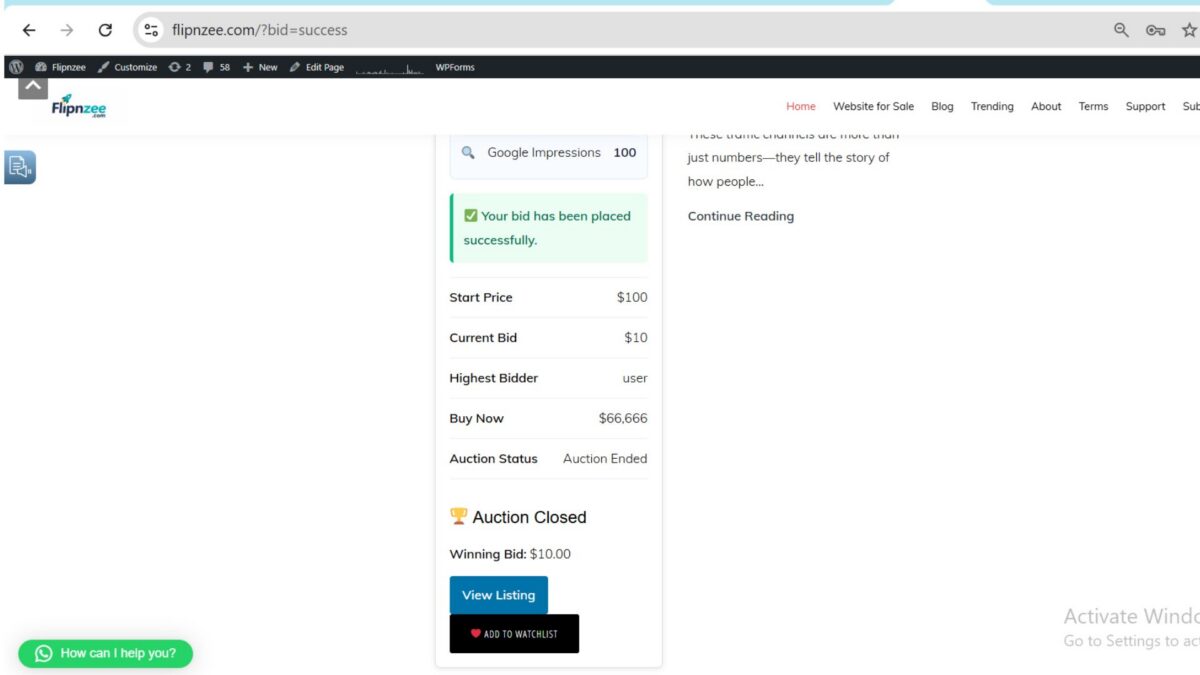
Welcome to Lesson 104 of our Flipnzee Auctions plugin development series. In the previous lessons, we successfully implemented winner determination, automatic transaction creation, and transfer record generation after an auction was closed manually.
One limitation still remained: auctions depended on an administrator to change their status from Active to Closed. In a real auction marketplace, this process should happen automatically. In this lesson, we introduce an automated auction lifecycle that allows the plugin to activate scheduled auctions, close expired auctions, determine winners, and update the frontend without manual intervention.
Why Automatic Auction Processing Matters
An auction marketplace should continue functioning even when no administrator is logged into WordPress.
The plugin should automatically:
- Activate auctions when their scheduled start time arrives.
- Close auctions after the end time.
- Determine the winning bidder.
- Begin the post-auction workflow.
- Prevent additional bids after the auction ends.
This automation makes the marketplace significantly more reliable and scalable.
Objectives
By the end of this lesson, the plugin will:
- Automatically activate scheduled auctions.
- Automatically close expired auctions.
- Determine winners for automatically closed auctions.
- Log auction lifecycle events.
- Fire WordPress hooks for future integrations.
- Hide the bidding form after the auction ends.
- Display a professional “Auction Closed” message to visitors.
Scheduling the Maintenance Process
The plugin already registered a scheduled maintenance event using WordPress Cron.
During activation, the maintenance event is scheduled:
if ( ! wp_next_scheduled( 'flipnzee_auction_maintenance' ) ) {

    wp_schedule_event(
        time(),
        'hourly',
        'flipnzee_auction_maintenance'
    );

}
During plugin deactivation, the scheduled event is removed:
$timestamp = wp_next_scheduled(
    'flipnzee_auction_maintenance'
);

if ( $timestamp ) {

    wp_unschedule_event(
        $timestamp,
        'flipnzee_auction_maintenance'
    );

}
This prevents orphaned scheduled events from remaining in WordPress.
Registering the Maintenance Hook
The scheduled event must execute plugin code.
We connected the cron event to the Auction Manager:
add_action(
    'flipnzee_auction_maintenance',
    array(
        'Flipnzee_Auction_Manager',
        'run_scheduled_maintenance',
    )
);
Whenever WordPress runs the scheduled event, the auction maintenance routine is executed automatically.
Creating the Maintenance Method
Inside the Auction Manager we created a dedicated method responsible for all automated auction lifecycle operations.
public static function run_scheduled_maintenance() {

    self::activate_scheduled_auctions();

    self::update_expired_auctions();

}
This creates a clean orchestration layer that can easily be expanded later.
Future maintenance tasks can simply be added here.
Automatically Closing Expired Auctions
The plugin searches for all auctions that:
- are still Active
- have an end date earlier than the current time
SELECT id
FROM wp_flipnzee_auctions
WHERE status='active'
AND auction_end < current_time()
The matching auctions are then updated to:
Status = Closed
without administrator intervention.
Automatically Determining Winners
Before updating the auction status, the plugin stores the list of expired auction IDs.
After closing them, each auction is processed individually:
foreach ( $expired_auctions as $auction_id ) {

    Flipnzee_Bid_Manager::determine_winner(
        (int) $auction_id
    );

}
This guarantees every closed auction immediately receives a winner.
Logging Automatic Closures
Whenever one or more auctions are automatically closed, an activity log entry is created.
Example:
3 auction(s) automatically closed.
This gives administrators a historical record of automated maintenance.
Introducing a New Action Hook
After processing expired auctions we introduced a brand-new action hook:
do_action(
    'flipnzee_auctions_expired_processed',
    $updated_count
);
This hook allows future extensions to respond whenever auction maintenance finishes.
Possible integrations include:
- Analytics updates
- Email notifications
- Cache invalidation
- Third-party marketplace integrations
- Custom reporting
Following WordPress hook architecture keeps the plugin modular and extensible.
Updating the Frontend
One remaining issue existed.
Although auctions were closed successfully, buyers could still see:
- Bid amount field
- Place Bid button
Obviously, no additional bids should be accepted.
We solved this by displaying the bidding interface only when the auction status is Active.
if ( 'active' === $auction['status'] ) {

    // Display bidding form.

}
Otherwise, visitors now see an auction summary.
Showing the Auction Closed Message
Instead of the bidding form, the plugin now displays:
🏆 Auction Closed

Winning Bid:
$10.00
If no bids were placed, the interface displays:
No bids were placed.
This provides a much clearer experience for buyers.
Final Result
After completing this lesson, the auction lifecycle now works as follows:
Auction Created
        │
        ▼
Scheduled Start
        │
        ▼
Auction Automatically Activated
        │
        ▼
Users Place Bids
        │
        ▼
Highest Bid Tracked
        │
        ▼
Auction Automatically Closed
        │
        ▼
Winner Determined
        │
        ▼
Transaction Created
        │
        ▼
Transfer Record Created
        │
        ▼
Auction Closed Message Displayed
The entire process now requires virtually no manual intervention after an auction has been created.
What We Learned
In this lesson we learned how to:
- Schedule recurring plugin maintenance using WordPress Cron.
- Register custom cron actions.
- Build a centralized maintenance routine.
- Automatically close expired auctions.
- Automatically determine auction winners.
- Record automated activity logs.
- Introduce extensible WordPress action hooks.
- Improve the frontend after auction completion.
- Hide bidding controls once an auction has ended.
Download Source Code
Download the starting version of the plugin before the lesson:
Download the completed version after this lesson:
Conclusion
Lesson 104 marks an important milestone in the Flipnzee Auctions plugin. With automatic auction lifecycle management in place, the marketplace now behaves much more like a production-ready auction platform. Auctions can activate, expire, determine winners, create transactions, initiate transfer workflows, and update the user interface without requiring continuous administrator oversight.
In the next lesson, we will continue refining the marketplace by introducing additional automation and administrative improvements that build upon this fully automated auction lifecycle.