
Lesson 71 Implementation: Introducing the Payment Manager for Transaction Validation

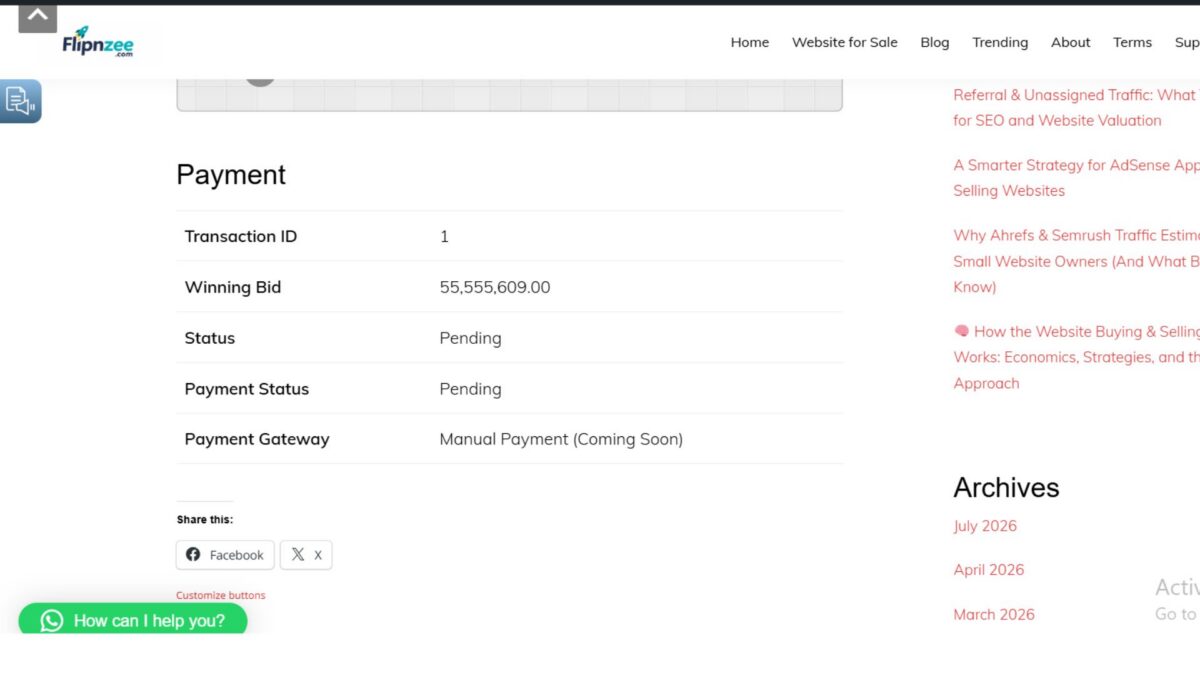
After successfully creating the buyer payment page in the previous lesson, the next logical improvement was to separate payment-related business logic from the presentation layer. Instead of allowing the payment page to directly decide whether a transaction could be paid, a dedicated Payment Manager class was introduced.
This lesson focuses on improving the plugin architecture while preparing the foundation for future payment gateway integrations such as Stripe, PayPal, Razorpay, or manual bank transfer.
Objective
The goals of this lesson were to:
- Create a dedicated
Flipnzee_Payment_Managerclass. - Centralize payment validation logic.
- Validate transactions before displaying the payment page.
- Prepare a placeholder method for future payment gateway integrations.
- Keep the payment page clean and easier to maintain.
Why This Refactoring Was Needed
In Lesson 70, the payment page displayed transaction details directly after fetching the transaction.
As more features are added, such as:
- payment expiry
- completed payments
- cancelled transactions
- multiple payment gateways
placing all validation logic inside the page would quickly become difficult to maintain.
Instead, all payment-related decisions should live inside a dedicated manager.
This follows the Single Responsibility Principle, where each class has one clear responsibility.
Step 1 — Creating the Payment Manager
A new file was created:
includes/class-payment-manager.php
The initial class structure:
<?php

if ( ! defined( 'ABSPATH' ) ) {
    exit;
}

class Flipnzee_Payment_Manager {

}
This class will eventually become the central place for everything related to buyer payments.
Step 2 — Registering the New Class
The loader was updated so WordPress loads the new class automatically.
Example:
require_once FLIPNZEE_AUCTIONS_PLUGIN_DIR . 'includes/class-payment-manager.php';
Step 3 — Moving Validation into the Manager
Instead of checking the transaction status directly inside the payment page, a reusable validation method was created.
public static function can_pay( $transaction ) {

    if ( ! $transaction ) {
        return false;
    }

    if ( strtolower( trim( $transaction->status ) ) !== 'pending' ) {
        return false;
    }

    return true;
}
Why strtolower()?
During testing, it was discovered that database values may use different capitalization.
Examples:
Pending
pending
PENDING
Using:
strtolower( trim( $transaction->status ) )
ensures all of these are treated consistently.
Step 4 — Validating the Transaction
The payment page now retrieves the transaction:
$transaction = Flipnzee_Payment_Manager::get_transaction(
    $transaction_id
);
If nothing is found:
if ( ! $transaction ) {
    return '<p>Transaction not found.</p>';
}
Then the Payment Manager determines whether payment is still allowed.
if ( ! Flipnzee_Payment_Manager::can_pay( $transaction ) ) {
    return '<p>This transaction is no longer available for payment.</p>';
}
This keeps the page itself very clean.
Step 5 — Preparing Gateway Support
Since payment gateways will be implemented in future lessons, a placeholder method was added.
public static function get_gateway_name( $transaction ) {

    return 'Manual Payment (Coming Soon)';
}
The payment page simply calls:
echo esc_html(
    Flipnzee_Payment_Manager::get_gateway_name( $transaction )
);
Later, this method will automatically return:
- Manual Bank Transfer
- Stripe
- Razorpay
- PayPal
without changing the payment page.
Debugging Along the Way
During implementation, a few useful issues were discovered.
1. Transaction Status Case Sensitivity
Initially the validation checked:
$transaction->status !== 'Pending'
However, the database stored:
pending
As a result, every payment was incorrectly rejected.
The validation was updated to:
strtolower( trim( $transaction->status ) ) !== 'pending'
making it much more reliable.
2. Missing Payment Gateway Column
An attempt was made to display:
$transaction->payment_gateway
This produced an undefined property warning because the database table does not yet contain a payment_gateway column.
Instead of adding a temporary workaround, the gateway display was moved into:
Flipnzee_Payment_Manager::get_gateway_name()
which currently returns a placeholder while the database schema is prepared in a future lesson.
Testing
Several scenarios were tested.
✅ Existing transaction loads correctly.
✅ Pending transaction is accepted.
✅ Invalid transaction ID displays:
Transaction not found.
✅ Placeholder payment gateway displays:
Manual Payment (Coming Soon)
No PHP warnings remain.
Final Result
The payment page now displays:
- Transaction ID
- Winning Bid
- Status
- Payment Status
- Payment Gateway
with validation handled entirely by the Payment Manager.
The interface remains clean while the underlying architecture becomes much more maintainable.
Download Source Code
Download the starting version of the plugin before the lesson:
Download the completed version after this lesson:
What Was Learned
This lesson demonstrated the value of separating business logic from presentation.
Instead of embedding validation throughout the payment page, all payment-related decisions are now centralized in a dedicated manager. This approach makes the code easier to read, easier to test, and far simpler to extend as new payment gateways and payment workflows are introduced.
It also highlighted the importance of real-world debugging—such as handling inconsistent database values (e.g., Pending vs. pending) and recognizing when a database schema needs to evolve rather than patching around missing fields.
With the Flipnzee_Payment_Manager now in place, the plugin has a solid foundation for implementing gateway-specific payment processing in upcoming lessons while keeping the payment page itself clean and focused.