
Implementing Lesson 62: Building the Transaction Manager Foundation in Flipnzee Auctions

As the Flipnzee Auctions plugin continues to evolve into a complete online auction marketplace, it becomes increasingly important to organize the code into well-defined components. After completing automatic winner determination in the previous lesson, the next step was to introduce a dedicated Transaction Manager.
Instead of embedding transaction logic directly inside the Auction Manager, this lesson focuses on building the architectural foundation that will eventually support escrow integration, payment processing, ownership transfer, and transaction history.
In this implementation, no visible changes are introduced to the plugin interface. However, significant backend improvements prepare the plugin for future marketplace features.
Why a Transaction Manager?
When an auction ends successfully, several business processes may follow:
- Creating an escrow transaction
- Recording payment information
- Sending buyer and seller notifications
- Tracking ownership transfer
- Marking the transaction as completed
Rather than placing all of these responsibilities inside the Auction Manager, it is better to create a dedicated class responsible only for transactions.
This follows the Single Responsibility Principle (SRP) and makes the plugin easier to maintain and extend.
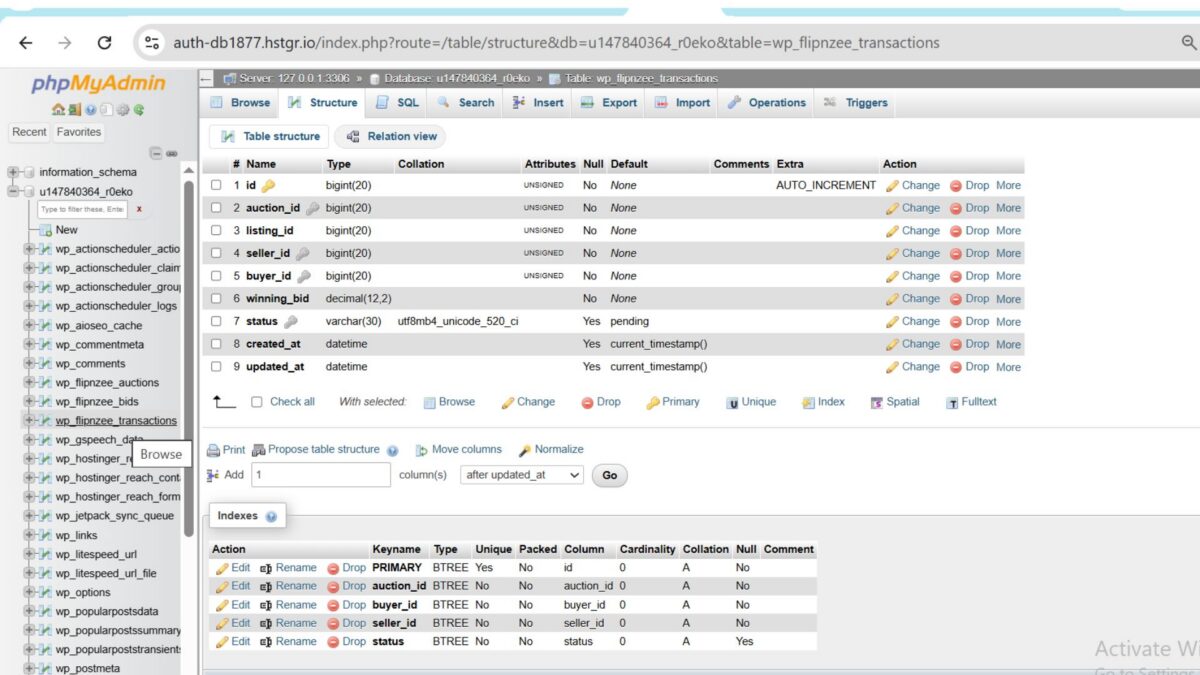
Step 1: Create the Transactions Database Table
The first task was extending the database installer to create a new table.
File modified:
includes/class-database.php
A new table was added:
wp_flipnzee_transactions
using dbDelta().
/*
 * Create transactions table.
 */
$transaction_table = $wpdb->prefix . 'flipnzee_transactions';

$sql = "CREATE TABLE {$transaction_table} (

	id BIGINT UNSIGNED NOT NULL AUTO_INCREMENT,

	auction_id BIGINT UNSIGNED NOT NULL,

	listing_id BIGINT UNSIGNED NOT NULL,

	seller_id BIGINT UNSIGNED NOT NULL,

	buyer_id BIGINT UNSIGNED NOT NULL,

	winning_bid DECIMAL(12,2) NOT NULL,

	status VARCHAR(30) DEFAULT 'pending',

	created_at DATETIME DEFAULT CURRENT_TIMESTAMP,

	updated_at DATETIME DEFAULT CURRENT_TIMESTAMP,

	PRIMARY KEY (id),

	KEY auction_id (auction_id),

	KEY buyer_id (buyer_id),

	KEY seller_id (seller_id),

	KEY status (status)

) {$charset_collate};";

dbDelta( $sql );
After reactivating the plugin, the new database table appeared successfully in phpMyAdmin.
Step 2: Create the Transaction Manager
A brand-new class was introduced.
New file:
includes/class-transaction-manager.php
Initial class structure:
<?php
/**
 * Transaction Manager.
 *
 * @package Flipnzee_Auctions
 */

if ( ! defined( 'ABSPATH' ) ) {
	exit;
}

class Flipnzee_Transaction_Manager {

}
This dedicated class will manage all transaction-related functionality in future lessons.
Step 3: Load the New Class
The main plugin loader was updated to include the new class.
File modified:
flipnzee-auctions.php
Code added:
require_once FLIPNZEE_AUCTION_PATH .
	'includes/class-transaction-manager.php';
This ensures the Transaction Manager is available throughout the plugin.
Step 4: Create Transactions Programmatically
The first functional method was added.
/**
 * Create a transaction.
 *
 * @param array $data Transaction data.
 * @return int|false
 */
public static function create_transaction( $data ) {

	global $wpdb;

	$table = $wpdb->prefix . 'flipnzee_transactions';

	$result = $wpdb->insert(
		$table,
		array(
			'auction_id'  => $data['auction_id'],
			'listing_id'  => $data['listing_id'],
			'seller_id'   => $data['seller_id'],
			'buyer_id'    => $data['buyer_id'],
			'winning_bid' => $data['winning_bid'],
			'status'      => 'pending',
		),
		array(
			'%d',
			'%d',
			'%d',
			'%d',
			'%f',
			'%s',
		)
	);

	if ( false === $result ) {
		return false;
	}

	return $wpdb->insert_id;
}
Although not yet connected to auction completion, this method provides the core functionality for creating marketplace transactions.
Step 5: Retrieve a Transaction
A second method was implemented for retrieving transaction details.
/**
 * Get a transaction.
 *
 * @param int $transaction_id Transaction ID.
 * @return object|null
 */
public static function get_transaction( $transaction_id ) {

	global $wpdb;

	$table = $wpdb->prefix . 'flipnzee_transactions';

	return $wpdb->get_row(
		$wpdb->prepare(
			"SELECT * FROM {$table} WHERE id = %d",
			$transaction_id
		)
	);
}
Keeping database queries inside the Transaction Manager avoids repeating SQL throughout the plugin.
Step 6: Update Transaction Status
Finally, a method was added for updating transaction status.
/**
 * Update transaction status.
 *
 * @param int    $transaction_id Transaction ID.
 * @param string $status         New status.
 * @return bool
 */
public static function update_status(
	$transaction_id,
	$status
) {

	global $wpdb;

	$table = $wpdb->prefix . 'flipnzee_transactions';

	$result = $wpdb->update(
		$table,
		array(
			'status' => sanitize_text_field( $status ),
		),
		array(
			'id' => absint( $transaction_id ),
		),
		array(
			'%s',
		),
		array(
			'%d',
		)
	);

	return false !== $result;
}
This method will later allow the plugin to move transactions through stages such as:
- Pending
- Escrow Started
- Payment Received
- Ownership Transferred
- Completed
- Cancelled
Testing the Implementation
After completing the changes:
- The plugin activated successfully.
- No PHP syntax errors were reported.
- The
wp_flipnzee_transactionstable was successfully created. - The new Transaction Manager loaded correctly.
- Existing auction functionality remained unaffected.
This confirmed that the new architecture had been integrated without breaking existing features.
Download Source Code
Download the starting version of the plugin before the lesson:
Download the completed version after this lesson:
Lessons Learned
This lesson demonstrates an important software engineering principle:
Build the architecture before building the features.
Although users cannot yet create or view transactions, introducing a dedicated Transaction Manager now will make future development much cleaner.
Future features such as escrow integration, payment gateways, notifications, and transaction history can all be implemented within this class without increasing the complexity of the Auction Manager.
Final Thoughts
Lesson 62 marks an important milestone in the Flipnzee Auctions project. Rather than focusing on user-facing functionality, this lesson strengthens the plugin’s internal architecture by introducing a dedicated Transaction Manager and transaction database table.
As the plugin grows into a full-featured auction marketplace, this modular design will make future enhancements significantly easier to implement, maintain, and extend.
In the next lesson, we will connect the Auction Manager and the Transaction Manager using WordPress action hooks so that a transaction is created automatically whenever an auction winner is determined. This event-driven approach will further improve the plugin’s flexibility and maintainability.