
Lesson 62: Building the Transaction Manager Foundation for Flipnzee Auctions

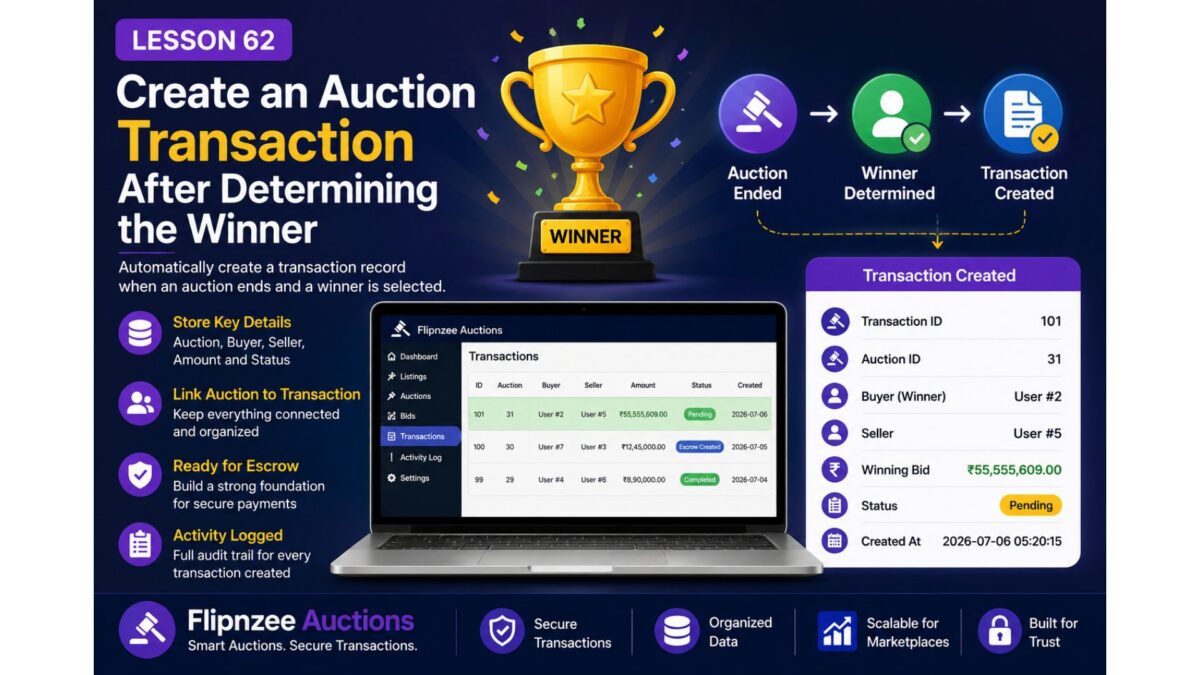
With automatic winner determination now complete, the Flipnzee Auctions plugin has reached an important milestone. Every completed auction now has a confirmed winner and a final bid amount.
The next logical step is not to integrate directly with an escrow service. Instead, we first need to build a solid transaction management layer that will act as the bridge between completed auctions and future payment or escrow workflows.
In this lesson, we will create the Transaction Manager Foundation, providing the architecture that will support escrow providers, payment gateways, notifications, and transaction tracking in future lessons.
Why Not Integrate Escrow Immediately?
When developing marketplace software, it is tempting to connect directly to an escrow provider as soon as a winner has been selected.
However, this creates tight coupling between auction logic and payment processing.
Instead, professional marketplace platforms introduce a separate transaction layer.
The workflow becomes:
Auction
      ↓
Winner Determined
      ↓
Transaction Created
      ↓
Escrow
      ↓
Ownership Transfer
      ↓
Transaction Completed
This separation makes the system easier to maintain, extend, and test.
Why Introduce a Transaction Manager?
The Auction Manager should remain responsible only for auction-related operations such as:
- creating auctions,
- activating auctions,
- closing auctions,
- determining winners.
It should not become responsible for:
- escrow,
- payment processing,
- notifications,
- transaction history.
Those responsibilities belong to a dedicated Transaction Manager.
Following the Single Responsibility Principle (SRP) keeps each class focused on one area of responsibility.
What We Will Build
During this lesson we will create a brand-new class:
includes/class-transaction-manager.php
This class will become responsible for managing every transaction that occurs after an auction has completed.
Initially, it will provide methods such as:
- Create Transaction
- Retrieve Transaction
- Update Transaction Status
Additional capabilities will be added in later lessons.
Creating a Transactions Table
To support transaction management, a new database table will be introduced:
wp_flipnzee_transactions
Each completed auction will eventually create a corresponding transaction record.
The table is designed to store information such as:
- Transaction ID
- Auction ID
- Listing ID
- Seller ID
- Buyer ID
- Winning Bid
- Transaction Status
- Creation Date
- Last Updated Date
Having a dedicated table keeps transaction information separate from auction data while allowing both systems to remain connected.
Benefits of a Separate Transaction Layer
This design offers several important advantages.
Clean Architecture
Each manager class performs one job.
Auction Manager manages auctions.
Bid Manager manages bids.
Transaction Manager manages transactions.
Future managers can handle:
- Escrow
- Notifications
- Payments
- Emails
without modifying the auction engine.
Easier Escrow Integration
Whether Flipnzee eventually integrates with:
- Escrow.com,
- another escrow provider,
- manual escrow,
- or an in-house payment system,
all of them can simply interact with the Transaction Manager rather than modifying auction logic.
Improved Maintainability
As new features are added, developers will know exactly where transaction-related code belongs.
Instead of one extremely large manager class, the plugin grows through focused, modular components.
Preparing for Future Lessons
This architectural foundation prepares the plugin for several major features.
Upcoming lessons will build on the Transaction Manager by adding:
- Automatic transaction creation
- Winner notifications
- Seller notifications
- Transaction status updates
- Escrow integration
- Payment tracking
- Ownership transfer workflow
Each feature will plug into the Transaction Manager without requiring major changes to the existing auction system.
What You’ll Learn
In this lesson, you will learn how to:
- Design a scalable WordPress plugin architecture.
- Apply the Single Responsibility Principle.
- Create a dedicated database table for transactions.
- Build a reusable Transaction Manager.
- Prepare a plugin for future integrations.
- Separate business logic into modular components.
Why the Roadmap Was Revised
Originally, the plan was to create transactions directly inside the Auction Manager.
During implementation, it became clear that this would gradually turn the Auction Manager into a very large class responsible for multiple unrelated tasks.
The architecture was therefore improved before the feature was completed.
Instead of tightly coupling auctions with transactions, the project now introduces a dedicated Transaction Manager that communicates with the rest of the plugin through well-defined methods and WordPress actions.
This approach closely follows the modular architecture used throughout WordPress itself.
Final Thoughts
As software projects grow, architecture becomes just as important as functionality.
Introducing a Transaction Manager may not produce an immediately visible feature for users, but it establishes a clean, scalable foundation that will support every post-auction process in the future.
By investing in a well-structured architecture now, the Flipnzee Auctions plugin is better prepared for secure escrow integration, transaction tracking, and the complete marketplace workflow that will power Flipnzee.com.
Next Lesson
In Lesson 63, we will connect the Auction Manager and the Transaction Manager using WordPress action hooks, allowing transactions to be created automatically whenever a winner is determined—without tightly coupling the two classes.