
Lesson 61 Implementation: Automatically Determine the Winning Bidder When an Auction Ends

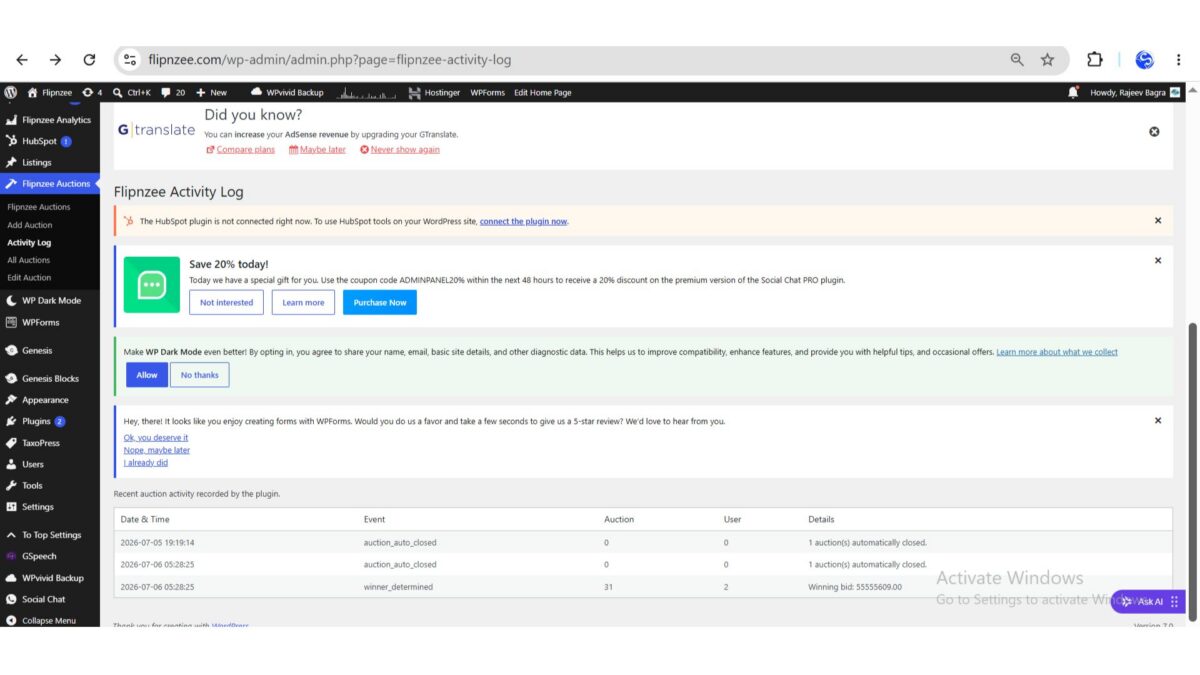
One of the most important milestones in the Flipnzee Auctions project has now been completed. In this lesson, the plugin was enhanced to automatically determine the winning bidder as soon as an auction expires.
Previously, the plugin was already capable of automatically closing expired auctions. However, after the auction was closed, no winner was selected automatically. An administrator would have needed to determine the highest bidder manually.
This lesson bridges that gap and moves the project much closer to becoming a fully functional online auction marketplace.
Objective
The goal of this lesson was to:
- Detect the highest valid bid after an auction closes.
- Save the winning bidder in the auction record.
- Update the final bid amount.
- Record the event in the Flipnzee Activity Log.
- Lay the foundation for future escrow integration.
The Problem
The plugin already contained logic that automatically changed an auction’s status from Active to Closed after the auction end time.
However, closing an auction alone is not sufficient.
A complete auction workflow should also:
- Find the highest bidder.
- Declare the winner.
- Store the winner permanently.
- Prepare the transaction for the next stage.
Without this step, the marketplace cannot proceed to payment or escrow.
Implementation Overview
The implementation consisted of three major improvements.
1. Creating a Winner Selection Method
A new method named determine_winner() was added to the Bid Manager.
Its responsibility is to:
- Retrieve all bids for an auction.
- Sort bids by highest amount.
- Use the earliest bid as the tie-breaker.
- Save the winning bidder.
- Update the final bid.
- Record the event in the activity log.
This centralizes the winner selection logic so it can be reused in future features.
2. Updating the Auction Closing Process
The auction closing routine was modified to perform two operations:
- Automatically close expired auctions.
- Immediately determine the winner for every auction that was closed.
Before updating auction statuses, the IDs of all expired auctions are collected.
Once the status update completes successfully, the plugin loops through those auction IDs and calls the new winner selection method.
This keeps the code clean while ensuring every expired auction receives a winner automatically.
3. Recording the Winner
After selecting the winning bid, the plugin stores:
- Winning User ID
- Final Bid Amount
inside the auction record.
It also records a new activity log entry similar to:
winner_determined
Auction: 31
User: 2
Winning bid: 55555609.00
This creates an audit trail that administrators can review at any time.
Testing the Feature
After uploading the updated plugin:
- The plugin activated successfully.
- An auction automatically changed to Closed after expiration.
- The highest bidder was identified correctly.
- The winner was saved.
- A new
winner_determinedentry appeared in the Activity Log.
This confirmed that the entire workflow executed successfully.
Challenges Faced
During development, one major issue occurred.
The plugin failed to activate because of a PHP parse error caused by an incorrectly placed closing brace inside the admin class.
Using:
php -l admin/class-admin.php
made it possible to quickly identify the syntax issue.
After correcting the misplaced brace and re-uploading the plugin, activation succeeded.
This served as another reminder of the importance of validating PHP files before deployment.
Files Modified
The following files were updated during this lesson:
includes/class-bid-manager.phpincludes/class-auction-manager.php
No database schema changes were required because the necessary fields already existed.
What Was Achieved
By the end of this lesson, the Flipnzee Auctions plugin can now:
- Automatically close expired auctions.
- Identify the highest bidder.
- Resolve ties using the earliest bid.
- Save the winner in the auction record.
- Update the final bid amount.
- Record the event in the Activity Log.
These enhancements significantly improve the automation of the auction lifecycle.
Lessons Learned
Several important development practices were reinforced:
- Separate business logic into reusable methods.
- Keep auction closing and winner determination as distinct responsibilities.
- Always validate PHP files using
php -lbefore deployment. - Activity logging is invaluable when testing automated workflows.
Download Source Code
Download the starting version of the plugin before the lesson:
Download the completed version after this lesson:
Looking Ahead
With automatic winner determination now complete, the next stage of development will focus on transforming a completed auction into a real transaction.
Upcoming lessons will introduce:
- Buyer and seller notifications.
- Transaction records.
- Escrow workflow preparation.
- Payment integration.
- Marketplace completion.
The project has now moved beyond simply displaying auctions. It is steadily evolving into a complete auction marketplace capable of supporting secure, end-to-end online transactions.