
Lesson 105 Implementation: Building an Event-Driven Notification System for Flipnzee Auctions

One of the strengths of WordPress is its event-driven architecture. Core WordPress features and many popular plugins communicate through actions and filters, allowing components to remain independent while still working together.
In this lesson, the Flipnzee Auctions plugin adopts the same design philosophy by introducing a dedicated Notification Manager. Rather than embedding notification logic inside the auction or transaction code, the plugin now responds to auction events using WordPress actions.
This approach keeps the code cleaner, easier to extend, and much simpler to maintain.
What We Built
Lesson 105 introduces a new notification subsystem that listens for auction events and records notifications for different participants.
Currently, the system logs notifications for:
- Auction Winner
- Seller
- Site Administrator
Although these notifications are currently written to the debug log, the architecture has been designed so that future versions can easily send:
- Emails
- SMS
- WhatsApp messages
- Slack notifications
- Discord webhooks
- Push notifications
without modifying the core auction logic.
Why Use an Event-Driven Design?
Instead of writing code like this:
Auction Closed
↓

Determine Winner
↓

Send Winner Email
↓

Send Seller Email
↓

Send Admin Email
↓

Create Transaction
↓

Create Transfer
the plugin now works like this:
Auction Closed
↓

Determine Winner
↓

Fire WordPress Action
flipnzee_auction_winner_determined

↓

Notification Manager
Transaction Manager
Analytics
Future Extensions
The auction manager no longer needs to know what happens after a winner is determined.
It simply announces that the event has occurred.
Other components decide whether they need to respond.
Creating the Notification Manager
A new class was added:
includes/
    class-notification-manager.php
This class contains all notification-related functionality.
Separating responsibilities like this follows good object-oriented design and makes future maintenance much easier.
Initializing the Notification Manager
The plugin bootstrap file was updated to include the new class.
flipnzee-auctions.php
The Notification Manager is then initialized when the plugin loads.
This ensures every notification hook is registered automatically whenever WordPress loads the plugin.
Registering WordPress Actions
Inside the Notification Manager, three listeners were registered.
add_action(
    'flipnzee_auction_winner_determined',
    array( __CLASS__, 'notify_winner' ),
    10,
    2
);

add_action(
    'flipnzee_auction_winner_determined',
    array( __CLASS__, 'notify_seller' ),
    10,
    2
);

add_action(
    'flipnzee_auction_winner_determined',
    array( __CLASS__, 'notify_admin' ),
    10,
    2
);
Notice something important.
Three completely different methods are listening for exactly the same event.
This is one of the biggest advantages of WordPress actions.
Firing the Event
During Lesson 103, winner determination already triggered an action.
do_action(
    'flipnzee_auction_winner_determined',
    $auction_id,
    $winner
);
Lesson 105 takes advantage of that event.
No modifications to the auction manager were required.
The Notification Manager simply listens for it.
Implementing Notification Methods
Three notification methods were created.
notify_winner()

notify_seller()

notify_admin()
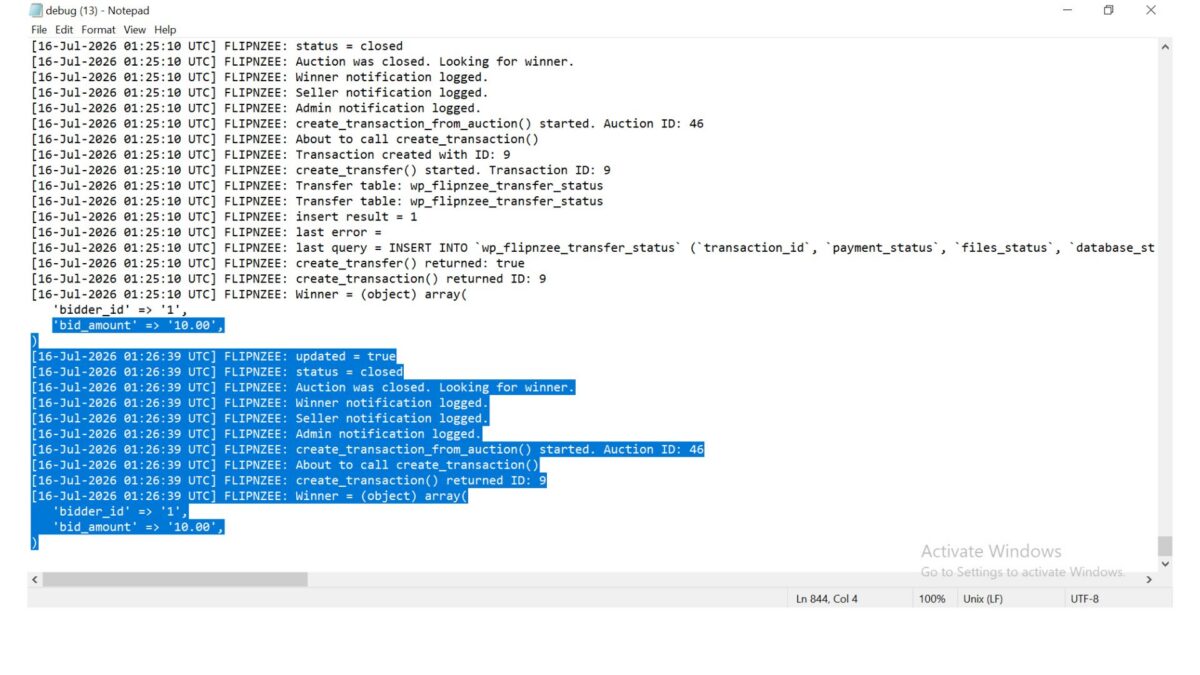
Each currently records an entry in the debug log.
Example:
FLIPNZEE: Winner notification logged.

FLIPNZEE: Seller notification logged.

FLIPNZEE: Admin notification logged.
Although simple, this verifies that the notification system is functioning correctly.
Keeping Responsibilities Separate
One of the design goals of this lesson was to avoid tightly coupling unrelated systems.
The Notification Manager does not:
- determine auction winners
- create transactions
- update transfer status
- modify auctions
Likewise, the Auction Manager does not send notifications.
Each class has one clearly defined responsibility.
This makes future development much easier.
End-to-End Testing
Several live auction tests were performed.
The following workflow completed successfully.
Auction Closed

↓

Winner Determined

↓

Winner Notification Logged

↓

Seller Notification Logged

↓

Admin Notification Logged

↓

Transaction Created

↓

Transfer Status Created
Database verification confirmed that:
- Transactions were created successfully.
- Transfer records were created successfully.
- Notification handlers executed without affecting existing functionality.
No SQL errors or PHP fatal errors were encountered during testing.
Benefits of This Architecture
The Notification Manager now provides a foundation for future communication features.
Possible additions include:
- Email confirmations
- Bid confirmation emails
- Winning bid emails
- Seller notifications
- Administrator alerts
- SMS gateways
- WhatsApp Business integration
- Discord notifications
- Slack integrations
- Push notifications
- Third-party CRM integrations
Most of these can be added by creating new action listeners without modifying the auction lifecycle.
Lessons Learned
This lesson demonstrates an important software engineering principle:
Code should communicate through events rather than direct dependencies whenever practical.
Using WordPress actions allows independent components to work together while remaining loosely coupled.
The result is code that is easier to extend, easier to test, and easier to maintain over time.
Download Source Code
Download the starting version of the plugin before the lesson:
Download the completed version after this lesson:
Conclusion
Lesson 105 introduced an event-driven notification system to the Flipnzee Auctions plugin.
Instead of embedding notification logic inside auction processing, the plugin now responds to auction events using native WordPress actions. Winner, seller, and administrator notifications are handled independently, while transactions and transfer records continue to function without modification.
Although the current implementation logs notifications for testing purposes, the underlying architecture is now ready for future enhancements such as email delivery, SMS alerts, messaging platform integrations, and other communication channels. This modular design represents an important architectural milestone, bringing the plugin closer to a scalable and production-ready auction platform.