
Lesson 60: Display Activity Logs in a Professional WordPress Admin Table

Overview
In Lesson 59, the Flipnzee Auctions plugin gained a dedicated Activity Log page that displays the contents of the log file. While functional, presenting raw log entries inside a text area isn’t ideal for administrators managing a busy auction marketplace.
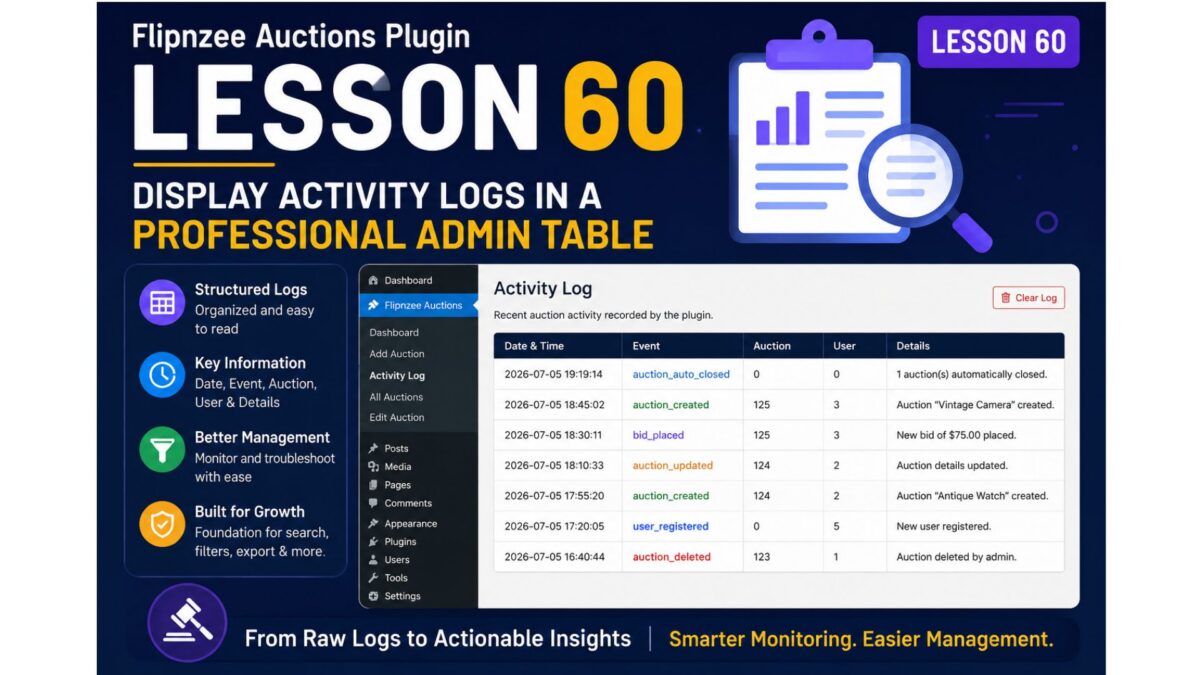
In this lesson, we’ll redesign the Activity Log page by displaying each log entry in a clean WordPress-style table with separate columns for the timestamp, event, auction ID, user ID, and details.
What You Will Learn
- Read and parse log entries from a text file.
- Convert plain text into structured PHP arrays.
- Build a professional HTML table using WordPress admin styling.
- Improve readability for administrators.
- Lay the foundation for future features like search, filtering, pagination, CSV export, and log deletion.
Current Output
Recent auction activity recorded by the plugin.

[2026-07-05 19:19:14] Event: auction_auto_closed | Auction: 0 | User: 0 | Details: 1 auction(s) automatically closed.
New Output
| Date & Time | Event | Auction | User | Details |
|---|---|---|---|---|
| 2026-07-05 19:19:14 | auction_auto_closed | 0 | 0 | 1 auction automatically closed |
Why This Improvement Matters
Displaying logs as structured data makes them much easier to:
- scan quickly
- troubleshoot auction problems
- identify system events
- prepare for future search and filtering
It also gives the plugin a much more polished and professional appearance.
Implementation Roadmap
Step 1
Read the activity log file.
Step 2
Split the file into individual log entries.
Step 3
Extract:
- timestamp
- event
- auction ID
- user ID
- details
using PHP string functions or regular expressions.
Step 4
Store each entry in an array.
Step 5
Generate a WordPress admin table.
Step 6
Handle empty or missing log files gracefully.
Step 7
Test with multiple log entries.
Skills Covered
- File parsing
- String manipulation
- Arrays
- Regular expressions
- WordPress admin UI
- HTML tables
- Defensive programming
Expected Outcome
By the end of this lesson, the Flipnzee Auctions plugin will feature a professional Activity Log dashboard where every event is neatly organized into columns, making monitoring and troubleshooting significantly easier.
I think this is a strong progression from Lesson 59 because it builds directly on the feature you just implemented while introducing practical PHP skills such as file parsing and structured data handling. It also creates a solid foundation for future lessons like searching logs (Lesson 61), clearing logs (Lesson 62), or exporting logs to CSV (Lesson 63).