
Lesson 60: Parsing Activity Logs into a Professional Admin Table in the Flipnzee Auctions Plugin

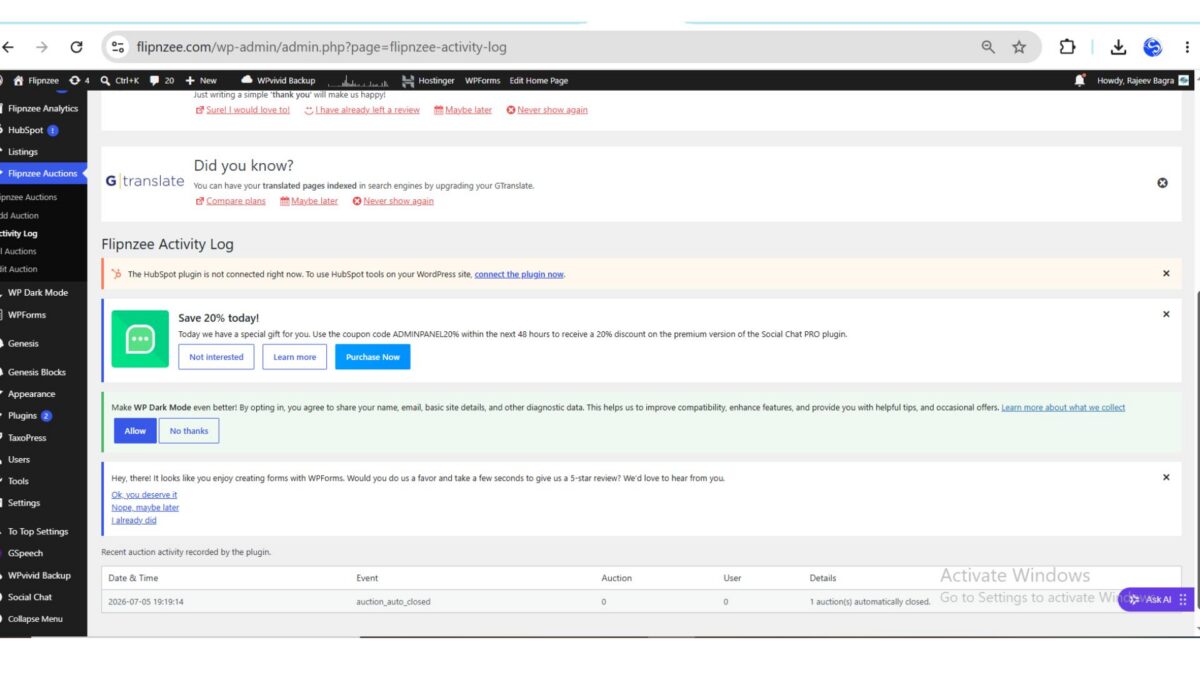
As the Flipnzee Auctions plugin continued to evolve, the Activity Log introduced in previous lessons became increasingly useful for tracking important auction events. However, displaying each log entry as a single line made it difficult to scan and understand.
In this lesson, the plugin was enhanced to parse each log entry and display it inside a structured WordPress admin table. This small improvement greatly increases readability and lays the groundwork for advanced features like searching, filtering, exporting, and pagination.
Why Improve the Activity Log?
A plain text log might work for developers, but administrators need information that is easy to understand at a glance.
Instead of displaying this:
[2026-07-05 19:19:14] Event: auction_auto_closed | Auction: 0 | User: 0 | Details: 1 auction(s) automatically closed.
the Activity Log now presents the information in separate columns.
| Date & Time | Event | Auction | User | Details |
|---|---|---|---|---|
| 2026-07-05 19:19:14 | auction_auto_closed | 0 | 0 | 1 auction(s) automatically closed. |
This makes the history of auction activity much easier to browse.
What Was Implemented
During this lesson, the Activity Log renderer was upgraded to:
- Read each log entry from the log file
- Parse the stored text using a regular expression
- Extract individual values
- Display the information inside a structured HTML table
- Continue displaying unknown log formats safely using a fallback
Understanding the Log Format
Every activity recorded by the plugin follows a consistent structure.
Example:
[2026-07-05 19:19:14] Event: auction_auto_closed | Auction: 0 | User: 0 | Details: 1 auction(s) automatically closed.
The parser separates this into five individual fields:
- Date & Time
- Event
- Auction ID
- User ID
- Details
Because every log entry follows the same format, PHP can reliably extract the values before displaying them.
Using Regular Expressions
The parser uses PHP’s preg_match() function to identify each section of the log.
Rather than treating the entire line as plain text, it captures the different values individually.
This allows each value to be displayed inside its own table cell.
Creating the Admin Table
Instead of printing one long string, the renderer now creates a table containing:
- Date & Time
- Event
- Auction
- User
- Details
Each log entry becomes a separate row.
The result is much cleaner and far easier to read.
Fallback for Unexpected Entries
Not every log file remains perfectly formatted forever.
To prevent errors, the renderer checks whether the regular expression successfully matches the expected format.
If it does, the values are displayed in separate columns.
If not, the original log line is still displayed safely inside a single table row.
This ensures older or unexpected entries never disappear.
Testing the Feature
After updating the plugin:
- Upload the latest plugin ZIP.
- Activate the plugin.
- Open:
Flipnzee Auctions → Activity Log
If log entries already exist, they should automatically appear as structured table rows.
Final Result
The Activity Log is now significantly more useful for administrators.
Instead of reading long text strings, administrators can quickly identify:
- when something happened,
- what event occurred,
- which auction was involved,
- which user performed the action,
- and additional details.
This makes troubleshooting and auditing much easier.
What I Learned
This lesson demonstrated how small user interface improvements can dramatically improve usability.
Key concepts covered included:
- Reading log files
- Parsing structured text
- Using PHP regular expressions
- Displaying dynamic data inside HTML tables
- Building fallback logic for unexpected input
- Improving the WordPress admin experience
Download Source Code
Download the starting version of the plugin before the lesson:
Download the completed version after this lesson:
Looking Ahead
With structured activity logs now working, the next logical improvements include:
- Search within logs
- Filter events by type
- Download logs as CSV
- Pagination for large log files
- Clear log button
- Colour-coded event badges
- Date range filtering
These enhancements will transform the Activity Log into a powerful administration and debugging tool for the Flipnzee Auctions plugin.
Lesson 60 Complete! The Flipnzee Auctions plugin now features a professional, structured Activity Log that presents auction events in an organized table, making plugin administration cleaner, faster, and more user-friendly.