
Lesson 72 Implementation: Building a Future-Ready Payment Gateway Selection Interface

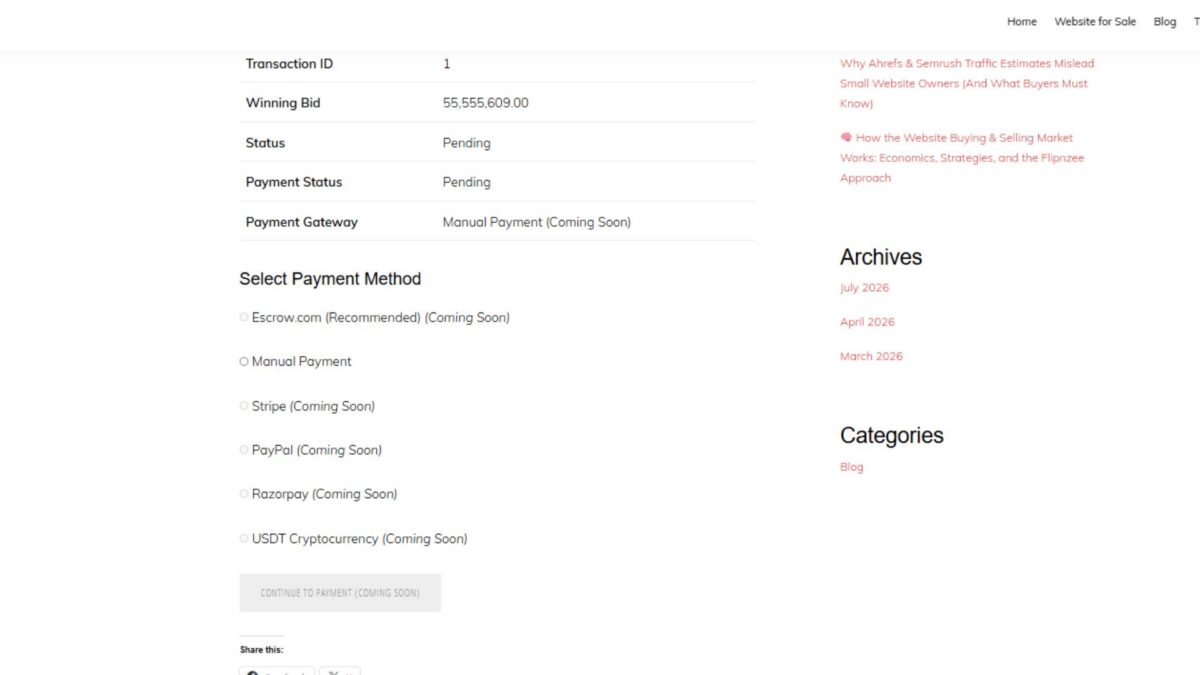
As the Flipnzee Auctions plugin continues to evolve into a professional website marketplace, one of the most important architectural decisions is how payment gateways will be integrated. Rather than hardcoding a single payment provider, this lesson introduces a flexible gateway selection system that can easily support multiple payment methods in the future.
Although no real payment gateways are connected yet, the plugin now provides a scalable framework for adding Escrow.com, Stripe, PayPal, Razorpay, cryptocurrency payments, and other providers without redesigning the payment page.
Why This Lesson Was Needed
Until the previous lesson, buyers could only see the transaction details and a placeholder payment gateway.
While functional, that approach wasn’t scalable. Every time a new payment provider was added, the payment page would need to be rewritten.
Instead, the payment page should simply ask:
“Which payment gateways are currently available?”
The Payment Manager should answer that question.
This separation of responsibilities makes the code easier to maintain and extend.
Objectives
In this lesson we:
- Centralized payment gateway definitions
- Added a helper method to retrieve available gateways
- Introduced Escrow.com as the planned primary marketplace payment method
- Generated the payment method list dynamically
- Displayed future gateways as disabled
- Added a disabled “Continue to Payment” button
- Prepared the plugin for future payment gateway integrations
Step 1 – Centralizing Available Payment Gateways
Inside:
includes/class-payment-manager.php
a new helper method was introduced:
/**
 * Get available payment gateways.
 *
 * @return array
 */
public static function get_available_gateways() {

    return array(

        'escrow' => array(
            'label'   => 'Escrow.com (Recommended)',
            'enabled' => false,
        ),

        'manual' => array(
            'label'   => 'Manual Payment',
            'enabled' => true,
        ),

        'stripe' => array(
            'label'   => 'Stripe',
            'enabled' => false,
        ),

        'paypal' => array(
            'label'   => 'PayPal',
            'enabled' => false,
        ),

        'razorpay' => array(
            'label'   => 'Razorpay',
            'enabled' => false,
        ),

        'crypto' => array(
            'label'   => 'USDT Cryptocurrency',
            'enabled' => false,
        ),

    );

}
Instead of hardcoding gateway names inside the payment page, all available gateways are now managed from a single location.
Step 2 – Loading Gateways in the Payment Page
After validating the transaction, the payment page now requests the available gateways from the Payment Manager.
$gateways = Flipnzee_Payment_Manager::get_available_gateways();
This keeps the page independent from payment logic and allows new gateways to be introduced without modifying the frontend.
Step 3 – Rendering Gateway Options Dynamically
The payment page now loops through the available gateways to generate the interface.
<h3>Select Payment Method</h3>

<div class="flipnzee-payment-gateways">

<?php foreach ( $gateways as $gateway_id => $gateway ) : ?>

    <p>

        <label>

            <input
                type="radio"
                name="payment_gateway"
                value="<?php echo esc_attr( $gateway_id ); ?>"
                <?php checked( $gateway['enabled'] ); ?>
                <?php disabled( ! $gateway['enabled'] ); ?>
            >

            <?php echo esc_html( $gateway['label'] ); ?>

            <?php if ( ! $gateway['enabled'] ) : ?>

                <em>(Coming Soon)</em>

            <?php endif; ?>

        </label>

    </p>

<?php endforeach; ?>

</div>
This approach automatically displays every configured gateway without manually writing HTML for each payment provider.
Step 4 – Adding a Checkout Placeholder
Since actual payment processing has not yet been implemented, a disabled button was added.
<p class="flipnzee-payment-actions">

    <button
        type="button"
        class="button button-primary"
        disabled
    >
        Continue to Payment (Coming Soon)
    </button>

</p>
The button clearly communicates that payment processing will be introduced in a future lesson while maintaining a professional checkout layout.
Why Escrow.com Appears First
During implementation, the payment architecture was adjusted to better reflect Flipnzee’s purpose.
Instead of treating Stripe or PayPal as the primary payment method, the gateway list now starts with:
- Escrow.com (Recommended)
- Manual Payment
- Stripe
- PayPal
- Razorpay
- USDT Cryptocurrency
Since Flipnzee is designed as a marketplace for buying and selling websites, Escrow.com is expected to become the primary payment solution once its API integration is implemented.
Until then, it remains disabled and marked as “Coming Soon.”
Testing
After implementing the changes:
- The Payment page continued displaying transaction information correctly.
- Payment gateways were loaded dynamically.
- Manual Payment appeared as the only selectable option.
- Future gateways appeared disabled.
- Escrow.com was displayed as the recommended marketplace payment solution.
- The “Continue to Payment” button appeared in a disabled state.
No PHP syntax errors were encountered during testing.
Lessons Learned
This lesson reinforced several important software design principles:
- Business logic should be separated from presentation logic.
- Payment providers should be managed centrally.
- Dynamic rendering reduces future maintenance.
- Building a scalable architecture early simplifies later integrations.
- Placeholder interfaces help guide future development while keeping the application stable.
Current Progress
The Flipnzee Auctions plugin now includes:
- Auction management
- Transaction creation
- Purchase history
- Individual purchase details
- Dedicated payment page
- Payment gateway architecture
- Dynamic gateway selection interface
- Escrow-ready payment framework
Although real payment processing has not yet been added, the plugin now has a solid architectural foundation that will make future integrations significantly easier.
Download Source Code
Download the starting version of the plugin before the lesson:
Download the completed version after this lesson:
Next Lesson
In Lesson 73, we’ll move beyond the static gateway list and begin building the actual payment flow by allowing buyers to submit their selected payment method, validating their choice, storing it with the transaction, and preparing the plugin to route users toward the appropriate payment handler. This will transform the current placeholder interface into the first stage of a working checkout process.