
Lesson 73: Capturing and Validating the Buyer’s Selected Payment Method

Objective
In the previous lesson, we introduced a dynamic payment gateway selection interface. Buyers can now see the available payment methods, but their selection is not yet processed.
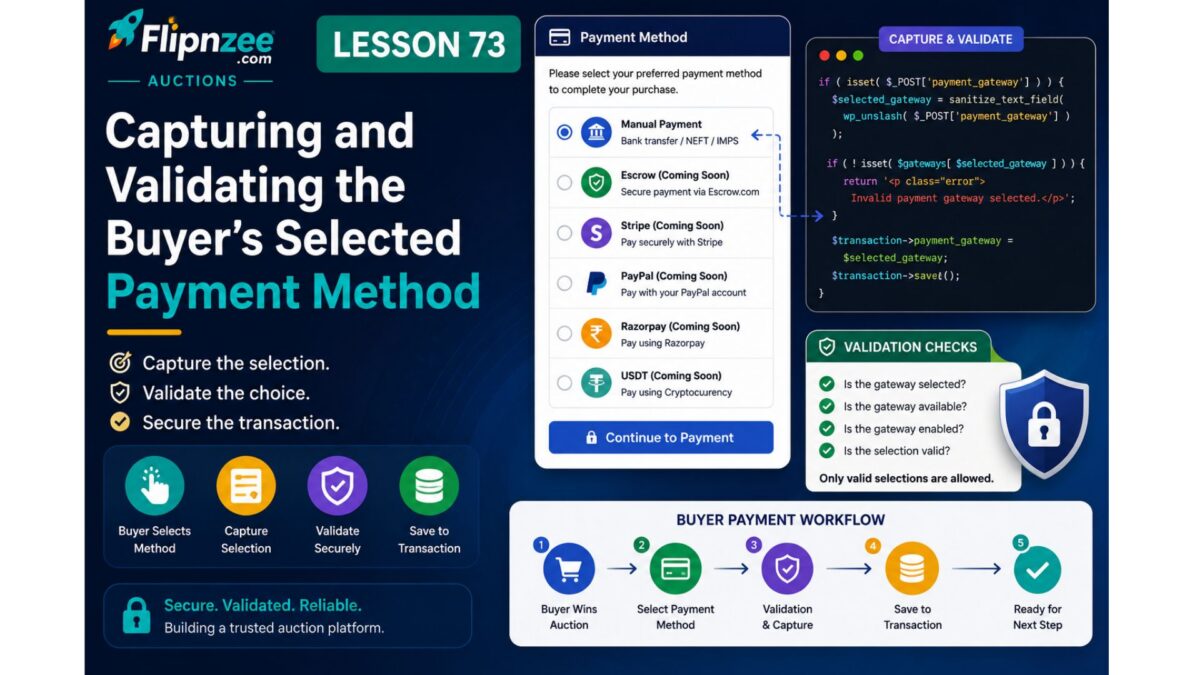
In this lesson, we’ll begin building the actual checkout workflow by wrapping the gateway list inside a form, capturing the selected payment method, validating it on submission, and preparing the plugin for gateway-specific payment processing.
Although real payment gateways are still not connected, this lesson establishes the core workflow that every future payment provider will use.
Why This Lesson Matters
A payment page is only useful if it can process the buyer’s choice.
Instead of immediately integrating Stripe, PayPal, or Escrow.com APIs, we first need a common checkout workflow that:
- accepts the selected gateway
- validates user input
- prevents invalid gateway selections
- prepares the transaction for payment
- redirects to the appropriate payment handler
Once this workflow exists, every new payment provider can plug into it.
What We’ll Build
The payment page will evolve from:
○ Escrow.com
● Manual Payment
○ Stripe
○ PayPal

[Continue (Disabled)]
into:
○ Escrow.com
● Manual Payment
○ Stripe
○ PayPal

[Continue to Payment]
When the buyer clicks the button:
- The selected gateway is submitted.
- The selection is validated.
- Disabled gateways cannot be submitted.
- Manual Payment continues to the next step.
- Future gateways display an informative placeholder message.
Files We’ll Modify
Existing
includes/class-payment-page.php
Existing
includes/class-payment-manager.php
Features to Implement
1. Wrap Gateway Selection Inside a Form
Convert the payment gateway section into a proper HTML form.
The form will submit the selected gateway using the POST method.
2. Enable the Continue Button
Replace the disabled placeholder button with an active submit button.
Example:
Continue to Payment
3. Capture Buyer Selection
Read the submitted gateway using:
$_POST['payment_gateway']
Sanitize the value before processing.
4. Validate the Selected Gateway
Verify that:
- the gateway exists
- the gateway is currently enabled
If validation fails, display a user-friendly error message.
5. Prepare Gateway Routing
Rather than processing payments directly, create routing logic similar to:
if Manual Payment
    continue to manual payment workflow

if Escrow
    placeholder

if Stripe
    placeholder

if PayPal
    placeholder
This architecture allows future lessons to implement each gateway independently.
User Experience
Current:
Choose Gateway

Manual Payment

Continue (disabled)
After Lesson 73:
Choose Gateway

Manual Payment

Continue to Payment
Upon submission:
Selected Gateway:
Manual Payment
or
Escrow.com integration is coming soon.
depending on the selected gateway.
Architecture Improvement
Before Lesson 73:
Payment Page

↓

Display Gateways
After Lesson 73:
Payment Page

↓

Capture Form

↓

Validate Gateway

↓

Route to Selected Payment Method

↓

Future Gateway Handler
This creates a reusable payment flow that every payment provider will follow.
Benefits
By the end of this lesson, Flipnzee Auctions will have:
- Functional payment selection form
- Gateway validation
- Secure handling of buyer input
- Centralized routing logic
- Foundation for integrating Escrow.com, Stripe, PayPal, Razorpay, and cryptocurrency payments
What We Won’t Build Yet
To keep the implementation stable, we are not implementing:
- Escrow.com API
- Stripe Checkout
- PayPal Checkout
- Razorpay API
- Cryptocurrency payments
- Payment confirmation
- Webhooks
- Automatic transaction updates
Those will be introduced in future lessons after the payment workflow has been completed.
Expected Outcome
By the end of Lesson 73, the Payment page will evolve from a static gateway selection interface into the first stage of a real checkout process. Buyers will be able to submit their chosen payment method, the plugin will validate the selection securely, and the architecture will be ready to hand control to the appropriate payment gateway implementation in future lessons.