
Lesson 82 Implementation: Refactoring the Flipnzee Admin Dashboard with External CSS

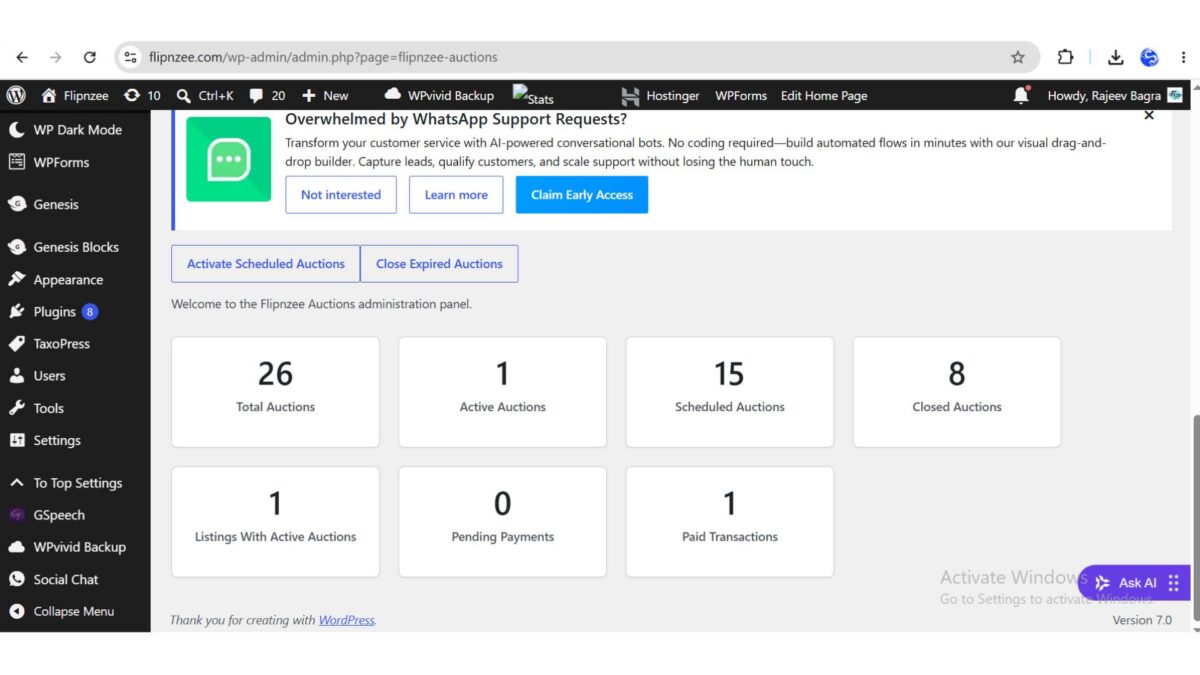
After completing the planning phase in Lesson 82, the next step was to improve the maintainability of the Flipnzee Auctions dashboard by separating presentation from PHP logic. Until now, the dashboard cards relied heavily on inline CSS, making the code difficult to maintain and extend.
In this lesson, the dashboard styling was moved into a dedicated stylesheet while keeping the existing functionality unchanged.
Goal
Refactor the Flipnzee Auctions Dashboard by:
- Removing inline styling from the dashboard cards
- Creating a dedicated
admin.cssstylesheet - Loading the stylesheet only on Flipnzee admin pages
- Keeping the dashboard visually identical while improving code quality
Step 1: Created a Dedicated Admin Stylesheet
A new stylesheet was created inside the plugin.
assets/
└── css/
    ├── frontend.css
    └── admin.css
This file now contains all dashboard-related styles.
Example:
.flipnzee-dashboard-grid {
    display: flex;
    flex-wrap: wrap;
    gap: 20px;
    margin-top: 25px;
}

.flipnzee-dashboard-card {
    flex: 1 1 220px;
    max-width: 260px;
    padding: 20px;
    background: #fff;
    border: 1px solid #ccd0d4;
    border-radius: 6px;
    box-shadow: 0 1px 2px rgba(0,0,0,.08);
    text-align: center;
}

.flipnzee-dashboard-card h2 {
    margin: 0;
    font-size: 34px;
    line-height: 1;
}

.flipnzee-dashboard-card p {
    margin-top: 10px;
    font-weight: 600;
    color: #50575e;
}
Step 2: Replaced Inline Styles
Previously, the dashboard contained markup similar to:
<div style="display:flex;flex-wrap:wrap;gap:20px;">
This was replaced with semantic class names.
<div class="flipnzee-dashboard-grid">
Likewise, each statistics card became:
<div class="flipnzee-dashboard-card">
instead of using long inline style="" attributes.
Step 3: Enqueued the Admin Stylesheet
A new function was added to the main plugin file.
function flipnzee_admin_enqueue_styles( $hook ) {

    if ( false === strpos( $hook, 'flipnzee' ) ) {
        return;
    }

    wp_enqueue_style(
        'flipnzee-admin',
        plugin_dir_url( __FILE__ ) . 'assets/css/admin.css',
        array(),
        FLIPNZEE_AUCTION_VERSION
    );
}

add_action(
    'admin_enqueue_scripts',
    'flipnzee_admin_enqueue_styles'
);
This ensures that the stylesheet loads only on Flipnzee administration pages.
Step 4: Troubleshooting
Initially, the dashboard cards continued to appear vertically stacked.
After investigation, the issue was traced to the plugin folder name on the live server.
The uploaded plugin directory had been named:
82lesson
instead of its expected plugin folder name.
Because of this, the browser returned:
404 Not Found
for:
assets/css/admin.css
Once the plugin folder was corrected and the stylesheet loaded successfully, the dashboard immediately displayed correctly.
This highlighted the importance of verifying that static assets are actually being served by the web server before assuming there is a CSS or PHP issue.
Step 5: Result
After loading the stylesheet successfully:
- Dashboard cards displayed horizontally.
- Responsive wrapping worked correctly.
- Card spacing became consistent.
- Inline CSS was removed from the dashboard.
- The admin interface became much cleaner and easier to maintain.
The refactored dashboard now follows a much more professional plugin architecture.
Lessons Learned
This lesson reinforced several important WordPress development practices:
- Keep presentation separate from business logic.
- Avoid large inline style attributes.
- Load assets only where they are needed.
- Verify browser network requests when debugging missing CSS.
- Organize plugin assets into dedicated CSS and JavaScript files.
Benefits of This Refactoring
- Cleaner PHP templates
- Easier maintenance
- Better separation of concerns
- Improved scalability
- Reusable dashboard components
- More professional WordPress plugin architecture
Testing Performed
The following tests were completed successfully:
- ✅ Admin stylesheet loaded successfully.
- ✅ Dashboard statistics displayed correctly.
- ✅ Cards wrapped properly on different screen widths.
- ✅ No PHP syntax errors were introduced.
- ✅ No visual regressions occurred.
- ✅ Plugin functionality remained unchanged after the refactoring.
Complete Source Code
The primary implementation consisted of:
- Creating
assets/css/admin.css - Replacing inline dashboard styling with reusable CSS classes
- Registering and enqueueing the stylesheet using
admin_enqueue_scripts - Updating the dashboard HTML to use the new class-based layout
Download Source Code
Download the starting version of the plugin before the lesson:
Download the completed version after this lesson:
Outcome: Lesson 82 modernized the Flipnzee Auctions admin dashboard by introducing a dedicated stylesheet and removing inline styling. The result is a cleaner, more maintainable codebase that aligns with WordPress development best practices while preserving the dashboard’s functionality and appearance.