
Implementation Lesson 34: Display Auction Start and End Dates in the Auctions Table

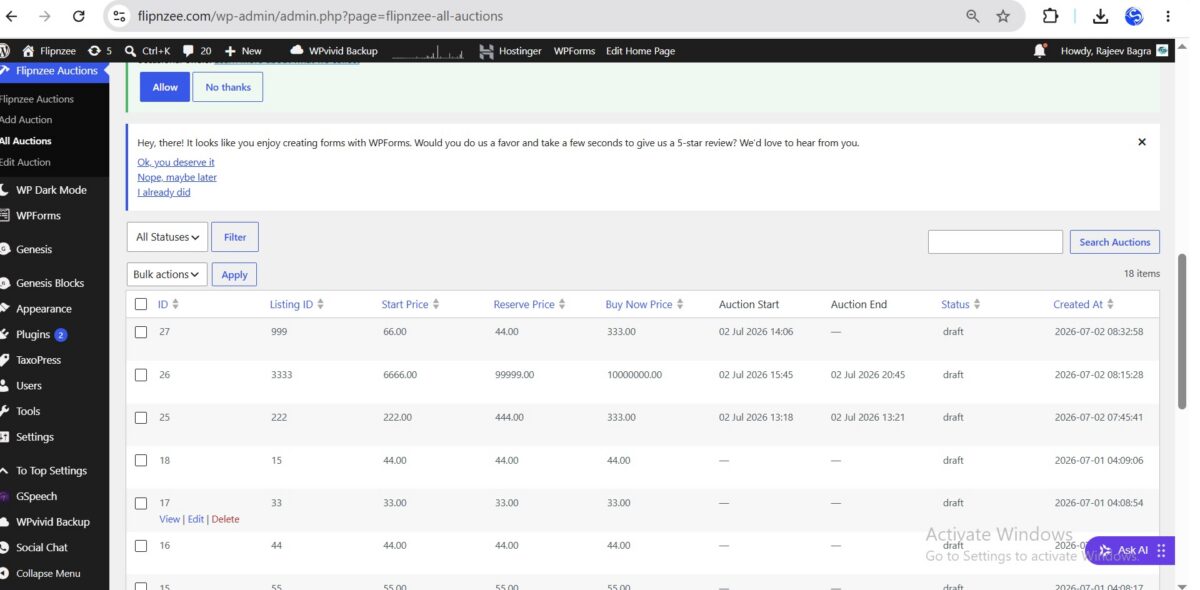
In the previous lesson, we added Auction Start and Auction End fields to the Add Auction and Edit Auction forms. However, administrators still could not see these values from the All Auctions page.
In this implementation lesson, we’ll enhance the auction management table by displaying both dates in a clean, human-readable format. We’ll also ensure that missing or invalid dates are handled gracefully.
What We’ll Build
By the end of this lesson, the All Auctions table will display:
- Auction Start
- Auction End
- Properly formatted dates
- A dash (
—) whenever no date has been configured
Instead of displaying raw database values such as:
2026-07-02 14:06:00
the table will display:
02 Jul 2026 14:06
which is much easier for administrators to read.
Step 1: Add the New Columns
Open:
admin/class-auctions-table.php
Locate the get_columns() method.
Add two new columns:
'auction_start' => 'Auction Start',
'auction_end'   => 'Auction End',
Your auctions table will now include two additional headings.
Step 2: Format the Dates
Locate the column_default() method.
Instead of returning the raw database value, we’ll format the dates using WordPress’ wp_date() function.
For the Auction Start column:
case 'auction_start':

    $timestamp = strtotime( $item->auction_start );

    if (
        empty( $item->auction_start ) ||
        '0000-00-00 00:00:00' === $item->auction_start ||
        false === $timestamp
    ) {
        return '—';
    }

    return wp_date(
        'd M Y H:i',
        $timestamp
    );
Repeat the same logic for the Auction End column:
case 'auction_end':

    $timestamp = strtotime( $item->auction_end );

    if (
        empty( $item->auction_end ) ||
        '0000-00-00 00:00:00' === $item->auction_end ||
        false === $timestamp
    ) {
        return '—';
    }

    return wp_date(
        'd M Y H:i',
        $timestamp
    );
Why Use wp_date()?
Although PHP provides the date() function, WordPress recommends using wp_date() because it:
- Respects the site’s configured timezone
- Produces consistent output across WordPress
- Follows WordPress coding standards
- Makes plugins more portable
Step 3: Handle Missing Dates Gracefully
Many auctions may not yet have a configured start or end time.
Instead of showing confusing values like:
0000-00-00 00:00:00
or
30 Nov -0001 00:00
our implementation simply displays:
—
This creates a much cleaner interface for administrators.
Step 4: Make the Columns Sortable
To improve usability, add the new columns to the sortable columns list.
Inside get_sortable_columns():
'auction_start' => array( 'auction_start', false ),
'auction_end'   => array( 'auction_end', false ),
Then update the list of allowed database columns inside:
includes/class-auction-manager.php
Add:
'auction_start',
'auction_end',
to the $allowed_columns array.
This allows administrators to sort auctions by either start or end date.
Step 5: Test the Implementation
Create a few auctions with different schedules.
Verify that:
- Auction Start displays correctly.
- Auction End displays correctly.
- Empty dates display as
—. - Clicking the column headings sorts the table.
- Existing auctions without dates continue to work normally.
Final Result
The All Auctions page now provides administrators with immediate visibility into the auction schedule without opening each auction individually.
The table is easier to scan, easier to sort, and provides a much more professional management experience.
Troubleshooting Tips
If you encounter unexpected date values:
- Verify that the database contains valid DATETIME values.
- Use
wp_date()instead ofdate(). - Check that
strtotime()returns a valid timestamp. - Display
—whenever the date is empty, invalid, or equal to0000-00-00 00:00:00.
A quick syntax check can also help before packaging the plugin:
php -l admin/class-auctions-table.php
If the command reports:
No syntax errors detected
your PHP syntax is valid.
What We Learned
In this lesson, we learned how to:
- Extend a custom
WP_List_Table - Add new columns to an admin table
- Format database dates for display
- Use
wp_date()following WordPress best practices - Handle empty and invalid dates gracefully
- Make custom columns sortable
These improvements make the Flipnzee Auctions plugin feel much closer to a polished, production-ready WordPress plugin while laying the groundwork for future features such as automatic auction activation, countdown timers, and bid management.
Download Source Code
Download the starting version of the plugin before the lesson:
Download the completed version after this lesson: