
Implementing Automatic Auction Lifecycle Management in Flipnzee Auctions (Lesson 55)

In the previous lesson, we improved the frontend by ensuring manually closed auctions no longer displayed a misleading countdown timer. However, there was still an important piece missing from the auction lifecycle.
Although an auction could reach its end time, its status in the database would remain Active until an administrator manually changed it. This meant the plugin’s stored data didn’t always reflect the true state of the auction.
In this lesson, I implemented Automatic Auction Lifecycle Management, allowing the plugin to automatically detect expired auctions and update their status to Closed.
This may seem like a small enhancement, but it significantly improves the reliability and architecture of the plugin.
The Problem
Before this lesson, an auction could look like this in the database:
| Status | Auction End |
|---|---|
| Active | Yesterday |
Although the auction had already expired, its status remained Active until someone manually edited it.
As the plugin grows, relying on manual updates becomes impractical. Features such as winner notifications, analytics, and scheduled processing all depend on accurate auction statuses.
Designing the Solution
Rather than placing the expiry logic inside the frontend or scattering it across multiple files, we decided to keep all lifecycle management inside the Auction Manager.
This follows one of the fundamental principles of object-oriented programming:
Business logic belongs in the manager classes, while presentation classes should focus only on displaying information.
Creating a Dedicated Lifecycle Method
The first step was creating a new method inside includes/class-auction-manager.php.
public static function update_expired_auctions()
Its responsibility is straightforward:
- Find auctions that are still marked as Active.
- Compare their end date and time with the current WordPress time.
- Update only those auctions whose expiry time has already passed.
Keeping this functionality in a dedicated method makes it reusable throughout the plugin.
Letting the Database Do the Work
Instead of retrieving every auction and checking them individually in PHP, we allowed MySQL to perform the update directly.
$result = $wpdb->query(
    $wpdb->prepare(
        "
        UPDATE {$table}
        SET status = %s
        WHERE status = %s
          AND auction_end < %s
        ",
        'closed',
        'active',
        current_time( 'mysql' )
    )
);
This approach is far more efficient because the database updates all matching auctions in a single query.
We also used:
current_time( 'mysql' )
instead of PHP’s date() function so that the comparison respects the timezone configured in WordPress.
Our First Implementation
Initially, I called the new method directly inside the auction shortcode.
Flipnzee_Auction_Manager::update_expired_auctions();

$auctions = Flipnzee_Auction_Manager::get_active_auctions();
The feature worked correctly.
However, after reviewing the architecture, we realised the shortcode had started doing more than simply displaying auctions.
Refactoring for Better Architecture
The shortcode was now responsible for two different tasks:
- Updating auction statuses.
- Displaying auction listings.
Although functional, this wasn’t the cleanest design.
Instead, we moved the lifecycle processing into the Auction Manager itself.
Inside get_active_auctions() we added:
self::update_expired_auctions();
The shortcode then became much cleaner.
$auctions = Flipnzee_Auction_Manager::get_active_auctions();
Now the shortcode simply requests active auctions, while the Auction Manager ensures that the returned data is already accurate.
Why This Refactoring Matters
This small architectural improvement keeps responsibilities clearly separated.
Auction Manager
Responsible for:
- Auction lifecycle
- Business rules
- Database operations
- Retrieving auction data
Shortcode Class
Responsible for:
- Displaying auction information
- Rendering HTML
- User interface
Separating responsibilities like this makes future maintenance much easier.
Testing the Feature
After completing the implementation, I carried out a real-world test instead of relying only on syntax validation.
First, I confirmed that the WordPress site was configured to use the Kolkata timezone under Settings → General.
I then created an auction with an expiry time a few minutes in the future.
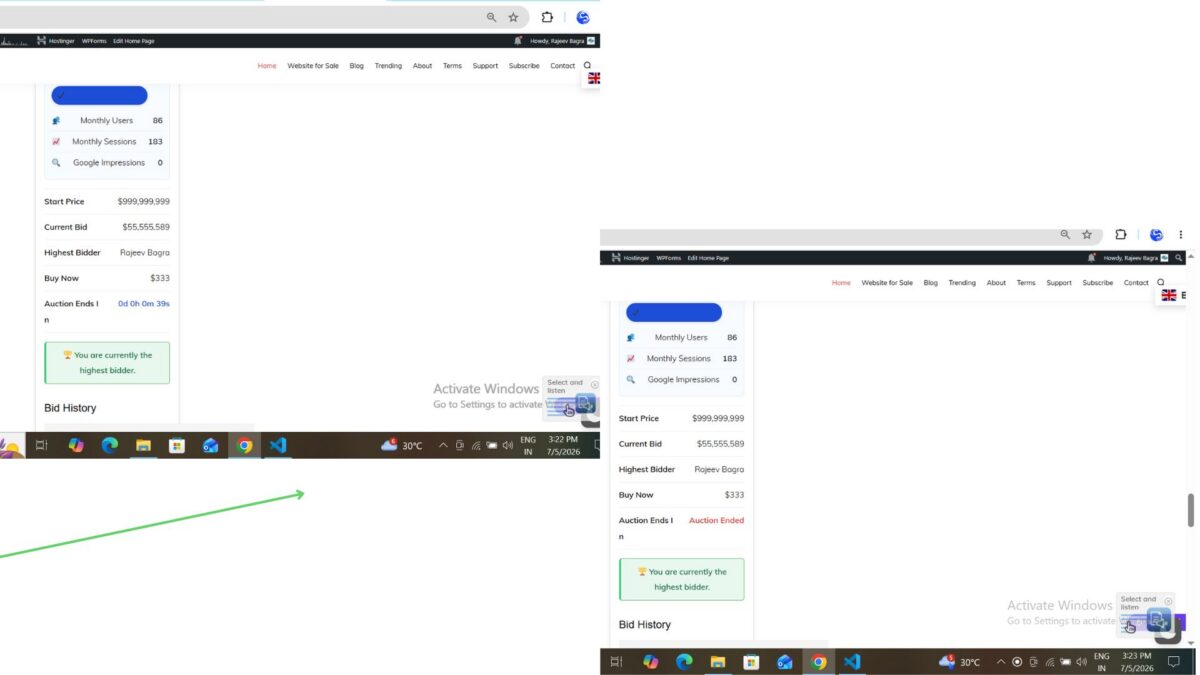
Once the end time was reached, I refreshed the auction page.
The results were exactly as expected:
- The auction automatically transitioned from Active to Closed.
- The countdown was replaced with the Auction Ended notice.
- No manual status update was required.
This confirmed that the automatic lifecycle management works correctly with the site’s configured WordPress timezone.
Lessons Learned
One of the biggest takeaways from this lesson was that good software isn’t just about making features work—it’s about placing responsibilities in the right classes.
The feature functioned correctly in its initial form, but moving the lifecycle processing into the Auction Manager resulted in a cleaner and more maintainable architecture.
Small refactorings like this become increasingly valuable as a project grows.
Looking Ahead
This lesson also supports the long-term vision for the Flipnzee Platform.
Although Flipnzee Auctions and Flipnzee Analytics are separate plugins, they are designed to complement each other. Keeping auction lifecycle management centralized provides a solid foundation for future integrations, including:
- Winner notifications
- Scheduled background processing
- Marketplace statistics
- Analytics events
- Dashboard updates
Building this foundation now will make future lessons much easier to implement.
Download Source Code
Download the starting version of the plugin before the lesson:
Download the completed version after this lesson:
Conclusion
Lesson 55 introduced automatic auction lifecycle management to the Flipnzee Auctions plugin.
Expired auctions now automatically transition from Active to Closed, keeping the database synchronized with real-world auction activity.
Just as importantly, this lesson reinforced the architectural principles that guide the project: business logic belongs in manager classes, presentation classes should remain focused on the user interface, and each improvement should prepare the plugin for future growth.
With Lesson 55 complete, Flipnzee Auctions has become more reliable, easier to maintain, and better prepared for the next stage of development.