
Lesson 58 Implementation: Adding a Persistent Activity Logging System to Flipnzee Auctions

In the previous lesson, we introduced WordPress hooks so that other plugins and future Flipnzee components could respond whenever auctions were automatically closed.
In this lesson, we take the next step by building a lightweight activity logging system. Instead of silently processing important events, the plugin now records them in a dedicated log file. This creates an audit trail that helps during debugging, monitoring, and future analytics development.
What We Built
By the end of this lesson, the plugin can:
- Create a dedicated logging class
- Automatically create a log directory if it doesn’t exist
- Create an activity.log file
- Record important auction events
- Store timestamps and useful event details
- Keep logs separate from WordPress debug.log
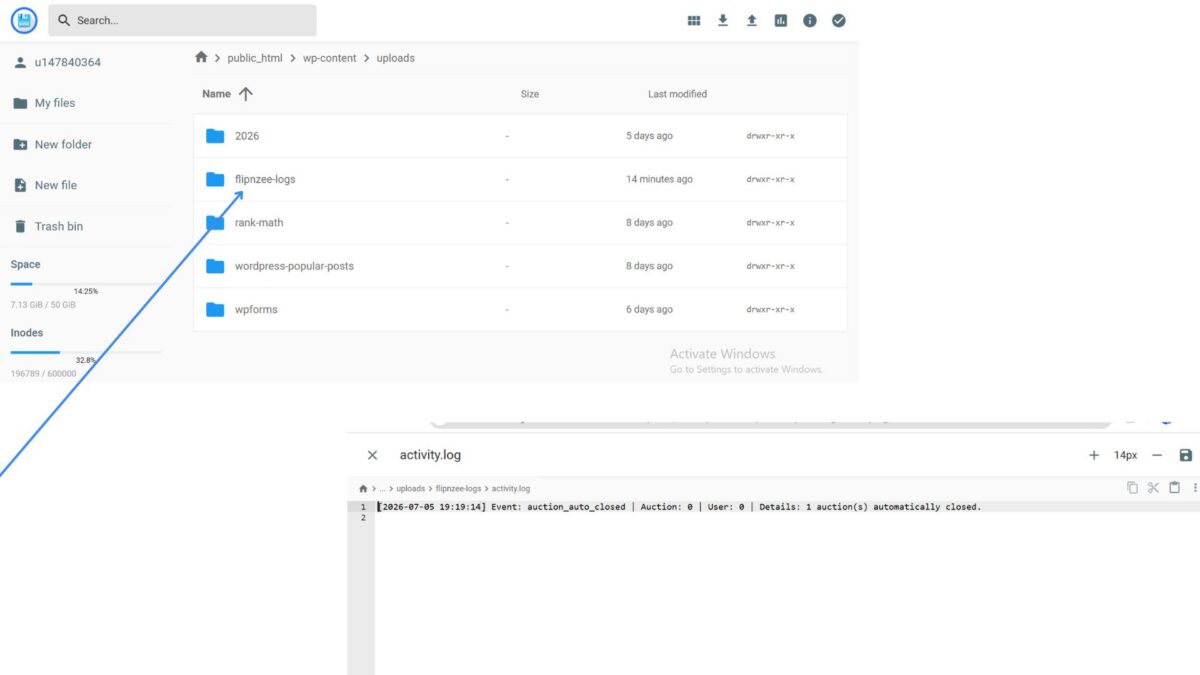
Example log entry:
[2026-07-05 19:19:14]
Event: auction_auto_closed
Auction: 0
User: 0
Details: 1 auction(s) automatically closed.
Step 1 — Create the Activity Logger
A new file was added:
includes/class-activity-log.php
This class is responsible for:
- Creating the log directory
- Creating the log file
- Formatting log entries
- Writing entries safely
Instead of scattering error_log() calls throughout the plugin, everything now goes through one reusable class.
Benefits include:
- Cleaner code
- Easier maintenance
- Centralized logging
- Future extensibility
Step 2 — Load the Logger
The new logger class was loaded inside the main plugin file:
flipnzee-auctions.php
The class is included only if the file exists:
require_once FLIPNZEE_AUCTION_PATH .
    'includes/class-activity-log.php';
This ensures the logger is available everywhere in the plugin.
Step 3 — Record Automatic Auction Closures
Inside:
includes/class-auction-manager.php
The existing method:
update_expired_auctions()
was enhanced.
After expired auctions are closed automatically, the plugin now records a log entry.
Example:
if ( $updated_count > 0 ) {

    Flipnzee_Activity_Log::log(
        'auction_auto_closed',
        0,
        0,
        sprintf(
            '%d auction(s) automatically closed.',
            $updated_count
        )
    );
}
This means activity is only logged when one or more auctions were actually updated.
Step 4 — Store Logs in a Dedicated Folder
Rather than using WordPress’s global debug log, the plugin now creates its own directory:
wp-content/uploads/
    flipnzee-logs/
        activity.log
Keeping logs separate provides several advantages:
- Easier troubleshooting
- Cleaner WordPress debug logs
- Plugin-specific history
- Better preparation for future analytics features
Step 5 — Test the Logger
To verify everything worked:
- Created an auction that would expire shortly.
- Waited for the auction to expire.
- Allowed the plugin to automatically close the auction.
- Opened the log file on the server.
The log contained:
Event: auction_auto_closed
Details: 1 auction(s) automatically closed.
This confirmed that:
- automatic expiration worked,
- the logger executed correctly,
- and the activity file was successfully written.
Final Result
The Flipnzee Auctions plugin now includes its own lightweight activity logging framework.
Important auction events can now be recorded without relying on WordPress debug logs, making troubleshooting significantly easier during development.
More importantly, this logging infrastructure lays the groundwork for future features such as:
- administrator activity history
- bidder activity logs
- seller notifications
- email event tracking
- analytics dashboards
- security auditing
- webhook monitoring
- plugin diagnostics
Download Source Code
Download the starting version of the plugin before the lesson:
Download the completed version after this lesson:
Key Takeaways
During this lesson, we:
- Created a reusable
Flipnzee_Activity_Logclass. - Loaded the logger through the main plugin bootstrap.
- Logged automatic auction closures.
- Stored logs in
wp-content/uploads/flipnzee-logs/activity.log. - Successfully verified that the logger writes real events to disk.
The Flipnzee Auctions plugin now has a solid foundation for tracking important marketplace activity, making future debugging, reporting, and analytics much easier.