
Lesson 63 Implementation: Building an Event-Driven Transaction System for Flipnzee Auctions

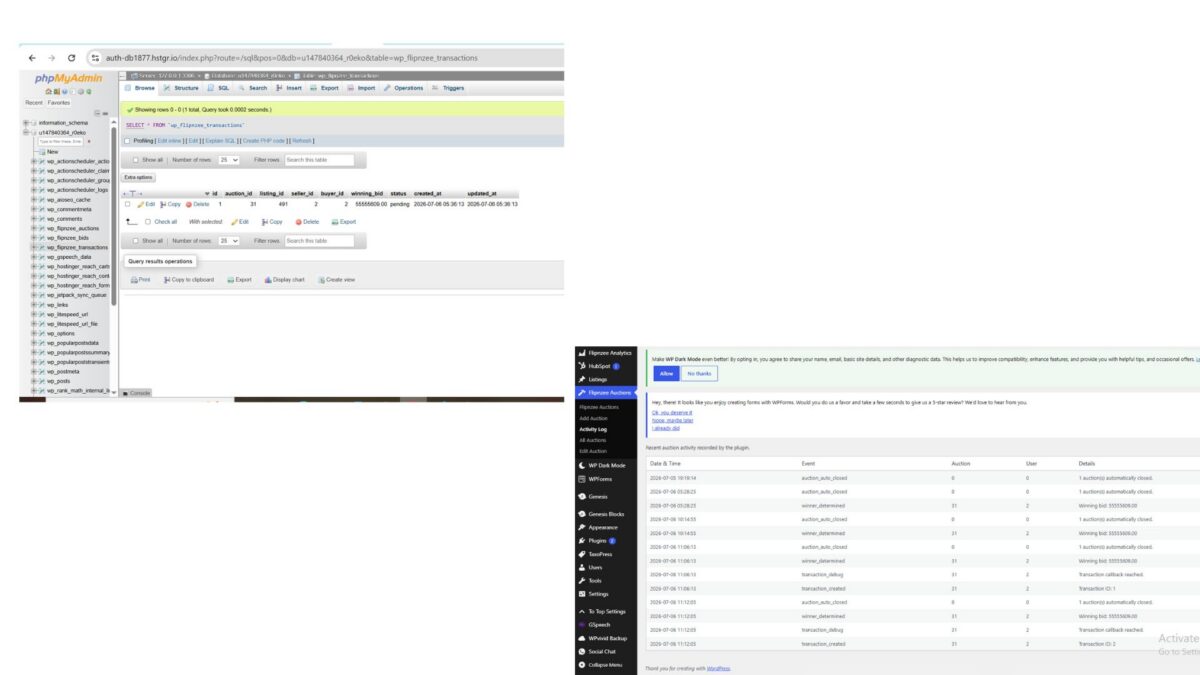
After completing the database structure in Lesson 62, the next logical step was to automate what happens after an auction successfully ends.
Instead of tightly coupling transaction creation with the auction closing logic, this lesson introduced an event-driven architecture using WordPress hooks. This approach keeps the plugin modular and makes future integrations—such as escrow services, payment gateways, and notifications—much easier.
Objective
Automatically create a transaction record whenever an auction winner is determined.
By the end of this lesson:
- Auction winner determination triggers an event.
- The Transaction Manager listens for that event.
- A transaction is automatically created.
- The Activity Log records the transaction creation.
Step 1: Fire an Event After Determining the Winner
Winner determination is handled inside:
includes/class-bid-manager.php
After recording the winner in the Activity Log, add:
do_action(
	'flipnzee_auction_winner_determined',
	$auction_id,
	$winner
);
The end of the method becomes:
Flipnzee_Activity_Log::log(
	'winner_determined',
	$auction_id,
	$winner->bidder_id,
	sprintf(
		'Winning bid: %s',
		$winner->bid_amount
	)
);

do_action(
	'flipnzee_auction_winner_determined',
	$auction_id,
	$winner
);

return true;
This broadcasts an event without knowing who will respond to it.
Step 2: Create the Transaction Manager Listener
Open:
includes/class-transaction-manager.php
Add a constructor:
public function __construct() {

	add_action(
		'flipnzee_auction_winner_determined',
		array(
			$this,
			'create_transaction_from_auction',
		),
		10,
		2
	);
}
Whenever the event is fired, this callback will execute automatically.
Step 3: Build the Callback Method
Add the following method:
/**
 * Create transaction when an auction winner is determined.
 *
 * @param int    $auction_id Auction ID.
 * @param object $winner     Winning bid.
 * @return void
 */
public function create_transaction_from_auction(
	$auction_id,
	$winner
) {

	global $wpdb;

	$auction = $wpdb->get_row(
		$wpdb->prepare(
			"SELECT *
			FROM {$wpdb->prefix}flipnzee_auctions
			WHERE id = %d",
			$auction_id
		)
	);

	if ( ! $auction ) {
		return;
	}

	$listing_author = (int) get_post_field(
		'post_author',
		$auction->listing_id
	);

	$transaction_id = self::create_transaction(
		array(
			'auction_id'  => $auction->id,
			'listing_id'  => $auction->listing_id,
			'seller_id'   => $listing_author,
			'buyer_id'    => $winner->bidder_id,
			'winning_bid' => $winner->bid_amount,
		)
	);

	if ( $transaction_id ) {

		Flipnzee_Activity_Log::log(
			'transaction_created',
			$auction->id,
			$winner->bidder_id,
			'Transaction ID: ' . $transaction_id
		);
	}
}
This method:
- retrieves the auction,
- identifies the seller,
- creates a transaction,
- logs the successful creation.
Step 4: Load the Transaction Manager
Open:
flipnzee-auctions.php
Near the bottom:
new Flipnzee_Shortcodes();
Add:
new Flipnzee_Transaction_Manager();
Result:
new Flipnzee_Shortcodes();
new Flipnzee_Transaction_Manager();
Without instantiating the class, WordPress would never register the action hook.
Step 5: Verify Syntax
Run:
php -l includes/class-bid-manager.php
Then:
php -l includes/class-transaction-manager.php
Both should report:
No syntax errors detected
Step 6: Test the Workflow
Create a test auction.
Place at least one bid.
Allow the auction to expire naturally.
After scheduled maintenance runs, verify:
Activity Log
You should see:
winner_determinedtransaction_created
Transactions Table
A new row should appear inside:
wp_flipnzee_transactions
Example:
| Auction | Seller | Buyer | Status |
|---|---|---|---|
| 31 | 2 | 2 | pending |
Event Flow
The plugin now follows this architecture:
Auction Ends
        │
        ▼
Bid Manager
Determines Winner
        │
        ▼
do_action(
    flipnzee_auction_winner_determined
)
        │
        ▼
Transaction Manager
        │
        ▼
Creates Transaction
        │
        ▼
Activity Log
Each component has a single responsibility.
Challenges Faced
During implementation, an important architectural refinement emerged.
Initially, the event hook was placed inside the Auction Manager. However, testing showed that winner determination actually occurs within the Bid Manager. Moving the hook to the correct location ensured that the event is fired exactly when the winning bid is known.
This adjustment resulted in a cleaner and more maintainable design.
Lessons Learned
Several important WordPress development concepts were reinforced:
- WordPress hooks can be used to build event-driven systems.
- Managers should communicate through actions rather than direct method calls.
- Keeping responsibilities separated improves maintainability.
- Activity logs provide valuable insight during debugging and verification.
- Incremental testing after each change makes it easier to isolate and resolve issues.
Download Source Code
Download the starting version of the plugin before the lesson:
Download the completed version after this lesson:
Outcome
By the end of this lesson, the Flipnzee Auctions plugin automatically creates a transaction record whenever an auction successfully determines a winner. The transaction is stored in its own database table and recorded in the Activity Log, providing a reliable foundation for future features such as escrow integration, payment processing, seller confirmation, buyer confirmation, and ownership transfer.
This lesson marks an important architectural milestone, transitioning the plugin toward a scalable, event-driven design that will support the remaining stages of the auction lifecycle.