
Lesson 66 Implementation: Building a Transaction Details Page for Completed Auctions

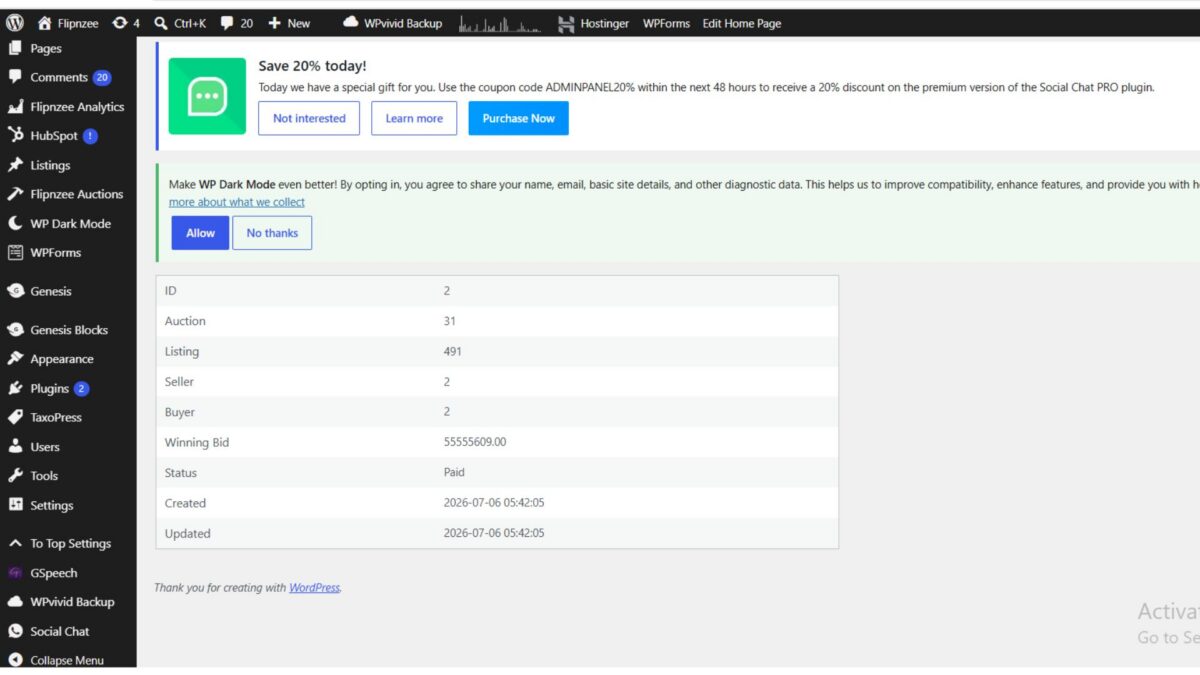
One of the biggest advantages of developing your own WordPress plugin is that you can continuously improve the user experience. In the previous lessons, the Flipnzee Auctions plugin was already creating transactions automatically after an auction ended and displaying them in a Transactions table. However, there was no way to inspect a transaction in detail.
In this lesson, a dedicated Transaction Details page was introduced. This page provides administrators with complete information about an individual auction transaction and lays the foundation for future features such as escrow management, payment verification, domain transfer tracking, and audit logs.
What We Built
Instead of only viewing a transaction inside a table, administrators can now click a View action to open a dedicated page displaying all transaction information.
Current information displayed includes:
- Transaction ID
- Auction ID
- Listing ID
- Seller ID
- Buyer ID
- Winning Bid
- Transaction Status
- Created Date
- Updated Date
This provides a much cleaner workflow compared to searching through database records manually.
Step 1 – Creating the Transaction Details Admin Page
A new admin class was created:
admin/class-admin-transaction-details.php
This class is responsible for rendering the Transaction Details screen inside the WordPress admin dashboard.
Initially, the page only displayed a placeholder message while the routing and menu registration were tested.
Step 2 – Registering the Admin Page
The new page was registered inside the plugin’s admin menu.
Unlike normal menu pages, this page is hidden from the sidebar because it is accessed directly from the Transactions table using a URL similar to:
admin.php?page=flipnzee-transaction-details&transaction_id=2
This keeps the admin menu clean while still allowing administrators to access detailed information.
Step 3 – Loading Transaction Data
Inside the render_page() method, the transaction ID is safely retrieved using:
$transaction_id = isset( $_GET['transaction_id'] )
	? absint( $_GET['transaction_id'] )
	: 0;
Using absint() ensures only valid numeric IDs are accepted.
The transaction is then retrieved from the custom database table using a prepared SQL query.
This protects the plugin against SQL injection while ensuring the correct transaction is loaded.
Step 4 – Handling Invalid Transactions
Good plugins never assume that data always exists.
If an invalid transaction ID is supplied, the plugin now displays an error message instead of generating PHP warnings or fatal errors.
Example:
Transaction not found.
This small validation greatly improves the robustness of the plugin.
Step 5 – Displaying Transaction Information
After confirming that the transaction exists, the placeholder content was replaced with a professional information table.
The page now displays:
| Field | Description |
|---|---|
| ID | Internal transaction ID |
| Auction | Auction record ID |
| Listing | WordPress listing ID |
| Seller | Seller user ID |
| Buyer | Buyer user ID |
| Winning Bid | Final auction amount |
| Status | Current transaction status |
| Created | Creation timestamp |
| Updated | Last update timestamp |
This information is presented using a WordPress widefat striped table for a consistent admin experience.
Step 6 – Troubleshooting During Development
Like most real-world development sessions, implementation was not completely straightforward.
Several issues were encountered, including:
- PHP parse errors caused by misplaced braces.
- Accidental duplication of an
ifstatement during copy-and-paste. - Mixed HTML and PHP tags while replacing placeholder content.
- Leftover placeholder code causing unexpected output.
- Additional syntax validation before uploading the plugin.
Each issue was resolved by:
- Running PHP syntax checks:
php -l admin/class-admin-transaction-details.php
- Carefully reviewing opening and closing braces.
- Replacing only the affected code block instead of rewriting the entire file.
- Testing after every small change.
This incremental debugging approach made it much easier to locate and resolve problems.
Final Result
The Flipnzee Auctions plugin now includes a dedicated Transaction Details page.
Administrators can:
- Open a completed transaction
- View all important transaction information
- Verify buyer and seller IDs
- Review the winning bid
- Check the current transaction status
- See creation and update timestamps
The page is now ready for future enhancements without requiring any structural redesign.
Why This Matters
Although this page currently displays basic information, it establishes the foundation for a complete transaction management system.
Future lessons can build upon this page by adding:
- Buyer profile links
- Seller profile links
- Listing title instead of ID
- Auction title
- Escrow status
- Payment history
- Domain transfer progress
- Shipping information (for physical products)
- Internal administrator notes
- Activity timeline
- Email history
- Downloadable invoices
Because the framework is already in place, adding these features will be much easier.
Download Source Code
Download the starting version of the plugin before the lesson:
Download the completed version after this lesson:
Lessons Learned
During this implementation, several important development practices were reinforced:
- Build features incrementally rather than all at once.
- Validate user input before querying the database.
- Always use prepared SQL statements.
- Check for missing records gracefully.
- Run PHP syntax checks before uploading changes.
- Test every modification immediately to catch errors early.
- Use dedicated detail pages instead of overcrowding list tables.
Conclusion
Lesson 66 significantly improves the administrative experience of the Flipnzee Auctions plugin. Instead of viewing transactions only in a summary table, administrators can now inspect individual transactions on a dedicated page with all essential details.
More importantly, this page serves as the foundation for advanced transaction management features planned for future lessons, bringing the plugin another step closer to a production-ready auction platform.