
Lesson 66: Building a Transaction Details Page for Flipnzee Auctions

Overview
In previous lessons, we built a complete transaction workflow:
- Auctions close automatically.
- Winners are determined.
- Transactions are created automatically.
- Administrators can view transactions.
- Transaction statuses can be updated.
However, administrators still cannot inspect an individual transaction in detail.
In this lesson, we’ll build a dedicated Transaction Details page where administrators can view every aspect of a completed auction before moving on to escrow, payment, or ownership transfer.
What You Will Learn
In this lesson you will learn how to:
- Create an admin details page.
- Read a single transaction securely.
- Display auction information.
- Display buyer and seller information.
- Display listing information.
- Display winning bid information.
- Display transaction timeline.
- Prepare the page for escrow integration.
Why This Lesson Matters
Imagine receiving an email from a buyer asking:
“Has my payment been received?”
Currently an administrator would need to search several database tables.
Instead, we’ll provide a dedicated transaction page showing everything in one place.
Current Workflow
Auction

↓

Winner

↓

Transaction

↓

Transactions Table
New Workflow
Auction

↓

Winner

↓

Transaction

↓

Transactions Table

↓

Transaction Details
What We’ll Build
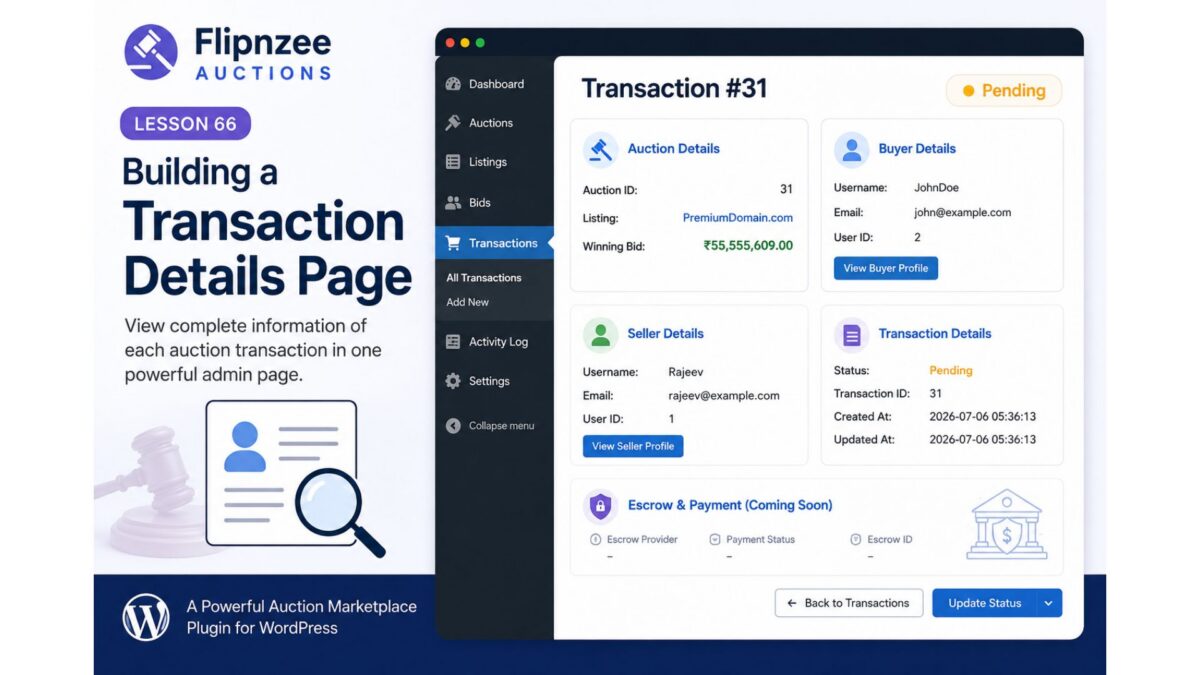
Each transaction will have a View action.
Example:
ID      Status

31      Pending

View
Clicking View opens:
Transaction #31

Auction
-----------------------------------
Auction ID
Listing
Winning Bid

Buyer
-----------------------------------
Username
Email

Seller
-----------------------------------
Username
Email

Status
-----------------------------------
Pending

Created

Last Updated
Files We’ll Modify
New
admin/class-admin-transaction-details.php
Modify
admin/class-admin-transactions.php
Modify
admin/class-transactions-table.php
Reuse
includes/class-transaction-manager.php
Features
Step 1
Create Transaction Details page.
Step 2
Register submenu page.
Step 3
Add View action.
Step 4
Load transaction.
Step 5
Display buyer details.
Step 6
Display seller details.
Step 7
Display auction details.
Step 8
Display transaction status.
Step 9
Display timestamps.
Step 10
Prepare escrow section placeholder.
Example Page
------------------------------------------------

Transaction #12

Status
Pending

-----------------------------------------------

Auction

Auction ID: 31

Listing:
PremiumDomain.com

Winning Bid:
₹55,555,609

-----------------------------------------------

Buyer

Username:
John

Email:
[email protected]

-----------------------------------------------

Seller

Username:
Rajeev

Email:
[email protected]

-----------------------------------------------

Created

2026-07-06 14:25

Updated

2026-07-06 14:31

------------------------------------------------
Future Escrow Section
The page will intentionally leave space for:
Escrow Provider

Payment Status

Escrow ID

Release Funds

Release Domain

Complete Transaction
These features will be implemented in later lessons without redesigning the page.
Skills You’ll Practice
- WordPress admin pages
- Secure URL parameters
- Database lookups
- WordPress user functions
- Data presentation
- Preparing for escrow integration
- Clean admin UI design
Difficulty Level
Intermediate
This lesson combines custom admin pages, database retrieval, and structured data presentation. It also establishes the administrative workflow that will support escrow services, payment processing, and domain or website transfers in future lessons.
Final Thoughts
Lesson 66 marks another important milestone in the Flipnzee Auctions plugin. Instead of treating transactions as simple database records, administrators will be able to inspect every completed auction from a single screen. This improves usability, simplifies support, and creates the ideal foundation for integrating escrow providers, payment gateways, email notifications, and ownership transfer workflows as the plugin moves closer to powering live auctions on Flipnzee.com.