
Lesson 125: Designing the Escrow.com Integration Architecture

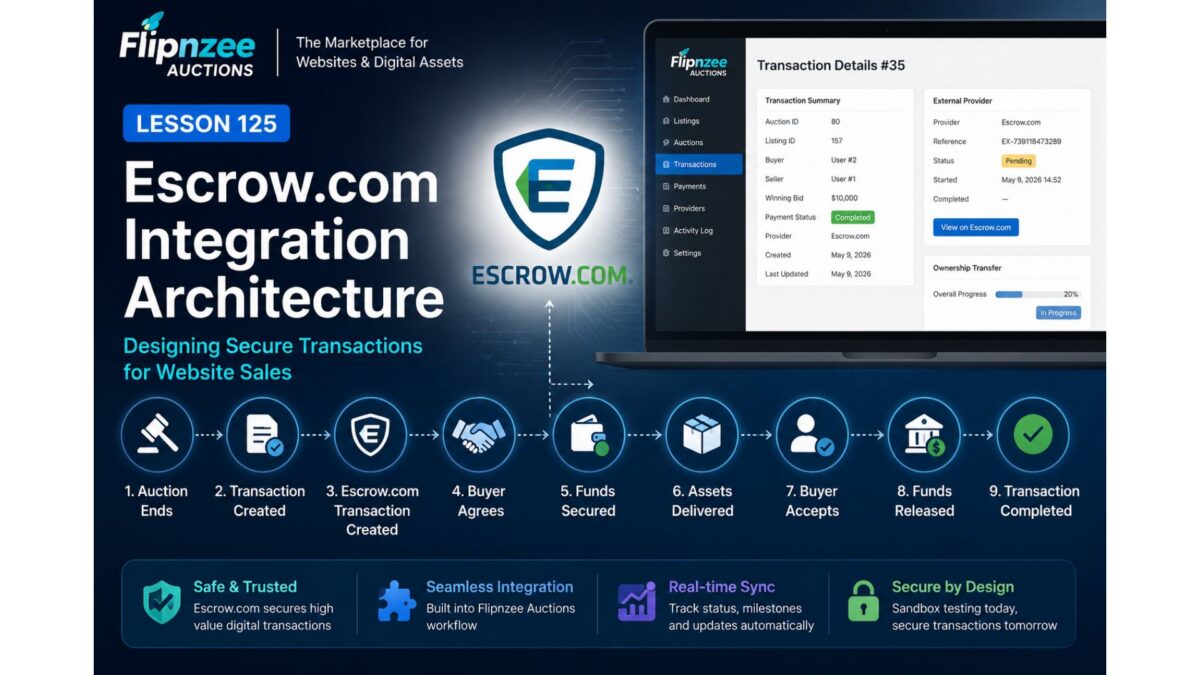
Overview
With the transaction management workflow now established, the next objective is to replace the simulated Escrow provider with a production-ready integration.
Rather than treating Escrow.com as simply another payment gateway, Flipnzee Auctions will use it as the central transaction platform responsible for securely managing website sales between buyers and sellers.
This lesson focuses on designing that integration before implementing live API communication.
Why Escrow.com?
Unlike Stripe or PayPal, Escrow.com is designed for high-value transactions where assets are transferred after payment conditions have been satisfied.
Website and domain sales fit this model almost perfectly.
The buyer wants assurance that ownership will be transferred.
The seller wants assurance that payment has been secured.
Escrow.com acts as the trusted intermediary throughout that process. (escrow.com)
Current Plugin Workflow
Today the plugin works like this:
Auction Ends

↓

Transaction Created

↓

Payment Completed

↓

Ownership Transfer

↓

Transaction Closed
This is ideal for simulation, but it doesn’t yet involve Escrow.com.
Future Workflow
With API integration the workflow becomes:
Auction Ends

↓

Flipnzee Creates Transaction

↓

Escrow.com Transaction Created

↓

Buyer Agrees

↓

Buyer Funds Escrow

↓

Escrow Confirms Funds

↓

Seller Transfers Website

↓

Buyer Accepts Website

↓

Escrow Releases Funds

↓

Transaction Completed
The Flipnzee plugin becomes the orchestration layer, while Escrow.com manages the escrow lifecycle. (escrow.com)
Components We Will Build
The architecture will evolve as follows:
Flipnzee Auctions

│

├── Auction Manager

├── Transaction Manager

├── Payment Manager

├── External Provider Manager

│

└── Escrow Provider

        │

        ▼

Escrow API Client

        │

        ▼

Escrow.com REST API
The existing Flipnzee_Escrow_Provider becomes responsible for communicating with the live API instead of generating simulated references.
API Responsibilities
The Escrow API Client will eventually support operations such as:
- Create Escrow transaction
- Retrieve transaction details
- Synchronize provider status
- Generate agreement links
- Monitor funding status
- Track inspection periods
- Detect completion
- Detect cancellation
- Record disputes
This logic will remain isolated from the rest of the plugin.
Mapping Plugin Data
Most of the information required by Escrow.com already exists inside Flipnzee Auctions.
| Flipnzee | Escrow.com |
|---|---|
| Auction | Transaction |
| Listing | Item |
| Buyer | Buyer |
| Seller | Seller |
| Winning Bid | Amount |
| Transaction ID | Reference |
| Ownership Transfer | Inspection & Acceptance |
Very little additional data will be required.
Website Sales as Milestone Transactions
One particularly interesting discovery is that Escrow.com recommends Milestone Transactions for services and website/domain sales involving staged delivery. This maps well to your plugin because ownership transfer already has multiple steps that can be represented as milestones rather than a single “completed” event. (escrow.com)
A future transaction could look like:
Payment Funded

↓

Website Files Delivered

↓

Database Delivered

↓

Domain Transferred

↓

Buyer Verification

↓

Escrow Releases Funds
Your existing Ownership Transfer feature already provides the beginnings of this model.
Keeping Responsibilities Separate
One design principle remains unchanged:
- Transaction Manager manages marketplace transactions.
- External Provider Manager stores provider records.
- Escrow Provider communicates with Escrow.com.
- Escrow API Client performs HTTP requests.
Each class retains a single responsibility, making the integration easier to maintain and test.
Immediate Goal
The next implementation lessons will focus on introducing a dedicated API client and configuration rather than making live requests immediately.
A sensible progression would be:
- Lesson 126 — Build an
Escrow_API_Clientclass (authentication, HTTP abstraction, sandbox support). - Lesson 127 — Add Escrow API settings (API key, email, sandbox/live mode).
- Lesson 128 — Create live transactions from Flipnzee Auctions.
- Lesson 129 — Synchronize transaction status from Escrow.com.
- Lesson 130 — Handle agreement links, funding, and milestone updates.
This staged approach lets us test each layer independently before enabling real financial transactions.
One recommendation
I also noticed from your screenshot that you’re already using Escrow.com “Buy It Now” and “Make an Offer” buttons on your listings. That’s a smart transitional solution because it gives buyers a trusted path today while the plugin evolves.
When the API integration is complete, those external buttons can be replaced by plugin-driven actions:
- Buy with Escrow
- Make Offer
- Proceed to Escrow
These buttons would create and manage Escrow.com transactions automatically while keeping the user inside the Flipnzee workflow until it’s time to complete the secure escrow process. That will make Flipnzee feel like a complete marketplace rather than a site that links out to Escrow.com.