
Lesson 42 Implementation: Adding a Live JavaScript Auction Countdown to Flipnzee Auctions

One of the key characteristics of any modern auction website is a live countdown timer. Instead of showing visitors only the auction end date, a countdown creates urgency and helps buyers know exactly how much time remains before bidding closes.
In this lesson, the Flipnzee Auctions plugin was enhanced by replacing the static auction end date with a live JavaScript countdown timer that updates every second.
Objective
Convert this:
Auction Ends
03 Jul 2026
into something like:
Auction Ends In
5d 14h 32m 08s
and automatically display:
Auction Ended
once the auction expires.
What Was Implemented
The countdown feature required changes in three different areas of the plugin.
Step 1 — Create a JavaScript Countdown File
A new file was created:
assets/js/countdown.js
This script:
- Finds every countdown on the page
- Reads the auction end date
- Calculates the remaining time
- Updates every second
- Automatically displays “Auction Ended” when time runs out
Step 2 — Pass the Auction End Date to JavaScript
Inside the shortcode output, the auction end date was stored inside a custom HTML data attribute.
Example:
<span
class="flipnzee-countdown"
data-end="2026-07-03 06:29:00">
Loading...
</span>
This allows JavaScript to read the date without embedding PHP inside the script.
Step 3 — Enqueue the JavaScript File
The plugin originally loaded only the frontend CSS.
It was updated to also load the countdown script.
Example:
wp_enqueue_script(
    'flipnzee-countdown',
    FLIPNZEE_AUCTION_URL . 'assets/js/countdown.js',
    array(),
    FLIPNZEE_AUCTION_VERSION,
    true
);
Loading the script in the footer ensures the HTML has already been generated before JavaScript executes.
Step 4 — Update the Countdown Every Second
JavaScript calculates the remaining:
- Days
- Hours
- Minutes
- Seconds
and refreshes the display every second using:
setInterval(updateCountdown, 1000);
The visitor therefore always sees an accurate countdown without refreshing the page.
Step 5 — Display “Auction Ended”
When the remaining time reaches zero, the script automatically changes the display to:
Auction Ended
instead of showing negative numbers.
Step 6 — Add Visual Styling
The countdown text was styled using CSS.
Normal countdown:
- Blue text
- Semi-bold
Expired auction:
- Red text
- Bold
Example CSS:
.flipnzee-countdown {
    color: #1d4ed8;
    font-weight: 600;
}

.flipnzee-countdown.ended {
    color: #dc2626;
    font-weight: 700;
}
This makes expired auctions immediately obvious to visitors.
Final Result
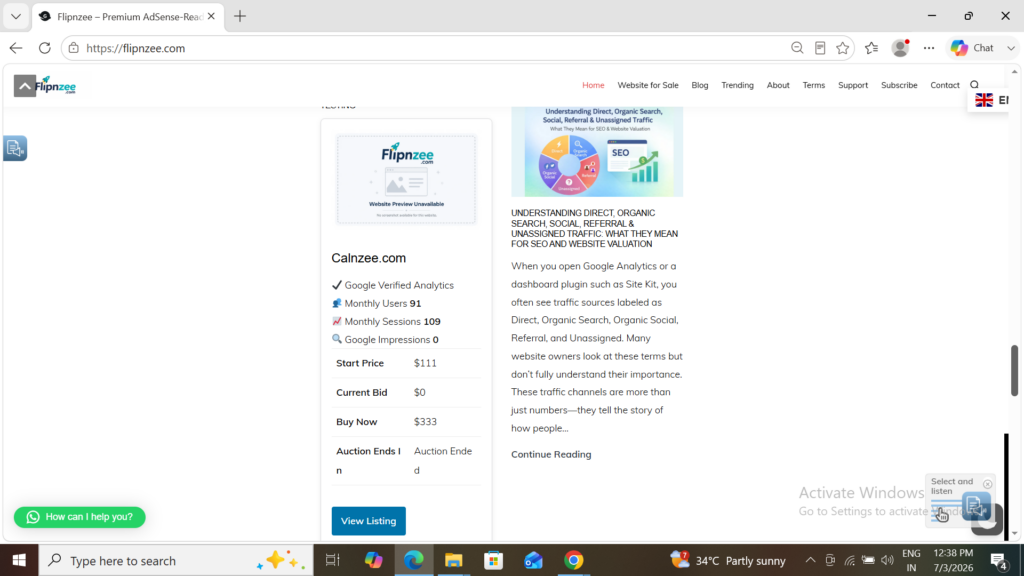
Each auction listing now displays:
✔ Google Verified Analytics

👥 Monthly Users
📈 Monthly Sessions
🔍 Google Impressions

Start Price
Current Bid
Buy Now

Auction Ends In
5d 08h 16m 42s

View Listing
Once the timer reaches zero, it automatically changes to:
Auction Ends In
Auction Ended
with the expired status highlighted in red.
What Was Learned
During this lesson, several important WordPress development concepts were covered:
- Creating and organizing external JavaScript files
- Loading JavaScript properly using
wp_enqueue_script() - Passing PHP data to JavaScript through HTML data attributes
- Using
setInterval()to update content dynamically - Calculating countdown timers with JavaScript date functions
- Enhancing user experience with conditional CSS classes
Why This Feature Matters
A live countdown is a standard feature on professional auction platforms because it creates urgency and encourages users to act before time runs out. Even without refreshing the page, visitors always know exactly how much time remains.
With this enhancement, the Flipnzee Auctions plugin feels significantly more interactive and professional, bringing it one step closer to a production-ready auction solution.
Download Source Code
Download the starting version of the plugin before the lesson:
Download the completed version after this lesson:
Complete Source Code
The complete source code for this lesson is available in the Flipnzee Auctions GitHub repository and reflects the changes made to implement the live JavaScript auction countdown.