
Understanding the WordPress Technology Stack: Programming Language, Database, CMS and Web Server

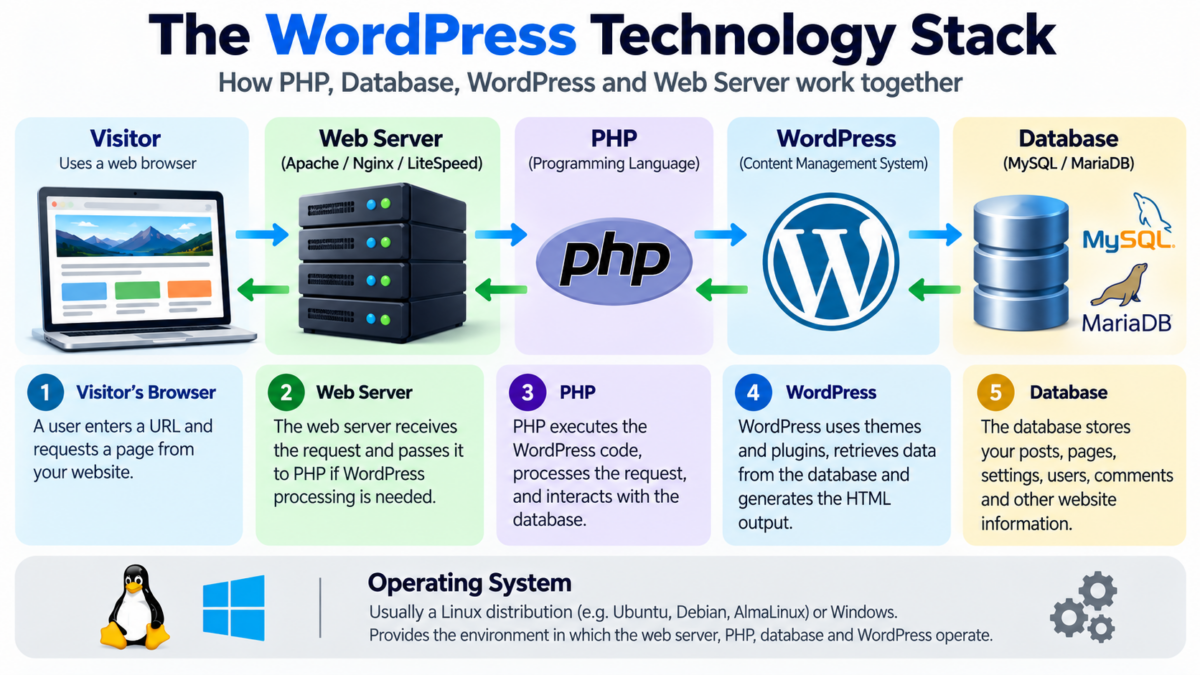
WordPress is one of the world’s most widely used Content Management Systems (CMS). It enables individuals, businesses, bloggers, and developers to create and manage websites without having to develop every feature from scratch.
However, WordPress does not operate independently. It relies on several underlying technologies that work together to make a website functional.
To understand how WordPress works, it is useful to classify its technology stack into four fundamental components:
- Programming Language
- Database Management System
- Content Management System (CMS)
- Web Server
An operating system provides the underlying environment in which these technologies operate.
Let’s examine each component, understand its responsibilities, and see how they combine to power a WordPress website.
1. Programming Language: PHP
A programming language provides instructions that a computer can execute to perform specific tasks.
WordPress is primarily developed using PHP, a server-side programming language.
PHP is responsible for executing the instructions that make WordPress function. It processes requests, communicates with databases, executes application logic, and generates dynamic webpage content.
What does PHP do in WordPress?
Consider a visitor opening a blog post on a WordPress website.
PHP helps WordPress:
- Identify which webpage the visitor has requested.
- Retrieve the relevant information from the database.
- Process theme and plugin functionality.
- Apply website settings and user permissions.
- Generate the HTML output that the visitor’s browser receives.
PHP also powers the WordPress administration dashboard, enabling website owners to create posts, install plugins, change settings, and manage their websites.
Does PHP run on the visitor’s computer?
No. PHP normally runs on the server hosting the website.
The visitor’s browser receives the resulting HTML, CSS, JavaScript, images, and other frontend resources rather than executing the website’s PHP code.
This is why PHP is classified as a server-side programming language.
Other examples of server-side programming languages used in web development include Python, Java, Ruby, and JavaScript through Node.js.
However, WordPress itself primarily relies on PHP.
2. Database Management System: MySQL or MariaDB
Every dynamic website needs a mechanism to store and retrieve information.
WordPress uses a relational database management system (RDBMS) to manage its website data.
The two commonly used database systems for WordPress are:
- MySQL
- MariaDB
Although they are separate database management systems, MariaDB originated as a fork of MySQL and maintains substantial compatibility with it.
What is the role of a database?
A database stores information in an organised manner so that applications can retrieve, update, and manage it when required.
A typical WordPress database stores:
- Blog posts and pages.
- User accounts and password hashes.
- Categories and tags.
- Comments.
- Website settings.
- Plugin settings and data.
- Navigation menu information.
- Other structured website information.
WordPress organises much of this information into database tables.
For example:
| Database table | Purpose |
|---|---|
| wp_posts | Stores posts, pages, and other content types |
| wp_users | Stores user account information |
| wp_comments | Stores comments |
| wp_options | Stores website settings |
| wp_terms | Stores categories, tags, and taxonomy terms |
| wp_postmeta | Stores additional information associated with posts |
The prefix wp_ is the default and can be changed during installation.
Can WordPress use databases other than MySQL?
WordPress is designed around a database abstraction layer and has historically supported MySQL and MariaDB as its standard database backends.
Other database technologies exist, including PostgreSQL, SQLite, and Microsoft SQL Server. However, they are not interchangeable with the standard WordPress database setup. Using them generally requires additional compatibility layers or specialised implementations.
Therefore, when selecting a conventional WordPress hosting plan, MySQL or MariaDB compatibility is essential.
3. Content Management System: WordPress
The third component is the Content Management System itself.
WordPress is open-source software distributed through WordPress.org. It is primarily written in PHP and uses a database to store and retrieve website information.
While PHP provides the programming foundation and MySQL or MariaDB manages the data, WordPress brings these capabilities together into a practical website management platform.
What does WordPress provide?
WordPress provides several important features.
A. Administration Dashboard
The dashboard allows website owners to manage posts, pages, media, comments, users, settings, and other website functionality.
B. Themes
Themes control the visual presentation of a website.
They determine elements such as:
- Page layouts.
- Typography.
- Colours.
- Header and footer designs.
- Templates.
- Responsive presentation.
C. Plugins
Plugins extend the functionality of WordPress.
For example, plugins can add:
- Contact forms.
- SEO functionality.
- Analytics dashboards.
- Auction systems.
- E-commerce facilities.
- Mathematical calculators.
- Membership systems.
- Security features.
D. Content Management
WordPress enables website owners to create, edit, organise, publish, and update content through its administration interface.
E. User Management
WordPress provides different user roles and capabilities, allowing administrators to control who can access particular areas of a website.
WordPress.org versus WordPress.com
It is also important to understand the difference between WordPress.org and WordPress.com.
WordPress.org distributes the open-source WordPress software. Website owners can download it and install it on compatible hosting services.
This provides substantial control over hosting, themes, plugins, website files, and database management.
WordPress.com, on the other hand, is a hosted website platform operated by Automattic. It provides hosting and WordPress-based website management, with features and restrictions depending on the selected plan.
In simple terms:
- WordPress.org provides the software.
- WordPress.com provides a hosted website service based on WordPress.
4. Web Server: Apache, Nginx or LiteSpeed
A web server is another fundamental component of a WordPress hosting environment.
Its primary responsibility is to receive HTTP or HTTPS requests from visitors’ browsers and deliver the appropriate website resources and responses.
Common web server technologies include:
- Apache.
- Nginx.
- LiteSpeed.
What does a web server do?
Suppose someone visits:
The browser sends a request to the server hosting the website.
The web server receives this request and determines how to handle it.
If the request requires WordPress processing, the web server passes it to PHP through an appropriate PHP handler, such as PHP-FPM.
PHP then executes the WordPress application, which may communicate with the database to retrieve the required information.
After processing, the generated response is returned through the web server to the visitor’s browser.
Web servers also deliver static resources such as:
- Images.
- CSS files.
- JavaScript files.
- Fonts.
- Other downloadable resources.
The web server therefore acts as an important intermediary between website visitors and the server-side application.
5. The Operating System: The Underlying Environment
Although the four components discussed above form the main functional categories of the WordPress technology stack, an operating system provides the environment in which the hosting software operates.
Many WordPress hosting providers use Linux-based operating systems.
Examples include Ubuntu, Debian, and AlmaLinux.
The operating system manages system resources and provides the environment required to run PHP, database software, web servers, and other services.
However, WordPress is not restricted to Linux. It can also operate in compatible Windows-based hosting environments.
6. Frontend Technologies: HTML, CSS and JavaScript
The technologies discussed so far primarily explain how WordPress operates on the server.
However, a website also needs to present information to visitors in a browser.
Three important frontend technologies are HTML, CSS, and JavaScript.
HTML: Structure
HTML (HyperText Markup Language) defines the structure of webpages.
It describes elements such as:
- Headings.
- Paragraphs.
- Images.
- Links.
- Lists.
- Tables.
CSS: Presentation
CSS (Cascading Style Sheets) controls the visual appearance of webpages.
It defines:
- Colours.
- Fonts.
- Spacing.
- Page layouts.
- Responsive designs.
- Other visual properties.
JavaScript: Interactivity
JavaScript adds interactive functionality to webpages.
For example, it can power:
- Dropdown menus.
- Interactive calculators.
- Form validation.
- Dynamic content updates.
- Interactive charts.
- Other browser-side features.
These frontend technologies work alongside PHP and WordPress to deliver the website experience.
7. How Do These Components Work Together?
Let’s understand the complete process through a practical example.
Suppose a visitor opens a blog post on a WordPress website.
What happens behind the scenes?
Step 1: The visitor makes a request
The visitor enters a URL into a browser.
The browser sends an HTTP or HTTPS request to the web server hosting the website.
Step 2: The web server receives the request
The web server identifies the requested resource.
If the request requires WordPress processing, it passes the request to PHP.
Step 3: PHP executes WordPress
PHP executes the relevant WordPress code.
WordPress identifies the requested page or post and determines which theme templates, plugins, and application functions are required.
Step 4: WordPress communicates with the database
Through PHP, WordPress requests the necessary information from MySQL or MariaDB.
For example, it may request the post title, content, metadata, and other relevant information.
Step 5: The database returns the information
The database retrieves the requested information and sends it back to WordPress.
Step 6: WordPress generates the webpage
WordPress combines the retrieved information with the active theme, plugin functionality, and other relevant resources.
PHP executes the necessary instructions to generate the HTML response.
Step 7: The web server delivers the response
The web server sends the generated response to the visitor’s browser.
The browser processes the HTML, CSS, and JavaScript and displays the webpage.
This entire process generally takes place within a fraction of a second, although the actual time depends on hosting resources, database performance, caching, network conditions, and website complexity.
8. A Summary of the WordPress Technology Stack
The following table summarises the main components and their respective responsibilities.
| Component | Technology examples | Main responsibility |
|---|---|---|
| Programming Language | PHP | Executes application logic |
| Database Management System | MySQL, MariaDB | Stores and retrieves information |
| Content Management System | WordPress | Provides website management and functionality |
| Web Server | Apache, Nginx, LiteSpeed | Handles requests and delivers responses |
| Operating System | Linux, Windows | Provides the underlying operating environment |
| Frontend Technologies | HTML, CSS, JavaScript | Structures, styles, and adds interactivity to webpages |
9. Why Understanding the WordPress Technology Stack Matters
Understanding these components is useful even for people who do not write code.
Hosting selection: Website owners can evaluate whether a hosting provider offers compatible PHP and database versions.
Troubleshooting: Understanding the different components makes it easier to identify whether a problem originates in PHP execution, database connectivity, the web server, or WordPress itself.
Performance optimisation: Website performance depends on several factors, including PHP execution, database efficiency, server resources, caching, and frontend optimisation.
Security: Maintaining a secure website requires keeping WordPress, themes, plugins, PHP, the database system, and server software appropriately updated.
Website development: Developers working with WordPress plugins generally need PHP knowledge, database skills, and familiarity with HTML, CSS, and JavaScript.
Website migration: Moving a WordPress website generally involves transferring both its website files and database, followed by configuring the new hosting environment.
Conclusion
WordPress is not simply an independent software package. It is a Content Management System built on top of several complementary technologies.
Its technology stack can be understood through four fundamental functional categories:
- Programming Language: PHP executes the instructions that power WordPress.
- Database Management System: MySQL or MariaDB stores and retrieves website information.
- Content Management System: WordPress brings the underlying capabilities together and provides an interface for managing the website.
- Web Server: Apache, Nginx, or LiteSpeed receives requests and delivers website resources and responses.
An operating system provides the underlying environment, while HTML, CSS, and JavaScript help deliver the frontend experience.
Together, these technologies make it possible to build anything from a simple personal blog to a complex business website, digital marketplace, membership platform, or e-commerce store.
Understanding this architecture is an excellent starting point for anyone interested in WordPress development, website hosting, or technical administration.