
Implementing Lesson 45: Displaying Bid History in Flipnzee Auctions

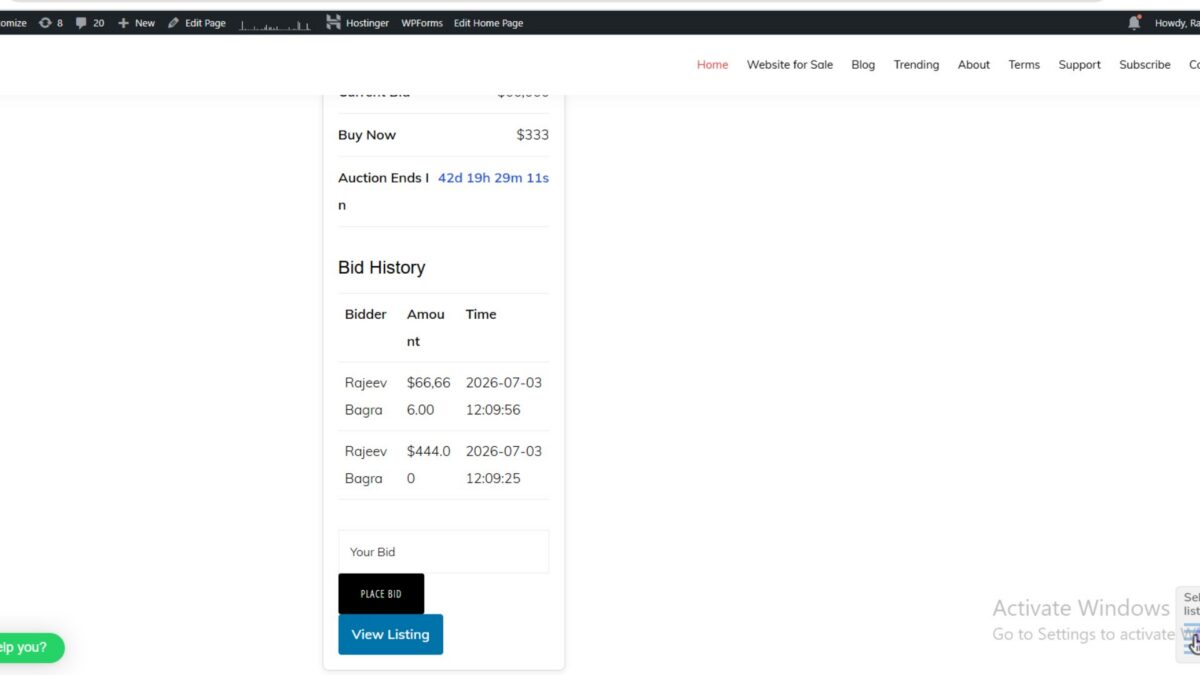
In Lesson 45, we transformed our auction system from simply displaying the current highest bid into a much more transparent platform by introducing Bid History.
Instead of showing only the latest bid amount, visitors can now see every bid placed on an auction, who placed it, and when it was submitted. This feature is common on professional auction platforms because it builds trust and encourages competitive bidding.
In this implementation post, we’ll walk through the complete code used to build the Bid History feature.
Step 1: Create a Method to Retrieve Bids
The first step is to retrieve all bids for a particular auction from the database.
Open:
includes/class-bid-manager.php
Add the following method inside the Flipnzee_Bid_Manager class.
/**
 * Get all bids for an auction.
 *
 * @param int $auction_id Auction ID.
 *
 * @return array
 */
public static function get_bids( $auction_id ) {

	global $wpdb;

	$bid_table = $wpdb->prefix . 'flipnzee_bids';

	return $wpdb->get_results(
		$wpdb->prepare(
			"SELECT *
			FROM {$bid_table}
			WHERE auction_id = %d
			ORDER BY bid_amount DESC,
			         created_at DESC",
			$auction_id
		)
	);

}
What this code does
- Retrieves every bid for the selected auction
- Uses prepared SQL statements for security
- Orders bids from highest to lowest
- Displays newer bids first if two bids have the same amount
Step 2: Retrieve Bid History Inside the Shortcode
Open:
includes/class-shortcodes.php
Locate the auction details table.
Immediately after the closing </table> tag, retrieve all bids.
<?php
$bids = Flipnzee_Bid_Manager::get_bids(
	$auction['id']
);
?>
This gives us all bids belonging to the currently displayed auction.
Step 3: Display the Bid History Heading
If bids exist, display a heading.
<h3>Bid History</h3>
Step 4: Handle Auctions With No Bids
Before creating the table, check whether any bids exist.
<?php if ( empty( $bids ) ) : ?>

<p>No bids have been placed yet.</p>

<?php else : ?>
This provides a better user experience than displaying an empty table.
Step 5: Create the Bid History Table
Now create the HTML table.
<table class="flipnzee-bid-history">

<thead>

<tr>

<th>Bidder</th>

<th>Amount</th>

<th>Time</th>

</tr>

</thead>

<tbody>
Step 6: Display Every Bid
Loop through all bids.
<?php foreach ( $bids as $bid ) : ?>

<?php
$user = get_userdata(
	$bid->bidder_id
);
?>

<tr>

<td>

<?php
echo esc_html(
	$user
	? $user->display_name
	: 'Unknown'
);
?>

</td>

<td>

<?php
echo '$' .
	number_format_i18n(
		$bid->bid_amount,
		2
	);
?>

</td>

<td>

<?php
echo esc_html(
	wp_date(
		'd M Y g:i A',
		strtotime(
			$bid->created_at
		)
	)
);
?>

</td>

</tr>

<?php endforeach; ?>
This code displays:
- Bidder name
- Bid amount
- Bid date and time
Step 7: Close the Table
Finish the table.
</tbody>

</table>

<?php endif; ?>
Step 8: Improve the Table Appearance
Open:
assets/css/frontend.css
Add the following styles.
.flipnzee-bid-history{
	width:100%;
	border-collapse:collapse;
	margin:20px 0;
}

.flipnzee-bid-history th,
.flipnzee-bid-history td{
	padding:10px;
	border-bottom:1px solid #ddd;
	text-align:left;
	white-space:nowrap;
}

.flipnzee-bid-history th{
	background:#f5f5f5;
	font-weight:600;
}
This produces a cleaner and more professional table.
Final Result
After completing this lesson, each auction page now displays something like:
| Bidder | Amount | Time |
|---|---|---|
| Rajeev Bagra | $66,666.00 | 03 Jul 2026 12:09 PM |
| Rajeev Bagra | $444.00 | 03 Jul 2026 12:09 PM |
Visitors can immediately understand:
- Who is bidding
- How the auction has progressed
- When bids were placed
- The current competition
Troubleshooting During Development
While implementing this feature, a few issues were encountered and resolved:
- Initially, the page displayed “No bids have been placed yet.” even though bids existed in the database.
- A temporary debug statement was added to display the current auction ID, confirming that the correct auction (
Auction ID: 31) was being queried. - After verifying the auction ID and database records, the bid history displayed correctly.
- The bid amount column initially wrapped because of the narrow card layout; this was improved using CSS with
white-space: nowrap. - The raw database timestamp was replaced with a more readable format using
wp_date().
These small debugging steps are a normal part of plugin development and highlight the importance of verifying data flow before assuming the query itself is incorrect.
What We Achieved
By the end of this implementation, Flipnzee Auctions gained another feature found in professional auction platforms:
- ✅ Secure database retrieval of bid history
- ✅ Display bidder names
- ✅ Display bid amounts
- ✅ Display bid timestamps
- ✅ Graceful handling of auctions with no bids
- ✅ Clean, responsive frontend table
- ✅ Increased transparency and trust for bidders
Download Source Code
Download the starting version of the plugin before the lesson:
Download the completed version after this lesson:
In the next lesson, we’ll enhance the bidding engine further by introducing Minimum Bid Increment Validation, ensuring that every new bid must exceed the current highest bid by a configurable minimum amount.