
Lesson 127 — Testing the Escrow API Connection

Introduction
In the previous lesson, we implemented a dedicated Escrow Settings administration page, allowing administrators to securely configure the plugin without modifying source code. Those settings now provide the foundation for interacting with the Escrow.com API.
However, before the plugin can create transactions or manage escrow payments, it is important to verify that the supplied credentials are valid and that communication with the selected environment is functioning correctly.
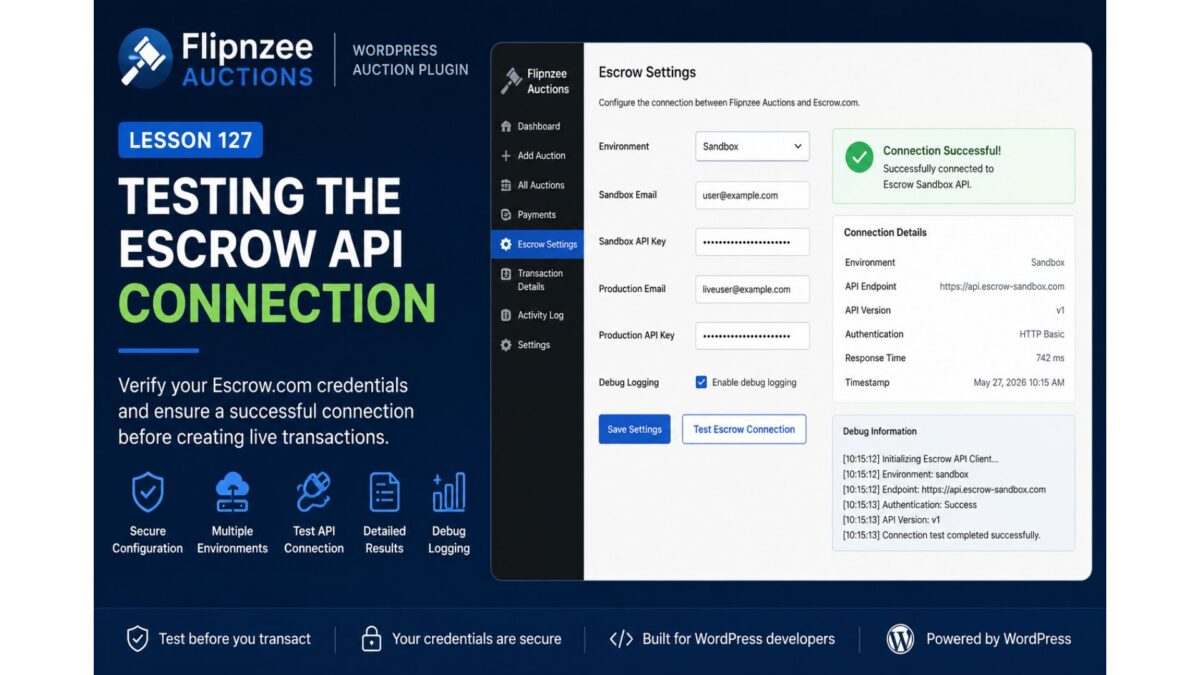
In this lesson, we will implement a Test Escrow Connection feature that allows administrators to verify connectivity directly from the WordPress dashboard.
Why Test the Connection?
Many integration problems occur long before the first API request is made.
Examples include:
- Incorrect API credentials
- Wrong environment selected
- Network connectivity issues
- Invalid API endpoints
- Authentication failures
Rather than discovering these problems during a live auction, administrators should be able to verify their configuration beforehand.
Lesson Objectives
By the end of this lesson, the plugin will:
- Add a Test Escrow Connection button.
- Read configuration from the Escrow Settings page.
- Initialize the Escrow API Client.
- Determine the selected environment.
- Attempt a connection.
- Display the connection result to the administrator.
- Record diagnostic information when debug logging is enabled.
Current Architecture
The plugin currently looks like this:
Administrator
        │
        ▼
Escrow Settings Page
        │
        ▼
WordPress Options API
        │
        ▼
Escrow API Client
This lesson extends the final stage by allowing the administrator to verify that communication with Escrow.com is working.
Reading Stored Configuration
The API client should no longer rely on hard-coded values.
Instead, it should retrieve configuration from the settings saved in Lesson 126.
Typical values include:
- Environment
- Sandbox Email
- Sandbox API Key
- Production Email
- Production API Key
- Debug Logging
This keeps the plugin flexible and makes switching environments as simple as changing a dropdown selection.
Initializing the API Client
The Test Connection action will instantiate the existing Flipnzee_Escrow_API_Client and configure it using the stored settings.
The client should automatically determine which endpoint to use based on the selected environment.
For example:
- Simulation
- Sandbox
- Production
Keeping this logic inside the API client avoids duplicating environment selection throughout the plugin.
Simulation Mode
During development, many developers may not yet have Sandbox credentials.
To support plugin development, the existing Simulation mode remains useful.
Instead of making an external HTTP request, the plugin simply returns a simulated successful response.
Example:
✓ Simulation Mode Active

No external API request was performed.
This allows developers to continue building other parts of the plugin without depending on a live service.
Sandbox Connection
When Sandbox mode is selected, the plugin should:
- Validate the stored credentials.
- Build the appropriate request.
- Contact the Escrow Sandbox endpoint.
- Capture the response.
- Report the outcome.
A successful response confirms that the configuration is ready for development and testing.
Production Connection
Production mode follows the same workflow but communicates with the live Escrow.com environment.
Because Production interacts with live services, administrators should verify that:
- Correct credentials are being used.
- The intended environment is selected.
- Debug logging is configured appropriately.
No financial transaction should be created during the connection test.
The purpose is only to confirm connectivity and authentication.
Displaying Results
After testing the connection, the administration page should present a clear status message.
Examples include:
Successful:
✓ Connected successfully.

Environment:
Sandbox

API Version:
Available

Authentication:
Successful
Simulation:
✓ Simulation Mode Active

No remote connection required.
Failure:
Connection Failed

Reason:
Authentication failed.

Please verify your API credentials.
Providing meaningful feedback helps administrators diagnose configuration issues without consulting server logs.
Debug Logging
If Debug Logging is enabled, the plugin should record useful diagnostic information.
Examples include:
- Environment selected
- Endpoint used
- Request start time
- Response received
- HTTP status code
- Error messages
Sensitive information such as API keys or passwords should never be written to logs.
Error Handling
External services are not always available.
The implementation should gracefully handle situations such as:
- Invalid credentials
- HTTP errors
- Timeout exceptions
- SSL problems
- Unexpected API responses
Administrators should receive clear messages while detailed diagnostics remain available through debug logging.
Security Considerations
The Test Connection action should follow the same security practices established in previous lessons.
This includes:
- WordPress nonce verification
- Administrator capability checks
- Sanitized user input
- Escaped output
- No exposure of API secrets
Maintaining consistent security practices is essential when interacting with third-party services.
Expected Workflow
Administrator
      │
      ▼
Clicks Test Connection
      │
      ▼
Load Saved Settings
      │
      ▼
Initialize API Client
      │
      ▼
Select Environment
      │
      ▼
Attempt Connection
      │
      ▼
Receive Response
      │
      ▼
Display Status Message
      │
      ▼
Optional Debug Log
Files Likely to be Updated
admin/class-admin-escrow-settings.php

includes/class-escrow-api-client.php

includes/class-logger.php (if required)
The exact implementation may vary, but the objective is to keep responsibilities clearly separated while reusing the API client introduced in earlier lessons.
What You’ll Learn
This lesson introduces several practical concepts commonly found in production WordPress plugins:
- Testing third-party API connectivity.
- Reading configuration from the WordPress Options API.
- Environment-aware application design.
- Graceful error handling.
- Diagnostic logging.
- Secure administrator actions.
- Integrating existing classes rather than duplicating functionality.
These patterns are applicable to many WordPress integrations beyond Escrow.com.
Conclusion
With a dedicated settings page now in place, the next logical step is to verify that the plugin can successfully communicate with the configured Escrow environment. Implementing a Test Connection feature provides administrators with immediate feedback, reduces configuration errors, and lays the groundwork for future features such as transaction creation, status synchronization, and payment management.
In the next implementation lesson, we will build the Test Escrow Connection feature and connect it to the Flipnzee_Escrow_API_Client, completing the first end-to-end interaction between the plugin and the configured Escrow environment.