
Lesson 126 Implementation — Building the Escrow Settings Administration Page

In the previous lesson, we created the foundation for communicating with Escrow.com by introducing a dedicated API client. Before that client can establish a connection, however, the plugin needs a secure and flexible way to store configuration details.
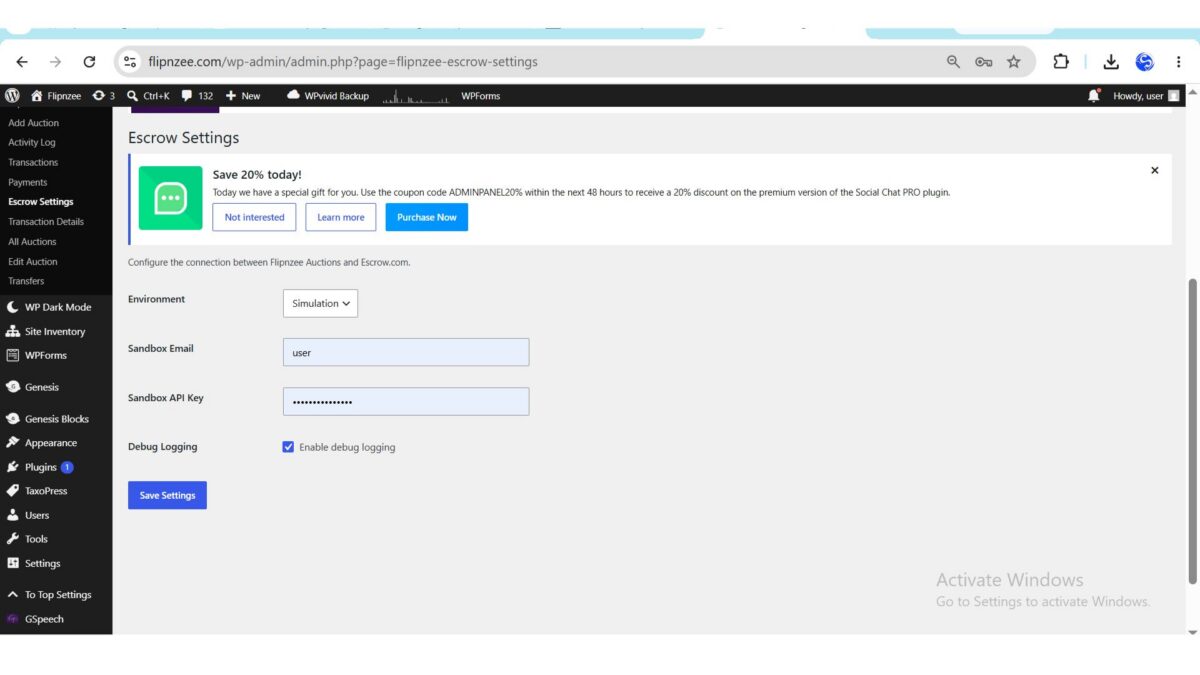
In this lesson, we implement a dedicated Escrow Settings administration page. This page allows administrators to configure the plugin without editing source code and prepares the foundation for Sandbox and Production integrations in future lessons.
Why This Lesson Is Important
One of the hallmarks of a well-designed WordPress plugin is that it separates configuration from application logic. Rather than embedding credentials directly in PHP files, configuration should be managed through the WordPress administration interface.
This approach offers several benefits:
- Better security
- Easier maintenance
- Environment flexibility
- Cleaner codebase
- Improved user experience
It also makes the plugin suitable for deployment across multiple websites without requiring code modifications.
Objectives
By the end of this lesson, the plugin will:
- Add an Escrow Settings page to the WordPress admin area.
- Store configuration using the WordPress Options API.
- Support multiple operating environments.
- Allow Sandbox credentials to be managed from the dashboard.
- Enable or disable debug logging.
- Protect settings using WordPress nonce verification.
Creating the Administration Class
A new class was introduced to encapsulate all Escrow configuration functionality.
admin/
└── class-admin-escrow-settings.php
Instead of placing settings inside the main administration class, a dedicated class was created to keep responsibilities focused and improve maintainability.
The class is responsible for:
- Rendering the settings page
- Loading stored configuration
- Saving administrator changes
- Displaying the configuration interface
Loading the Class
The new class was registered during plugin initialization.
The plugin bootstrap now loads the class before it is referenced by the administration menu.
This small but essential step ensures that WordPress can instantiate the settings page without encountering class loading errors.
Registering the Menu
A new submenu was added beneath the existing Flipnzee Auctions menu.
Flipnzee Auctions
    ├── Dashboard
    ├── Auctions
    ├── Payments
    └── Escrow Settings
Keeping the page within the existing administration structure provides a familiar experience for administrators.
Building the User Interface
The page follows standard WordPress administration conventions using a familiar settings table layout.
The current interface includes:
- Environment selector
- Sandbox Email
- Sandbox API Key
- Debug Logging option
- Save Settings button
Following WordPress UI conventions ensures the page feels consistent with the rest of the dashboard.
Supporting Multiple Environments
Different deployment stages require different Escrow environments.
The plugin now supports:
| Environment | Purpose |
|---|---|
| Simulation | Internal testing without contacting Escrow.com |
| Sandbox | Escrow.com’s testing environment |
| Production | Live transactions |
During development, Simulation mode allows the rest of the plugin to be implemented without relying on external API availability.
Saving Configuration
Instead of creating a custom database table, this lesson uses the WordPress Options API.
Configuration is stored under a single option, allowing WordPress to handle serialization and retrieval automatically.
The implementation uses:
get_option()update_option()wp_parse_args()
This keeps the code concise while remaining fully compatible with WordPress standards.
Security
Administrative settings should never trust submitted data.
The implementation therefore includes several important security measures.
Nonce Verification
Every settings submission includes a WordPress nonce to protect against Cross-Site Request Forgery (CSRF).
Sanitization
Submitted values are sanitized before storage.
Examples include:
sanitize_email()sanitize_text_field()
Escaping Output
Values displayed back to administrators are escaped before rendering to prevent unintended HTML output.
These practices are fundamental to secure WordPress plugin development.
Object-Oriented Structure
The settings page follows the same object-oriented design used throughout the Flipnzee Auctions plugin.
Flipnzee_Admin_Escrow_Settings
│
├── render_page()
├── save_settings()
└── get_settings()
Each method performs a single responsibility, making the class easier to understand, test, and extend.
Debugging During Development
While implementing the feature, a few issues were encountered and resolved.
These included:
- Missing class loading during plugin initialization.
- Callback registration errors.
- Admin page rendering failures.
- Validation of plugin bootstrap order.
- Incremental rebuilding of the settings page after isolating the source of a critical error.
Although these issues were temporary, resolving them improved the plugin’s architecture and highlighted the importance of testing each component as it is introduced.
Testing
The completed implementation was tested to verify that:
- The Escrow Settings page loads successfully.
- The submenu appears correctly.
- Settings can be saved.
- Stored values persist after page refresh.
- The selected environment is retained.
- Sandbox credentials are stored correctly.
- Debug logging preferences are preserved.
- WordPress nonce protection functions as expected.
Integration with Previous Lessons
The plugin architecture now looks like this:
Flipnzee_Admin_Escrow_Settings
            │
            ▼
 WordPress Options API
            │
            ▼
 Escrow Configuration
            │
            ▼
Flipnzee_Escrow_API_Client
Future API requests will retrieve configuration directly from these stored settings instead of relying on hard-coded values.
Files Added and Updated
admin/
└── class-admin-escrow-settings.php

admin/
└── class-admin.php

flipnzee-auctions.php
These changes establish the administrative infrastructure required for future Escrow integration.
What We Learned
This lesson demonstrated several important WordPress development concepts:
- Creating dedicated administration classes.
- Registering custom admin menus.
- Using the WordPress Options API.
- Designing secure administration forms.
- Implementing nonce verification.
- Sanitizing and escaping user input.
- Structuring plugin code using object-oriented principles.
These techniques are applicable to many types of WordPress plugins beyond auction systems.
Conclusion
The Flipnzee Auctions plugin now includes a dedicated administration page for configuring its Escrow integration. By separating configuration from application logic and leveraging the WordPress Options API, the plugin becomes easier to deploy, maintain, and extend.
This implementation provides a solid foundation for the next phase of development, where the stored configuration will be used to establish communication with the Escrow.com API.
https://github.com/SplendidDigital/flipnzee-auctions/releases/tag/lesson-126-stable
Next Lesson
In Lesson 127, we will integrate the Escrow API Client with the stored settings and implement a Test Escrow Connection feature. This will allow administrators to verify connectivity to the selected Simulation, Sandbox, or Production environment before initiating real escrow transactions.