
Lesson 130 – Building a Production-Ready Escrow Settings Interface

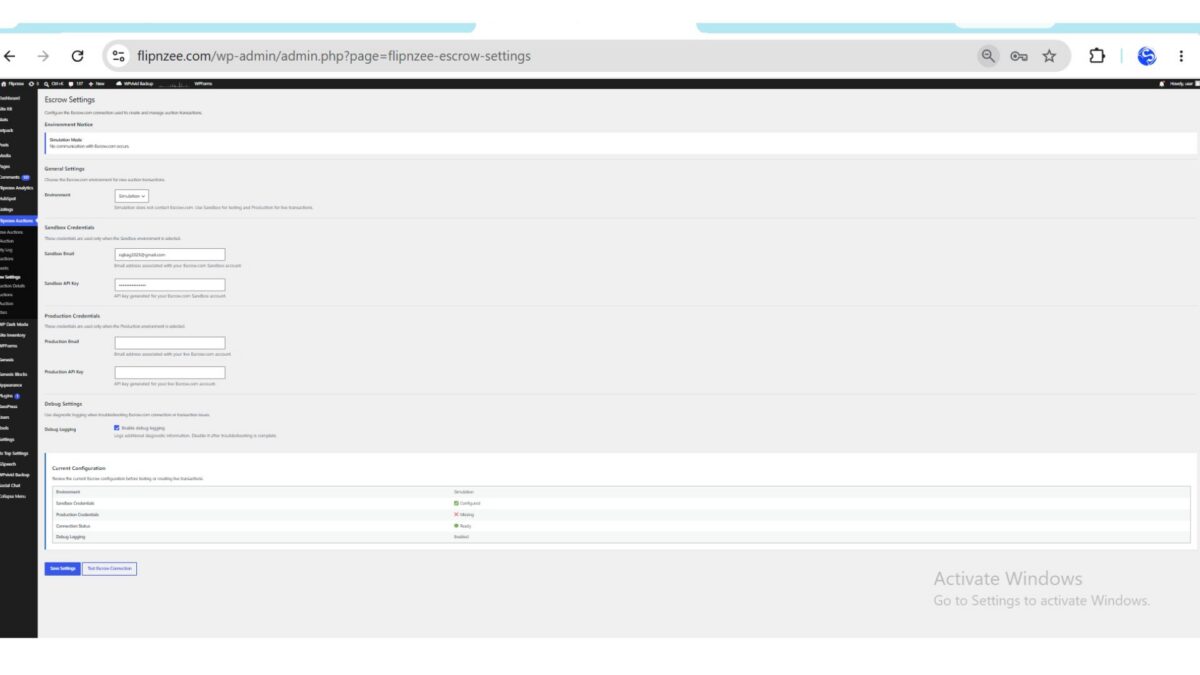
In the previous lessons, we focused on strengthening the internal architecture of the Escrow integration. The API client was refactored to use the WordPress HTTP API, response handling became standardized, and the plugin gained support for Simulation, Sandbox, and Production environments.
While these backend improvements significantly improved maintainability, the administrator experience still had room for improvement.
In this lesson, we’ll redesign the Escrow Settings page to provide a cleaner interface, better validation, and a clearer overview of the plugin’s configuration.
Where We Left Off
At the end of Lesson 129, administrators could configure the Escrow integration, but the page was fairly minimal.
It provided:
- Environment selection
- Sandbox credentials
- Debug logging
- Connection testing
Although functional, it didn’t fully expose the capabilities already built into the Escrow API client.
Objectives
The goal of this lesson is to transform the Escrow Settings page into a more polished administration interface while keeping the existing backend architecture intact.
The improvements focus on usability rather than introducing new API functionality.
Introducing Multiple Configuration Sections
Instead of presenting every option inside a single table, the settings page is now divided into logical sections.
The new layout includes:
- Environment Notice
- General Settings
- Sandbox Credentials
- Production Credentials
- Debug Settings
- Current Configuration
Breaking the page into smaller sections makes navigation easier and improves readability as the plugin continues to grow.
Environment Awareness
One of the most noticeable improvements is the addition of an environment notice.
Whenever an administrator selects an environment, the page immediately explains what that environment represents.
For example:
- Simulation performs no external requests.
- Sandbox communicates with the Escrow testing environment.
- Production is intended for real Escrow transactions.
Providing this information directly within the interface reduces configuration mistakes and makes the plugin easier to understand.
Production Credentials
Previous versions of the settings page focused primarily on Sandbox credentials.
Lesson 130 introduces dedicated fields for live Escrow.com credentials.
Administrators can now configure:
- Production Email
- Production API Key
This completes the configuration interface and aligns it with the capabilities already implemented within the Escrow API client.
Better Input Validation
The plugin now validates configuration before saving.
Depending on the selected environment, administrators must provide the required credentials.
For example:
Sandbox mode requires:
- Sandbox Email
- Sandbox API Key
Production mode requires:
- Production Email
- Production API Key
Instead of saving incomplete settings, the plugin now displays clear validation messages, helping administrators resolve configuration problems before attempting to connect to Escrow.com.
Credential Verification
A small helper method now determines whether the required credentials exist for the active environment.
Rather than repeating this logic throughout the codebase, it has been centralized into a reusable method.
This helper is now used to determine whether the current configuration is ready for testing.
Smarter Connection Testing
One subtle but useful improvement is the Test Escrow Connection button.
Rather than allowing administrators to submit a request that is guaranteed to fail, the button now becomes unavailable whenever the required credentials are missing.
This defensive approach improves the overall user experience while reducing unnecessary API requests.
Configuration Dashboard
The settings page now concludes with a configuration summary.
Rather than forcing administrators to review multiple input fields, the dashboard provides a quick overview of the current Escrow configuration.
Information displayed includes:
- Current Environment
- Sandbox Credential Status
- Production Credential Status
- Connection Readiness
- Debug Logging Status
This makes it much easier to verify the plugin’s configuration at a glance.
Cleaner Code Structure
Although the visual changes are significant, the internal architecture has also improved.
Several responsibilities have been moved into dedicated helper methods, including:
- Environment labeling
- Credential validation
- Credential availability checks
- Environment notices
This keeps the render_page() method focused on presentation while allowing reusable logic to remain centralized elsewhere in the class.
User Experience Improvements
Several smaller refinements were also introduced:
- Better section headings
- Improved field descriptions
- More consistent spacing
- Clearer labels
- Improved accessibility through proper form labels
- Better alignment with the native WordPress administration interface
While individually small, these improvements combine to create a much more polished configuration experience.
Preparing for Live Escrow Transactions
Although this lesson doesn’t yet create real Escrow transactions, it lays an important foundation for the lessons that follow.
Before a plugin can communicate reliably with an external payment provider, administrators must have confidence that their configuration is correct.
Lesson 130 ensures that the plugin can now validate and present that configuration much more effectively.
Expected Outcome
After completing this lesson, Flipnzee Auctions provides a significantly improved Escrow administration experience.
Administrators can:
- Configure Sandbox and Production credentials separately.
- Clearly identify the active environment.
- Validate settings before saving.
- Test only valid configurations.
- Review their current configuration from a dedicated status dashboard.
These improvements make the plugin easier to configure, easier to troubleshoot, and better prepared for future production features.
Conclusion
As software matures, development gradually shifts from building core functionality to refining the overall user experience.
Lesson 130 demonstrates that production-ready software isn’t defined solely by powerful backend code. A well-designed administration interface is equally important, helping users configure the system correctly while reducing errors and simplifying maintenance.
With the configuration interface now significantly improved, the groundwork is complete for the next major milestone: creating and managing real Escrow.com transactions directly from Flipnzee Auctions.
In the next lesson, we’ll begin implementing the transaction lifecycle by initiating real Escrow transactions through the refactored API client, bringing the plugin one step closer to a fully production-ready Escrow integration.
https://github.com/SplendidDigital/flipnzee-auctions/releases/tag/lesson-130-stable