
Lesson 52 Implementation: Continue Displaying Closed Auctions with a Clear “Auction Ended” Status

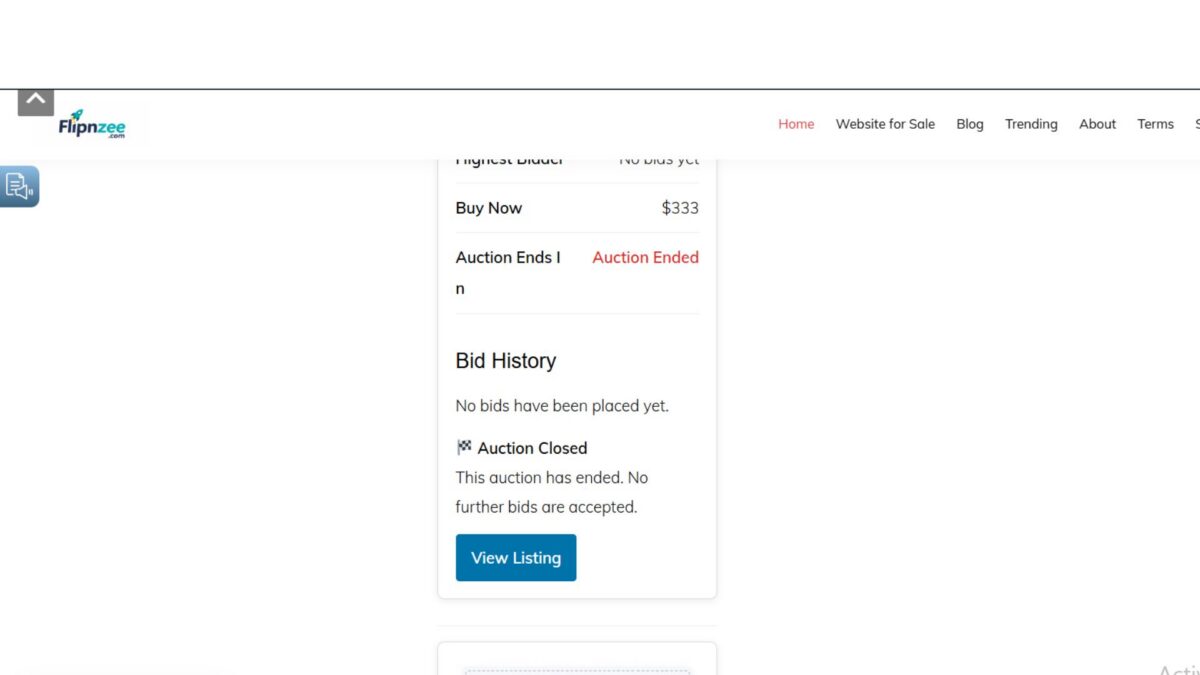
In the previous lesson, the Flipnzee Auctions plugin stopped displaying auctions immediately after they were closed. While that prevented further bidding, it also removed the auction from public view, making it impossible for visitors to see the final auction result.
In this lesson, the plugin was improved so that closed auctions remain visible. Instead of disappearing, they now display an “Auction Ended” status and prevent any further bids from being placed.
Why This Change Was Needed
Previously, once an auction status became closed, the frontend shortcode only retrieved active auctions.
This caused several problems:
- Visitors could no longer view completed auctions.
- Final bid information disappeared.
- Buyers could not see that an auction had successfully concluded.
- There was no indication that bidding had ended.
A completed auction is still valuable information, so it should remain publicly visible.
Step 1: Update the Auction Query
Open:
includes/class-auction-manager.php
Locate the method:
public static function get_active_auctions()
Replace the query with:
public static function get_active_auctions() {

	global $wpdb;

	$table = $wpdb->prefix . 'flipnzee_auctions';

	return $wpdb->get_results(
		"SELECT *
		FROM {$table}
		WHERE status IN ('active', 'closed')
		ORDER BY auction_end ASC",
		ARRAY_A
	);
}
Instead of returning only active auctions, the method now also retrieves closed auctions.
Step 2: Detect Whether an Auction Has Ended
Inside:
includes/class-shortcodes.php
After loading the auction information, determine its current state:
$current_time = current_time( 'timestamp' );
$end_time     = strtotime( $auction['auction_end'] );

if ( $end_time <= $current_time ) {

	$status       = 'ended';
	$status_label = '🔴 Auction Ended';

} elseif ( ( $end_time - $current_time ) <= DAY_IN_SECONDS ) {

	$status       = 'ending';
	$status_label = '🟡 Ending Soon';

} else {

	$status       = 'live';
	$status_label = '🟢 Live Auction';

}
This allows the auction card to dynamically display whether the auction is live, ending soon, or has already ended.
Step 3: Display the Auction Status Badge
Above the auction title, output the status label:
<div class="flipnzee-auction-status <?php echo esc_attr( $status ); ?>">
	<?php echo esc_html( $status_label ); ?>
</div>
Visitors can now instantly recognise the auction state.
Step 4: Prevent Further Bidding
Hide the bidding form after the auction has ended.
Example:
<?php if ( $status !== 'ended' ) : ?>

	<!-- Bid form -->

<?php else : ?>

	<div class="flipnzee-auction-closed">
		<strong>🏁 Auction Closed</strong><br>
		This auction has ended. No further bids are accepted.
	</div>

<?php endif; ?>
This ensures the auction remains visible while preventing additional bids.
Step 5: Style the Closed Auction Notice
In:
assets/css/frontend.css
Add:
.flipnzee-auction-closed {
	background: #fff5f5;
	border: 1px solid #e74c3c;
	color: #b71c1c;
	padding: 12px;
	margin-top: 15px;
	border-radius: 6px;
	font-size: 14px;
}
The notice clearly communicates that bidding has finished.
Testing
The implementation was tested by viewing a closed auction.
Expected behaviour:
- The auction card remained visible.
- The status badge changed to Auction Ended.
- The bid form disappeared.
- Visitors were informed that no further bids would be accepted.
During testing, it was also observed that historical test auctions remained visible because multiple auction records had been created for the same listing during development. This highlighted an architectural improvement that would be addressed in the next lesson.
Download Source Code
Download the completed version after this lesson:
What Was Learned
This lesson improved the user experience by ensuring that completed auctions remain publicly visible instead of disappearing. Visitors can continue viewing the listing, the auction status, and historical information, while the system correctly prevents any new bids after the auction has ended.
The implementation also revealed the importance of maintaining a single auction record per listing, which would become the focus of the next lesson to simplify auction management and avoid duplicate auction histories.