
Lesson 52: Display Closed Auctions Instead of Hiding Them

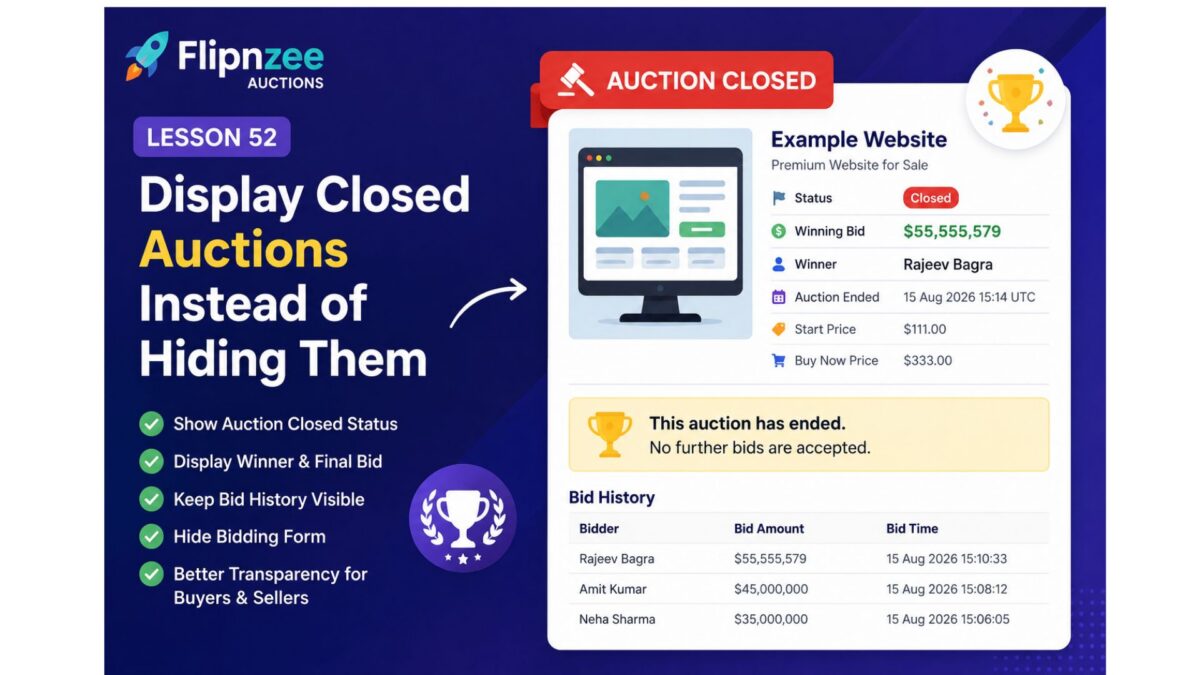
In the previous lesson, we introduced automatic auction closure based on the auction end time. While that prevented late bids, it also exposed an important usability issue—once an auction was marked as closed, the entire auction disappeared from the frontend.
In this lesson, we’ll improve the user experience by displaying completed auctions instead of hiding them. Visitors will still be able to see the auction results, while bidding will be disabled.
What You’ll Learn
By the end of this lesson, you’ll be able to:
- Display both active and closed auctions.
- Show an Auction Closed status message.
- Continue displaying the final bid amount.
- Display the winning bidder.
- Keep the complete bid history visible.
- Disable the bid form once the auction has ended.
- Improve transparency and trust for buyers and sellers.
Why This Matters
Imagine visiting an auction page only to discover that it has completely disappeared after the auction ended.
Questions immediately arise:
- Who won?
- What was the final bid?
- Was the auction successful?
- Is the page broken?
Professional auction platforms never hide completed auctions. Instead, they preserve the auction page as a permanent record.
Examples include:
- eBay
- Heritage Auctions
- Sotheby’s
- Copart
Visitors can still review the auction outcome even though bidding has ended.
Current Behaviour
At present, our shortcode behaves roughly like this:
if ( $auction['status'] !== 'active' ) {
    return '';
}
As soon as the auction status changes to closed, nothing is displayed.
Desired Behaviour
Instead of hiding the auction, we’ll show something like this:
Status
Closed

Winning Bid
$55,555,579

Winner
Rajeev Bagra

Auction Ended
15 Aug 2026 15:14 UTC

🏆 This auction has ended.
No further bids are accepted.
The bid history will remain visible.
Only the bidding form will disappear.
Implementation Plan
During this lesson we’ll:
Step 1
Remove the logic that hides closed auctions.
Step 2
Display an “Auction Closed” badge whenever the auction status is closed.
Step 3
Continue showing:
- Start Price
- Current Bid
- Highest Bidder
- Buy Now Price
- Auction End Time
- Bid History
Step 4
Hide only:
- Bid input field
- Place Bid button
Step 5
Display a friendly message:
🏁 This auction has ended. No further bids are accepted.
Benefits
After completing this lesson, Flipnzee Auctions will provide a much more professional experience.
Visitors will be able to:
- Verify who won the auction.
- See the final selling price.
- Review the complete bid history.
- Trust that auctions are permanently recorded.
- Understand immediately that bidding has ended.
What We’ll Build
By the end of this lesson, every completed auction page will resemble a real-world auction result page instead of disappearing completely.
This lays the foundation for future enhancements such as:
- 🏆 Winner badges
- 🎉 Sold ribbons
- Seller notifications
- Winner email notifications
- Auction archives
- Recently Sold listings
- Searchable auction history
Next Lesson
Lesson 53: Highlight the Winning Bidder and Final Selling Price for Closed Auctions
In the next lesson, we’ll enhance the completed auction page by prominently displaying the winner and the final sale price with improved styling, making the auction results more visually appealing and easier to understand.