
Lesson 54: Handling Manually Closed Auctions Correctly in Flipnzee Auctions

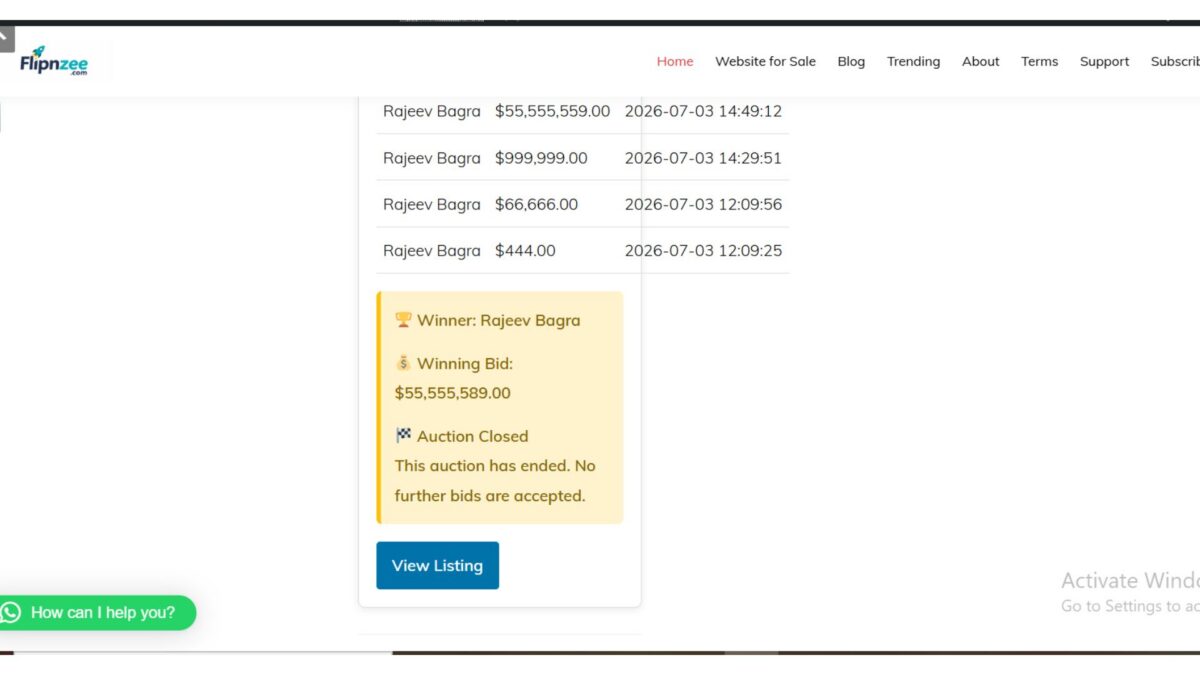
While developing the Flipnzee Auctions plugin, an interesting edge case was discovered. Auctions that were manually marked as Closed from the admin dashboard continued to display a live countdown timer on the frontend. Although bidding was no longer possible, visitors still saw that the auction had many days remaining.
In this lesson, the auction display was updated so that manually closed auctions are presented consistently throughout the website.
The Problem
Initially, the auction countdown relied only on the auction end date.
The logic was similar to this:
$current_time >= strtotime( $auction['auction_end'] )
This worked perfectly when an auction naturally expired, but it ignored the auction status stored in the database.
As a result:
- the auction card displayed a red Auction Ended badge,
- the bidding form was disabled,
- yet the countdown still showed something like:
Auction Ends In

41d 2h 53m
This created conflicting information for visitors.
Understanding the Cause
Each auction stores a status in the database.
Typical values include:
- draft
- active
- closed
When an administrator manually closes an auction, the status changes to:
closed
However, the auction end date remains unchanged because the scheduled end date is still stored for historical purposes.
Therefore, relying only on the end date was not enough.
Updating the Auction Logic
The auction is now considered closed if either of the following conditions is true:
- the auction status is closed, or
- the scheduled end date has already passed.
The logic now looks like this:
$auction_closed =
(
    'closed' === $auction['status']
)
||
(
    current_time( 'timestamp' ) >=
    strtotime( $auction['auction_end'] )
);
This allows the plugin to distinguish between an auction that is still active and one that has been manually closed.
Improving the Frontend Display
Previously, every auction displayed the countdown row.
Auction Ends In
Loading...
This has now been replaced with conditional output.
For manually closed auctions the visitor now sees:
Auction Status
Auction Ended
For active auctions the countdown remains unchanged.
Auction Ends In
12d 05h 18m
This makes the interface much clearer.
Preserving Winner Information
During implementation another issue was discovered.
While testing, the code responsible for retrieving the winning bid had accidentally been commented out.
Because of that:
- the Winner section disappeared,
- the plugin incorrectly displayed “No bids were placed.” even when several bids existed.
Restoring the following code resolved the problem:
$winning_bid = Flipnzee_Bid_Manager::get_winning_bid(
    $auction['id']
);
After restoring it:
- Winner information appeared correctly.
- Winning bid amount was displayed.
- Bid history continued to work.
- Closed auctions correctly showed their final results.
Final Behaviour
The auction system now behaves consistently.
Active Auction
- Live countdown displayed
- Bidding enabled
- Highest bidder shown
- Bid history available
Naturally Expired Auction
- Auction Ended shown
- Winner displayed
- Winning bid displayed
- No further bids accepted
Manually Closed Auction
- Auction Status → Auction Ended
- Winner displayed (if bids exist)
- Winning bid displayed
- Bid history preserved
- No misleading countdown shown
Lessons Learned
This implementation highlighted an important development principle.
A date alone should not always determine the state of an application. When a dedicated status field exists in the database, both the status and the timestamp should be considered before deciding how information is presented to users.
Handling these edge cases makes the auction system more reliable and provides a better experience for both buyers and sellers.
Download Source Code
Download the starting version of the plugin before the lesson:
Download the completed version after this lesson:
Conclusion
With this improvement, Flipnzee Auctions now correctly handles manually closed auctions while preserving auction history, winner information, and bid history. Visitors receive clear and accurate information regardless of whether an auction ended naturally or was closed early by an administrator, making the plugin more robust and professional.