
Lesson 123: Displaying External Provider Information in the Transaction Details Screen

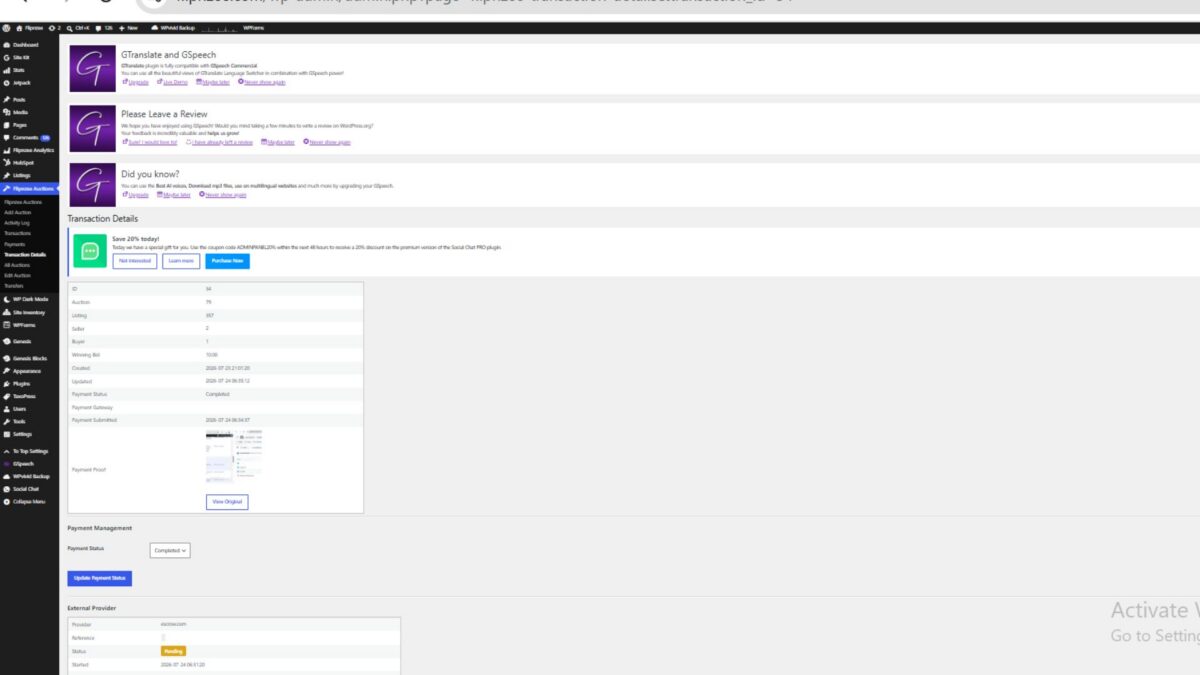
In the previous lesson, the Flipnzee Auctions plugin introduced persistent storage for external provider transactions. Whenever a payment reached the completed stage, the Escrow provider generated a provider reference and stored important information such as provider status, timestamps, and notes within a dedicated database table.
Although this information was now permanently stored, it was only accessible by inspecting the database directly.
In this lesson, that changes.
The Transaction Details page is enhanced to display external provider information directly within the WordPress administration area, giving administrators immediate visibility into the provider responsible for processing a transaction.
Why Display Provider Information?
Once a website sale enters the payment stage, the auction transaction is no longer the only entity involved.
An external provider—such as Escrow.com in our simulated implementation—maintains its own transaction lifecycle.
Administrators frequently need answers to questions such as:
- Which provider is handling this transaction?
- What is the provider reference number?
- Has the provider transaction been created?
- What is the current provider status?
- Are there any provider notes?
Without displaying this information inside WordPress, administrators must inspect database records manually, making day-to-day transaction management unnecessarily difficult.
Bringing the Provider Layer into the User Interface
The Transaction Details screen now retrieves provider information using the External Provider Manager rather than performing direct database queries.
The page requests the provider record associated with the current transaction and displays the information in a dedicated section beneath Payment Management.
Conceptually, the flow now looks like this:
Transaction Details
        │
        ▼
External Provider Manager
        │
        ▼
Latest Provider Record
        │
        ▼
Display Provider Information
This preserves the plugin’s object-oriented architecture by separating presentation logic from data access.
Information Displayed
The new External Provider section includes:
- Provider name
- Provider reference
- Current provider status
- Started timestamp
- Completed timestamp
- Provider notes
A typical provider record appears as follows:
| Field | Example |
|---|---|
| Provider | Escrow.com |
| Reference | ESCROW-20260724010512-34 |
| Status | Created |
| Started | 2026-07-24 06:35:12 |
| Completed | — |
| Notes | Simulated escrow transaction created. |
This allows administrators to monitor provider activity without leaving the WordPress dashboard.
Graceful Handling of Missing Provider Records
Not every transaction will necessarily have an associated provider.
For example:
- Historical transactions created before provider persistence was introduced.
- Transactions that have not yet reached the payment completion stage.
- Future transactions using alternative payment methods.
Instead of generating errors or displaying incomplete information, the page now detects the absence of a provider record and displays a clear message indicating that no provider information is available.
This improves both usability and robustness.
Maintaining Separation of Responsibilities
One of the primary objectives of the refactoring effort has been reducing coupling between components.
The Transaction Details page now communicates exclusively with the Flipnzee_External_Provider_Manager.
Responsibilities are clearly divided:
- Escrow Provider creates provider records.
- External Provider Manager retrieves provider information.
- Transaction Details presents the information.
- Transaction Lifecycle Manager coordinates the overall workflow.
Each component remains responsible for a single concern, making the codebase easier to understand, maintain, and extend.
Improving Administrative Visibility
The addition of provider information significantly improves the administrative workflow.
An administrator reviewing a completed transaction can now immediately determine:
- Which provider created the transaction.
- The external provider reference.
- The provider’s current status.
- When the provider transaction started.
- Whether additional provider information has been recorded.
This reduces reliance on database inspection while providing a clearer operational overview of website sales.
Preparing for Future Integrations
Although the current provider implementation continues to simulate Escrow.com, the user interface has now been designed with future integrations in mind.
When a live Escrow.com API is introduced, the same section can display:
- Live provider status.
- Escrow milestones.
- Buyer and seller verification.
- Payment confirmation.
- Domain transfer progress.
- Provider synchronization timestamps.
Because the display layer is already connected to the provider abstraction rather than the provider implementation, future integrations can be introduced with minimal changes to the administration interface.
Benefits of This Lesson
The improvements introduced in this lesson provide several practical advantages:
- External provider information is available directly within WordPress.
- Administrators no longer need to inspect the database for provider details.
- The transaction management interface becomes more informative.
- Presentation logic remains independent from database operations.
- The architecture remains fully extensible for future payment and escrow providers.
Most importantly, the Transaction Details page now serves as a unified view of the complete website sale process, combining auction information, payment management, ownership transfer, and external provider details in a single location.
Looking Ahead
Displaying provider information is only the first step toward comprehensive provider management.
Future lessons will continue building upon this foundation by introducing:
- Improved transaction navigation.
- Enhanced provider user interface components.
- Provider status synchronization.
- External API communication.
- Webhook processing.
- Live Escrow.com integration.
With external provider information now visible alongside payment and ownership transfer details, the Flipnzee Auctions plugin takes another significant step toward becoming a complete transaction management platform for buying and selling websites.
https://github.com/SplendidDigital/flipnzee-auctions/releases/tag/lesson-123-stable