
Lesson 123: Displaying External Provider Information in the Transaction Details Screen

Overview
In the previous lesson, we introduced persistent storage for external provider transactions. Every completed payment now creates a provider record containing the provider name, escrow reference, timestamps, status, and notes.
However, this information is only available by directly inspecting the database.
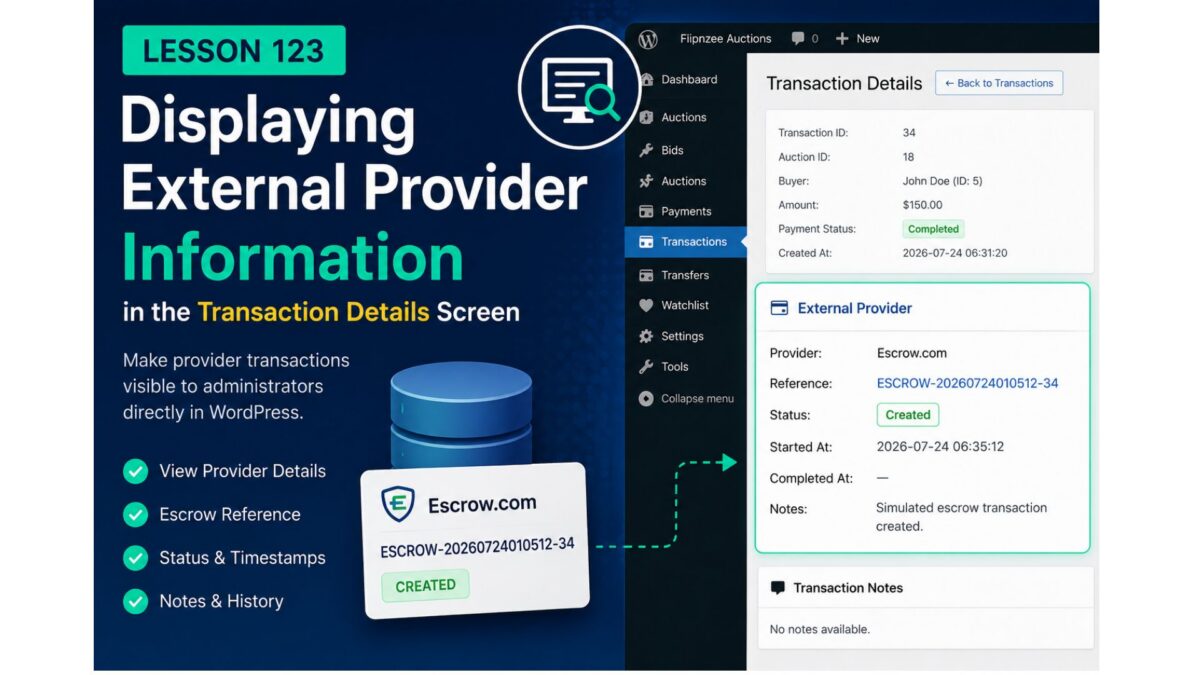
In this lesson, we’ll integrate the External Provider Manager with the WordPress administration interface so administrators can view provider information directly from the Transaction Details page.
This represents an important shift from building backend infrastructure to exposing meaningful operational information through the plugin’s user interface.
Why this lesson?
At the moment, an administrator managing a website sale has no immediate visibility into the external provider handling the transaction.
To answer questions such as:
- Which provider is managing this payment?
- What is the escrow reference?
- Has the provider transaction been created?
- What status is the provider reporting?
- Were any notes recorded?
the administrator must manually inspect the database.
The goal of this lesson is to eliminate that requirement.
Objectives
By the end of this lesson we will:
- Retrieve provider information using
Flipnzee_External_Provider_Manager - Associate provider records with auction transactions
- Display provider details inside the Transaction Details page
- Gracefully handle transactions without a provider record
- Lay the foundation for future provider actions and status synchronization
Planned Interface
The Transaction Details page will gain a new section similar to:
──────────────────────────────────────────
External Provider
──────────────────────────────────────────

Provider
Escrow.com

Reference
ESCROW-20260724010512-34

Status
Created

Started
24 Jul 2026 06:35

Completed
—

Notes
Simulated escrow transaction created.
If no provider record exists, the interface will instead display:
External Provider

No provider information is available for this transaction.
This ensures the interface remains informative without producing errors for historical transactions.
Architectural Improvements
Rather than querying the database directly from the admin screen, the page will use:
Flipnzee_External_Provider_Manager::get_provider_by_transaction()
This maintains a clear separation of responsibilities:
- External Provider Manager retrieves provider data.
- Admin Transaction Details focuses solely on presentation.
- Escrow Provider remains responsible for provider creation.
- Transaction Lifecycle Manager continues orchestrating the workflow.
This follows the object-oriented architecture established throughout the project.
Benefits
After completing this lesson:
- Administrators can inspect provider information without leaving WordPress.
- Transaction debugging becomes significantly easier.
- Escrow references become immediately accessible.
- Provider status is visible during transaction processing.
- The UI becomes ready for future actions such as “Open Escrow Transaction”, “Refresh Provider Status”, or “Retry Provider Synchronization”.
What We’ll Build
The implementation will involve three primary steps:
- Retrieve provider information for the current transaction.
- Add a dedicated External Provider panel to the Transaction Details page.
- Display provider fields using WordPress admin styling and proper escaping.
No database changes are required, as the persistence layer introduced in Lesson 122 already provides everything needed.
Looking Ahead
Displaying provider information is only the first step toward a fully integrated provider management system.
Future lessons will build on this interface by allowing administrators to:
- Synchronize provider status with external services.
- View provider history.
- Launch provider-specific actions.
- Integrate with the real Escrow.com API.
- Support multiple external payment and escrow providers through the same abstraction layer.
With provider information now visible inside the administration interface, the Flipnzee Auctions plugin moves one step closer to providing a complete transaction management experience for buying and selling websites.