
Lesson 47 Implementation – Display the Highest Bidder and Show Winning/Outbid Status

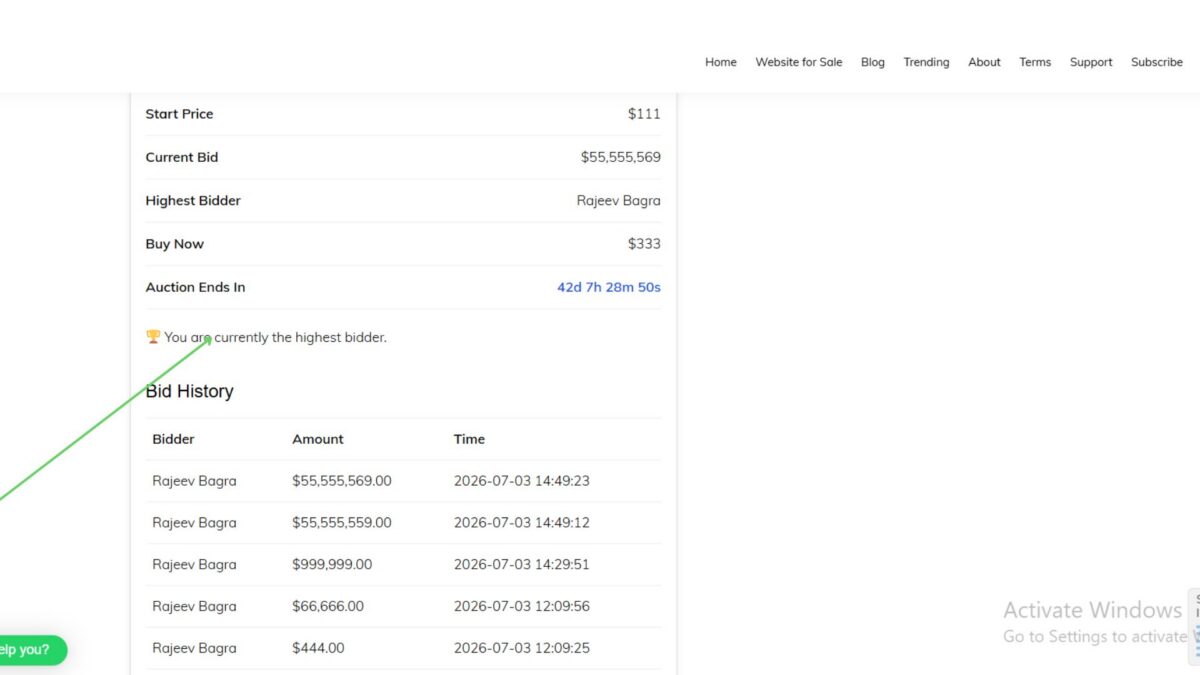
In the previous lesson, we created the method to retrieve the highest bidder from the database. In this implementation lesson, we integrate that functionality into the auction page so visitors can immediately see who is currently leading the auction.
Additionally, logged-in bidders receive a visual message telling them whether they are currently winning or have been outbid.
This makes the auction experience much more interactive and similar to professional auction platforms.
Step 1: Retrieve the Highest Bidder
Open:
includes/class-shortcodes.php
Locate the code where bids are loaded for the Bid History section.
It should look like this:
$bids = Flipnzee_Bid_Manager::get_bids(
    $auction['id']
);
Immediately after it, add:
$highest_bidder =
    Flipnzee_Bid_Manager::get_highest_bidder(
        $auction['id']
    );
The final code becomes:
$bids = Flipnzee_Bid_Manager::get_bids(
    $auction['id']
);

$highest_bidder =
    Flipnzee_Bid_Manager::get_highest_bidder(
        $auction['id']
    );
This retrieves the highest bid record from the database and stores it for use throughout the auction page.
Step 2: Display the Highest Bidder
Locate the auction details table.
Replace the existing Highest Bidder row with:
<tr>

    <th>Highest Bidder</th>

    <td>

        <?php

        if ( $highest_bidder ) {

            echo esc_html(
                $highest_bidder->display_name
            );

        } else {

            esc_html_e(
                'No bids yet',
                'flipnzee-auctions'
            );

        }

        ?>

    </td>

</tr>
Now the auction page displays the current leading bidder instead of the placeholder text.
Step 3: Show the Winning/Outbid Status
After the auction details table closes:
</table>
add:
<?php if ( is_user_logged_in() && $highest_bidder ) : ?>

    <?php if (
        get_current_user_id()
        === (int) $highest_bidder->bidder_id
    ) : ?>

        <div class="flipnzee-bid-status flipnzee-winning">
            🏆 You are currently the highest bidder.
        </div>

    <?php else : ?>

        <div class="flipnzee-bid-status flipnzee-outbid">
            ⚠️ You have been outbid.
        </div>

    <?php endif; ?>

<?php endif; ?>
Because this block is placed outside the table, it produces valid HTML and displays correctly.
Step 4: Add CSS Styling
Open:
assets/css/frontend.css
Add:
.flipnzee-bid-status {

    margin: 15px 0;

    padding: 12px 15px;

    border-radius: 6px;

    font-weight: 600;

}

.flipnzee-winning {

    background: #e9f8ef;

    color: #0b6b35;

    border-left: 4px solid #2ecc71;

}

.flipnzee-outbid {

    background: #fff3f3;

    color: #b30000;

    border-left: 4px solid #e74c3c;

}
This makes the notification visually stand out and improves the overall user experience.
Step 5: Test the Feature
Create two WordPress user accounts.
Log in as the first user and place a bid.
You should see:
🏆 You are currently the highest bidder.
Log in as the second user and place a higher bid.
Now:
- User 2 sees:
🏆 You are currently the highest bidder.
- User 1 sees:
⚠️ You have been outbid.
The Highest Bidder row also updates automatically after refreshing the page.
Complete Source Code
Loading the Highest Bidder
$bids = Flipnzee_Bid_Manager::get_bids(
    $auction['id']
);

$highest_bidder =
    Flipnzee_Bid_Manager::get_highest_bidder(
        $auction['id']
    );
Highest Bidder Row
<tr>

    <th>Highest Bidder</th>

    <td>

        <?php

        if ( $highest_bidder ) {

            echo esc_html(
                $highest_bidder->display_name
            );

        } else {

            esc_html_e(
                'No bids yet',
                'flipnzee-auctions'
            );

        }

        ?>

    </td>

</tr>
Winning / Outbid Message
<?php if ( is_user_logged_in() && $highest_bidder ) : ?>

    <?php if (
        get_current_user_id()
        === (int) $highest_bidder->bidder_id
    ) : ?>

        <div class="flipnzee-bid-status flipnzee-winning">
            🏆 You are currently the highest bidder.
        </div>

    <?php else : ?>

        <div class="flipnzee-bid-status flipnzee-outbid">
            ⚠️ You have been outbid.
        </div>

    <?php endif; ?>

<?php endif; ?>
CSS
.flipnzee-bid-status {

    margin: 15px 0;

    padding: 12px 15px;

    border-radius: 6px;

    font-weight: 600;

}

.flipnzee-winning {

    background: #e9f8ef;

    color: #0b6b35;

    border-left: 4px solid #2ecc71;

}

.flipnzee-outbid {

    background: #fff3f3;

    color: #b30000;

    border-left: 4px solid #e74c3c;

}
Download Source Code
Download the starting version of the plugin before the lesson:
Download the completed version after this lesson:
What We Achieved
By completing this implementation:
- Displayed the current highest bidder on every auction.
- Replaced the placeholder text with real bidder information from the database.
- Added personalized Winning and Outbid notifications for logged-in users.
- Styled the notifications for a more professional appearance.
- Improved the auction experience by giving bidders immediate feedback on their current status.
With Lesson 47 complete, Flipnzee Auctions now provides real-time auction context that helps users quickly understand whether they are leading the auction or need to place a higher bid.