
Lesson 67 Implementation: Building the Buyer Dashboard with the My Purchases Shortcode

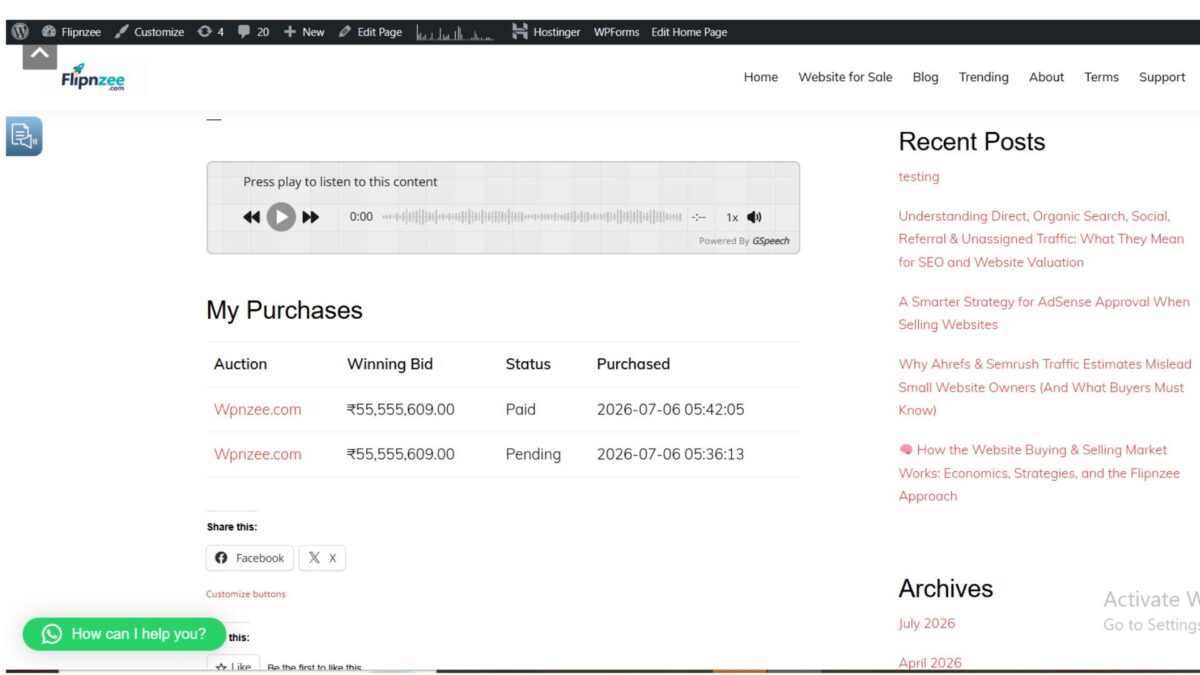
One of the first features buyers expect after winning an auction is the ability to review their purchases. In Lesson 67, the Flipnzee Auctions plugin gained a dedicated buyer dashboard through a new shortcode called My Purchases.
Instead of forcing buyers to contact the administrator or search through emails, they can now view their completed and pending purchases directly from a WordPress page.
What We Built
During this lesson, a new class named Flipnzee_My_Purchases was created to handle the buyer dashboard.
The class:
- Checks whether the visitor is logged in.
- Retrieves transactions belonging to the current buyer.
- Displays a friendly message if there are no purchases.
- Outputs a purchase table using a shortcode.
The new shortcode is:
[flipnzee_my_purchases]
This allows the dashboard to be placed on any WordPress page.
Loading the New Class
A new file was created:
includes/class-my-purchases.php
The class was then loaded inside the main plugin file using require_once, ensuring it is available whenever the plugin loads.
As always, syntax was verified after making the change using:
php -l includes/class-my-purchases.php
Registering the Shortcode
The shortcode was registered inside the shortcode manager.
This makes the following shortcode available throughout WordPress:
[flipnzee_my_purchases]
From this point onwards, any page can become a buyer dashboard simply by inserting this shortcode.
Retrieving Buyer Transactions
The next task was querying the custom transactions table.
Only transactions belonging to the currently logged-in buyer are retrieved.
The query filters records using the current WordPress user ID and orders them from newest to oldest.
If no purchases exist, a friendly message is displayed instead of an empty table.
Displaying Purchase Information
Once the data was retrieved successfully, a responsive HTML table was generated.
Initially the table displayed:
- Listing ID
- Winning Bid
- Status
- Purchase Date
Testing confirmed that multiple purchases were displayed correctly.
Improving the User Experience
The Listing ID was later replaced with the actual listing title using WordPress functions.
Instead of displaying:
491
buyers now see something like:
Wpnzee.com
This makes the dashboard far easier to understand.
Making Listings Clickable
The listing title was then converted into a hyperlink.
Buyers can now click directly on the purchased website to revisit the listing page.
This small enhancement greatly improves navigation throughout the marketplace.
Formatting Currency
Winning bid values were originally displayed as raw numbers:
55555609.00
The output was improved using PHP’s number_format() function together with the Rupee symbol.
The dashboard now displays:
₹55,555,609.00
which is much more readable and professional.
Final Result
The completed buyer dashboard now displays:
| Auction | Winning Bid | Status | Purchased |
|---|---|---|---|
| Wpnzee.com | ₹55,555,609.00 | Paid | 2026-07-06 05:42:05 |
| Wpnzee.com | ₹55,555,609.00 | Pending | 2026-07-06 05:36:13 |
Each listing title links directly to its auction page.
Lessons Learned
A few important development practices were reinforced during this lesson:
- Separate business logic into dedicated classes.
- Keep database queries limited to the logged-in user.
- Escape all displayed output using
esc_html()andesc_url(). - Prefer meaningful titles over internal database IDs.
- Format monetary values for readability.
- Test every incremental change before moving to the next step.
Download Source Code
Download the starting version of the plugin before the lesson:
Download the completed version after this lesson:
Why This Feature Matters
This lesson marks an important milestone for Flipnzee Auctions.
Until now, most development focused on the administrator’s workflow—creating auctions, recording bids, generating transactions, and managing activity logs.
Lesson 67 introduces the first dedicated buyer-facing dashboard, allowing users to monitor their purchases without administrator assistance.
As the platform grows, this dashboard can be expanded with payment history, downloadable invoices, escrow updates, transaction completion status, and buyer support tools.
Even in its current form, it provides a solid foundation for a professional auction marketplace and brings Flipnzee one step closer to a production-ready Version 1 release.