
Lesson 41: Displaying Verified Analytics on Auction Cards

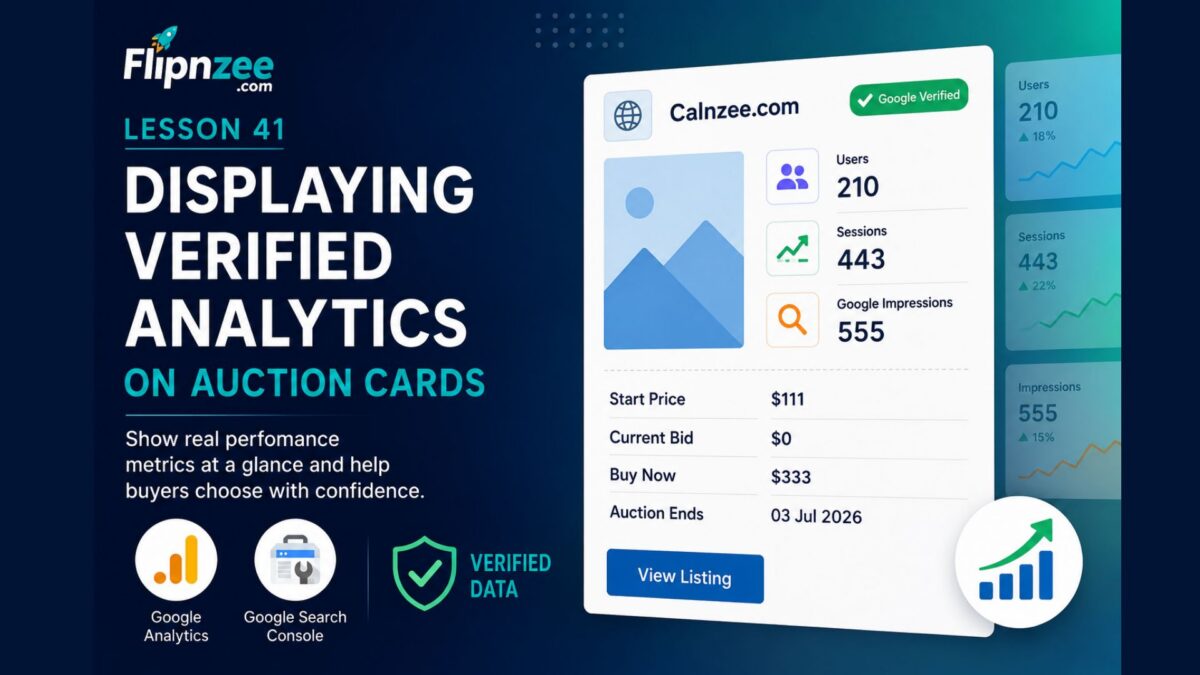
One of Flipnzee’s biggest advantages over traditional website marketplaces is that every listing can display verified Google Analytics and Google Search Console data. Instead of asking buyers to trust screenshots or seller claims, Flipnzee can present real performance metrics directly from the website owner.
In this lesson, we’ll begin displaying selected analytics directly on each auction card, giving buyers valuable insights before they even open the full listing page.
Why Show Analytics on the Auction Card?
Most website marketplaces display only basic information:
- Website name
- Asking price
- Category
- Description
A buyer must open each listing individually before discovering whether the website actually has visitors.
Flipnzee can do better.
Since each listing already has verified analytics available through the Flipnzee Analytics plugin, we can surface the most important metrics directly within the marketplace.
The Buyer Experience
Imagine browsing dozens of websites for sale.
Instead of seeing this:
Calnzee.com

Start Price: $111
Current Bid: $0
Buy Now: $333
buyers will see something like:
Calnzee.com

✔ Google Verified Analytics

👥 Users...............210
📈 Sessions...........443
🔍 Impressions.......555

Start Price..........$111
Current Bid...........$0
Buy Now..............$333
Within seconds, buyers can identify listings that are already attracting visitors.
Why This Is Different
Many marketplace platforms rely entirely on information entered manually by the seller.
That means buyers often wonder:
- Are these traffic numbers genuine?
- Were the screenshots edited?
- Is the data recent?
Flipnzee takes a different approach.
Analytics are pulled automatically from the connected Google Analytics and Google Search Console properties, helping reduce reliance on manually entered statistics.
Which Metrics Should Be Displayed?
The goal is not to overwhelm visitors with dozens of statistics.
Instead, show only a few headline metrics.
A good starting point is:
- Users
- Sessions
- Google Impressions
These three values provide a quick overview of a website’s activity and search visibility.
The complete analytics dashboard remains available on the individual listing page.
Keep the Auction Card Simple
Think of the auction card as a preview.
It should answer one question:
“Is this listing worth opening?”
If the answer is yes, the visitor clicks View Listing to explore the complete analytics dashboard.
This creates a natural flow:
Marketplace

↓

Auction Card

↓

Listing Page

↓

Verified Analytics

↓

Place Bid
Avoid Information Overload
Showing every available metric on the auction card would make it difficult to scan.
For example, displaying all of these at once would quickly become cluttered:
- Users
- Sessions
- Returning Visitors
- Average Session Duration
- Pages per User
- Live Users
- Countries
- Cities
- Keywords
- Traffic Sources
- Impressions
- Clicks
- Indexed Pages
Instead, the marketplace should provide a concise summary, while the listing page remains the place for detailed analysis.
Future Enhancements
As Flipnzee evolves, additional indicators can be introduced without overcrowding the card.
Examples include:
- Google Verified badge
- Live visitors indicator
- Growth percentage
- Auction ending soon badge
- Recently updated analytics timestamp
- Mobile-friendly metric icons
These enhancements can gradually enrich the browsing experience while keeping the interface clean.
What We Learned
One of Flipnzee’s strongest competitive advantages is its ability to present verified website performance, not just seller-provided descriptions.
By displaying a few key analytics directly on the auction card, buyers can evaluate listings more quickly and confidently, while the full listing page continues to provide comprehensive insights.
This approach helps transform the marketplace from a simple directory of websites into a data-driven platform where informed decisions can be made at a glance.
Next Lesson
In Lesson 41 (Implementation), we’ll modify the auction card shortcode to retrieve selected metrics from the connected Flipnzee Analytics plugin and display them alongside the auction details, creating the first analytics-powered marketplace cards.